Connected Home Charger - Speed Decreasing on 100A Circuit

i made this same unfortunate mistake.. doh! i even called customer care like a dummy. https://
You're not dumb; the manual is wrong. They should fix it.
 
You're not dumb; the manual is wrong. They should fix it.
thanks for that, but being a long time veteran of the tech industry, this was a major doh moment!!!
 
thanks for that, but being a long time veteran of the tech industry, this was a major doh moment!!!
I made the same mistake; I quickly resolved it by realizing the error, but yeah, it is Lucid's fault on this one, not yours (or mine :P)
 
The current instructions are much better than the set I had to work with in 2022.
IMO they should outright state that the unit will not connect properly to a wireless 192.168.1.x network. Or better, fix the bug.
 
I made the same mistake; I quickly resolved it by realizing the error, but yeah, it is Lucid's fault on this one, not yours (or mine :P)
I was surprised that the manual wasn't clearer, as I literally just received the new charger/manual this week. After I entered the correct HTTPS URL, I did enter my home WIFI info..... I got a very brief message saying it was successful. Is there a simple way to test whether the charger is actually connected to my WIFI?
 
I was surprised that the manual wasn't clearer, as I literally just received the new charger/manual this week. After I entered the correct HTTPS URL, I did enter my home WIFI info..... I got a very brief message saying it was successful. Is there a simple way to test whether the charger is actually connected to my WIFI?
Try to locate your LCHCS's IP address in your router's client table. It may show up as u-blox AG, as does the Air. Type that IP address into a web browser (if you are on the same wifi network), and you should be able to see the LCHCS's login screen. You may need to preface the IP address with http:// or https://. I can see my -02 revision LCHCS on my home guest network without either, e.g. just entering 192.168.2.222.
 
The current instructions are much better than the set I had to work with in 2022.
IMO they should outright state that the unit will not connect properly to a wireless 192.168.1.x network. Or better, fix the bug.
hmm i have mine on an IOT network on 192.168.1.x on both the wifi and wired. what am i missing? It worked on the prior one as well as this new -v3 unit
 
hmm i have mine on an IOT network on 192.168.1.x on both the wifi and wired. what am i missing? It worked on the prior one as well as this new -v3 unit
By "worked" do you mean that you can:

Unplug the Ethernet cable
Reboot the LCHCS
Type 192.168.1.[LCHCS IP address]

and have it respond with a login prompt?

Mine will do this on 192.168.2.x, but never on 191.168.1.x. It won't even respond to a ping. I've tried this many times on both Google and Unifi wifi routers with the same result.

I've had no problems using the Ethernet interface, as long as my network didn't have an address conflict at the LCHCS' hardwired 192.168.1.10 address.

The unit will charge the car fine, with or without communications working.
 
By "worked" do you mean that you can:

Unplug the Ethernet cable
Reboot the LCHCS
Type 192.168.1.[LCHCS IP address]

and have it respond with a login prompt?

Mine will do this on 192.168.2.x, but never on 191.168.1.x. It won't even respond to a ping. I've tried this many times on both Google and Unifi wifi routers with the same result.

I've had no problems using the Ethernet interface, as long as my network didn't have an address conflict at the LCHCS' hardwired 192.168.1.10 address.

The unit will charge the car fine, with or without communications working.
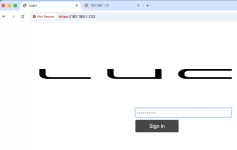
Yup. I have a login prompt on both ip addresses on 192.168.1.x. I reserved the .10 for the wired on my UniFi
 
Yup. I have a login prompt on both ip addresses on 192.168.1.x. I reserved the .10 for the wired on my UniFi
Sounds like they fixed the bug then!
 
its robust!!
 

Attachments

  • Screenshot 2025-11-17 at 7.24.09 AM.webp
    Screenshot 2025-11-17 at 7.24.09 AM.webp
    18.3 KB · Views: 135
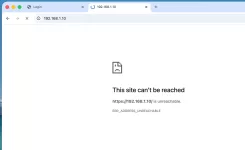
  • Screenshot 2025-11-17 at 7.24.18 AM.webp
    Screenshot 2025-11-17 at 7.24.18 AM.webp
    23.2 KB · Views: 123
I'll try mine again later today. It's still on the same firmware that has failed to connect through many, many attempts on 192.168.1.x. Could it be that I didn't type http or https each time (before this was explicitly mentioned in the instructions)? If so, why does it always connect without issue on 192.168.2.x? AFAIK I'm the same person typing the same form of address into the URL window.
 
Let us know how it goes. And to confirm, prior to the May update this year you were fine at full 48 amps on the Lectron?
I’ve done several charging sessions, including one from about 40% SOC to 80% SOC at 48A no issues.

And NOW I see Lucid has released their home 80A NACS to J1772 adapter. Although, I’ll admit it looks very much like the Lectron unit that I just replaced. Priced about the same as well. I’ll stick with the Tesla Tap unit.
 
I’ve done several charging sessions, including one from about 40% SOC to 80% SOC at 48A no issues.

And NOW I see Lucid has released their home 80A NACS to J1772 adapter. Although, I’ll admit it looks very much like the Lectron unit that I just replaced. Priced about the same as well. I’ll stick with the Tesla Tap unit.
Doesn’t it always work out that way? I’m actually supposed to receive it tomorrow. I am at about 30 miles or range today so I’m purposely going to charge only enough for what I need tomorrow and then really test the new adaptor tomorrow.
 
Doesn’t it always work out that way? I’m actually supposed to receive it tomorrow. I am at about 30 miles or range today so I’m purposely going to charge only enough for what I need tomorrow and then really test the new adaptor tomorrow.
Great - hope all goes well!
 
Update and it’s not good. I received the new Lucid branded home adaptor today and fired it up at 8:36 pm in my completely normal winter garage temperature in Miami. Low humidity as well. I was cautiously optimistic as I noticed that when I plugged in the new adaptor it took a second to “handshake” with the Tesla gen 3 wall connector. Maybe things would be different. With the Lectron it started charging instantly. So now I’m about 45 mins in and the 11(.5) kw reading is, as usual, down to 8 kw. I know from experience unfortunately that it will never regain the full 11.5, as has happened since the May software update under unchained circumstances before and after May.

@marqie I am tagging you here so you’re aware of this latest troubleshooting. I know you can’t comment on specific charging issues but maybe you can point the appropriate individuals at Lucid to take a look in light of the Lucid adaptor having no effect here in solving this issue.

I am more convinced than ever this is a software issue.

Anyone else try this with the new adaptor?


IMG_7862.webp
IMG_7865.webp
 
Update and it’s not good. I received the new Lucid branded home adaptor today and fired it up at 8:36 pm in my completely normal winter garage temperature in Miami. Low humidity as well. I was cautiously optimistic as I noticed that when I plugged in the new adaptor it took a second to “handshake” with the Tesla gen 3 wall connector. Maybe things would be different. With the Lectron it started charging instantly. So now I’m about 45 mins in and the 11(.5) kw reading is, as usual, down to 8 kw. I know from experience unfortunately that it will never regain the full 11.5, as has happened since the May software update under unchained circumstances before and after May.

@marqie I am tagging you here so you’re aware of this latest troubleshooting. I know you can’t comment on specific charging issues but maybe you can point the appropriate individuals at Lucid to take a look in light of the Lucid adaptor having no effect here in solving this issue.

I am more convinced than ever this is a software issue.

Anyone else try this with the new adaptor?


View attachment 34444View attachment 34445

If you haven’t done it I strongly recommend reaching out to customer care. As far as I can tell it’s the temperature of the wiring and the connector. Hopefully lucid has performance data from other brand chargers.

I know one person that has the LCHCs on a 48a breaker and he sees throttling. I’ve given him the same recommendation if he ever follows through on that I’ll post the update here.
 
If you haven’t done it I strongly recommend reaching out to customer care. As far as I can tell it’s the temperature of the wiring and the connector. Hopefully lucid has performance data from other brand chargers.

I know one person that has the LCHCs on a 48a breaker and he sees throttling. I’ve given him the same recommendation if he ever follows through on that I’ll post the update here.
It’s not the wiring. I’ve been using this charger for 5 plus years on a Tesla without any issue. I was using it on my Air since March without issue until the May update referenced in post 1 of this thread. No change to my setup pre and post may update.
 
Back
Top