Home Assistant Automations

fyi - the polling errors can be seen in "Settings" - "System" - "Logs".

I disabled LucidLogger and am still seeing these errors in Home Assistant:
This error originated from a custom integration.

Logger: custom_components.lucidmotors.coordinator
Source: helpers/update_coordinator.py:414
integration: Lucid Motors (documentation, issues)
First occurred: October 12, 2025 at 9:10:37 AM (109 occurrences)
Last logged: 4:11:38 PM

Error fetching Lucid account email-address_xxxxxx data: Error communicating with API: StatusCode.RESOURCE_EXHAUSTED:
Error fetching Lucid account email-address_xxxxxx data: Error communicating with API: StatusCode.INTERNAL: Unable to get Vehicle Config.no healthy upstream
 
fyi - the polling errors can be seen in "Settings" - "System" - "Logs".

I disabled LucidLogger and am still seeing these errors in Home Assistant:
We are testing a prerelease version of the new Home Assistant integration. If you know how to download prerelease versions in HACS, feel free to try it. If you don't, give us a few days to test it and then we will release it as a proper release.

(You can of course test it either way, just know it might break)
 
I have installed the latest version of the integration 1.3.0. I received the upgrade message today from lucid to upgrade my lucid to version 2.8.7. I was curious why HA had not notified me of the upgrade as it has in the past when an upgrade occurs. I looked at my integration and as you can see in the attached pic, it said I was up to date, but also stated there was an upgrade, but did not offer a way to install. Is this some type of bug? Did it need more time? I love the integration, just thought you’d like to know this.
 

Attachments

  • IMG_1233.webp
    IMG_1233.webp
    143.4 KB · Views: 156
Can you explain how to make these changes in Home Assistant? I am having trouble with my garage door automation due to the car’s location being sporadically unavailable, which is likely due to this polling issue.

I am using the Lucid integration on my Home Assistant Green. Thanks!

This is how I did it. I am sure there are other ways

Step 1: Install File Editor (if you haven’t already)

• Go to Settings → Add-ons
• Search for “File editor” and install it
• Start the add-on
Step 2: Edit the const.py file
• Open File editor from the sidebar
• Navigate to: /homeassistant/custom_components/lucidmotors/const.py
• Change the three values as I mentioned:
• DEFAULT_UPDATE_INTERVAL = 120 (line should say # Changed from 30)
• AWAKE_UPDATE_INTERVAL = 30 (line should say # Changed from 7)
• FAST_UPDATE_INTERVAL = 15 (line should say # Changed from 3)
• Click the save icon
Step 3: Restart Home Assistant
• Go to Settings → System → Restart (under the three-dot menu in top right)

Another way I do the restart is to go to developer tools and restart
• Wait for Home Assistant to come back online

After the restart, monitor your logs (Settings → System → Logs) and you should see far fewer RESOURCE_EXHAUSTED errors. This should fix the sporadic “unavailable” location issue with your garage door automation.


I am a novice in this topic - @borski any issues with the steps above and will it not be necessary with the code update you are working on?
 
I am a novice in this topic - @borski any issues with the steps above and will it not be necessary with the code update you are working on?
That's sound, nothing wrong with what you did there.

So 1.3.0 does include what we hoped would fix the rate limit issue. It's been a pain for me to test since my car is not reporting properly at the moment either, but I guess it hasn't actually fixed the issue for good. Will have to revisit.
 
Thanks to @tonybot for taking the time to write up those detailed instructions. I was able to implement those changes yesterday and so far so good overnight. The car hasn’t reported unavailable yet. We’ll see once I drive it today how the garage automation works.
 
I remain an HA ignoramus, but the Lucid integration doesn't work for me after installing the latest HA Core update. Reverted to the earlier HA Core version and the integration was working again.
 
We are testing a prerelease version of the new Home Assistant integration. If you know how to download prerelease versions in HACS, feel free to try it. If you don't, give us a few days to test it and then we will release it as a proper release.

(You can of course test it either way, just know it might break)
Matrix The GIF - Matrix The One - Discover & Share GIFs
 
I remain an HA ignoramus, but the Lucid integration doesn't work for me after installing the latest HA Core update. Reverted to the earlier HA Core version and the integration was working again.
Yeah, it's broken because of the most recent HA update. We have to fix it. I'm tired.

Maybe tomorrow <3

tagging @segbrk in case he's somehow less tired

if you are reading this and can write code, we accept PRs

it's been a long week, lol
 
Yeah, it's broken because of the most recent HA update. We have to fix it. I'm tired.

Maybe tomorrow <3

tagging @segbrk in case he's somehow less tired

if you are reading this and can write code, we accept PRs

it's been a long week, lol
 
Thanks all. Fix is out, v1.3.1.
I installed the new version but left the previous HA Core, and still got the same error message. Should I update the core and then install the Lucid update?
 
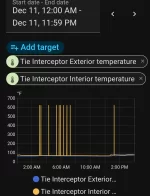
Just got HA going and installed the Lucid integration. Overall it seems to work great, but I noticed this for the interior temperature after my drive at lunch.

I know Texas is hot, but I'm pretty sure it's not THAT hot.

This is for HA 2025.12.2, Lucid Integration 1.3.1.

I'm assuming it's an issue with values the car is sending to Lucid, or that Lucid is returning from the API? Or I missed something important when setting it up in HA.
 

Attachments

  • Screenshot_20251211-160313.webp
    Screenshot_20251211-160313.webp
    62.8 KB · Views: 128
I get these out of range spikes on most data entities, I wish there was a way to filter the Y axis data when plotting graphs.
 
Just got HA going and installed the Lucid integration. Overall it seems to work great, but I noticed this for the interior temperature after my drive at lunch.

I know Texas is hot, but I'm pretty sure it's not THAT hot.

This is for HA 2025.12.2, Lucid Integration 1.3.1.

I'm assuming it's an issue with values the car is sending to Lucid, or that Lucid is returning from the API? Or I missed something important when setting it up in HA.
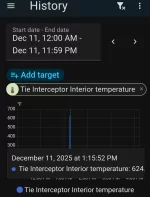
Weird, I haven't seen that one. What is the exact value when it's insanely high? It should tell you if you hover (or tap-and-hold on a phone) over one of the spikes
 
Weird, I haven't seen that one. What is the exact value when it's insanely high? It should tell you if you hover (or tap-and-hold on a phone) over one of the spikes
He's one of them reading 624°
 

Attachments

  • Screenshot_20251211-171331.webp
    Screenshot_20251211-171331.webp
    58.9 KB · Views: 115
He's one of them reading 624°
Well that's random. I was hoping it was exactly 350ºC or something, an obvious "I don't know" value we could just ignore. Doesn't seem like a round number in any unit to me though. We might just have to decide on some reasonable bounds for those and ignore values outside that range.
 
Back
Top