Air Version 2.9.0

You cannot pass on an OTA update. I don't know if it shows up before or after it's installed, but you can't "skip" an update in any case.
Mine installed this morning. No issues.
 
I installed it and can confirm that the lane changes on hfds is much better and feels more deliberate...it is more concise overall and feels like a more experienced approach to lane changes. Now the blinkers also stop at the exact right time. Also loving the Google APIs and the new images to go with it. Great update...
 
I updated to 2.9.0 this morning on my 2025 AT. Now I'm running into some bugs. First, when I push the mic button on the steering wheel the car no longer makes a ding noise...not a huge issue since the screen says that that the care is listening. The big issue is that my navigation is frozen. I used navigation to drive from Apollo Beach FL to Sarasota FL...everything was working fine. I stopped somewhere midway to get lunch. When I got back in the car, the navigation was stuck. It still thinks the car is located where I got lunch earlier today. I left the car for a couple hours, came back...still stuck. I did a reboot by holding the two buttons and the break...didn't fix the issue. The navigation thinks I'm where I had lunch, but if I click the Location button on the iOS app, it shows my car in my garage. @marqie any thoughts?

You may need to reset your TCU.
 
Updated to 2.9 without issue. Everything seems fine with my Mobil app yet I’m getting the following message. When I go to settings I don’t see a “Connect Lucid ID” in the top left corner of the display” or anywhere else. Thoughts?
1778409466165.webp
1778409466165.webp
 
Updated to 2.9 without issue. Everything seems fine with my Mobil app yet I’m getting the following message. When I go to settings I don’t see a “Connect Lucid ID” in the top left corner of the display” or anywhere else. Thoughts?
View attachment 38687View attachment 38687
In the car, log out and log back in. It may fail first time you try to log back in. Be persistent. All settings will restore.
 
Software update has been downloading, circle spinning, for over an hour and it hasn’t started the installation yet. Since it’s Sunday, Lucid customer care is closed, and no one is available to help. So I’m home, but can’t go anywhere since the car is frozen, waiting for the update to install. Any ideas? This is not looking good….
 
Software update has been downloading, circle spinning, for over an hour and it hasn’t started the installation yet. Since it’s Sunday, Lucid customer care is closed, and no one is available to help. So I’m home, but can’t go anywhere since the car is frozen, waiting for the update to install. Any ideas? This is not looking good….
It is 6.2 GB. It’s a a lot of data. Depending on your internet WiFi connection, it might be a long download. After it downloads, expect a 15-30 min delay until the says it’s available to install. When that window happens, the car has completed downloaded the update and has it on board. You could drive it then. Before the actual install.
 
Software update has been downloading, circle spinning, for over an hour and it hasn’t started the installation yet. Since it’s Sunday, Lucid customer care is closed, and no one is available to help. So I’m home, but can’t go anywhere since the car is frozen, waiting for the update to install. Any ideas? This is not looking good….
This one takes a while. Can be a few hours to download and a few hours to install. Took me two hours to download, plus another two to install. Just be patient.
 
I installed 2.9.0 this morning. Now, Android Auto doesn't load/work.

Has anyone else experienced the same? Rebootthe car? Insights?
Did a X-Mic-Brake RESET this morning. AA restored!
 
I walked away from my
Software update has been downloading, circle spinning, for over an hour and it hasn’t started the installation yet. Since it’s Sunday, Lucid customer care is closed, and no one is available to help. So I’m home, but can’t go anywhere since the car is frozen, waiting for the update to install. Any ideas? This is not looking good….
Had same issue, Hard reset worked for me, walk away from car, take your keyfob, phone, card at least 30 feet away. Wait 30 minutes. My download started after that.
 
  • Like
Reactions: HES
Any user feedback on the PurLuxe lighting comment? Still awaiting my update.
 
Any user feedback on the PurLuxe lighting comment? Still awaiting my update.
The "ambient lighting" does indeed match the theme now.

My initial comments about not thinking the Pureluxe models had any ambient lighting at all were based on 2 things:

1. It's apparently barely what I'd call "ambient lighting", it's just the light in the door pocket and the far edge of the dashboard, as far as I can tell, and even at the brightest setting, it's very subtle. You can't even see it during the day. I was thinking it was something more substantial (both in extent and brightness) like my previous BMW or the Mercedes I've seen.

2. Before this update, I had the light completely turned off in the theme because I when I got the car, the theme light brightness didn't seem to do anything at all that I noticed. At this point a year later, I don't know if it's because it really didn't have ANY lighting related to it, or if it was just such subtle white lighting and so minimal in extent that I couldn't even notice the difference of it being on or not.
 
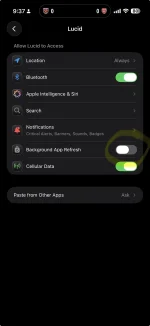
Still enduring massive battery drain on iPhone 17 with latest iOS app and 2.9 in the car. 18% yesterday. I’ve resorted to turning background activity off in the settings. This appears to have stopped it today and has not affected phone as a key operation.

Settings > Type “Lucid” in search at bottom > turn off the slider for background refresh as pictured.
 

Attachments

  • IMG_2492.webp
    IMG_2492.webp
    60.2 KB · Views: 98
I am glad to see that navigation now displays battery percent at arrival. Previously it displayed range in miles/KM at arrival that was calculated using EPA efficiency I think.
1000005152.webp
 
Still enduring massive battery drain on iPhone 17 with latest iOS app and 2.9 in the car. 18% yesterday. I’ve resorted to turning background activity off in the settings. This appears to have stopped it today and has not affected phone as a key operation.

Settings > Type “Lucid” in search at bottom > turn off the slider for background refresh as pictured.
Yes mine has been doing that for a while. I have Tesla, BMW and Lucid apps and the Lucid is the only one that does this. I hope they fix it.
 
The miles on arrival calculated when using nav never used (at least on my 2023) EPA efficiency to calculate range used. Its been fairly accurate and I've only noticed large discrepancies when temperatures were less than zero F, heavy rain or snow covered roads. Otherwise on 260 mile trips over hilly terrain its been within 10 miles of showing finished range (which is EPA based).
 
It is 6.2 GB. It’s a a lot of data. Depending on your internet WiFi connection, it might be a long download. After it downloads, expect a 15-30 min delay until the says it’s available to install. When that window happens, the car has completed downloaded the update and has it on board. You could drive it then. Before the actual install.
Where'd you get that 6.2 GB figure? My car only pulled down a little under 4 GB. Just curious - your point stands either way; the download will take time.
 
Back
Top