Home Assistant Automations

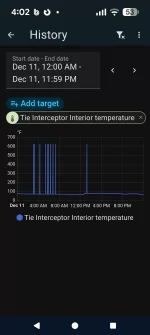
Well that's random. I was hoping it was exactly 350ºC or something, an obvious "I don't know" value we could just ignore. Doesn't seem like a round number in any unit to me though. We might just have to decide on some reasonable bounds for those and ignore values outside that range.
What are the chances it’s actually 655.35? ;)
 
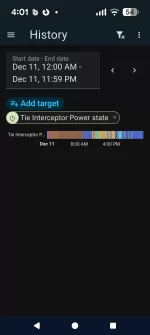
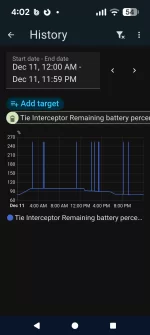
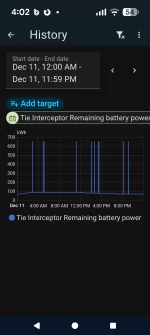
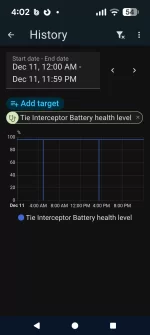
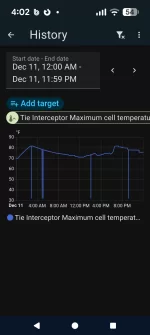
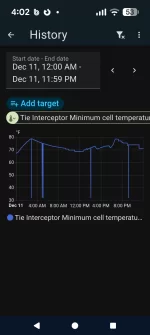
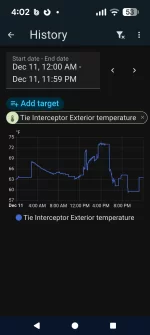
Looks like the internal temperature isn't the only metric showing a pattern of odd values.

My network is fairly reliable (I've been in IT for 30 years), so I don't THINK it's an issue there, though that also means I know enough to not rule it out entirely. :)

Some of them seem to occur in the same pattern to similar metrics. Due example, remaining battery percent and remaining battery power match each other, min/max cell temp are a different pattern but match each other. But then there's the internal temp which doesn't match anything else while the external temp doesn't show odd spikes at all. Tire pressures don't show spikes either.

Attached images are all the same time period/scale showing all of yesterday.
 

Attachments

  • Screenshot_20251212-160121.webp
    Screenshot_20251212-160121.webp
    47.7 KB · Views: 164
  • Screenshot_20251212-160201.webp
    Screenshot_20251212-160201.webp
    65.2 KB · Views: 126
  • Screenshot_20251212-160207.webp
    Screenshot_20251212-160207.webp
    65.8 KB · Views: 122
  • Screenshot_20251212-160214.webp
    Screenshot_20251212-160214.webp
    58 KB · Views: 118
  • Screenshot_20251212-160231.webp
    Screenshot_20251212-160231.webp
    64.4 KB · Views: 119
  • Screenshot_20251212-160240.webp
    Screenshot_20251212-160240.webp
    63.9 KB · Views: 125
  • Screenshot_20251212-160258.webp
    Screenshot_20251212-160258.webp
    63.2 KB · Views: 143
  • Screenshot_20251212-160250.webp
    Screenshot_20251212-160250.webp
    65.1 KB · Views: 138
@doubletwist check if spikes correspond in time stamps with Power State changes to/from sleep, etc. I suspect data gets garbled when car changes power state.
BTW, I have the same issue as you, some entities have spikes and some don’t.
Things might change with the big update being released today.
 
Looking at the CSV data, I'm not seeing any clear correlation between unusual data points and power state changes. The internal temperature is most likely to happen about 5 minutes after going into Charge/Sleep state but it doesn't happen every time and sometimes happens during other states (Wink, Monitor, etc) and at carrying times after a state change.
 
It's very likely that I am stupid - I recently changed the password to my Lucid Account but I cannot figure out how I can provide the new password to Lucid Integration in HA. Please help 😥
 
It's very likely that I am stupid - I recently changed the password to my Lucid Account but I cannot figure out how I can provide the new password to Lucid Integration in HA. Please help 😥
I would just remove the integration and re-add it.
 
It's become much easier for newbies to deal with complex stuff using ChatGPT. It will write the YAML for you and then you can just copy it and add your device ids etc where they're needed
True if you don’t wish to know what any of that text does. But if you just want it to work then chat output should work
 
True if you don’t wish to know what any of that text does. But if you just want it to work then chat output should work
I was and remain an utter neophyte when it comes to HA, but I have learned a lot from the AIs. The chat output generally doesn't work out of the box (at least for me), but I spend time prodding the AIs and learn why something does or doesn't work. Using motion detected on a Ring device to trigger non-Ring devices has been especially interesting .... And I've spent the better part of the last two days setting my HA Green up as a WireGuard server to work with a travel router. It can be maddening but strangely satisfying when it finally comes together.
 
I was using this script and found it stopped working recently. Here is how I fixed it - in case anyone is interested. The fixed script is attached. Remove the .txt extension if you are copying it over.

The Problem​


If you're using the original Lucid trip report PyScript with Home Assistant, you may have noticed that emails never arrive after drives. This happens because the power_state sensor often flickers between "Drive" and "unavailable" during trips, causing the automation to fail. The original script expects a clean transition from "Drive" to another state (like "Accessory" or "Sleep"), but when the sensor becomes unavailable during the drive, this transition never happens, and the email is never sent.

Key Changes​


The updated script solves the flickering sensor problem by:

  1. Adding state tracking: Uses is_driving and drive_started flags to track drive sessions across sensor interruptions
  2. Ignoring "unavailable" states: The script continues tracking your drive even when the sensor temporarily becomes unavailable
  3. Triggering on stable states: Email is sent only when the car transitions to a stable state (Accessory, Sleep, Wink) after driving, not when the sensor is unavailable


Installation​

  1. Save this script to /config/pyscript/trip_report.py or whatever name you are using
  2. Edit the CAR_NAME and EMAIL_TARGET variables at the top
  3. Reload PyScript: Developer Tools → YAML → PyScript Python scripting → Reload

Configuration Requirements​


You'll need email notifications configured in your configuration.yaml: In this example, I am using Gmail.

notify:
- name: "email_xxxx" # Change this name as needed
platform: smtp
server: "smtp.gmail.com"
port: 587
timeout: 15
sender: "[email protected]"
encryption: starttls
username: "[email protected]"
password: "your-app-password" # Use Gmail App Password (no spaces)
recipient:
- "[email protected]"
sender_name: "Your Name Automation"

Testing​


  1. Uncomment the test function line in the script: @time_trigger("startup")
  2. Save and reload PyScript (Developer Tools → YAML → PyScript Python scripting → Reload)
  3. Check your email - you should receive a test trip report
  4. Comment out the test function again
  5. Take a short drive and verify that you receive the email after parking

​

Hardcoding the password? Not very secure coding practice. Use a password vault and make a call to retrieve it at process execution.
If you feel you must contribute to old security vulnerabilities then please create a disposable account just for this purpose.
 
Hardcoding the password? Not very secure coding practice. Use a password vault and make a call to retrieve it at process execution.
If you feel you must contribute to old security vulnerabilities then please create a disposable account just for this purpose.
Use an app password. No, it’s not as secure as using the 1Password CLI (or similar), but at least Google will still enforce 2FA, and changing your password invalidates all app passwords.
 
I know this is off-topic but is there a way to get the average efficiency that is displayed in the car with the Python API? I know there is instant efficiency, but that requires constant polling to get an average that is remotely accurate. It would be nice to convert that to a more accurate indicator for range.

Also, has anyone tried to connect to the vehicle ethernet for Can?
 
I know this is off-topic but is there a way to get the average efficiency that is displayed in the car with the Python API? I know there is instant efficiency, but that requires constant polling to get an average that is remotely accurate. It would be nice to convert that to a more accurate indicator for range.

Also, has anyone tried to connect to the vehicle ethernet for Can?
Air doesn't expose average efficiency. I believe Gravity does, but I don't have one, so haven't really verified that.
The diagnostics ethernet port requires authentication from Lucid's diagnostic software. Without that, it's silent.
 
1768337468361.webp

I am not sure where this is polling from but it is pretty accurate. 15min rolling average efficiency last 24 hours. haven't driven much in last 24 hours. This is 2022 AGT in Home Assistant. And no, i have never seen it displayed in the car itself in years. There was a brief time when I bought the car almost 4 years ago when it did but then Lucid took it away. The Trip number is pretty useless as is the remaining mileage in the car. Our 11 year old Prius does it better. @segbrk, where does this come from and is it accurate. you are the expert.
 
View attachment 35877
I am not sure where this is polling from but it is pretty accurate. 15min rolling average efficiency last 24 hours. haven't driven much in last 24 hours. This is 2022 AGT in Home Assistant. And no, i have never seen it displayed in the car itself in years. There was a brief time when I bought the car almost 4 years ago when it did but then Lucid took it away. The Trip number is pretty useless as is the remaining mileage in the car. Our 11 year old Prius does it better. @segbrk, where does this come from and is it accurate. you are the expert.
We're computing that in the Home Assistant integration. The car reports a (very accurate, like down to the centimeter) odometer, and similarly very accurate kWh remaining. We just track the difference over a rolling window, change in odometer / change in kWh. And no, I have no idea why the car doesn't just do this itself.
 
Question about alerts for Gravity downloads. I created an automation to alert me when the Gravity has a download and noticed that not only did I get one for the update a few days ago but a few more since then. Looking back in the logs I can see that the Gravity does a download from time to time that isn't related to an OTA update. I assume this is just something normal going on in the background but it'd be nice to be able to remove them as false positives for the alert if possible.

This is just a quick screenshot of the last couple days. I got the 3.5.1 update Thursday night, which lines up with the times on the 19th but also had downloads the last couple days. I notice they don't have the "changed to Downloading" for the other ones so that's probably how I'll filter to see if I can capture just the OTAs but figured I'd ask to see what other Gravity owners are seeing.

Screenshot 2026-03-21 173018.webp
 
....This is just a quick screenshot of the last couple days. I got the 3.5.1 update Thursday night, which lines up with the times on the 19th but also had downloads the last couple days. I notice they don't have the "changed to Downloading" for the other ones so that's probably how I'll filter to see if I can capture just the OTAs but figured I'd ask to see what other Gravity owners are seeing.
Mine looks identical.
1774141623547.webp
 
Last edited:
I hadn't thought about it, but my automation is set up to work properly for this:

1774142447402.webp
 
Hey all, for those who don’t know, @segbrk and I reversed the Lucid Motors mobile API, and you can find the Python bindings for that here: https://github.com/nshp/python-lucidmotors

Pary of the reason we reversed it (other than it’s fun and we don’t know how not to open locked doors) was to build a Home Assistant integration, which is now fully featured and you can find here: https://github.com/borski/ha-lucidmotors

It’s super easy to install the HA integration through HACS, as explained in the link above - if you don’t have Home Assistant, it’s a fantastic tool that is trivial to set up and will handle all of your home automation, allowing you to do things you’ve never even considered doing before.

For example, my bathroom fan turns on whenever the humidity is above 60% automatically, and turns off when it’s at a reasonable humidity level - that is something I accomplished with a $3 temperature/humidity sensor that hooked right up to home assistant with zero lines of code.

If you are adept with the terminal, there are a myriad number of ways to install Home Assistant.

If you are not, and don’t want to learn, that’s totally fine! Even the most Luddite of us can set up Home Assistant Green - it’s a little $99 box you plug in, and is entirely plug-and-play, and comes with HA preinstalled. It’s really super duper easy. Seriously, here’s the 4-step tutorial.

If you are fancy and have any Zigbee or Thread devices, you can add on a SkyConnect for $35. If you don’t know what Zigbee or Thread is, don’t worry about it for now, but the gist is they are wireless local communication protocols for smart home devices; HA cannot hear them by default, but by buying this “USB key” it can hear those radio waves and interact with those home devices.

Anyway, this thread is meant to be for people to share their automations, useful ways they’ve set up the Lucid integration for their home, and so on. If enough people use it, it may become its own subforum, but for now this is fine. Have fun!

Thank you for this PSA on behalf of all us Luddites !!
 
Back
Top