
Gravity Bugs / Issues

I am charging my new to me 2026 Gravity DE with 6k miles on it at home with my Tesla 32A mobile charger. The charger has worked flawlessly for many years with my Tesla Model 3 Performance and Model S Plaid.

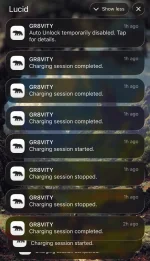
Now that I’m using it with the Gravity it seems to start and stop charging constantly when charging. Over the last hour the app has notified my phone 100 times of charging status changes. The battery does eventually get to my commanded 80% state of charge.

Am I doing something wrong? Is the Gravity not compatible with the Tesla mobile charger?

At least my driver’s window is staying closed today. :-)
 

Attachments

  • IMG_2040.webp
    IMG_2040.webp
    156 KB · Views: 27
I am charging my new to me 2026 Gravity DE with 6k miles on it at home with my Tesla 32A mobile charger. The charger has worked flawlessly for many years with my Tesla Model 3 Performance and Model S Plaid.

Now that I’m using it with the Gravity it seems to start and stop charging constantly when charging. Over the last hour the app has notified my phone 100 times of charging status changes. The battery does eventually get to my commanded 80% state of charge.

Am I doing something wrong? Is the Gravity not compatible with the Tesla mobile charger?

At least my driver’s window is staying closed today. :-)
Just to be clear its a Tesla mobile charger or its a wall mounted EVSE? The Gravity came with it's own mobile charger with L2 if you have the wall socket...
 
Am I doing something wrong? Is the Gravity not compatible with the Tesla mobile charger?

At least my driver’s window is staying closed today. :-)
Welcome to the wonderland of Gravity ownership where "am I doing something wrong?" is a daily question you'd be asking yourself.
I had a similar issue with 32A Tesla charger where the car was trying to pull more than 32A and couldn't negotiate the max rate for whatever reason.
Set the charge limit in the Lucid app to just below 32A and see if it solves the issue.
Also try to reboot the car, with buttons and with a sleep cycle, that might clear it's clogged brain.
 
Welcome to the wonderland of Gravity ownership where "am I doing something wrong?" is a daily question you'd be asking yourself.
I had a similar issue with 32A Tesla charger where the car was trying to pull more than 32A and couldn't negotiate the max rate for whatever reason.
Set the charge limit in the Lucid app to just below 32A and see if it solves the issue.
Also try to reboot the car, with buttons and with a sleep cycle, that might clear it's clogged brain.
The Gravity does not work with the older Tesla Destination wall chargers. (Lots of EVs don't, IIRC.) Only the newer ones that have the built-in adapter. You can fool the old ones with a TeslaTap adapter though (adding the reverse adapter to it to convert back to NACS), which I had to do on a recent road trip.

I'm not an expert on Tesla wall chargers so maybe someone else that knows them better can chime in, but at hotels I just know to look at the holster slot to see if it's the old style or the new style. That's about the only difference I can see (the built-in adapter inside the holster).
 
Here's a pic I took of a Tesla wall charger that DOES work. The ones that don't work just have an empty holster hole instead. I had to look for the difference on a recent trip. The Peppermill Hotel Casino in Reno has 6 of the old ones and 4 of the new ones, and I figured out I had to stick to the new ones.

I didn't bring my old TeslaTap with me on that trip because I figured I'd never need it since the Gravity has a NACS port. On the following trip I brought it along in case I needed to use an old Tesla wall charger, and I did. Daisy-chaining the TeslaTap + reverse adapter did work, although I only got 3kw. Still not sure if that was the adapter or the charger. I assume it was the chargers just being configured for lower power in that parking garage (Barona Casino near San Diego).

Screenshot_20260707-212353~2.webp
 
Define old Tesla charger. I have one that was installed in 2014, it it worked fine with my Model S, my Mustang Mach E, and now my GGT. I have the car set to 40 amps.
 
My Tesla Wall Charger from 2018 works fine and has the "empty holster" you mentioned.
 
Define old Tesla charger. I have one that was installed in 2014, it it worked fine with my Model S, my Mustang Mach E, and now my GGT. I have the car set to 40 amps.
That's why I asked for someone who's more familiar with Tesla Destination chargers to chime in. I know it's often the case at hotels that have Tesla Destination chargers, but I don't know if it's the same for Tesla Wall chargers for home. They look like the same hardware but maybe they're configured differently? Perhaps some are somehow set to work on Teslas only. 🤷‍♂️

(I do see that the OP was talking about the Tesla mobile charger, so none of this may apply to them anyway.)
 
Experienced the Kyle OOS death rattle (at least that's what I've heard some call it) while using ddppro handsfree on my gravity gt. Happened twice on the turnpike and felt like a rumble strip. Adjusting steering got rid of it. Hope it's not a sign?!
 
Experienced the Kyle OOS death rattle (at least that's what I've heard some call it) while using ddppro handsfree on my gravity gt. Happened twice on the turnpike and felt like a rumble strip. Adjusting steering got rid of it. Hope it's not a sign?!
The rumble strip is the regular lane leaving intervention alert, unless it just keeps going and oscillates back and forth?
 
The rumble strip is the regular lane leaving intervention alert, unless it just keeps going and oscillates back and forth?
It's not the lane departure alert. This is while using ddppro. If you watch his video you'll see what I mean at 38:35
 
Yes or file the SWfeedback bug with the rough date and time, then they can check the ADAS logs and actually see what happened to troubleshoot and fix it....
For OOS Kyle's, I think Lucid replaced the steering rack.
 
Hi all, just to update I swapped out my Tesla wall connector for the Lucid mobile and the Gravity is charging fine.

Thanks for all the responses! Perhaps commiseration builds community and that’s an unexpected perk of Gravity ownership? ;-p
 
Yes or file the SWfeedback bug with the rough date and time, then they can check the ADAS logs and actually see what happened to troubleshoot and fix it....
it is not software.
 
...Perhaps commiseration builds community and that’s an unexpected perk of Gravity ownership?
Hoping that you're on your way to joining the ranks of the pretty darn happy Gravity owners.
 
Yes or file the SWfeedback bug with the rough date and time, then they can check the ADAS logs and actually see what happened to troubleshoot and fix it....
Dont have time for service and swfeedback does nothing. I'll submit but they never acknowledge.
 
Back
Top