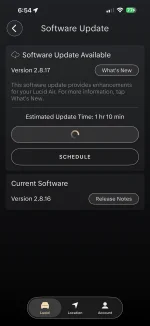
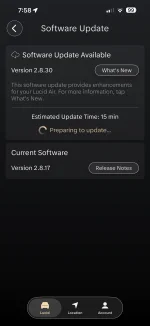
Air Version 2.8.30

I was hoping this update would the bugs I have encountered, but sadly no:

* I have two profiles. Often times when changing the profile (by way of using a different key) the seat position does not restore. Worse yet, some times clicking the restore button does nothing (or it makes the sounds tries to move, then stops). Doubly worse is some times I can not even lower the seat. If I drive a bit, then the restore button works again.
* I turned off passive unlock. Touch to unlock stopped working around 2.8.17 and remains broke.

Hopefully 2.8.31 will fix these.
 
I was hoping this update would the bugs I have encountered, but sadly no:

* I have two profiles. Often times when changing the profile (by way of using a different key) the seat position does not restore. Worse yet, some times clicking the restore button does nothing (or it makes the sounds tries to move, then stops). Doubly worse is some times I can not even lower the seat. If I drive a bit, then the restore button works again.
* I turned off passive unlock. Touch to unlock stopped working around 2.8.17 and remains broke.

Hopefully 2.8.31 will fix these.
I don’t think they can. I bet send map to car doesn’t work anymore either.
 
I was hoping this update would the bugs I have encountered, but sadly no:

* I have two profiles. Often times when changing the profile (by way of using a different key) the seat position does not restore. Worse yet, some times clicking the restore button does nothing (or it makes the sounds tries to move, then stops). Doubly worse is some times I can not even lower the seat. If I drive a bit, then the restore button works again.
* I turned off passive unlock. Touch to unlock stopped working around 2.8.17 and remains broke.

Hopefully 2.8.31 will fix these.
You likely need to have seat rehoming down by service. Mobile can do it. Takes 5 min.

As for passive unlock, I strongly suspect you have a door handle issue, not a software issue.
 
Nope this is Air OTA 2.8.3 thread and can confirm that map sharing is still broke.

IMG_0617.webp
 
What is "seat rehoming" ?

As to fixing things, Lucid can fix whatever they want. It's all a matter of prioritization. Being a small company I have no doubt they are largely focused on the Gravity.
 
Just got 2.8.30 on my car. At long last, my 2.8.16 nightmare is finally over. 😀

Oddly enough, the car installed 2.8.17 first. THEN asked if I wanted to update to 2.8.30. (Anyone else on 2.8.16, don't be surprised if you see this, too.)

Which means they could have let me install 2.8.17 all along. But all's well that ends well. I never had the issue 2.8.17 was meant to fix, anyway.
The same thing happened to me. Quick updates for both.
 

Attachments

  • IMG_9940.webp
    IMG_9940.webp
    78.3 KB · Views: 94
  • IMG_9941.webp
    IMG_9941.webp
    78 KB · Views: 107
After installing 2.8.30 in my 2023 AT, I had the UI feedback (highlighting, unhighlighting) on the climate screen of the pilot panel become unresponsive. The climate features still worked and you could see what temperature, AC on/off, fan speed, etc... when using the physical buttons, which would display briefly on the main screen. A soft reset fixed the issue. I used to automatically do a soft reset after installing the latest update, but I had grown lazy after none of the latest updates caused any issues.
 
What is "seat rehoming" ?

As to fixing things, Lucid can fix whatever they want. It's all a matter of prioritization. Being a small company I have no doubt they are largely focused on the Gravity.
It’s a software program they run to reset the seat’s knowledge of where the different positions are.
 
Unlocking the car by hitting the button explicitly doesn’t use mobile key, so it will ask for PIN. That’s actually intended behavior.

Next time, try pressing in the door handle instead, and see if it unlocks.

Deleting and adding the mobile key again may help as well.

Oh, and make sure passive unlock didn’t somehow get turned off.
Yeah, it turns out the mobile key had completely stopped working due to the update. I was able to restore functionality by deleting it on both ends and going through the add flow again. Now I'm back to complaining about it constantly locking/unlocking when I'm 1 floor away at home :rolleyes: It really needs a "don't auto lock at home" feature, like Tesla.
 
I installed a couple weeks ago. Deep sleep every night with no key fobs or phones available to the car. It seems every other day the Hands Free Driving Assist will work or not work. Tidal will now play one song and is done playing for the day. And I can not send an address to the navigation from my phone on any day. The first two items were very stable and working well for months. I can’t speak to the navigation as I don’t send directions all that often. I do know you can’t send any directions to the in car navigation now. I truly wish I had not installed the latest software. My once stable software has now taken a trip the land of instability.
 
Today was my first use of Hands Free after the Reduction update . Much less warnings to pay attention: or was it my imagination?
Same for me. Also, it seems that the respond on throttle pedal is quicker on smooth mode. Otherwise I didn't notice any significant change on other alerts.
 
So mine updated Tuesday and I noted a difference in available climate settings in the phone app and that there is now a precondition battery option in the phone app. I tried the precondition and it worked fine.
Since then whenever I've looked the precondition button, it is grayed out and says "preconditioning unavailable." This has been the case whether the car is plugged in or not.
Does anyone know the parameters that determine whether or preconditioning is available?
I thought it was only unavailable when the car was plugged in (or asleep obviously).
Have you tried triggering the frunk to open using the phone app or the fob? I have a separate thread here about how, even though it makes no sense, using the phone or key fob to unlock the frunk would work when the inside button would result in it only partly opening as you describe. Maybe the lock cycles open longer when you do it from outside the car? No idea...
Based on my experience with frunk issues (all unrelated to software updates), I wonder if your issue (and others') is possibly coincidence and not actually related to the update. Obviously I don't know if the update did something to impact this. But there's at least a chance the problem would have occurred without the update.

I've been told that the latches get misaligned from repeated use. When the weather is not going to be anywhere near freezing for a few days (I park outside), I'm going to try out some things to see if I can adjust the latches and get it working better
 
Yeah, it turns out the mobile key had completely stopped working due to the update. I was able to restore functionality by deleting it on both ends and going through the add flow again. Now I'm back to complaining about it constantly locking/unlocking when I'm 1 floor away at home :rolleyes: It really needs a "don't auto lock at home" feature, like Tesla.
Lucid did say the “don’t auto lock at home” feature is coming for the Air but didn’t specify (as far as I know) if it’ll be in the current UX 2.0 software or it it will be part of the UX 3.0 upgrade coming later this year.
 
After installing 2.8.30 in my 2025 Air Pure, it seems the regen issue is finally fixed. My regen got drastically reduced in September, I can't even which release it was. 2.8.7 I think. For 6 months I have been receiving errors about regen being reduced due to battery state of charge even while under 80%. To mitigate this, I changed my nightly charge setting to 75% but still had reduced regen. After 2.8.30, regen seemed to return to normal. I since changed back to 80% nightly charge and after 3 drives charged to 80%, have not noticed any reduced regen, not gotten the pop up about temporarily reduced regen, and have not had the dashed line on the charge curve of the center dash. I'm very thankful to have my regen back (albeit perturbed it took 6 months).
 
I installed a couple weeks ago. Deep sleep every night with no key fobs or phones available to the car. It seems every other day the Hands Free Driving Assist will work or not work. Tidal will now play one song and is done playing for the day. And I can not send an address to the navigation from my phone on any day. The first two items were very stable and working well for months. I can’t speak to the navigation as I don’t send directions all that often. I do know you can’t send any directions to the in car navigation now. I truly wish I had not installed the latest software. My once stable software has now taken a trip the land of instability.
They broke "send to app" for a lot us last year, you're lucky it worked as long as it did! Now you're one of us.

After installing 2.8.30 in my 2023 AT, I had the UI feedback (highlighting, unhighlighting) on the climate screen of the pilot panel become unresponsive. The climate features still worked and you could see what temperature, AC on/off, fan speed, etc... when using the physical buttons, which would display briefly on the main screen. A soft reset fixed the issue. I used to automatically do a soft reset after installing the latest update, but I had grown lazy after none of the latest updates caused any issues.
I haven't had any car software issues since last update except the car still doesn't wake up when i push the handles in on the drivers side. They said they can't fix that though because they don't have a way to test the mobile key.
 
I installed a couple weeks ago. Deep sleep every night with no key fobs or phones available to the car. It seems every other day the Hands Free Driving Assist will work or not work. Tidal will now play one song and is done playing for the day. And I can not send an address to the navigation from my phone on any day. The first two items were very stable and working well for months. I can’t speak to the navigation as I don’t send directions all that often. I do know you can’t send any directions to the in car navigation now. I truly wish I had not installed the latest software. My once stable software has now taken a trip the land of instability.
Do you have the full Dream Drive Pro (DDP) or the Every Other Day Dream Drive Pro (EODDDP)?
 
Not to be inpatient, but just wished to inquire whether the update has rolled out to everyone, or is stilling gradually released. My 2025 Air GT DDPro is rolling with the 2.8.16 update and for the most part working well... Is the update still being rolled out? Cheers
 
Back
Top