NACS Charging at Tesla SCs

Many EVs have a button near the charge port that you can press to terminate charging and unlock the cable. The Air does not have this, but I think I saw one on a Gravity pic.
Gravity has this.
 
I had my first DCFC sessions yesterday.
The goal was to learn on local chargers before venturing on the road next week (500+ miles).

Apps installed, payment methods setup.

First stop was supposed to be the parking lot of a local Target that was supposed to have a bank of EA chargers. They were actually EVgo chargers. My bad; misread the location in the EA app. Those connectors and cables are huge and heavy! I'd seen pictures on this forum, but seeing and feeling them in person definitely confirmed comments I'd read on the forum. I took out my trusty CCS adapter and went through the process. Long story short: 4 stalls at location, 2 available at arrival. Thirty minutes later I had tried 3 of the 4 stalls with no success. Error message, cable connect then disconnect, tried connecting with app and by tapping credit card. I think the weight of the connector and plug pulled down on the CCS adapter such that the connection to the NACS port on the car wasn't secure enough for success. I did not like how the weight of the CCS connector and cable seemed to put stress on the car charging port through the adapter. I can see the NACS port being damaged through repeated stress. Maybe not, but I'd rather not find out after the fact. NACS part of adapter is small while CCS part is large. Good bye EVgo.

Next stop was a bank of Tesla superchargers at a Sheetz. Eight stalls onsite with three available. Bring up Tesla app, select stall, plug in charging plug and I'm charging within seconds. Max charge rate of 221kWh for several minutes. Added 61 kWh (172 miles) in 21 minutes. Message displayed during charging said something about the charging rate was being restricted. It was 4:00 pm.

Final stop was the Target location with the bank of EA chargers. Didn't charge, but was able to see the size and feel the weight of the connectors and cables. Bulky and heavy, as stated on this forum. Good bye EA.

My takeaway: I will avoid CCS chargers and the use of the CCS adapter to avoid putting stress on the Gravity charging port from the weight of heavy CCS charging connectors and cables. Look for Tesla SCs unless I can find EVgo chargers with NACS connector or BP Pulse locations.

 
... I will avoid CCS chargers and the use of the CCS adapter to avoid putting stress on the Gravity charging port from the weight of heavy CCS charging connectors and cables. Look for Tesla SCs unless I can find EVgo chargers with NACS connector or BP Pulse locations.
You might have better luck at CCS stations if you hold the plug and adapter in and square, keeping the cable weight off of it, for a minute until charging power ramps up.
 
You might have better luck at CCS stations if you hold the plug and adapter in and square, keeping the cable weight off of it, for a minute until charging power ramps up.
I held the plug and adapter a few times. That seemed to allow a good connection. However, whenever I let go, there was a disconnection. I considered I might need to hold the plug and adapter for a successful session. I wasn't going to do that.

I don't like that weight and stress on the charging port. Long term, that can't be good.
 
Next stop was a bank of Tesla superchargers at a Sheetz. Eight stalls onsite with three available. Bring up Tesla app, select stall, plug in charging plug and I'm charging within seconds.
If you go into your Lucid app/account and add the “Lucid Charging Base Plan” add on, as well as put a card in your Lucid wallet, you won’t even have to use the Tesla app; that’s how you set up Plug and Charge. Yesterday I plugged the G into a Tesla station in Cupertino, and walked away. :)
 
I had my first DCFC sessions yesterday.
The goal was to learn on local chargers before venturing on the road next week (500+ miles).

Apps installed, payment methods setup.

First stop was supposed to be the parking lot of a local Target that was supposed to have a bank of EA chargers. They were actually EVgo chargers. My bad; misread the location in the EA app. Those connectors and cables are huge and heavy! I'd seen pictures on this forum, but seeing and feeling them in person definitely confirmed comments I'd read on the forum. I took out my trusty CCS adapter and went through the process. Long story short: 4 stalls at location, 2 available at arrival. Thirty minutes later I had tried 3 of the 4 stalls with no success. Error message, cable connect then disconnect, tried connecting with app and by tapping credit card. I think the weight of the connector and plug pulled down on the CCS adapter such that the connection to the NACS port on the car wasn't secure enough for success. I did not like how the weight of the CCS connector and cable seemed to put stress on the car charging port through the adapter. I can see the NACS port being damaged through repeated stress. Maybe not, but I'd rather not find out after the fact. NACS part of adapter is small while CCS part is large. Good bye EVgo.

Next stop was a bank of Tesla superchargers at a Sheetz. Eight stalls onsite with three available. Bring up Tesla app, select stall, plug in charging plug and I'm charging within seconds. Max charge rate of 221kWh for several minutes. Added 61 kWh (172 miles) in 21 minutes. Message displayed during charging said something about the charging rate was being restricted. It was 4:00 pm.

Final stop was the Target location with the bank of EA chargers. Didn't charge, but was able to see the size and feel the weight of the connectors and cables. Bulky and heavy, as stated on this forum. Good bye EA.

My takeaway: I will avoid CCS chargers and the use of the CCS adapter to avoid putting stress on the Gravity charging port from the weight of heavy CCS charging connectors and cables. Look for Tesla SCs unless I can find EVgo chargers with NACS connector or BP Pulse locations.
Newer EA chargers are longer cables with a support from above so there’s no weight pulling it down. I did a test similar to yours close to home with EA and it was perfect. Except for the annoyance of having to use an adapter at all.

I will stick with Tesla SCs for ease of use. Excepting there’s a BP Pulse. Those are amazing and have NACS.
 
If you go into your Lucid app/account and add the “Lucid Charging Base Plan” add on, as well as put a card in your Lucid wallet, you won’t even have to use the Tesla app; that’s how you set up Plug and Charge. Yesterday I plugged the G into a Tesla station in Cupertino, and walked away. :)
I hope they get the passthrough for the Tesla charging membership soonish, we plan on getting it for the cheaper charging rates and you can only get that using the Tesla app.

It's not a showstopper but it'd be nice to be able to use it with plug and charge.
 
If you go into your Lucid app/account and add the “Lucid Charging Base Plan” add on, as well as put a card in your Lucid wallet, you won’t even have to use the Tesla app; that’s how you set up Plug and Charge. Yesterday I plugged the G into a Tesla station in Cupertino, and walked away. :)
If you use the Tesla charging membership for the lower charge rate, you'll have to use the Tesla app for now. I think I read somewhere that Lucid is working on that so it's part of the plug & charge eventually. Fingers crossed.

-iThinkEV-
 
I don't like that weight and stress on the charging port. Long term, that can't be good.
I worry about this too. The Lucid charge port feels much looser (or perhaps is less deep? or both?) than the one on our Tesla, and I worry about breaking something anytime I use one of those insanely bulky and heavy CCS plugs.
 
If you go into your Lucid app/account and add the “Lucid Charging Base Plan” add on, as well as put a card in your Lucid wallet, you won’t even have to use the Tesla app; that’s how you set up Plug and Charge. Yesterday I plugged the G into a Tesla station in Cupertino, and walked away. :)
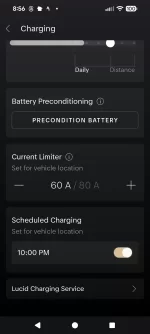
Are you referring to the Lucid Charging Service?
I see that in the app.
I also have my cc setup in the Lucid Wallet.
Maybe I didn't need to use the Tesla app to select the stall.

1000004926.webp


1000004927.webp
 

Attachments

  • 1000004926.webp
    1000004926.webp
    46.3 KB · Views: 135
Newer EA chargers are longer cables with a support from above so there’s no weight pulling it down. I did a test similar to yours close to home with EA and it was perfect. Except for the annoyance of having to use an adapter at all.

I will stick with Tesla SCs for ease of use. Excepting there’s a BP Pulse. Those are amazing and have NACS.
I've seen pictures of those.
Hopefully I can find one to test
 
I worry about this too. The Lucid charge port feels much looser (or perhaps is less deep? or both?) than the one on our Tesla, and I worry about breaking something anytime I use one of those insanely bulky and heavy CCS plugs.
The depth of actual insertion doesn't feel like it matches the depth of potential insertion.

That may not be the fact, but it feels that way based on the ever so slight movement of the adapter after insertion.

There may not be any actual harmful/intolerable stress, but I'd hate find out later that there was.
 
I worry about this too. The Lucid charge port feels much looser (or perhaps is less deep? or both?) than the one on our Tesla, and I worry about breaking something anytime I use one of those insanely bulky and heavy CCS plugs.
I wonder if this is a difference in the 500V-capable OG port design on your Tesla vs the newer 1000V-capablle NACS port on your Gravity. Some dimensions were changed to accommodate the increased voltage.
 
Yup! You should be able to just plug in and wait 15-60s. It should start without any additional action.
OK. Good.

That means I didn't need to open the Tesla app before plugging in.
Today I went back to the EA charger I went to over the weekend and plugged in instead of opening the app.
The transaction was authorized and charging was set. I just cancelled the session.
 
OK. Good.

That means I didn't need to open the Tesla app before plugging in.
Today I went back to the EA charger I went to over the weekend and plugged in instead of opening the app.
The transaction was authorized and charging was set. I just cancelled the session.
I went back to the EA charger that I went to over the weekend.
My purpose was to compare the weight of the connector/plug to the EVgo connector/plug.
Over the weekend I just viewed the connector/plug.
About the same weight, maybe somewhat less than the EVgo connector/plug.

While there I saw how an idea for lessening the weight might work.
I had Googled "ccs cable and plug are too heavy" and one of the results was an idea posted in a Chevy Bolt forum.
Uses the safety poles located next to the stalls.
I think I might try it.


Screenshot 2025-09-15 at 2.09.46 PM.webp

Source: https://www.chevybolt.org/threads/heavy-ccs-connector-solution-ea-stations.39653/
 
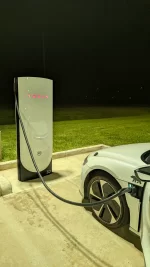
Recently charged my Air Touring at Tesla v4 SC...got under 50kw...when is this supposed to bump up to v4 speeds by Tesla for Lucid?
1000135210.webp
 

Attachments

  • PXL_20250921_043312050.webp
    PXL_20250921_043312050.webp
    1.5 MB · Views: 124
Recently charged my Air Touring at Tesla v4 SC...got under 50kw...when is this supposed to bump up to v4 speeds by Tesla for Lucid?View attachment 32602
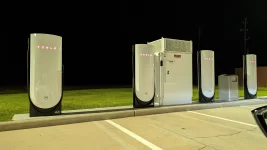
Where? There are no v4 superchargers built to date, to my knowledge. There are some where they have built out the units, but not the power cabinets, making them “v4” in name only (for Tesla or anyone else)

What you want is a v4 cabinet: https://insideevs.com/news/741083/tesla-v4-supercharger-cabinet-speed/
 
Where? There are no v4 superchargers built to date, to my knowledge. There are some where they have built out the units, but not the power cabinets, making them “v4” in name only (for Tesla or anyone else)

What you want is a v4 cabinet: https://insideevs.com/news/741083/tesla-v4-supercharger-cabinet-speed/
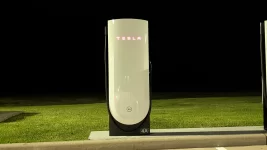
Wharton Bucee's ..southwest Houston...the link you shared is almost exactly what I saw at the Tesla location...the cables were so new they still had cellophane protective wrappers on them...and the power cabinet is also there and I can confirm it was active and I heard relay switches go off when I started charging ..I didn't need the charge but only did this as an experiment upon seeing the v4 chargers...was hoping to get over 47kw...ph well
 

Attachments

  • PXL_20250921_042141661.webp
    PXL_20250921_042141661.webp
    685 KB · Views: 99
  • PXL_20250921_042151638.webp
    PXL_20250921_042151638.webp
    438.4 KB · Views: 99
Back
Top