I saw this post somewhere on opening and closing trunk/frunk but can't find now. I believe if you hold the FOB in it will open the Frunk but how do you open the Trunk?
There are currently (8/1/22) 5 functions for the key fob.
1) Press Once - Lock. If you do this again, you will hear the horn honk.
2) Press Twice - Unlock
3) Press 3 times - Alarm activates
4) Press + Hold - Frunk Open/Close
5) Pres Once + Press + Hold - Trunk Open/Close
Which impresses me as being overly complex... the simplicity of a single "button" but the complexity of needing to memorize a non-intuitive set of dances to do with it...
Which impresses me as being overly complex... the simplicity of a single "button" but the complexity of needing to memorize a non-intuitive set of dances to do with it...
it will become second nature for those who use the fob all the time but for those who only use it on occasion, you shouldn't need to go to the manual to remember the button sequence to get things to open. I just use the App top open and close the Frunk\Trunk
Which impresses me as being overly complex... the simplicity of a single "button" but the complexity of needing to memorize a non-intuitive set of dances to do with it...
Certainly a tradeoff. But the advantage is that they were able to add that two-tap-and-hold for the trunk after-the-fact. Something they would not have been able to do if there were multiple buttons that had locked-in functionality, like most fobs.
Who knows what else they may add in the future? Probably not much else they need, but they at least have the option.
Which impresses me as being overly complex... the simplicity of a single "button" but the complexity of needing to memorize a non-intuitive set of dances to do with it...
There are currently (8/1/22) 5 functions for the key fob.
1) Press Once - Lock. If you do this again, you will hear the horn honk.
2) Press Twice - Unlock
3) Press 3 times - Alarm activates
4) Press + Hold - Frunk Open/Close
5) Pres Once + Press + Hold - Trunk Open/Close
Since the big update, my horn does not always sound when I press the key fob the second time. I always check to make sure the car is locked, so I don't know why the horn doesn't always sound. Has anyone else noticed this?
Speaking of memorizing functions and presses - you don’t necessarily need to memorize. There are pictograms on the bottom side of the fob. So if you forget the sequence turn it over and use the visual aide
Speaking of memorizing functions and presses - you don’t necessarily need to memorize. There are pictograms on the bottom side of the fob. So if you forget the sequence turn it over and use the visual aide
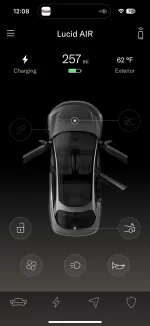
Is it possible to close the frunk and trunk with the mobile app.? I can open using the app. without issue, but the can't figure out how to close via the app., if that's even an option. Here's my screen with the frunk currently open.
Is it possible to close the frunk and trunk with the mobile app.? I can open using the app. without issue, but the can't figure out how to close via the app., if that's even an option. Here's my screen with the frunk currently open.
Touch the icon that opens it and it should close an open one...
though I find the frunk's operation is a bit flaky (sometimes it opens, sometimes not).
Speaking of memorizing functions and presses - you don’t necessarily need to memorize. There are pictograms on the bottom side of the fob. So if you forget the sequence turn it over and use the visual aide
The mystyc runes on the key fob can only be seen by the last light of Durin's Day, when the thrush knocks thrice. In my paper user manual even the Lucid logo is shown as white, yet no such logo appears on the fob itself. Mystery upon mystery.
Touch the icon that opens it and it should close an open one...
though I find the frunk's operation is a bit flaky (sometimes it opens, sometimes not).
There are currently (8/1/22) 5 functions for the key fob.
1) Press Once - Lock. If you do this again, you will hear the horn honk.
2) Press Twice - Unlock
3) Press 3 times - Alarm activates
4) Press + Hold - Frunk Open/Close
5) Pres Once + Press + Hold - Trunk Open/Close