Gravity Bugs / Issues

Actually, Nick didn’t say it, this guy did in a back and forth with Nick. Or referred to it.

Regardless, most car updates have been preceded by an app update for whatever reason - sometimes for the fob.
That app update has been out for a while, which is why it was discussed. Gravity mobile app UI has a new button which, at present, does nothing. Once 3.5 is installed, it will be remote start.
 
You just tap the same button again. Same way you turn it on.
Negative. I turned mine on in my car, not on my phone. Could access screens to end Creature Comfort so had to go to the app to turn it off.
 
Negative. I turned mine on in my car, not on my phone. Could access screens to end Creature Comfort so had to go to the app to turn it off.
Wait, what? I was referring to turning it on in the car as well. Once I get in, the car shows me the screens and I can turn it off by hitting the same button. There was one time I had to reopen and reclose the door, but that’s it.

To be fair, I almost always use keep mode, not creature comfort, but I’ve used both.

I do not use the mobile app for this.
 
You just tap the same button again. Same way you turn it on.
I think @prodolf is trying to say the same thing (although he has a confusing typo in his reply above) - but in my case, the next morning, the pilot panel would not wake up, so I could not get to the same button again, even after opening and closing doors. In fact, I couldn't get the car to respond at all to be able to drive away until I turned off CC in the app. Then everything woke up again.
 
I think @prodolf is trying to say the same thing (although he has a confusing typo in his reply above) - but in my case, the next morning, the pilot panel would not wake up, so I could not get to the same button again, even after opening and closing doors. In fact, I couldn't get the car to respond at all to be able to drive away until I turned off CC in the app. Then everything woke up again.
Ohhhhhh I see. I’ve never had that happen. Got it.
 
Wait, what? I was referring to turning it on in the car as well. Once I get in, the car shows me the screens and I can turn it off by hitting the same button. There was one time I had to reopen and reclose the door, but that’s it.

To be fair, I almost always use keep mode, not creature comfort, but I’ve used both.

I do not use the mobile app for this.
Okay....my reply was confusing. My situation was I launched CC from within the car on the screen not the app. Upon returning to the car, with my happily cool pups, I couldn't get either screen to respond. They stayed in CC mode until I used the app to stop it. All normal after that. I have yet to use the keep mode so I might try that next.
 
Okay....my reply was confusing. My situation was I launched CC from within the car on the screen not the app. Upon returning to the car, with my happily cool pups, I couldn't get either screen to respond. They stayed in CC mode until I used the app to stop it. All normal after that. I have yet to use the keep mode so I might try that next.
Yeah, that makes sense haha. I haven’t seen that happen, but I’ll be on the lookout.
 
That app update has been out for a while, which is why it was discussed. Gravity mobile app UI has a new button which, at present, does nothing. Once 3.5 is installed, it will be remote start.
I can’t find a button that does nothing in the phone app, but all good. Can’t wait for the OTA for car.
 
Okay....my reply was confusing. My situation was I launched CC from within the car on the screen not the app. Upon returning to the car, with my happily cool pups, I couldn't get either screen to respond. They stayed in CC mode until I used the app to stop it. All normal after that. I have yet to use the keep mode so I might try that next.
My situation with CC is the screens sometimes get “stuck” the way they appear to folks who see it from the outside when CC is on. So there is no button to turn it off on the screen. But when I open the driver door and close it, it seems to “wake”…
 
That app update has been out for a while, which is why it was discussed. Gravity mobile app UI has a new button which, at present, does nothing. Once 3.5 is installed, it will be remote start.
Was that “button” the extra live view camera in the app that’s in the drop down where the suspension height is? Now I am determined to find that button.
 
Looks like the Apple app store has an updated Lucid app: v.2.14.0...

Went live 21 hr ago.

But it still shows that my car software 3.4.4 is "up to date."
 
Looks like the Apple app store has an updated Lucid app: v.2.14.0...

Went live 21 hr ago.

But it still shows that my car software 3.4.4 is "up to date."
The App Store app is for your phone. It's not related to v 3.5 for your Lucid. Your can will download that sometime in the next week or so.
 
The App Store app is for your phone. It's not related to v 3.5 for your Lucid. Your can will download that sometime in the next week or so.
Yep copy.

I just posted that b/c it was mentioned above that one needs to update the phone app before you'll be able to do the vehicle update. And the phone app update is fresh outta the oven.
 
Android app 2.14.0 Sometime I get notification, driver door is open. A couple minutes after I locked doors manually. Anyone same issue?
 
Last edited:
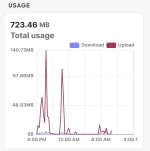
This is not a bug, but can’t find a place to post it. Does anyone know if this is a typical amount of upload data from the Gravity to Lucid? The uploads all happen as soon as I park at home and lock it. Seems like 700mb of data is a lot of data to upload in a 24 hour period, but I’ve just started paying attention as I wait/hope for the CarPlay download…
 

Attachments

  • IMG_0461.webp
    IMG_0461.webp
    30.8 KB · Views: 67
This is not a bug, but can’t find a place to post it. Does anyone know if this is a typical amount of upload data from the Gravity to Lucid? The uploads all happen as soon as I park at home and lock it. Seems like 700mb of data is a lot of data to upload in a 24 hour period, but I’ve just started paying attention as I wait/hope for the CarPlay download…
What are you using to monitor traffic
 
This is not a bug, but can’t find a place to post it. Does anyone know if this is a typical amount of upload data from the Gravity to Lucid? The uploads all happen as soon as I park at home and lock it. Seems like 700mb of data is a lot of data to upload in a 24 hour period, but I’ve just started paying attention as I wait/hope for the CarPlay download…
It is a lot of data, but it is consistent with what I'm seeing - mine was 854.7 MB in the last 24 hours and almost 4 GB in the last week. I find mine uploads a lot of data while AC charging. I also see periodic uploads, maybe every hour?
IMG_2022.webp
 
What are you using to monitor traffic
Similar to @torvald27, but I have Meraki WAPs and am using the client info to monitor.

Still seems like a lot of data compared to our Rivian and Tesla which are barely active. I don’t especially care but I am curious about the discrepancy.
 
Back
Top