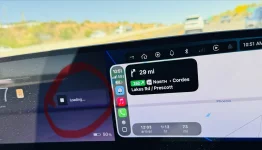
Anyone else noted more aggressive regen after update?

I feel just the opposite. I find it extremely useful, especially the integrated Calendar, navigation, and texting functionality. I will never buy a car that does not have CarPlay.I hate CarPlay and think it has no place in vehicles of this price point when they now have native apps and connectivity integrated directly into the car. So i'm hoping when people see how outdated it looks and with its big ass icons people may turn to the dark side and just use the native UI. Very wishful thinking on my part though
Yes we went through this when it was first introduced on Air.Do you have a 'Wallpaper' option, because I don't?
View attachment 37524
The only option I have is to use a wallpaper from my phone. So, the only way I found to have a black background on my screen is to set a black image as a background on my phone and then turn on "Use phone's wallpaper". But yeah, it's an AA-related issue.


IOS 26.4 is not yet available for general release (at least according to my iphone)Actually that is not true. As of iOS 26.4, CarPlay does support video streaming apps. The catch is that both the video app and car need to support CarPlay video streaming. I believe Apple calls it “Video in the car” and it is referred to on their CarPlay page for developers.

CarPlay - Apple Developer
A smarter, safer way to use iPhone in the car, CarPlay lets people get directions, make calls, send and receive messages, and play music from their car’s built-in display, all while staying focused on the road.developer.apple.com
Native Tidal still sounds best. Carplay sounds better than Bluetooth but you can't do the atmos integration via carplay/aaAnyone with premium sound system tried playing music thru CarPlay and see if they miss Atmos or notice any loss of sound quality? If native Tidal sounds notably better than CarPlay, that would be a deal breaker for me.
It’s in the CarPlay app in Settings on the iPhone.Do you have a 'Wallpaper' option, because I don't?
View attachment 37524
The only option I have is to use a wallpaper from my phone. So, the only way I found to have a black background on my screen is to set a black image as a background on my phone and then turn on "Use phone's wallpaper". But yeah, it's an AA-related issue.
My 48A charger holds 11kw for the entire charge. Maybe a hardware issue?Unfortunately seems like AC charging issue still here for those following that issue (@GravitMe iirc ). The GT on 3.5.1 on my home 48A charger, starting at ~30% SOC held 11kw for 30-40 minutes and dropped to 7kw. The DE still is able to hold 11kw for entire multiple hours charging sessions though. cc @marqie if this is something you can potentially help confirm or check on please

Thank you, I will mention this data point next time to my SC, they had mentioned comparing it to other GT's they had and seeing similar behavior as mineMy 48A charger holds 11kw for the entire charge. Maybe a hardware issue?


Its close. Like within days, as the release candidate is out. Been messing with the betas on some of my other devices and should be pretty nice for when it does release. I hope Lucid will allow video while parked. That would do a lot to make a lot of users happy, I would imagine.IOS 26.4 is not yet available for general release (at least according to my iphone)
This is the only reason I wanted CarPlay, to run Waze concurrently with Lucid Nav. What’s the point? Now I’ll be back to running Waze on my phone.Tested out CarPlay using Waze. That works well, BUT Waze and the Lucid navigation don't work concurrently. Turning on the Lucid nav stops Waze and vice versa.
That's a bummer - I'd like to see both - Waze shows me accidents, cops, etc and Lucid nav will route to chargers.
There doesn't seem to be any change in the DreamDrive Pro. I was hoping for an update on the self-driving and the Auto Park, but I guess we'll wait until the next update

I have it on my phone but haven't looked to see if it works in the RC. I'll be going out soon so I'll give it a try then. I doubt it'll work though, when Lucid showed video playback it looked like a native app and that'll probably be how they allow video some day.Its close. Like within days, as the release candidate is out. Been messing with the betas on some of my other devices and should be pretty nice for when it does release. I hope Lucid will allow video while parked. That would do a lot to make a lot of users happy, I would imagine.
I briefly experimented with this for that same use case but was unable to use Google maps and Native navigation at same time.I also like that I can now run Waze/Google Maps in the top screen while having the native navigation running in the lower screen and doing the charging stop calculations and preconditioning.
This is working as designed.I briefly experimented with this for that same use case but was unable to use Google maps and Native navigation at same time.
I had google maps going on top screen, and when i hit a destination on the native maps in the bottom screen it canceled the routing directions in the google maps. This was reported by somebody above as well
Anyone reporting differently?

As @Bobby said, this is the intended behavior, as two navigation systems would conflict (audio guidance, actions in the cluster display, etc.) .I have the same behavior on my X5 - Google Maps shows guidance arrows on both the cluster display and in the HUD, which is very convenient.I briefly experimented with this for that same use case but was unable to use Google maps and Native navigation at same time.
I had google maps going on top screen, and when i hit a destination on the native maps in the bottom screen it canceled the routing directions in the google maps. This was reported by somebody above as well
Anyone reporting differently?
Edit: Several people reporting the same.
This feels surreal. Thanks , Lucid!
View attachment 37534
On BMW, Apple CarPlay actually shows a secondary map in the instrument cluster. Then it shows the next turn in the heads up. This is a very nice implementation. If the overall route is on the main CarPlay screen, it shows the zoomed in turn by turn view on the dashboard. Those can be swapped as well.As @Bobby said, this is the intended behavior, as two navigation systems would conflict (audio guidance, actions in the cluster display, etc.) .I have the same behavior on my X5 - Google Maps shows guidance arrows on both the cluster display and in the HUD, which is very convenient.