3.0 on Air

Hitting that "L" logo works sometimes, but doesn't actually seem to kill Carplay, and if Spotify and Carplay are crashing, only way to fix it is a hard reset. Yesterday the L logo wasn't taking me back at all, so I think the two systems were fighting each other.
Oh wow. That's not good.
 
I unpaired my phone (iphone 18 pro) and re-paired it, and they key seems to be working much better. Did you actually delete the key and then add it again?


I could not have said it better myself. 100% agree. Audio pauses for no reason on Spotify as well. And the Lucid "card" does not allow you to shut down carplay. Once Carplay is going, it is going until the next drive at least, and it's fighting with the native Lucid apps big time. They need to do like Tesla did and dump Carplay and just make their own native apps work, or dump the native apps (not my preference since less control over screens) and keep Carplay. I think Lucid, sadly, is already sunk. Their window for correcting their terrible software reputation was earlier this year, and this is October. Most people I speak with have heard the software sucks, and I can't argue with them. Still love my car though most of the time, so fun to drive. This must be like being married to an alcoholic...
I did delete the key and add it in again. but sadly it appears I celebrated too soon. Today, I needed to wake the phone screen to get the Lucid doors to unlock. I did not have to unlock the phone or open the lucid app, but locked phone in pocket does not work. At least not today. Frustratingly, locked phone in hand unlocked the car from a few feet away. But only one time. I would now say my experience is the same as yours, "much better", but not as robust as it was yesterday. Who knows, maybe tomorrow will be like yesterday. It's hard to test this as eventually the Lucid will disable passive lock/unlock. It's possible, probable even, that none of my recent experience can be attributed to deleting the mobile key. Or the new UX 3.0, and it's all about bluetooth inconsistencies as @borski has explained previously.
 
The volume is louder, but also comes on much louder at lower levels.
I noticed this as well and sent it to the [email protected] address. It gets too loud to quickly, so it's difficult to make small adjustments at low volumes. One of the few changes that I deeply dislike, along with the washed out background colors.
 
Hitting that "L" logo works sometimes, but doesn't actually seem to kill Carplay, and if Spotify and Carplay are crashing, only way to fix it is a hard reset. Yesterday the L logo wasn't taking me back at all, so I think the two systems were fighting each other.
You can also toggle between Carplay and the native screen by pressing the Carplay icon above the Carplay screen (circle with a triangle in it). That icon never goes away so you can always go in and out of Carplay - one of the things I really like about the update. I suppose if something is borked, that may not work, though it has never failed for me (yet). That may not help your issue, just mentioning that that toggle exists.
 
I noticed this as well and sent it to the [email protected] address. It gets too loud to quickly, so it's difficult to make small adjustments at low volumes. One of the few changes that I deeply dislike, along with the washed out background colors.
volume wheel is more touchy too, but the steering controls is smoother now for sure.
 
I’ve seen the screens, auto dim and brighten slightly, but with that new pilot panel background, it’s still too bright even on auto.

You can hit the Lucid "L" logo in carplay to revert back to the native system (all CarPlay vehicles have this in CarPlay) but yeah they should've kept a quick access home button like back in the prior version.
The CarPlay icon at the top of the right head screen is a toggle. Tap it once to turn CarPlay on, tap it again to turn CarPlay off.
 
Hey Air owners. I've had 3.0 UX (2.11.0) for a week on my AT. Love most of it! However, every time I let the car sit for a while (like 15 minutes) , when I open the door and sit, the left and center cockpit panels disply quickly, but the righthand panel and pilot do not. The timings vary, see attached for an example.

The righthand panel shows my chosen scene backgroiund (stars) after about 10 seconds, then 10 se cord or so later thesameon the pilot panel. Finally, 30-45 seconds later, they display what they should.

Any one esle seeinng this? Support looked at the logs remotly and do not see anything unusual. Awaiting a call from the service center.
 
Hey Air owners. I've had 3.0 UX (2.11.0) for a week on my AT. Love most of it! However, every time I let the car sit for a while (like 15 minutes) , when I open the door and sit, the left and center cockpit panels disply quickly, but the righthand panel and pilot do not. The timings vary, see attached for an example.

The righthand panel shows my chosen scene backgroiund (stars) after about 10 seconds, then 10 se cord or so later thesameon the pilot panel. Finally, 30-45 seconds later, they display what they should.

Any one esle seeinng this? Support looked at the logs remotly and do not see anything unusual. Awaiting a call from the service center.
Only visual issues I have had is a flashing pilot panel sometimes when I change tabs, haven't had any issues like a blackout startup screen for a long time.
 
Hey Air owners. I've had 3.0 UX (2.11.0) for a week on my AT. Love most of it! However, every time I let the car sit for a while (like 15 minutes) , when I open the door and sit, the left and center cockpit panels disply quickly, but the righthand panel and pilot do not. The timings vary, see attached for an example.

The righthand panel shows my chosen scene backgroiund (stars) after about 10 seconds, then 10 se cord or so later thesameon the pilot panel. Finally, 30-45 seconds later, they display what they should.

Any one esle seeinng this? Support looked at the logs remotly and do not see anything unusual. Awaiting a call from the service center.
I’ve not driven since cccv2 install an hour ago but maybe a difference in system boot time?
 
I’ve seen the screens, auto dim and brighten slightly, but with that new pilot panel background, it’s still too bright even on auto.

You can hit the Lucid "L" logo in carplay to revert back to the native system (all CarPlay vehicles have this in CarPlay) but yeah they should've kept a quick access home button like back in the prior version.

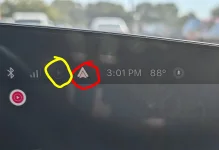
Doesn't CarPlay have the icon on the very top bar that can open/close the CarPlay screen? It works for AA.

Attached pic with the CarPlay icon (I think) in yellow, and the AA icon in red. If I tap the AA icon, it drops me right back to the native home screen, and if I tap it again it brings back AA.

At least when AA has bothered to connect. It's been a little hit or miss with the new update.
 

Attachments

  • PXL_20261007_200140211.RAW-01~2.webp
    PXL_20261007_200140211.RAW-01~2.webp
    187.5 KB · Views: 6
Easy fix. Touch the profile tab on the pilot (upper left) and go to your profile. 15 second fix
This does not 'fix' it, just changes to my profile. I know how to do that. Been doing that for nine months.

The point was that Luci always loads my wife's profile even when I am the one in the driver's seat.
 
This does not 'fix' it, just changes to my profile. I know how to do that. Been doing that for nine months.

The point was that Luci always loads my wife's profile even when I am the one in the driver's seat.
With fobs or phones?

I just found out that pairing the first fob connects to the last fob pressed.
 
left and center cockpit panels disply quickly, but the righthand panel and pilot do not. The timings vary, see attached for an example.
This happened for the first time to me last night. It took maybe 30-45 seconds for the two laggards to activate.

Back to normal today.
 
Impressions of UX 3.0 after a week:

I'm driving a 2023 AGT. Bought it used from Lucid, and had it for 13 months. I should note that the car has been reliable, and I love to drive it.

On to UX 3.0...

First few days were trouble free, then some little issues began to appear.
First, audio issues with USB music. UX 3.0 now lists 2 USB ports, and it keeps switching back and forth for some reason, or when I get in the car it says there is no media. I switch to the other port and my music appears.
On multiple occasions music from USB has stopped playing for no apparent reason, and again the car suddenly reports there's no media.
I unplug the USB stick, plug it back in, and the music comes back.
One of my gripes with the previous software was the system could not always keep track of what was playing when I exit the car and get back in. That's still true for USB playback. Sometimes it resumes what was playing, even after an overnight sleep, and sometimes it forgets.
I've had 2 times when I get in the car and the screens are black. All or some of them. They come back, but it's frustrating and something I didn't see on the older software.
Happened the other day when I got in the car to demo it to a potential Lucid buyer. Oops.
I don't understand the purpose of the 3 cards on the upper screen. Can I choose what cards appear? Like Waze would be nice.
Tire pressure suggestion displayed is wrong.
Front and back cameras seem to have better resolution.
Side cameras have not improved. Video jumps and skips like a movie from the 20's.
Outside temperature is now much more accurate. Before the update the display was often 10-12 degrees high. Now it is quite accurate.
Audio is much improved. There's more bass. What did they do in software? Nothing is listed in the release notes.

So that's it. I like the update, but it is not polished enough, and didn't seem to get adequate beta testing. (I get it, we're doing it.)
I've reported what I've seen to Lucid. There's a lot of good ideas in this update, so I think Lucid is on the right track.

As I said, I love the car, and the philosophy behind it, but with the management changes (firings and hirings), I expected a better rollout of UX 3.0. When people ask me about my car, they invariably say "Beautiful car, but I hear the software is awful".

That's a hard reputation to live down, and a really smooth rollout of UX 3.0 would have really helped in changing perceptions. I'm hoping for a quick update to address these issues, but so far Lucid has been silent.

If this happens with the Cosmos, Lucid is sunk and I don't want that to happen.

Once again I'll suggest Lucid send a monthly email news letter to owners with news, information, tips, known bugs, and plans to fix them.
Finally, we need complete documentation of UX 3.0. We should not have to rely on the forums and people discovering the good and the bad.

Onward, and I hope, upward.

I also have problems with the USB music player. For second day in the row, it stopped playing. This time it would not start even when I switch to the phantom USB 2. Had to switch to Carplay for music. I did move the Lucid App to the first page. This made it easier to switch out of Carplay. Hope they fix the USB music player.
 
The old software had a brightness level adjustment right on the home page of the pilot panel. I can't find this control in the new software; would you happen to know where it is?
Swipe down on the pilot panel.
 
Back
Top