
It’s funny to see a few folks complain about that. In my two years the only time I put that pilot panel up is to grab or stow my hat, which is rare. I know we’re all different but there’s a lot of usefulness to that screen
You are using an out of date browser. It may not display this or other websites correctly.
You should upgrade or use an alternative browser.
You should upgrade or use an alternative browser.
3.0 on Air
- Thread starter nashvillelucid
- Start date
- Joined
- Jun 18, 2024
- Messages
- 104
- Reaction score
- 63
- Cars
- 2022 Grand Touring
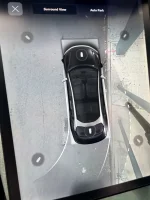
UPDATE: Curb rash alert briefly works if I go into “parking features” settings and turn it off and back on. But the next time I get in the car, it doesn’t work againSince the update, my curb rash alert doesn’t work anymore. (The distance to the curb isn’t showing up)
Hard reset didn’t help.
Anyone else having this issue?

Attachments
Last edited:

Gravity owner here, so please excuse my chiming in on an Air thread.
It is so cool, awesome and wonderful that Lucid was able to hit a home run with this update! OK, so there are some rough edges (some of which may be just learning the system) but it sure seems that Lucid Software engineering was able to satisfy allot of users with a really significant software update!
Kudos to Lucid - your efforts are appreciated and remind us just how hard you work to improve your products!
Dream Ahead!
It is so cool, awesome and wonderful that Lucid was able to hit a home run with this update! OK, so there are some rough edges (some of which may be just learning the system) but it sure seems that Lucid Software engineering was able to satisfy allot of users with a really significant software update!
Kudos to Lucid - your efforts are appreciated and remind us just how hard you work to improve your products!
Dream Ahead!

When I approach my garage my homelink prompt appears and I can click it while the vehicle is moving. Seems to work for me as before the update.Cons
1. Have to fully stop to use homelink. This is kind of annoying.
My wish is that they add geo location so it opens my garage door when I get close. My Tesla had this at least 6 or 7 years ago.When I approach my garage my homelink prompt appears and I can click it while the vehicle is moving. Seems to work for me as before the update.
this update finally fixed the random turning on of pilot panel display at every stop sign. the double tap to turn off display is not there though which is a bummer.

Most things on the new software work better but man it has really killed Android Auto for me. I had to remove my phone and it took me 6 tries of re-adding my phone to get wireless Android Auto working, and then it only worked for one day.

Same here.When I approach my garage my homelink prompt appears and I can click it while the vehicle is moving. Seems to work for me as before the update.
- Joined
- Mar 6, 2022
- Messages
- 473
- Reaction score
- 277
- Cars
- AGT 19"
Not (yet) on the new software, but I found that AA's phone (Samsung S22+) battery usage caused me to walk away from AA... the native Air apps are good enough and any benefit from AA didn't justify needing to plug in to keep my phone charged (note, the phone's battery usage is fine in other cases, it is just when AA is on that it burns through the battery).... it has really killed Android Auto for me. ...
I might be able to get away with completely skipping AA if they released a native YouTube music app but the functionality of controlling it through Bluetooth on this car is terrible.Not (yet) on the new software, but I found that AA's phone (Samsung S22+) battery usage caused me to walk away from AA... the native Air apps are good enough and any benefit from AA didn't justify needing to plug in to keep my phone charged (note, the phone's battery usage is fine in other cases, it is just when AA is on that it burns through the battery).
I'd miss being able to have Waze up showing me Hazards ahead (one of the biggest reasons I wanted this update was so that I could have the native nav on the bottom screen, and Wazeon the top screen), but i could live without that if I just had a decent interface for the music.
My curb rash alert also stopped working.Since the update, my curb rash alert doesn’t work anymore. (The distance to the curb isn’t showing up)
Hard reset didn’t help.
Anyone else having this issue?

- Joined
- Jan 2, 2026
- Messages
- 408
- Reaction score
- 637
- Location
- Detroit, Michigan
- Cars
- 2023 Air GT (White)
When I approach my garage my homelink prompt appears and I can click it while the vehicle is moving. Seems to work for me as before the update.
At most it should be a selectable choice. There may be reasons you DON'T want it to automatically open. In my case, opening my gate upon approach instead of from my prompt could unleash two rather large German Shepherds to explore the neighborhood. Nobody wants that.My wish is that they add geo location so it opens my garage door when I get close. My Tesla had this at least 6 or 7 years ago.
Ha. True.At most it should be a selectable choice. There may be reasons you DON'T want it to automatically open. In my case, opening my gate upon approach instead of from my prompt could unleash two rather large German Shepherds to explore the neighborhood. Nobody wants that.
The Tesla implementation was an option to do it. Then you could select a distance as well as which door you wanted opened in case you had programmed multiple doors. For my wife and her Model 3, she just needs to pull into the driveway and it sends the command to open her garage door. Same on her way out to close it.
Meanwhile, I pull into the driveway and am reaching forward to press the Lucid screen. Usually several times before it registers. For those of us that have been around a while, the pop up is already much better. Used to have to hit the very small homelink button and then the correct door.
So yes, agree completely it should be a choice and obviously, you'll need to be able to tell it which door. The distance option was interesting as you wanted to select something that was far enough to give the door enough time to open but close enough for the signal to register.
Thank you Lucid for deciding to fix SS Premium! Maybe it's because I already put a sub in the trunk, but the sound system is MUCH improved. Didn't think a software update could fix that issue.


After a few days on UX3.0 I really dig it. I have a few nitpick around the Parking option not automatically appearing like it did on UX2.0, and also for the life of me I can’t find where the addresses I send to my car are. But otherwise, big big improvement.
If you’re like me using Tidal, the app it still broken in as many ways as it was in UX 2.0. No surprises here
If you’re like me using Tidal, the app it still broken in as many ways as it was in UX 2.0. No surprises here

- Joined
- Apr 21, 2026
- Messages
- 75
- Reaction score
- 94
- Location
- San Diego, California, USA
- Cars
- 2023 Lucid Air Touring
As far as I am concerned is the biggest fail by Lucid @marqie was not including a tutorial about how to use the new features. I have spent 2-3 hours sitting in the parked car trying to learn by trail and error. I have spent several other hours consuming the posts here and on FB learning from others, both learning and sharing what I have learned.This is what I have found:
- Vastly improved audio for Surreal Surround Sound Pro. It is amazing with Spotify and Apple CarPlay.
- Hands free drive assist nags less and lane change is smoother.
- More customization allowed for accessing different settings from the pilot panel.
- Profile switches have been more reliable, especially for seat settings.
- Profile switches take longer.
- Navigation screens vastly improved and routing improved as well.
- After a learning curve of a couple of hours it does seem to easier to access settings and to switch between CarPlay and the home screen in the right cockpit panel.
- I don't regret the CCCv2 upgrade cost at all.

- Joined
- Aug 18, 2020
- Messages
- 1,432
- Reaction score
- 1,169
- Location
- Tucson, AZ
- Cars
- LCID DER,GGT TSLA X,CT
- Air DE Number
- 153
- Referral Code
- 0M97RTIO
If it’s like the Gravity, it shows up on the left Pilot Panel as a card.for the life of me I can’t find where the addresses I send to my car are.
- Joined
- Dec 30, 2023
- Messages
- 47
- Reaction score
- 22
- Cars
- 2023 Lucid AT Black
So Here is an exampleStill same app user but the car has always had you link a mobile key to a profile, so it shouldn’t get confused.
Nope.
When I am walking to my car along with my Wife, We both have our phones set to the car as a mobile key. For some reason, The car sets to my wife profile even when she walks towards the passengers side. I have to sit and manually change it to my profile. Justa note that my phone and my profile is the primary profile. Not sure why that happens, Also Very few times its setting up her profile even when she is not near, Like in my office. I have both Lucid and Tesla, Tesla always sets the profile who opened the car on the drivers side. I tested this multiple times removing and adding users/Profiles etc. By the way it used to happen even in previous versions. Not a 3.0 isssue, Just posting here since this is more active thread than posting outside

- Joined
- Mar 24, 2026
- Messages
- 116
- Reaction score
- 162
- Location
- San Francisco Bay Area
- Cars
- Lucid Air Pure 2026
Please report this to [email protected]. Include your VIN.So Here is an example
When I am walking to my car along with my Wife, We both have our phones set to the car as a mobile key. For some reason, The car sets to my wife profile even when she walks towards the passengers side. I have to sit and manually change it to my profile. Justa note that my phone and my profile is the primary profile. Not sure why that happens, Also Very few times its setting up her profile even when she is not near, Like in my office. I have both Lucid and Tesla, Tesla always sets the profile who opened the car on the drivers side. I tested this multiple times removing and adding users/Profiles etc. By the way it used to happen even in previous versions. Not a 3.0 isssue, Just posting here since this is more active thread than posting outside