Gravity Bugs / Issues

I can’t remember if I mentioned this earlier. With 3.4.1, my DDPro is now changing the speed limit whenever it sees the suggested speed limit at exit ramps on the highway. Anyway else have that issue?

It’s kind of dangerous, I think. Example. I am going 70 with DDPro on a 65 and my DDPro is set to go 5mph over speed limit. I pass a highway exit that has one of those yellow “35 mph suggested speed limit” and my car makes 35mph that posted limited and slows to 40mph. It’s not jamming the brakes, but it’s quickly slowing down.

This happens every time I pass an exit with a suggested speed. Strange as the suggested speed signs look nothing like the typical white speed limit signs we all know. Hope this is a quick fix. I have another roadtrip this weekend and, at a minimum, this bug makes DDPro annoying. At worst, it’s dangerous given you don’t want to slow from 70 to 40 or 30 when you’re in the middle lane of a four lane highway…
Yes, it's reading the exit speed signs and applying then as highway ones
 
Yes, it's reading the exit speed signs and applying then as highway ones
There is a setting for this in the settings, where you can have it automatically adjust to the speed limit with an offset. Check and see if that got turned on by the update?
 
There is a setting for this in the settings, where you can have it automatically adjust to the speed limit with an offset. Check and see if that got turned on by the update?
It’s still working and offsetting by 5mph. The issue is it’s reading a sign that isn’t a speed limit sign and then setting the offset based on that as it thinks that’s the speed limit.
 
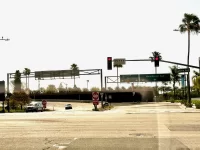
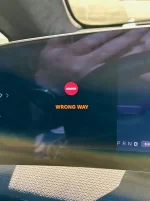
Had an interesting bug with the sign detection when I was just in Anaheim. I was sitting at a light waiting to get on to the freeway using an onramp that's side by side with the offramp. The offramp is clearly marked with large "wrong way - do not enter" signs but the road and onramp are to the right side of that. As I was sitting (and as I drove off when the light changed) the Gravity started freaking out with a wrong way warning and loud chimes. The sign detection is a bit too sensitive it seems. Images attached showing the intersection I mean and the warning that persisted until I got past the one way signs.
 

Attachments

  • GravitySign1.webp
    GravitySign1.webp
    402.7 KB · Views: 127
  • GravitySign2.webp
    GravitySign2.webp
    139.9 KB · Views: 125
Had an interesting bug with the sign detection when I was just in Anaheim. I was sitting at a light waiting to get on to the freeway using an onramp that's side by side with the offramp. The offramp is clearly marked with large "wrong way - do not enter" signs but the road and onramp are to the right side of that. As I was sitting (and as I drove off when the light changed) the Gravity started freaking out with a wrong way warning and loud chimes. The sign detection is a bit too sensitive it seems. Images attached showing the intersection I mean and the warning that persisted until I got past the one way signs.
Had a similar occurrence...
 
Had an interesting bug with the sign detection when I was just in Anaheim. I was sitting at a light waiting to get on to the freeway using an onramp that's side by side with the offramp. The offramp is clearly marked with large "wrong way - do not enter" signs but the road and onramp are to the right side of that. As I was sitting (and as I drove off when the light changed) the Gravity started freaking out with a wrong way warning and loud chimes. The sign detection is a bit too sensitive it seems. Images attached showing the intersection I mean and the warning that persisted until I got past the one way signs.
I submitted bug reports on 3.3.20 on this and have not had any problems since, but in my case I only saw this on local roads where the wrong way is right in front of me, i.e., where across the intersection the street becomes one way coming toward you.
 
There is a setting for this in the settings, where you can have it automatically adjust to the speed limit with an offset. Check and see if that got turned on by the update?
Just seeing this post.
I agree.
Perhaps 3.4.1 turned it on.

I don't recall ever having the issue until a few weeks ago. Didn't relate it to the update as a possible culprit.
 
It’s still working and offsetting by 5mph. The issue is it’s reading a sign that isn’t a speed limit sign and then setting the offset based on that as it thinks that’s the speed limit.
Oh, I see! Interesting.
 
In the last week, I’ve had numerous key fob issues. Two days ago I spent five minutes in the car shaking the key fob for it to finally work. Car is on 3.4.1 and key fob is up to date as well with a brand new Duracell in it. It’s insane how quickly the software may or may not degrade as soon as it’s rolled out. The first week with 3.4.1, flawless. Now in the last week, 50/50 chance the car does not unlock walking up to it, does not lock walking away from it. Have to pull out the key to unlock and lock. 50/50 the car forgets the entry/exit setting I’ve had programmed on the same settings for the last six months. As much as I love the car it’s insane that in 2026 a vehicle has key fob issues.
 
Anyone have issues with HVAC making high noise when in Auto mode ? If I manually adjust fan speed to the same level as in auto mode it's very quite. I noticed this only after 3.4.1 update.
 
In the last week, I’ve had numerous key fob issues. Two days ago I spent five minutes in the car shaking the key fob for it to finally work. Car is on 3.4.1 and key fob is up to date as well with a brand new Duracell in it. It’s insane how quickly the software may or may not degrade as soon as it’s rolled out. The first week with 3.4.1, flawless. Now in the last week, 50/50 chance the car does not unlock walking up to it, does not lock walking away from it. Have to pull out the key to unlock and lock. 50/50 the car forgets the entry/exit setting I’ve had programmed on the same settings for the last six months. As much as I love the car it’s insane that in 2026 a vehicle has key fob issues.
Possible bad battery? I once bought a packet of 4 batteries for my Tesla keyfob and two new ones each died within a week. I threw the other two from the pack away and bought a new one. It lasted years.
 
Anyone have issues with HVAC making high noise when in Auto mode ? If I manually adjust fan speed to the same level as in auto mode it's very quite. I noticed this only after 3.4.1 update.
Yes, same for me, but I also had it before 3.4.1. One of the few consistent aspects of my GGT 🙂
 
Possible bad battery? I once bought a packet of 4 batteries for my Tesla keyfob and two new ones each died within a week. I threw the other two from the pack away and bought a new one. It lasted years.
It's good to have a little battery tester on hand where you store your batteries. A 2-pack on Amazon is like $6. Always test batteries before replacing them. It's amazing how many are bad.

 
Anyone get "Charging Unavailable, Charging System Error, contact Customer Care" Little orange triangle at top of main screen which does not go away and the notification if you click on notification icon and sometimes when you start the car it appears on left side of screen. It is not transitional, it does not go away by rebooting or if it does it immediately reappears. I can still charge the car no problem. I have seen two other mentions in various threads, one said they had a service call impending but never saw a resolution. Another said it disappears quickly ... no it doesn't. Not sure it is a new bug as I got car 31 Dec, but pretty sure I did not see this prior to 3.41 or an actual problem with my car. Just charged car, and it is still there. Any help would be appreciated.
 
The issue with this is they need your key card to test it. I asked if they wanted my key card (not knowing about the bulletin), they said “no, just the fob”, then there was a note saying they couldn’t perform the test for the bulletin as they didn’t have my key card! Ugh. And yes, my center console stopped working for key card. Doesn’t really matter since b pillar works to start now, but still…
My center console also stopped working with the key card. Mobile tech replaced the tray( had to remove the console to do it) and its working again.
 
Had the tray in the center console replaced today via mobile visit.

Quick recap: NFC reader in the original tray from early August delivery never read key cards. Entire center console was replaced in early September. I noticed shortly after (month later) replacement that the center of the tray lifted up some when removing drinks from drink holder. However, the reader continued working until last month. Posted about that malfunction in the 3.4.0 thread, thinking it might be related to the 3.4.1 sw update; nope. Texted service tech about it last week, work was done today.

Service tech took malfunctioning tray apart to see if wire was pinched (original issue); nope. All internal wires seemed fine. The screws to hold the tray together (top to bottom) were missing. Screws weren't found in console area below tray, so looks like the tray was not properly assembled by the supplier. Tech believes the pad went bad or more likely that the continual movement of the tray when removing drinks along with the lack of connecting screws, just pulled something loose. New tray installed.

Additional work under three service campaigns also performed during visit:
  1. Tech asked for my key fob to see if it was made in the "affected date". Lucid is replacing key fobs made within a certain date range that may have loose buttons. Mine was in that affected date range, so I was given a new fob.
  2. Tech installed cables located under the third row seats that are used when the levers behind the third row seats are pulled to lower the seats into the cargo space or lift them out of that space.
  3. The side body panels that have "Gravity" on them were checked for stability. Apparently, some have been coming loose. Mine were fine.
 
Additional work under three service campaigns also performed during visit:
  1. Tech asked for my key fob to see if it was made in the "affected date". Lucid is replacing key fobs made within a certain date range that may have loose buttons. Mine was in that affected date range, so I was given a new fob.
  2. Tech installed cables located under the third row seats that are used when the levers behind the third row seats are pulled to lower the seats into the cargo space or lift them out of that space.
  3. The side body panels that have "Gravity" on them were checked for stability. Apparently, some have been coming loose. Mine were fine.
I, also, had all those things done recently. In addition they replaced the 2nd row seats because they were not going down reliably.
 
In the last week, I’ve had numerous key fob issues. Two days ago I spent five minutes in the car shaking the key fob for it to finally work. Car is on 3.4.1 and key fob is up to date as well with a brand new Duracell in it. It’s insane how quickly the software may or may not degrade as soon as it’s rolled out. The first week with 3.4.1, flawless. Now in the last week, 50/50 chance the car does not unlock walking up to it, does not lock walking away from it. Have to pull out the key to unlock and lock. 50/50 the car forgets the entry/exit setting I’ve had programmed on the same settings for the last six months. As much as I love the car it’s insane that in 2026 a vehicle has key fob issues.
Ditto. Within the past 72 hours my entry/exit has gone haywire. Doesn’t recognize the key on walk up; button mashing seems to help wake it up sometimes. Sometimes just some handles present. Once I’m in the car starts but it’s a confusing and unreliable first 30 seconds trying to get it to open. Twice the car has actually not turned off. I walk away and lights stay on, wipers going, etc. fortunately it was at home last night but only noticed 10 minutes after getting home. Gov reset didn’t work. I haven’t tried a new battery but my battery is about 2 weeks old; I was late putting a new one in after the 3.4.0 update.

I’ve since gotten 3.4.2 but these issues don’t exactly line up with that install. They lag by at least a few days.

This is after mostly flawless performance for the last month or so.
 
My rear driver side wheel has sustained a small amount of damage.
The very edge of the tire went over a large stone block hidden by overgrown grass.
As the tire rolled, the weight of the car shifted and the edge of the wheel made contact with the stone block.

I've sanded down the rash that was there, to what is shown in the pics below.
I have to look really hard to see it, but my mind knows it's there, so it's bugging me.

I took the car to a alloy wheel repair shop for an assessment.
They can recut/reman the entire wheel in order to restore to new condition for the price of $239.
The process involves a diamond cut of the wheel surface to remove the damaged area, power-coating of the wheel, and restoring to new condition.

I'm posting here after seeing posts in this thread about wheel damage from @jered and @Bdr100.
Hoping either member or someone else can advise of next steps.
@Northpointe I read a related thread in which you stated you had experience in alloy wheel repair, so your input would be valuable as well.

Screenshot 2026-03-04 at 4.11.13 PM.webp
closeupofwheeldamage.webp
 
Hoping either member or someone else can advise of next steps.
Ugh -- sorry to hear it. I'm just living with my scuffed up wheels, at least until the curb-rash protection software finally ships. I live in a city, we do lots of parallel parking, and it just ends up being a fact of life here.
 
Back
Top