NACS Charging at Tesla SCs

That's certainly true, but the message was that the car lost connection to the charger, which is a local, wired connection. There could have been a hiccup in the charger or in the car, and hopefully the connection was simply re-established a few moments later and charging continued. And the delay pointed out by @DeaneG probably means that disconnection happened at least a few moments ago, maybe even a minute or two ago, so by the time you look at the car, the connection has been re-established and charging was already back underway. I suspect the car might have shown an error briefly before the app showed the error.
So, it's possible if @hmp10 had navigated out of the charging section of the app and returned to it, the charging info could have been updated to match the info shown in the car?

I'm basing this on the instances when after unplugging from home charging, the app will show the rated miles incorrectly compared to what the car is showing, but moments later when I go back into the app, the rated miles in the app match what's showing in the car.
 
So, it's possible if @hmp10 had navigated out of the charging section of the app and returned to it, the charging info could have been updated to match the info shown in the car?

I'm basing this on the instances when after unplugging from home charging, the app will show the rated miles incorrectly compared to what the car is showing, but moments later when I go back into the app, the rated miles in the app match what's showing in the car.
@hmp10 the question in my post is probably better posed to you.
Did you do what I suggest?
 
@hmp10 the question in my post is probably better posed to you.
Did you do what I suggest?

Nope.

We had a mobile tech at the house last week to replace a malfunctioning steering wheel on our Gravity. He was at the house this morning to replace a door latch on our Air. While there, he noticed that three of the aero inserts on our Gravity wheels were beginning to pop out, so he snapped them back into place. He's coming back next week after a part comes in to replace the underbody panel that has come loose on the Gravity. He's waiting to find out if its dashboard has to come out again, this time to replace the malfunctioning vibe lighting strip.

I'm at the point that unless something makes one of our Lucids undriveable, I don't try to figure out workarounds. It's all just getting too exhausting.
 
That's certainly true, but the message was that the car lost connection to the charger
No, it wasn’t. That is a screenshot of the Tesla app, and the message is “lost connection to Charger,” implying that it was Tesla which, through the internet, lost connection to their charger (I assume temporarily).

The car charged fine, but Tesla couldn’t see that for a brief moment because of “bad air,” if you will. :)
 
So, it's possible if @hmp10 had navigated out of the charging section of the app and returned to it, the charging info could have been updated to match the info shown in the car?
That is a screenshot of the Tesla app. The Lucid app may have shown the correct info, as it was Tesla that lost connection to the charger.
 
Nope.

We had a mobile tech at the house last week to replace a malfunctioning steering wheel on our Gravity. He was at the house this morning to replace a door latch on our Air. While there, he noticed that three of the aero inserts on our Gravity wheels were beginning to pop out, so he snapped them back into place. He's coming back next week after a part comes in to replace the underbody panel that has come loose on the Gravity. He's waiting to find out if its dashboard has to come out again, this time to replace the malfunctioning vibe lighting strip.

I'm at the point that unless something makes one of our Lucids undriveable, I don't try to figure out workarounds. It's all just getting too exhausting.
In this case, your Lucid didn’t malfunction at all. The connection error is between Tesla and itself, not your car.

Again, one common denominator… :p jk
 
That is a screenshot of the Tesla app. The Lucid app may have shown the correct info, as it was Tesla that lost connection to the charger.
The connection error is between Tesla and itself, not your car.
That doesn't seem right to me.

I've owned supercharged Tesla vehicles I've owned since 2017 and never saw anything that would indicate the app was showing me information on whether the charger was connected to Tesla's network. It normally shows charging information from the vehicle, not directly from the charger.
 
In this case, your Lucid didn’t malfunction at all. The connection error is between Tesla and itself, not your car.

Again, one common denominator… :p jk

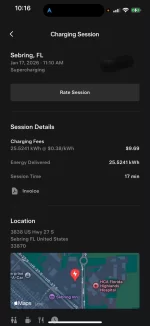
I'm confused. We took a little road trip today up the center of Florida and stopped to charge at a Supercharger in Sebring. As usual, I used the Tesla app to initiate charging as I have the monthly subscription plan. I have a credit card on file with Tesla to pay when using this plan, and the app today showed that credit card as the source of payment.

But I got a charging receipt from the Lucid Charging Service shortly afterward. Note that this receipt gave the vehicle name I have registered only in the Lucid app even though I never opened the Lucid app today.

What exactly is the connection between the Tesla app and Lucid? Why would Lucid be sending me a receipt for charging on the Tesla subscription plan which, as far as I know, is not linked to Lucid. I thought that was the reason you cannot use plug-and-charge at a Supercharger if you want to get the discounted charge fee on the Tesla subscription plan.

Screenshot 2026-01-17 at 6.38.09 PM.webp
 
That doesn't seem right to me.

I've owned supercharged Tesla vehicles I've owned since 2017 and never saw anything that would indicate the app was showing me information on whether the charger was connected to Tesla's network. It normally shows charging information from the vehicle, not directly from the charger.
Having owned or used other EVs to charge on Tesla chargers thru the app, this has indeed happened once or twice to me. Very rarely, but it happens. Maybe this doesn't happen to Teslas charging?
 
That is a screenshot of the Tesla app. The Lucid app may have shown the correct info, as it was Tesla that lost connection to the charger.
Ah yeah.
I see it's definitely not the Lucid app.
 
I'm confused. We took a little road trip today up the center of Florida and stopped to charge at a Supercharger in Sebring. As usual, I used the Tesla app to initiate charging as I have the monthly subscription plan. I have a credit card on file with Tesla to pay when using this plan, and the app today showed that credit card as the source of payment.

But I got a charging receipt from the Lucid Charging Service shortly afterward. Note that this receipt gave the vehicle name I have registered only in the Lucid app even though I never opened the Lucid app today.

What exactly is the connection between the Tesla app and Lucid? Why would Lucid be sending me a receipt for charging on the Tesla subscription plan which, as far as I know, is not linked to Lucid. I thought that was the reason you cannot use plug-and-charge at a Supercharger if you want to get the discounted charge fee on the Tesla subscription plan.

View attachment 36037
Did you initiate the charge first or plug in first? You have to initiate the charge through the Tesla app and *then* plug in; otherwise, you’re racing and Plug and Charge will almost certainly win and Lucid will charge you instead.

But yeah, in this case it didn’t use your Tesla subscription, and used Plug and Charge instead.
 
I'm confused. We took a little road trip today up the center of Florida and stopped to charge at a Supercharger in Sebring. As usual, I used the Tesla app to initiate charging as I have the monthly subscription plan. I have a credit card on file with Tesla to pay when using this plan, and the app today showed that credit card as the source of payment.

But I got a charging receipt from the Lucid Charging Service shortly afterward. Note that this receipt gave the vehicle name I have registered only in the Lucid app even though I never opened the Lucid app today.

What exactly is the connection between the Tesla app and Lucid? Why would Lucid be sending me a receipt for charging on the Tesla subscription plan which, as far as I know, is not linked to Lucid. I thought that was the reason you cannot use plug-and-charge at a Supercharger if you want to get the discounted charge fee on the Tesla subscription plan.

View attachment 36037
Is it possible that you initiated charge using the Tesla app (for the discounted rate) and sometime in the session the charge failed and then restarted only this time it used the Lucid plug and charge and completed the charge session?
 
Is it possible that you initiated charge using the Tesla app (for the discounted rate) and sometime in the session the charge failed and then restarted only this time it used the Lucid plug and charge and completed the charge session?
I don't think I've ever seen a charging session fail then restart on it's own. Usually takes unplugging and plugging back in to restart a session.

I was unsure based on his recap whether he ALSO got a charging receipt in the Tesla app? Did it bill him twice? Or did P&C simply grab the session first (which is known to happen at times). Unless you turn P&C off, you typically need to start the session in the Tesla app first before plugging in to force it to grab the session before P&C grabs it. And even then, the Tesla app could fail to actually start the session, allowing P&C to grab it instead. That's the downside of Tesla SCs not having a screen like EA -- there's no confirmation for what's going on anywhere but in the app, so it's harder to know if something blipped.
 
Did you initiate the charge first or plug in first? You have to initiate the charge through the Tesla app and *then* plug in; otherwise, you’re racing and Plug and Charge will almost certainly win and Lucid will charge you instead.

But yeah, in this case it didn’t use your Tesla subscription, and used Plug and Charge instead.

Backed into the space, opened the Tesla app, confirmed the location, and entered the charge post number. Then, when the "Start Charging" prompt came up on the Tesla app, plugged in and pressed the "Start Charging" button.

Waiting to press the "Start Charging" button until after plugging in must be what triggered plug-and-charge. I used that same station twice yesterday. I checked, and I got one receipt from Tesla for the morning session and one receipt from Lucid of the afternoon session.

IMG_2775.webp


I didn't realize it made a difference whether you plugged in before or after you press the "Start Charging" button.

Jeez, yet another detail you have to keep in mind when charging an EV at one vendor versus another . . . .
 

Attachments

  • IMG_2775.webp
    IMG_2775.webp
    38 KB · Views: 71
Is it possible that you initiated charge using the Tesla app (for the discounted rate) and sometime in the session the charge failed and then restarted only this time it used the Lucid plug and charge and completed the charge session?

No idea what's possible here. As you can see from my above post, I was not aware which foot you have to stand on and which direction you must rub your head when initiating charging when using the Tesla app with the Lucid.
 
I didn't realize it made a difference whether you plugged in before or after you press the "Start Charging" button.
Jeez, yet another detail you have to keep in mind when charging an EV at one vendor versus another . . . .
Thanks for debugging this for us
 
Waiting to press the "Start Charging" button until after plugging in must be what triggered plug-and-charge. I used that same station twice yesterday. I checked, and I got one receipt from Tesla for the morning session and one receipt from Lucid of the afternoon session.
Yes. When there's competing processes trying to initiate the charging session, the one that gets to it first takes precedence. Leaving P&C turned on means the car will attempt to initiate the session, unless the session has already been activated by another process (in this case, the Tesla app).

There's handshake time involved for P&C to initiate a session (anywhere from 5-30 seconds for your phone to send the start command to the Tesla servers, which talks to the charger, which talks to the car, as well as talking to your credit card company database). It sounds like one of those times you hit the Tesla app START just before the P&C handshake completed, and the other time just after. Thus why one was grabbed by Lucid and the other grabbed by Tesla.

The way to avoid that is to actually start the charge in the Tesla app before plugging in. I don't mean just be ready to start it after you plug in, I mean actually start the charge in the app. Even though it says to plug in first, it actually gives you about 2 minutes to plug the car before timing out after starting the charge in the app. (EA works the same way.) That way the session is already started in the Tesla (or EA) app and P&C can't grab it.
 
The way to avoid that is to actually start the charge in the Tesla app before plugging in. I don't mean just be ready to start it after you plug in, I mean actually start the charge in the app. Even though it says to plug in first, it actually gives you about 2 minutes to plug the car before timing out after starting the charge in the app. (EA works the same way.) That way the session is already started in the Tesla (or EA) app and P&C can't grab it.

"Even though it says to plug in first . . . ."

That pretty much says it all. Besides the availability issue, there are so many do's, don'ts, tricks, and work-arounds involved in charging EVs that it's small wonder that there is so much resistance to their wider adoption.

For me, the allure of EV performance (instant torque, fluidity, low center of gravity) is enough to make it worthwhile for me. But for the more typical driver just wanting convenience and reliability, we still have a long way to go.
 
"Even though it says to plug in first . . . ."

That pretty much says it all. Besides the availability issue, there are so many do's, don'ts, tricks, and work-arounds involved in charging EVs that it's small wonder that there is so much resistance to their wider adoption.

For me, the allure of EV performance (instant torque, fluidity, low center of gravity) is enough to make it worthwhile for me. But for the more typical driver just wanting convenience and reliability, we still have a long way to go.
Agreed. It's often still... messy.

In this case it's a matter of "too much of a good thing". Plugging in first is the most normal way to start a charge. The problem here is they're giving us two ways to start the charge instead of just one. Then it's a battle between which one gets the session. Automatic P&C is great and in the long run that's far preferable to phone apps. But right now, it's still only available on a few networks, and does not pick up the SC or EA membership discounts. So sometimes we want to use phone apps, and sometimes we want to use P&C. Just depends. Messy.

Personally, I want to see SC and EA do away with those membership discount plans, and adjust their overall pricing accordingly (like gas). It's a PITA for drivers to mess with these discounts. We feel limited to just those networks when paying the membership fee to buy the rate down. And even though it saves a few bucks, it makes the EV road trip experience worse by locking into just some stations rather than simply stopping wherever it's most convenient.

Depends on how long the trip is and how many charges I plan to do, but unless it's a lot, I just do without and pay the normal rate. The convenience of P&C making it all easier is worth giving up a few bucks.
 
Is it possible that you initiated charge using the Tesla app (for the discounted rate) and sometime in the session the charge failed and then restarted only this time it used the Lucid plug and charge and completed the charge session?
Ooh, this is possible, probably!
 
Back
Top