
It was originally blank. On the top dashboard I selected the music app and then the buttons showed up down below but all greyed out.Did you try unselecting the queue mode? In your screenshot the queue mode is on, which disables other modes. At least this is normal for Tidal app.
When things “don’t load correctly” there is usually blank space where buttons should be.
You are using an out of date browser. It may not display this or other websites correctly.
You should upgrade or use an alternative browser.
You should upgrade or use an alternative browser.
Software 3.3.20 Update
- Thread starter Ron_Burgundy
- Start date

Whenever I enter the car and it does not adjust seat and steering to drive position I check the profile. Every time the profile is set to Guest. I change it to my profile and everything adjusts to driving settings.Yes. This is an annoyance for our dog, too. I feel as if once the user turns it on, it should stay on. Not sure why it would turn off if we turn it on. It also doesn’t always remember prior state, which can be annoying as you need a checklist like a plane pilot to begin driving. As an example, my seat profile is rarely remembered, so have to adjust that each time.
- Joined
- Apr 24, 2022
- Messages
- 1,082
- Reaction score
- 1,531
Well after last week's plug and charge failure at the Tesla SC, I'm happy to report no issues this weekend. Same exact SC location, maybe even the same stall. Who knows....

- Joined
- Apr 27, 2025
- Messages
- 2,860
- Reaction score
- 4,818
- Cars
- Yes
My car starts on my profile when I use my fob, but it still doesn’t adjust my seat 90% of the time. Strange. But it’s always been like that. I expect it will be “fixed” whenever other profile-related items are addressed, like the lights reverting to white all the time on start.Whenever I enter the car and it does not adjust seat and steering to drive position I check the profile. Every time the profile is set to Guest. I change it to my profile and everything adjusts to driving settings.

- Joined
- Jan 4, 2022
- Messages
- 5,664
- Reaction score
- 10,860
- Location
- Santa Clarita, CA
- Cars
- 2026 Gravity Dream
- Gravity DE Number
- 68
- Referral Code
- AWNJLGKT
That’s weird. Mine is the opposite, works almost 100% of the time after they fixed the seat.My car starts on my profile when I use my fob, but it still doesn’t adjust my seat 90% of the time. Strange. But it’s always been like that. I expect it will be “fixed” whenever other profile-related items are addressed, like the lights reverting to white all the time on start.
- Joined
- Mar 7, 2020
- Messages
- 8,707
- Reaction score
- 14,409
- Location
- Naples, FL
- Cars
- Air DE-P, 2 Gravity DEs
- Air DE Number
- 395
- Gravity DE Number
- 067
238
- Referral Code
- 033M4EXG
We had a new snafu tonight: the Pilot Screen was showing the car in Swift mode, but the Glass Cockpit was showing it in Smooth mode. We had been driving in Swift mode on the way to dinner, but the car should have defaulted back to Smooth mode when It went through the sleep cycle. I have no idea whether this was just a screen error or whether the car failed to default, as I don't know which indication was accurate.
- Joined
- Apr 27, 2025
- Messages
- 2,860
- Reaction score
- 4,818
- Cars
- Yes
I’ve had this happen a few times. I expect cockpit where speed is shown is correct since that’s not part of infotainment and a separate system.We had a new snafu tonight: the Pilot Screen was showing the car in Swift mode, but the Glass Cockpit was showing it in Smooth mode. We had been driving in Swift mode on the way to dinner, but the car should have defaulted back to Smooth mode when It went through the sleep cycle. I have no idea whether this was just a screen error or whether the car failed to default, as I don't know which indication was accurate.
It goes away after sleep or if I switch the drive modes. I think it’s related to some of the general pilot screen lag and other issues.

- Joined
- Jun 22, 2024
- Messages
- 1,559
- Reaction score
- 1,305
- Location
- Naperville, IL
- Cars
- 14 CR-V EXL, 26GravityGT
- Referral Code
- W772ZCOT
Ok. Now I have noticed some other strange things....It got above 40 degrees here and magically the car is doing 3.0 mi/kwh when the last full battery charge (I used trip A to track ~120 kwhrs, 301 miles, 2.51 mi/kwhr). I also switched to manual HVAC just to see if that would stabilize things. However, I am also getting about 3% battery drain overnight. This didn't use to happen.
Not sure if I read this correctly. Your efficiency improved to 3.0mi/kwh, but you’re now also seeing a 3% battery drain over night.Ok. Now I have noticed some other strange things....It got above 40 degrees here and magically the car is doing 3.0 mi/kwh when the last full battery charge (I used trip A to track ~120 kwhrs, 301 miles, 2.51 mi/kwhr). I also switched to manual HVAC just to see if that would stabilize things. However, I am also getting about 3% battery drain overnight. This didn't use to happen.
- Joined
- Jun 22, 2024
- Messages
- 1,559
- Reaction score
- 1,305
- Location
- Naperville, IL
- Cars
- 14 CR-V EXL, 26GravityGT
- Referral Code
- W772ZCOT
Correct. In the usage app it showed battery conditioning, but that doesn't add up to 3% SOC drain. TBF I may have misremembered the SOC from when I parked the car, but I swear it was higher when parked based on last trip usage.Not sure if I read this correctly. Your efficiency improved to 3.0mi/kwh, but you’re now also seeing a 3% battery drain over night.
I’m going on a road trip in a few days to Vegas. My overall efficiency has stayed around 2.7mi/kwh over the course of about 900 miles. I’ll see what a new trip reset looks like for my road trip. I wish I could get 3.0mi/kwh, but I’m doubtful.Correct. In the usage app it showed battery conditioning, but that doesn't add up to 3% SOC drain. TBF I may have misremembered the SOC from when I parked the car, but I swear it was higher when parked based on last trip usage.
Do you by chance have your car connected to WiFi?
- Joined
- Jun 22, 2024
- Messages
- 1,559
- Reaction score
- 1,305
- Location
- Naperville, IL
- Cars
- 14 CR-V EXL, 26GravityGT
- Referral Code
- W772ZCOT
Yes at home in the garage. It's also a 20/21 wheel Gravity with 7 seats. Most of the recent driving was just normal around town.I’m going on a road trip in a few days to Vegas. My overall efficiency has stayed around 2.7mi/kwh over the course of about 900 miles. I’ll see what a new trip reset looks like for my road trip. I wish I could get 3.0mi/kwh, but I’m doubtful.
Do you by chance have your car connected to WiFi?
Not sure if this is still accurate, but maybe try turning off your WiFi to see if the drain goes away.Yes at home in the garage. It's also a 20/21 wheel Gravity with 7 seats. Most of the recent driving was just normal around town.
- Joined
- Nov 30, 2024
- Messages
- 142
- Reaction score
- 113
- Cars
- Tesla MS, Subaru Outback
- Air DE Number
- 0
Temperature may play a role. In my Tesla I arrived home after a 200 mile ride, with the car fully warmed up, with 7% showing. Thought I would super charge in the AM. It went to the 30's that night. In the morning it was down to 2%. Obviously much less range on a cold non-preconditioned battery. It's easily repeatable - just live and learn to not leave your car with a low SOC when temperatures are cool. Or if not at a low SOC, expect a drop of several points anyway.In the usage app it showed battery conditioning, but that doesn't add up to 3% SOC drain.
Of course, YMMV.
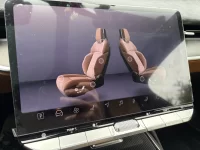
Car decided to get screen locked randomly again…everyday seems to be something new. Quite frustrating. The only thing consistent is expecting to get some sort of error or bug every drive. It’s like rolling the error wheel every drive and today I got the ? triangle.
Attachments

- Joined
- Aug 18, 2020
- Messages
- 1,436
- Reaction score
- 1,175
- Location
- Tucson, AZ
- Cars
- LCID DER,GGT TSLA X,CT
- Air DE Number
- 153
- Referral Code
- 0M97RTIO
I’ve encountered similar issues, such as the bottom row of icons disappearing. Once, I managed to swipe down and select the HUD adjustment screen, which restored everything to normal once I exited that screen. Mirror and steering wheel adjustments might also cause this problem. I haven’t experienced this issue since the latest 3.3.20 update. Additionally, I’ve had an issue where some graphics fail to display when switching from guest to my profile. This was resolved by switching to guest mode and then back to my profile.Car decided to get screen locked randomly again…everyday seems to be something new. Quite frustrating. The only thing consistent is expecting to get some sort of error or bug every drive. It’s like rolling the error wheel every drive and today I got the ? triangle.
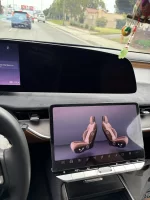
Stepped out of my car to do a lock reset since I had to go pick something up. Came back to the car 5 minutes later and now my top screen is blank and I can’t even do a manual restart. Going to have to try stepping away from the car again for several minutes and hope it powers down completely.I’ve encountered similar issues, such as the bottom row of icons disappearing. Once, I managed to swipe down and select the HUD adjustment screen, which restored everything to normal once I exited that screen. Mirror and steering wheel adjustments might also cause this problem. I haven’t experienced this issue since the latest 3.3.20 update. Additionally, I’ve had an issue where some graphics fail to display when switching from guest to my profile. This was resolved by switching to guest mode and then back to my profile.
Attachments
- Joined
- Aug 18, 2020
- Messages
- 1,436
- Reaction score
- 1,175
- Location
- Tucson, AZ
- Cars
- LCID DER,GGT TSLA X,CT
- Air DE Number
- 153
- Referral Code
- 0M97RTIO
Can't you switch profiles? And the steering wheel reset (Ⅹ +Stepped out of my car to do a lock reset since I had to go pick something up. Came back to the car 5 minutes later and now my top screen is blank and I can’t even do a manual restart. Going to have to try stepping away from the car again for several minutes and hope it powers down completely.
 ) does not work?
Can’t switch profiles because the top screen is blank. Bottom screen completely not working. When I got home, I had to have my wife open the garage door for me because the homelink wasn’t coming up. Steering wheel reset was not working. The last time this happened I had called roadside assistance and was told that I had to step away from the car for 2 minutes for it to fully power off and reset on its own.Can't you switch profiles? And the steering wheel reset (Ⅹ +
- Joined
- Aug 29, 2025
- Messages
- 11
- Reaction score
- 14
I just picked up our new Gravity GT (it's great, btw - flawless so far) and when I got home it popped up that a new software update is available, 3.3.20. But the weird thing is, the car was delivered with 3.3.20. Says so right on the app and in the car menu. Was there a rebuild of 3.3.20 that didn't bump the minor version number?