One Weekend with Lucid Gravity Dream Edition #319 (Former Model X Owner)

lucid_bay

New Member

Verified Owner
Joined
Jul 2, 2025
Messages
14
Reaction score
95
Location
San Francisco, CA
Cars
CybrTrk, Model X, S
Took delivery of our Gravity Dream Edition #319 last Friday. After a weekend of use, here are my initial impressions. Bottom line: best car our family has ever owned. The hardware is exceptional. Most areas for improvement are software related. We are recommending this vehicle to everyone we know. We have had our photo taken multiple times driving in the Bay Area. Everyone is excited to check out the vehicle, ask questions and know more about Lucid.

Learning Curve

A few habits to break coming from Tesla:
  • No auto turn signal cancel. I change lanes constantly and forget to turn it off, leaving my signal on forever.
  • Cannot keep mirror and rear camera view up while driving. I relied on this heavily for situational awareness in the Model X.
  • Phone key adjustment. Haven't used a physical key fob in years. Already left it in the vehicle once by accident.
  • No auto open/close charging port. Left it open after charging once. Won't make that mistake again.
Issues and Areas for Improvement (Nearly all software related)
  • Turn signal cameras are noticeably low resolution and low frame rate. Stands out against the otherwise sharp, crisp dashboard displays.
  • Attention monitoring is overly aggressive. Constantly tells me to pay attention when I'm looking directly at the road. Turned this feature off.
  • DreamDrive needs refinement. Reminds me of early Autopilot with ping ponging between lane markers instead of staying centered. Auto lane change executes confidently but the recentering afterward is rough and not smooth.
  • Live view is essentially unusable, even on 3.3.2. Can launch it and see a few frames before resolution tanks and connection drops. Not available while charging, which is exactly when I need parking lot view most. Stopped using it entirely.
  • Armrest fabric on Yosemite interior is a bit scratchy. You get used to it but not ideal.
  • Key fob occasionally not detected on 3.3.2. Shaking it wakes it back up. Never been locked out or unable to open the vehicle.
  • Occasional lag navigating between apps and changing drive modes with steering wheel button. More noticeable when vehicle is waking from sleep. Not a big deal but present.
What We Love
  • The HUD is excellent. Lane change markings, turn by turn navigation, speed, blind spot warnings. Incredibly useful. Glad we did not downgrade to a GGT to take earlier delivery.
  • Interior quality is outstanding. Every passenger has been impressed by the build quality and materials. Yosemite interior looks amazing.
  • Physical turn and drive stalks. Physical buttons. No explanation needed.
  • Interior space is massive. Packed all soccer team equipment (canopy, balls, chairs, 9 seat bench, cooler) with room to spare. Model X couldn't even fit our family's luggage for airport trips.
  • Sound system at 25-30% is loud and crisp. Excellent quality.
  • Lucid Vibes lighting looks incredible at night. The white interior makes the LED colors really pop. Amazing effect. Planning to tint windows because passing cars keep staring. Feels like riding in a limo.
  • Massage seats get constant use. Not a gimmick. Especially when coupled with Serenity mode. This is a crowd pleaser.
  • Suspension and ride quality make the Model X feel like a broken down car by comparison. Like riding on a cloud. Best ride feel and driving experience we have ever had.
  • Dashboard and display setup works perfectly. Driver gets turn by turn, passenger sees overall route. Great integration.
  • Kids love the second row tables. Use them constantly. My high schooler chose to stay in the car to do homework and listen to music during an errand. That says it all.
Summary

The hardware is rock solid. Once Lucid addresses the software issues, this will be nearly perfect. Already the best vehicle our family has owned. Recommending to everyone we know.
 

Attachments

  • gravity.webp
    gravity.webp
    392.6 KB · Views: 730
Took delivery of our Gravity Dream Edition #319 last Friday. After a weekend of use, here are my initial impressions. Bottom line: best car our family has ever owned. The hardware is exceptional. Most areas for improvement are software related. We are recommending this vehicle to everyone we know. We have had our photo taken multiple times driving in the Bay Area. Everyone is excited to check out the vehicle, ask questions and know more about Lucid.

Learning Curve

A few habits to break coming from Tesla:
  • No auto turn signal cancel. I change lanes constantly and forget to turn it off, leaving my signal on forever.
  • Cannot keep mirror and rear camera view up while driving. I relied on this heavily for situational awareness in the Model X.
  • Phone key adjustment. Haven't used a physical key fob in years. Already left it in the vehicle once by accident.
  • No auto open/close charging port. Left it open after charging once. Won't make that mistake again.
Issues and Areas for Improvement (Nearly all software related)
  • Turn signal cameras are noticeably low resolution and low frame rate. Stands out against the otherwise sharp, crisp dashboard displays.
  • Attention monitoring is overly aggressive. Constantly tells me to pay attention when I'm looking directly at the road. Turned this feature off.
  • DreamDrive needs refinement. Reminds me of early Autopilot with ping ponging between lane markers instead of staying centered. Auto lane change executes confidently but the recentering afterward is rough and not smooth.
  • Live view is essentially unusable, even on 3.3.2. Can launch it and see a few frames before resolution tanks and connection drops. Not available while charging, which is exactly when I need parking lot view most. Stopped using it entirely.
  • Armrest fabric on Yosemite interior is a bit scratchy. You get used to it but not ideal.
  • Key fob occasionally not detected on 3.3.2. Shaking it wakes it back up. Never been locked out or unable to open the vehicle.
  • Occasional lag navigating between apps and changing drive modes with steering wheel button. More noticeable when vehicle is waking from sleep. Not a big deal but present.
What We Love
  • The HUD is excellent. Lane change markings, turn by turn navigation, speed, blind spot warnings. Incredibly useful. Glad we did not downgrade to a GGT to take earlier delivery.
  • Interior quality is outstanding. Every passenger has been impressed by the build quality and materials. Yosemite interior looks amazing.
  • Physical turn and drive stalks. Physical buttons. No explanation needed.
  • Interior space is massive. Packed all soccer team equipment (canopy, balls, chairs, 9 seat bench, cooler) with room to spare. Model X couldn't even fit our family's luggage for airport trips.
  • Sound system at 25-30% is loud and crisp. Excellent quality.
  • Lucid Vibes lighting looks incredible at night. The white interior makes the LED colors really pop. Amazing effect. Planning to tint windows because passing cars keep staring. Feels like riding in a limo.
  • Massage seats get constant use. Not a gimmick. Especially when coupled with Serenity mode. This is a crowd pleaser.
  • Suspension and ride quality make the Model X feel like a broken down car by comparison. Like riding on a cloud. Best ride feel and driving experience we have ever had.
  • Dashboard and display setup works perfectly. Driver gets turn by turn, passenger sees overall route. Great integration.
  • Kids love the second row tables. Use them constantly. My high schooler chose to stay in the car to do homework and listen to music during an errand. That says it all.
Summary

The hardware is rock solid. Once Lucid addresses the software issues, this will be nearly perfect. Already the best vehicle our family has owned. Recommending to everyone we know.
Hoping this is the day of good news! Thanks for your reviews!
 
Thanks for the review.

I'm curious about the camera resolution. Multiple people have mentioned this. Is this really a software issue, or is it a camera hardware issue? The crystal clear backup camera on my (now quite old) 2017 Model S has ruined me on every other car I've ever been in. I am hopeful that this is a software limitation, but it seems hard to believe that low camera resolution can be fixed by an OTA update?
 
Thanks for the review.

I'm curious about the camera resolution. Multiple people have mentioned this. Is this really a software issue, or is it a camera hardware issue? The crystal clear backup camera on my (now quite old) 2017 Model S has ruined me on every other car I've ever been in. I am hopeful that this is a software limitation, but it seems hard to believe that low camera resolution can be fixed by an OTA update?
The Airs are like this too. It’s just bad, low resolution sensors like old webcams.
 
Thanks for the review.

I'm curious about the camera resolution. Multiple people have mentioned this. Is this really a software issue, or is it a camera hardware issue? The crystal clear backup camera on my (now quite old) 2017 Model S has ruined me on every other car I've ever been in. I am hopeful that this is a software limitation, but it seems hard to believe that low camera resolution can be fixed by an OTA update?
The Air’s cameras used to be worse, so it’s possible. No idea how likely.
 
Thanks for the review.

I'm curious about the camera resolution. Multiple people have mentioned this. Is this really a software issue, or is it a camera hardware issue? The crystal clear backup camera on my (now quite old) 2017 Model S has ruined me on every other car I've ever been in. I am hopeful that this is a software limitation, but it seems hard to believe that low camera resolution can be fixed by an OTA update?
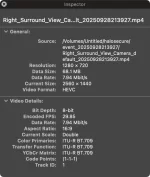
Good question. In the spirit of investigation, I downloaded photos and movies from Halo Secure to determine the camera quality. It is low (1280x720p @ 30fps). So this is not all software. It is hardware. Attached photos from video inspection. The frame rate issue is definitely software.

Here is a link to the frame rate issue as a movie as this forums will not let me upload it.


camera_quality_2.webp
camera_quality.webp
 

Attachments

  • Screenshot 2025-09-30 at 7.55.56 AM.webp
    Screenshot 2025-09-30 at 7.55.56 AM.webp
    41.4 KB · Views: 472
Last edited:
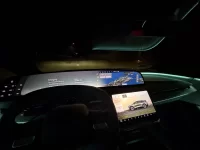
Here is a video of the HUD (which is difficult to capture). It is white / full color, though due to the way the image is projected (RBG) the iPhone camera splits RGB and does not combine it. I would have liked to have this as images / video of the HUD is hard to find.


Attachments

  • gravity_319.webp
    gravity_319.webp
    1.7 MB · Views: 484
Good question. In the spirit of investigation, I downloaded photos and movies from Halo Secure to determine the camera quality. It is low (1280x720p @ 30fps). So this is not all software. It is hardware. Attached photos from video inspection. The frame rate issue is definitely software.

Here is a link to the frame rate issue as a movie as this forums will not let me upload it.


View attachment 32923View attachment 32924
That doesn’t actually mean it isn’t software. Even if the cameras are capable of recording 2160p, you can still *choose* to record or save at a lower resolution, for example to save space or bandwidth when streaming

I’m not saying that’s true, but it is not a given that it is hardware-fixable only based on this (though useful info!)
 
This looks great, and mirrors my experience w/ my DE Gravity for the last 9–10 days as well. I have started to run into the more annoying software bugs and issues, but I'm going to power through them and hope that it's mostly software-related and fixable with OTAs. I remember when I initially got my 2022 Model X, those Falcon wing doors necessitated multiple trips to the repair center, to the point where the SA casually mentioned that I could lemon law the car if I came back again. The sad part was, by ~year 3 or so of owning the car, the doors became more of a hindrance than a feature; I kept on worrying about it hitting/hurting things than the additional ingress room.
 
No auto turn signal cancel. I change lanes constantly and forget to turn it off, leaving my signal on forever.
Many cars today have an intermediate turn signal position, from which it immediately auto-returns, but which flashes the turn signals 3-4 times.
  • No auto open/close charging port. Left it open after charging once. Won't make that mistake again.
I assume it auto closes once you start driving, right?

I put our Gravity order in about a week ago. Long-time EV owner (still have my Roadster from 2011), have also had an early Model Y and now on our second leased Model X. Some questions:

• Will the Gravity charge using our existing Gen 2 Tesla Wall Connector? And if so, at what power level (we have 240 volts and up to 80 amps available)?
• What should I expect from Dream Drive, both pro and con?
• With the Teslas, road tripping is straight-forward as it auto-chooses SuperCharger stops for you, which you can override pretty easily, especially since the stations are show-able on the map. What are Gravity owners doing?
• Is CarPlay available yet? And when it is, how will finding SuperChargers while in Apple's Maps app work?

FWIW, we haven't hated our Model X's like some here. FWDs have always worked, although front seat riders do have to co-ordinate their closing to not get hit. Worst thing is probably that the Model X's cabin always sounds like a window is not rolled fully up, even though they are. OK, maybe worst thing is the location of the horn and turn signal buttons.
 
• Will the Gravity charge using our existing Gen 2 Tesla Wall Connector? And if so, at what power level (we have 240 volts and up to 80 amps available)?
Check this thread out:

You will probably need to set the power lower. Some say as low as 48A, while another person said it works at 56A.
 
• Is CarPlay available yet? And when it is, how will finding SuperChargers while in Apple's Maps app work?
No CarPlay yet, but the native navigation will show them. You can also use then Tesla App and select a supercharger, scroll down to the bottom, and then press the right turn arrow icon. This will send the location to Apple Maps.
 
I assume it auto closes once you start driving, right?

• Will the Gravity charge using our existing Gen 2 Tesla Wall Connector? And if so, at what power level (we have 240 volts and up to 80 amps available)?
• What should I expect from Dream Drive, both pro and con?
• With the Teslas, road tripping is straight-forward as it auto-chooses SuperCharger stops for you, which you can override pretty easily, especially since the stations are show-able on the map. What are Gravity owners doing?
• Is CarPlay available yet? And when it is, how will finding SuperChargers while in Apple's Maps app work?

FWIW, we haven't hated our Model X's like some here. FWDs have always worked, although front seat riders do have to co-ordinate their closing to not get hit. Worst thing is probably that the Model X's cabin always sounds like a window is not rolled fully up, even though they are. OK, maybe worst thing is the location of the horn and turn signal buttons.
1. It does not auto close at all. Purely manual like an ICE car (push in, push out).
2. I have a Gen 3 Universal Wall Connector (48 Amp), no problems.
3. Dream Drive pro IMHO is like AutoPilot from 2021 without the Phantom Breaking problem. It will keep itself in lane, but ping pongs a little bit.
3. Not all SuperChargers are open to NACS (3rd Party). So you will have to use Lucid Navigation to find Superchargers that can actually be used. Correct it shows on the map just like a Tesla. Charging stops, etc..
 
I definitely want CarPlay for texts and music quality, but i am learning to really like the native navigation app and how it displays chargers nearby or en route. It’s really well done. If the send address to app from Apple Maps ever works, i can see myself not using CarPlay for navigation.
 
1. It does not auto close at all. Purely manual like an ICE car (push in, push out).
This sounds lame, but it's actually a good thing, imho. Waiting on the charging door to open is mildly annoying in the Air, and the constant movement can inevitably lead to misalignment. It took me a minute to get used to, but I like the Gravity cap.

I actually especially like that it doesn't swing open rapidly but rather 'soft opens'
 
No auto turn signal cancel. I change lanes constantly and forget to turn it off, leaving my signal on forever.
Many cars today have an intermediate turn signal position, from which it immediately auto-returns, but which flashes the turn signals 3-4 times
Lightly engage the turn signal it will engage the intermediate turn signal which flashes 3-4 times
On my solo Gravity test drive, engaging the intermediate turn signal stalk took me a few tries cause it really on takes a light touch
 
If you're in Dream Drive Pro and want to change lanes, do you have to disengage or something else?
Activate turn signal and it will initiate the lane change if it agrees it's ok. It didn't like going into or out of an HOV lane with solid line.

Otherwise steer it there yourself, DDPro takes right back over in the new lane. Unlike the way the X fights you until it lets go with a jerk scaring your passengers.
 
This sounds lame, but it's actually a good thing, imho. Waiting on the charging door to open is mildly annoying in the Air, and the constant movement can inevitably lead to misalignment. It took me a minute to get used to, but I like the Gravity cap.

I actually especially like that it doesn't swing open rapidly but rather 'soft opens'
On my vehicles with motorized doors, I've always found I get out of the car and sometimes forget to hit whatever button opens the door. I much prefer a manually operated gas cap door, and I'm assuming that'll be true for an EV's charger door as well.
 
It didn't like going into or out of an HOV lane with solid line.
Any solid line. It will only change lanes across dotted/dashed lines.
 
Back
Top