Navigation System Question

hmp10

Active Member

Founding Member
Verified Owner
Supporting Member
Joined
Mar 7, 2020
Messages
8,686
Reaction score
14,377
Location
Naples, FL
Cars
Air DE-P, 2 Gravity DEs
Air DE Number
395
Gravity DE Number
067
238
Referral Code
033M4EXG
We're taking a fishing trip in a couple of weeks where one of the addresses is just GPS coordinates. Does anyone know how to put the "degree" symbol into the location address on the Gravity?
 
Unless the fishing hole paid Here to put the coordinates in their database, I don't think you can.

A work around. Put the coordinates in just about any other map program and zoom out to figure geographically where it is. In Here pan and zoom around to match the location. Put finger on Here map in likely spot and hold for ~3secs, and a waypoint will appear with its coordinates. Note the error and drop another waypoint. Repeat as necessary. Once you have a good one save to favorites. Compromise nothing.
 
Unless the fishing hole paid Here to put the coordinates in their database, I don't think you can.

A work around. Put the coordinates in just about any other map program and zoom out to figure geographically where it is. In Here pan and zoom around to match the location. Put finger on Here map in likely spot and hold for ~3secs, and a waypoint will appear with its coordinates. Note the error and drop another waypoint. Repeat as necessary. Once you have a good one save to favorites. Compromise nothing.

Shouldn't a navigation system be able to locate GPS coordinates whether or not the occupant of that site registers it with the navigation provider?

I was able to put the coordinates into Google Maps, got the exact location and a driving route to it, and an offer to send the route to a phone. (I have an iPhone and can use CarPlay, but I'm not going to the fishing site with my partner who has an Android phone.

And I'm not sure there will be cell phone service in this part of the Blue Ridge, anyway. So I was hoping he could use the in-car navigation's stored map.
 
Shouldn't a navigation system be able to locate GPS coordinates whether or not the occupant of that site registers it with the navigation provider?
Of course. And were there a way to input it, it would. I think the parent post meant that unless it has a “name,” there’s no way to input coordinates via the Lucid Nav at the moment, not that HERE can’t find a set of coordinates.

I was able to put the coordinates into Google Maps, got the exact location and a driving route to it, and an offer to send the route to a phone. (I have an iPhone and can use CarPlay, but I'm not going to the fishing site with my partner who has an Android phone.

And I'm not sure there will be cell phone service in this part of the Blue Ridge, anyway. So I was hoping he could use the in-car navigation's stored map.
I don’t think there’s currently a way to input coordinates short of holding your finger down and getting a waypoint.

[edit] I was wrong and this was corrected down below.
 
Last edited:
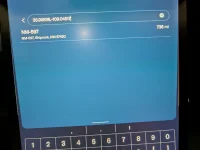
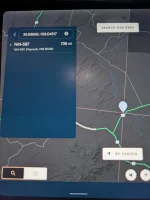
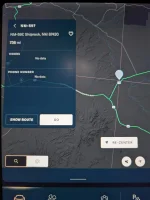
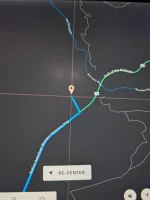
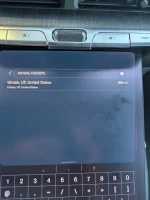
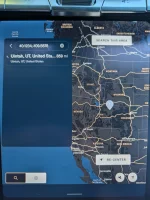
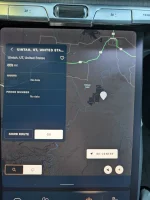
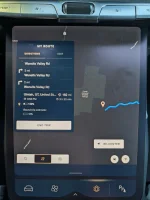
In the Air it lets me or in put in coordinates in decimal format just fine.

For example, I put in the coordinates for the four corners monument and it happily set up a route to it.
 

Attachments

  • PXL_20260503_204927209.webp
    PXL_20260503_204927209.webp
    300.8 KB · Views: 96
  • PXL_20260503_204943175.webp
    PXL_20260503_204943175.webp
    347.5 KB · Views: 93
  • PXL_20260503_204953182.webp
    PXL_20260503_204953182.webp
    512.4 KB · Views: 94
  • PXL_20260503_205025440.webp
    PXL_20260503_205025440.webp
    291.3 KB · Views: 96
Isn't it possible to add within the app and simply send route to the car?or find the spot in the app and make as favorite which could be used in the car?
 
In the Air it lets me or in put in coordinates in decimal format just fine.

For example, I put in the coordinates for the four corners monument and it happily set up a route to it.
That's only works because somebody put that locations coordinates into the map. Works on the gravity too. Try a random location.
 
That's only works because somebody put that locations coordinates into the map. Works on the gravity too. Try a random location.
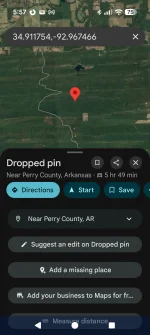
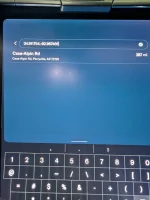
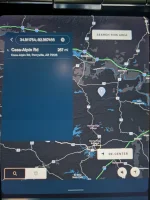
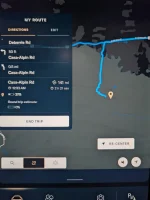
I picked a random spot in the middle of Arkansas and it worked just fine again.
 

Attachments

  • Screenshot_20260503-175732.webp
    Screenshot_20260503-175732.webp
    122.6 KB · Views: 90
  • PXL_20260503_225810423.webp
    PXL_20260503_225810423.webp
    773.7 KB · Views: 61
  • PXL_20260503_225825871.webp
    PXL_20260503_225825871.webp
    533.5 KB · Views: 79
  • PXL_20260503_225903074.webp
    PXL_20260503_225903074.webp
    489.4 KB · Views: 82
That looks like a random dropped pin not a search on a random coordinate. Try this: 40.1234,-109.5678
 
I used to enter GPS coordinates all the time on my Air, and just verified that it also works on my Gravity.
The caveat - the car will navigate you to the closest thing it can find near your GPS coordinates, not to the exact location you entered, unless HERE knows that there is a road that passes through that spot.
 
That's only works because somebody put that locations coordinates into the map. Works on the gravity too. Try a random location.
That is not how GPS works. This is incorrect.
 
I used to enter GPS coordinates all the time on my Air, and just verified that it also works on my Gravity.
The caveat - the car will navigate you to the closest thing it can find near your GPS coordinates, not to the exact location you entered, unless HERE knows that there is a road that passes through that spot.
This is correct.
 
That looks like a random dropped pin not a search on a random coordinate. Try this: 40.1234,-109.5678
Still seems to work fine, at least to the nearest point where there's a known road, which is a reasonable limit for a car navigation system.
 

Attachments

  • PXL_20260504_001950480.webp
    PXL_20260504_001950480.webp
    426.3 KB · Views: 82
  • PXL_20260504_002000072.webp
    PXL_20260504_002000072.webp
    581.6 KB · Views: 73
  • PXL_20260504_002010350.webp
    PXL_20260504_002010350.webp
    530.2 KB · Views: 80
  • PXL_20260504_002035543.webp
    PXL_20260504_002035543.webp
    462.6 KB · Views: 89
I used to enter GPS coordinates all the time on my Air, and just verified that it also works on my Gravity.
The caveat - the car will navigate you to the closest thing it can find near your GPS coordinates, not to the exact location you entered, unless HERE knows that there is a road that passes through that spot.

I consulted our software programming friend this afternoon. I gave him the coordinates as I had them, and he put them through a program that generated an alternate way to enter them using the symbols that are available on the Gravity keyboard.

The coordinates that worked on Google Maps -- XXºXX'XX.X"N XXºXX'XX.X."W -- became XX.XXXX, -XX.XXXX
 
I consulted our software programming friend this afternoon. I gave him the coordinates as I had them, and he put them through a program that generated an alternate way to enter them using the symbols that are available on the Gravity keyboard.

The coordinates that worked on Google Maps -- XXºXX'XX.X"N XXºXX'XX.X."W -- became XX.XXXX, -XX.XXXX
Just don't put the symbols at all. Just use "Decimal Degrees"

Like "40.1234,-109.5678"
 
I consulted our software programming friend this afternoon. I gave him the coordinates as I had them, and he put them through a program that generated an alternate way to enter them using the symbols that are available on the Gravity keyboard.

The coordinates that worked on Google Maps -- XXºXX'XX.X"N XXºXX'XX.X."W -- became XX.XXXX, -XX.XXXX
for the future: https://www.gps-coordinates.net/gps-coordinates-converter
 
Back
Top