Navigation froze - and therefore cruise control / dream drive won't work

davidbelden

New Member

Joined
Nov 21, 2025
Messages
11
Reaction score
4
Cars
Lucid Gravity GT 2026
On Thursday my navigation got stuck thinking I was still in my neighborhood and therefore when I got on the freeway the adaptive cruse control and dream drive would keep slowing down from whatever I set it at (70 for example) to 10mph over the speed limit (25mph in the neighborhood). So while driving down the freeway at 70, it decided I should be going 35 and started to slow me down. Rather than mess with the setting while I driving, I just drove without ACC / DD for the next hour and it resolved when I parked and it sat for 15 min. But the fact that the nav got stuck thinking I was in one place is odd and is worth adding to the list of bugs to be addressed.
 
On Thursday my navigation got stuck thinking I was still in my neighborhood and therefore when I got on the freeway the adaptive cruse control and dream drive would keep slowing down from whatever I set it at (70 for example) to 10mph over the speed limit (25mph in the neighborhood). So while driving down the freeway at 70, it decided I should be going 35 and started to slow me down. Rather than mess with the setting while I driving, I just drove without ACC / DD for the next hour and it resolved when I parked and it sat for 15 min. But the fact that the nav got stuck thinking I was in one place is odd and is worth adding to the list of bugs to be addressed.

A couple weeks ago, I thought I had a Highway Assist problem with my Air, as only Adaptive Cruise would work. A few days later, I discovered that the GPS was not operating, such that the car thought it was always in my garage. No wonder Highway Assist wouldn't work! The difference between my experience and yours is that even with an inoperative GPS, the Apaptive Cruise behaved with none of the speed altering issues you referenced. Might be an Air vs. Gravity thing.

BTW, the needed resolution for the GPS was a TCU reset. I stopped by the Scottsdale Service Center, and despite being quite busy, they very kindly did the prerequisite tests, and then reset my TCU. That resolved everything.
 
Last edited:
I don't know exactly what was reset, but my GPS froze and required a service visit to resolve as well.
 
Good to know! I'll check out my local service center if it happens again. Thanks!
 
How long did the TCU reset take? Asking for a friend.
 
How long did the TCU reset take? Asking for a friend.
It's just unplugging the TCU and plugging it back in (at least on the Air; I haven't done it on Gravity but I can't imagine it's any different). So just as much time as it takes a service tech to get to the TCU, which is just behind some carpet trim behind your backseat (again, on the Air; I don't know where it is for Gravity, but I imagine it is similarly easily accessible).
 
It's just unplugging the TCU and plugging it back in (at least on the Air; I haven't done it on Gravity but I can't imagine it's any different). So just as much time as it takes a service tech to get to the TCU, which is just behind some carpet trim behind your backseat (again, on the Air; I don't know where it is for Gravity, but I imagine it is similarly easily accessible).
Thanks...So about 30mins?
 
I'm pretty handy...could I reset it myself? I wonder to myself....don't tell the warranty gods
 
[…] Rather than mess with the setting while I driving, I just drove without ACC / DD for the next hour and it resolved when I parked and it sat for 15 min. But the fact that the nav got stuck thinking I was in one place is odd and is worth adding to the list of bugs to be addressed.
Ouch. It’s something like three clicks to change the setting from speed limit offset to current speed…

Is everyone sending in bug reports to swfeedback? It takes more work than writing about it on these forums, but frequently reported bugs may get more attention.
 
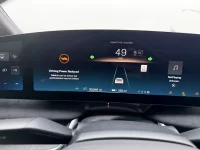
I had a similar issue yesterday on March 3. My Lucid Air was on dream drive pro and suddenly had a series of error messages and made the car go to a “turtle speed” of around 35 mph. I was on the interstate. I did a reset using the steering wheel “Mic” and “X” after pulling over. That bought me about five minutes and then it repeated again. I decided this time to clean my front camera (which was not dirty as I had a car wash a week earlier and had barely driven).

After getting to my destination my Air sat for 2 hours. On my way home there were zero issues.

Extremely odd and frustrating.

See image (video too large to upload).
 

Attachments

  • IMG_8345.webp
    IMG_8345.webp
    634.8 KB · Views: 118
I'm pretty handy...could I reset it myself? I wonder to myself....don't tell the warranty gods
Lucid doesn’t want you to. But I’m certain you’re fully capable
 
I had a similar issue yesterday on March 3. My Lucid Air was on dream drive pro and suddenly had a series of error messages and made the car go to a “turtle speed” of around 35 mph. I was on the interstate. I did a reset using the steering wheel “Mic” and “X” after pulling over. That bought me about five minutes and then it repeated again. I decided this time to clean my front camera (which was not dirty as I had a car wash a week earlier and had barely driven).

After getting to my destination my Air sat for 2 hours. On my way home there were zero issues.

Extremely odd and frustrating.

See image (video too large to upload).
Front camera wouldn’t cause turtle mode. The reset only resets infotainment; you’d have to let the car fall asleep to reset the rest (which is what you did).

If it happens again, definitely get it checked out; I’ve never received that.
 
Front camera wouldn’t cause turtle mode. The reset only resets infotainment; you’d have to let the car fall asleep to reset the rest (which is what you did).

If it happens again, definitely get it checked out; I’ve never received that.
Many things seem to "reset" when the car is allowed to "sleep." How long is that? Walk away from the car and allow 5 mins, 30 mins, 3 hours, 8 hours (recommended for upright bipeds) - does anyone have a number that literally needs to be met? Polestar 3 needs 2-3 minutes. Just curious...
 
Lucid doesn’t want you to. But I’m certain you’re fully capable
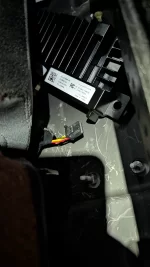
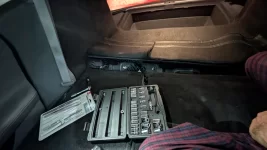
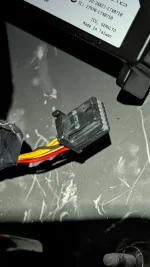
Guess what I did last night...
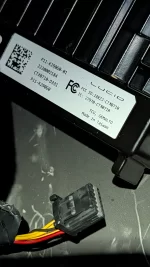
Posting pics for others..simple reset..
 

Attachments

  • PXL_20260305_060905385.webp
    PXL_20260305_060905385.webp
    331.1 KB · Views: 117
  • PXL_20260305_060921617.webp
    PXL_20260305_060921617.webp
    305.2 KB · Views: 114
  • PXL_20260305_060910439.webp
    PXL_20260305_060910439.webp
    260 KB · Views: 103
  • PXL_20260305_060914152.webp
    PXL_20260305_060914152.webp
    325.9 KB · Views: 116
Many things seem to "reset" when the car is allowed to "sleep." How long is that? Walk away from the car and allow 5 mins, 30 mins, 3 hours, 8 hours (recommended for upright bipeds) - does anyone have a number that literally needs to be met? Polestar 3 needs 2-3 minutes. Just curious...
Seems to be about 2-3 minutes. I have the excellent Home Assistant integration that @borski made and I watched it a few times. Usually by the time I even got to my computer in a few minutes from leaving the car it was already in the sleep mode.
 
Many things seem to "reset" when the car is allowed to "sleep." How long is that? Walk away from the car and allow 5 mins, 30 mins, 3 hours, 8 hours (recommended for upright bipeds) - does anyone have a number that literally needs to be met? Polestar 3 needs 2-3 minutes. Just curious...
About a minute or two, usually. You can track the state with Home Assistant if you have it up, or with the API (via testmycode.cc) if you’d like.

It doesn’t take very long.
 
Back
Top