Lucid Nexus: a free 3D Home Assistant dashboard that mirrors your car (Gravity, Air, Sapphire)

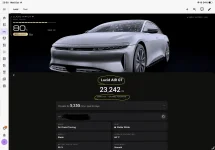
I've installed the dashboard extension through HACS. I then had claude create a dashboard for me. I have an Air Touring and it looks like I'm seeing an image of a Lucid Gravity; like the other members have reported, though I can't really tell given the angle that the 3D model is in. Can I adjust the angle of the model? The attached screenshot shows directly underneath the odometer reading a Gravity Touring. But the model field shows an Air Touring.
haha yeah its in flight! hopefully soon to be fixed. we have user adjustable camera angles as an additional feature on the roadmap to be implemented at some point down the road, but most of what air users are seeing right now was very rudimentary and quick placeholders just so that we can have all the cars included at launch
 
So we only tested this against the gravity but if people can let us know which features are missing that are present in the official lucid app we can look into adding them as we polish the air side of things and release future versions, that is as long as it's a feature that the integration and the official lucid api which the integration pulls its data from supports it.
I installed this just now for my Air, looks great so far; a couple features I'd like to see (that are available from Lucid API/ha-lucidmotors) would be showing stats like average speed/top speed over a period of time or last session, also average efficiency over a period of time or last session.
 
I see a calculated miles per year based on last 30 days value. You could build in what I’ve done in HA, by entering your yearly mileage allowance and start date to show a to-the-day mileage allowance. I’m currently 6k miles under lease allowance to the day.
 
I've installed the dashboard extension through HACS. I then had claude create a dashboard for me. I have an Air Touring and it looks like I'm seeing an image of a Lucid Gravity; like the other members have reported, though I can't really tell given the angle that the 3D model is in. Can I adjust the angle of the model? The attached screenshot shows directly underneath the odometer reading a Gravity Touring. But the model field shows an Air Touring.
Thanks for the screenshot, it helped a lot.

Good news: the card is showing your Air. The EARLY ACCESS · AIR tag in the top-right corner means it picked up your model correctly, and the 3D car is the Air model. Nothing in your dashboard setup needs changing.

There are two issues, and both are on our side:
  1. “GRAVITY · TOURING” under the odometer is a bug. That line had “Gravity” hard-coded no matter which car you have. The Model cell’s “Air Touring” is correct. The fix is done and will be in the next release. When it’s out, update Lucid Nexus in HACS and reload the browser.
  2. The car looking tall is the camera, not the model. The Air currently uses the Gravity’s camera angle, which sits low and close at the front corner, so a sedan ends up looking like an SUV. We’re giving the Air its own framing, and your screenshot is a good reference for it.
On changing the angle: the main dashboard card moves its camera on its own, for example swinging to the charge port when you plug in, so you can’t drag it. If you want to look at your car from any angle, add the Model card, which you can drag to rotate. On any dashboard, choose Add card, search for “Lucid”, and pick Model. Or add a Manual card with:

type: custom:lucid-model-card

If your agent is helping you customise, point it at https://github.com/Terablo/lucid-nexus/blob/main/AGENTS.md. It lists every option, like paint, wheels, tint and the ambient strip, and tells the agent what not to touch.

As far as we know you’re one of the first Air owners running this. If anything else looks off compared with your real car (lights, wheels, doors, badges), please send it our way. Reports from Air owners are how it gets out of early access.

 
I see a calculated miles per year based on last 30 days value. You could build in what I’ve done in HA, by entering your yearly mileage allowance and start date to show a to-the-day mileage allowance. I’m currently 6k miles under lease allowance to the day.
I installed this just now for my Air, looks great so far; a couple features I'd like to see (that are available from Lucid API/ha-lucidmotors) would be showing stats like average speed/top speed over a period of time or last session, also average efficiency over a period of time or last session.
nice ideas! added both to the to-do features roadmap
 
Installed Lucid Nexus and let it do the auto setup. I have an AGT but its showing a model of the Gravity despite showing Early Access - Air. How do I fix this?

Screenshot 2026-10-14 at 10.33.56.webp


The cutout of the frunk is definitely not an Air, so I don't think its an camera angle issue. I have tried removing Lucid Nexus and reinstalling, but no change.

Thank you and awesome work on Lucid Nexus.
 
Installed Lucid Nexus and let it do the auto setup. I have an AGT but its showing a model of the Gravity despite showing Early Access - Air. How do I fix this?

View attachment 41717

The cutout of the frunk is definitely not an Air, so I don't think its an camera angle issue. I have tried removing Lucid Nexus and reinstalling, but no change.

Thank you and awesome work on Lucid Nexus.
Edit card configuration with this
type: custom:lucid-card
model: air
 
Edit card configuration with this
type: custom:lucid-card
model: air
Worked for me

On another note
On the top of the homepage you can cycle through 3 numbers
One is percent and it makes sense
Then there are two numbers: 220 and 362 both are labeled as miles
It looks like a missed label change for km but the calculation seems to not match what I came up with. Can you verify and let me know if it was something I missed?
 
This is sweet! Really appreciate your work, it's a great addition to my HA dashboards.
 
Worked for me

On another note
On the top of the homepage you can cycle through 3 numbers
One is percent and it makes sense
Then there are two numbers: 220 and 362 both are labeled as miles
It looks like a missed label change for km but the calculation seems to not match what I came up with. Can you verify and let me know if it was something I missed?
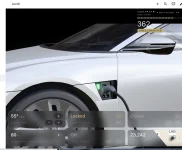
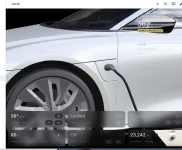
Air owner here as well. I have the same question. One number is the current range remaining (192mi for me currently), but the other (106 mi) seems to be a calculation of some kind. I thought maybe it was miles driven since last charge, but that doesn't line up for me either. And I didn't see another sensor reporting the 106mi number for me.

Also, I had assumed the bars in the top left, above the mile numbers, was a representation of % battery charge. This lines up when the number there is set to percentage, but then doesn't equate when the number is range remaining or the mystery number. See attached screen shots. I'm assuming the bars that are shown for my 192 and 106 numbers are the inverse of battery percent available, ie. battery percent that has been used?

Otherwise, this is very cool! Well done!!

1792012153786.webp
1792012172772.webp
1792012192536.webp
 
Last edited:
Back
Top