
Lucid Gravity UX 3.6 is here!

marqie

(they/them)
LUCID Team Member

LUCID Official
Joined
Nov 22, 2021
Messages
961
Reaction score
3,945
Location
Newark, CA
Hi, everyone.

I am excited to share that we have begun releasing thew UX 3.6 software update to Lucid Gravity owners! Please see the release notes below. Post here any questions you may have. We look forward to your feedback.

———————

Notes
  • Before installing the update, please unplug the vehicle from charging.
  • After installing the update, to ensure your cloud-connected features continue to work smoothly, please verify your identity. On the Pilot Panel, go to Settings > Profile > Verify your identity, tap View Details, and follow the instructions.

Release Summary

In this update, we’re releasing (NEW) Hands-Free Driving and a suite of hands-free driving features (for DreamDrive 2 Pro equipped vehicles) that enhance the highway driving experience, (NEW) Better places search in Lucid Navigation, (NEW) Adaptive Driving Beam (ADB), (NEW) Predictive Charging Power feature, and several new enhancements and improvements. Additional improvements have been made to the vehicle access and
media systems, enhancing overall stability for a smoother and more reliable experience.


Release Highlights

(NEW) Hands-Free Driving with DreamDrive 2 Pro

Enjoy a more relaxed and intuitive driving experience with a suite of new, hands-free driver assistance features for DreamDrive 2 Pro. Hands-Free Drive Assist will now assist with steering, acceleration, and braking on compatible roadways. Hands-Free Lane Change Assist will steer your vehicle into an adjacent lane when it is safe to do so after the turn signal is activated. And when Automatic Lane Changes are enabled, your vehicle will smoothly change lanes automatically to overtake slower vehicles during highway driving.

(NEW) Driving Styles for DreamDrive 2 Pro
Choose your preferred driving style for certain DreamDrive 2 driver assistance features. Select Conservative or Assertive to tailor assisted lane changes to your preference.

(NEW) Enhanced DreamDrive Visualization for DreamDrive 2 Pro
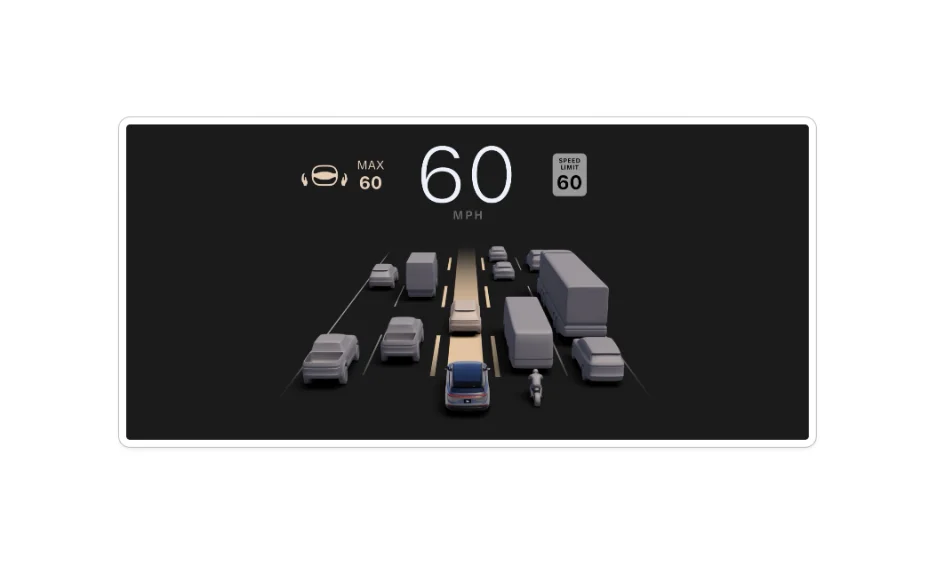
See a real-time visualization of up to five lanes of traffic on the Clearview Cockpit when Adaptive Cruise Control or Drive Assist is active, allowing greater visibility while using driver assistance features.

(NEW) Adaptive Driving Beam for DreamDrive 2 Premium & DreamDrive 2 Pro
Illuminate the road ahead for more comfort and safety while driving at night. High beams will stay on and adjust automatically to avoid blinding other drivers.

(NEW) Better Places Search in Lucid Navigation
Lucid Navigation now uses Google Maps Places API to provide richer, more reliable information about every destination with every search. Enjoy fresher results, more accurate business details, and useful place insights, including ratings and photos.

(NEW) Greater Fast Charging Confidence
Knowledge is power, and this update introduces Advanced Preconditioning View and Predictive Charging Power, offering greater insights that improve the DC fast charging Experience.

(NEW) Schedule Climate via Mobile App
Remote climate scheduling allows users to set and manage climate schedules via Lucid mobile app based on departure schedules, with flexibility for select days or recurring schedules. This feature helps prepare your cabin to your chosen comfort temperature just in time for your scheduled departure.

Note: Requires compatible Lucid Mobile App v.2.16 or later

Release Details

DreamDrive

Hands-Free Driving with DreamDrive 2 Pro (North America Only)

New Hands-Free Drive Assist helps steer, accelerate, and brake on select roads. When the turn signal is activated, Hands-Free Lane Change Assist can steer your vehicle into the adjacent lane for you when Hands-Free Drive Assist is active. To initiate a hands-free lane change, activate your turn signal in the direction of the lane you would like to move into. When it is safe to do so, your vehicle will automatically steer into that lane and re-center itself. To cancel a lane change, activate your turn signal in the opposite direction. If hands-free features are not available, DreamDrive will default to hands-on features.

These new hands-free features will be enabled by default. You can customize them in your DreamDrive settings.

Note: The sensors and cameras that power Drive Assist need to be calibrated the first time you use it. To calibrate the sensors, drive for at least 30 minutes on highways with at least one lane on either side of your vehicle, ideally with clear road markings. Once Drive Assist is ready, a steering icon will appear next to the speedometer on the Clearview Cockpit when DreamDrive is enabled. See your Owner’s Manual for more details.

Change Lanes Automatically with DreamDrive 2 Pro (North America Only)
Your vehicle can now change lanes for you when it’s safe to smoothly overtake slower vehicles. If the lane change involves moving into a passing lane, your vehicle will also move back into your original lane to complete the maneuver and keep traffic flowing. This new feature is on by default. You can disable it in your DreamDrive settings.

Changing lanes manually or canceling a lane-change maneuver will temporarily disable Automatic Lane Changes. See your Owner’s Manual for more information.

Hands-free features and automatic lane changes are only available in North America on select highways. These features require Lucid Gravity’s Driver Monitoring System to check that the driver is attentive and has a clear view of the road and may require seat or steering wheel adjustments.

Customize Your Driving Style for DreamDrive 2 Pro (North America Only)
Pick a driving style for DreamDrive’s driver assistance features that aligns with your personal comfort behind the wheel. Conservative will give you fewer lane-change maneuvers particularly in heavy traffic, while Assertive will change lanes more often. In all cases, your vehicle will only change lanes when it is safe to do so. Find and adjust these driving styles in your DreamDrive settings.

See Even More When Using DreamDrive 2 Pro (North America Only)
When Adaptive Cruise Control or Drive Assist is active, a real-time visualization of up to five lanes of traffic and the road users around your vehicle will display on the Clearview Cockpit, helping you see what your eyes can’t while your driver assistance features are active. The visualization now more accurately portrays SUVs, pick-up trucks, and buses, and if another vehicle is preventing an assisted or hands-free lane change, it will be highlighted.
1780950404796.webp

Smart Energy

Take the Guesswork Out of Preconditioning

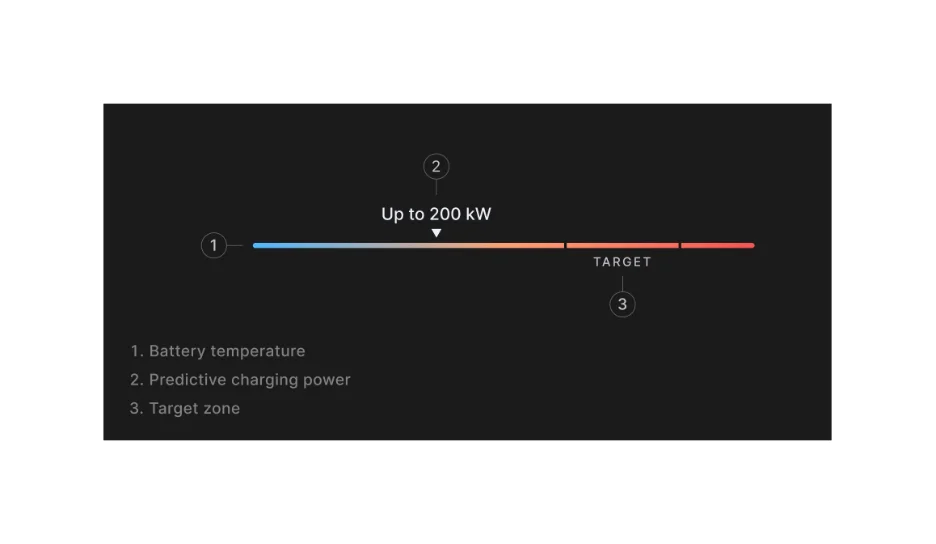
The new Advanced Preconditioning View and Predictive Charging Power give you a better understanding of your vehicle’s preconditioning progress to help you optimize your DC fast charging. When preconditioning for fast charging, a new battery readiness indicator shows your progress toward the optimal target temperature range for fast charging. See a real-time estimate of the peak charging power your vehicle is ready to receive before you plug in, based on your current battery temperature, battery level, and other vehicle conditions. With this information, you could decide to precondition a little longer to optimize your peak charging power, or plug in right away.

Enable this feature in Energy > Charging > Settings.
1780950404797.webp

Save Energy Without Compromising Comfort
Energy Saver Mode helps prioritize range to try to help you go the extra mile. Now when Energy Saver Mode is on, you can still control some climate settings for greater comfort. Climate will run in Auto to optimize your estimated range, now with more flexible temperature controls. Some Climate settings will still be unavailable when Energy Saver Mode is on. If you would like to change them in the moment, you’ll be able to disable Energy Saver Mode with just one tap.

More Accurate Energy Insights
The values displayed in your Efficiency Widget and Trip Meter on the Clearview Cockpit are now even more accurate to give you a better sense of how you’re driving and how to drive more efficiently.

Comprehensive Energy Improvements
Your Lucid Gravity charging experience is now better than ever. Your vehicle now uses even less energy when in Park and will now prioritize only necessary battery alerts, so you know when you should find a charging station.

Energy Range Settings via Mobile App
Lucid mobile app now supports all three range settings: Rated, Percentage, and Dynamic.

Navigation

(NEW) Better Places Search in Lucid Navigation

Lucid Navigation now uses Google Maps Places API to provide richer, more reliable information about every destination with every search. Enjoy fresher results, more accurate business details, and useful place insights, including ratings and photos.

See the real driving distance to potential destinations, rather than estimates, to make more informed choices about where to go.

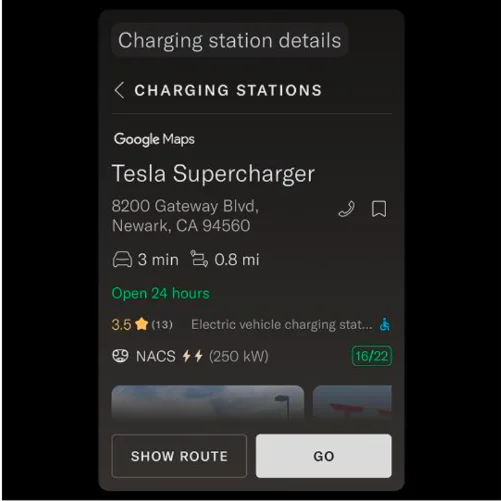
View more comprehensive charging station results that now include recent photos and better real-time charger availability, so you can know more before you go and route to the best station for you.
1780950404800.webp


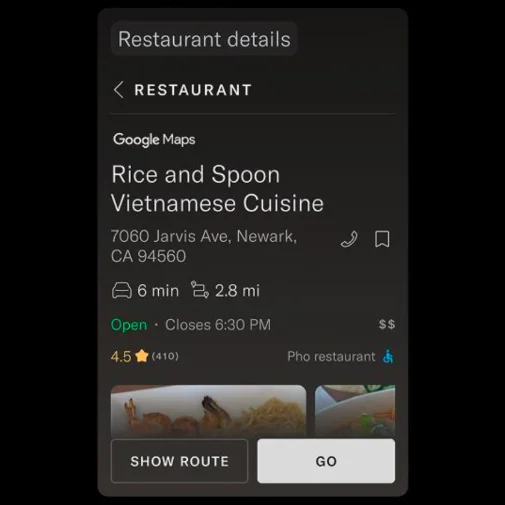
Simply use the on-screen search bar to find destinations more naturally. For example, just type “Vietnamese restaurants near me” and see relevant, up-to-date results instantly.

Note: Places data from Google Maps is available only when your vehicle is connected to the internet.
1780950404802.webp


Trip Sharing from Your Smartphone
Share a destination you’ve found on a third-party map app or in the Lucid mobile app with your vehicle to find an EV-optimized route. You should be logged in on the vehicle for this feature to be functional.

Lights & Mirrors

Adaptive Driving Beam for DreamDrive 2 Premium & DreamDrive 2 Pro

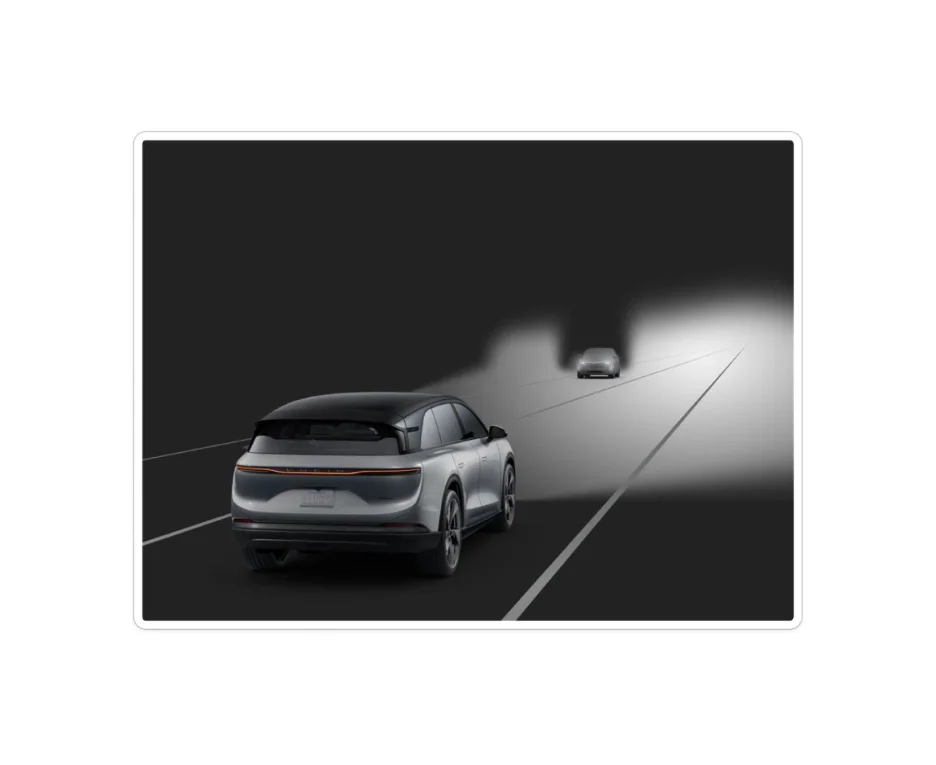
See the road ahead more brightly for increased safety and confidence while driving at night with Adaptive Driving Beam. When enabled, Adaptive Driving Beam keeps your high beams on most of the time whenever you’re traveling above 25 mph in non-urban areas, making it easier to see the road and any obstacles in your path. To avoid blinding other drivers, your high-tech headlamps automatically adjust the shape of the beam around other vehicles, reducing glare without compromising visibility.

To enable, go to Settings > Vehicle > Exterior Lighting.
1780950404804.webp

Mirror Tilt - More control while reversing
When reversing, you can now choose to tilt the driver-side mirror, passenger-side mirror, or both for improved visibility.

Access & Keys

Auto Lock & Unlock

When Auto Lock & Unlock is enabled, your vehicle will now detect your approach sooner and extend the door handles earlier, so they are ready to open when you’re ready to go.

When Auto Lock & Unlock is disabled, if your vehicle is unlocked, unoccupied, and no recognized key is in range, it will now go to sleep faster to save energy.

Media & Audio

Simplified Device Switching

Switch between your paired Bluetooth devices and manage them more easily with faster, more intuitive access to your device settings from both your Media and Phone apps. Select the device you would like to use and stay connected so your calls and tunes are always in sync.

Android Auto
Android Auto is now even better. We have improved the steering wheel controls response to skip songs, problems with playback and app stability, and made enhancements to the user interface and how Android Auto reconnects automatically.

Apple CarPlay
Apple CarPlay is also even better. We have improved app stability to keep your displays from freezing and the reliability of your volume controls when CarPlay is in use. We also made improvements to how album art displays and how CarPlay reconnects automatically when your vehicle wakes up.

Media
We have made overall enhancements to the Media experience in your vehicle, including improved native and third-party app performance and switching, more reliable audio playback, more reliable Favorites and History saving, and fixes to the user interface.

Audio
We have made significant improvements to your vehicle’s audio experience

Security

Halo Secure Drive Recorder

Drive Recorder is available when your vehicle is parked and occupied to capture footage of the unexpected, even when you aren’t driving. Reviewing recordings in Fisheye view is now easier, with corrected perspective and improved clarity.
 
Hi, everyone.

I am excited to share that we have begun releasing thew UX 3.6 software update to Lucid Gravity owners! Please see the release notes below. Post here any questions you may have. We look forward to your feedback.

———————

Notes
  • Before installing the update, please unplug the vehicle from charging.
  • After installing the update, to ensure your cloud-connected features continue to work smoothly, please verify your identity. On the Pilot Panel, go to Settings > Profile > Verify your identity, tap View Details, and follow the instructions.

Release Summary

In this update, we’re releasing (NEW) Hands-Free Driving and a suite of hands-free driving features (for DreamDrive 2 Pro equipped vehicles) that enhance the highway driving experience, (NEW) Better places search in Lucid Navigation, (NEW) Adaptive Driving Beam (ADB), (NEW) Predictive Charging Power feature, and several new enhancements and improvements. Additional improvements have been made to the vehicle access and
media systems, enhancing overall stability for a smoother and more reliable experience.


Release Highlights

(NEW) Hands-Free Driving with DreamDrive 2 Pro

Enjoy a more relaxed and intuitive driving experience with a suite of new, hands-free driver assistance features for DreamDrive 2 Pro. Hands-Free Drive Assist will now assist with steering, acceleration, and braking on compatible roadways. Hands-Free Lane Change Assist will steer your vehicle into an adjacent lane when it is safe to do so after the turn signal is activated. And when Automatic Lane Changes are enabled, your vehicle will smoothly change lanes automatically to overtake slower vehicles during highway driving.

(NEW) Driving Styles for DreamDrive 2 Pro
Choose your preferred driving style for certain DreamDrive 2 driver assistance features. Select Conservative or Assertive to tailor assisted lane changes to your preference.

(NEW) Enhanced DreamDrive Visualization for DreamDrive 2 Pro
See a real-time visualization of up to five lanes of traffic on the Clearview Cockpit when Adaptive Cruise Control or Drive Assist is active, allowing greater visibility while using driver assistance features.

(NEW) Adaptive Driving Beam for DreamDrive 2 Premium & DreamDrive 2 Pro
Illuminate the road ahead for more comfort and safety while driving at night. High beams will stay on and adjust automatically to avoid blinding other drivers.

(NEW) Better Places Search in Lucid Navigation
Lucid Navigation now uses Google Maps Places API to provide richer, more reliable information about every destination with every search. Enjoy fresher results, more accurate business details, and useful place insights, including ratings and photos.

(NEW) Greater Fast Charging Confidence
Knowledge is power, and this update introduces Advanced Preconditioning View and Predictive Charging Power, offering greater insights that improve the DC fast charging Experience.

(NEW) Schedule Climate via Mobile App
Remote climate scheduling allows users to set and manage climate schedules via Lucid mobile app based on departure schedules, with flexibility for select days or recurring schedules. This feature helps prepare your cabin to your chosen comfort temperature just in time for your scheduled departure.

Note: Requires compatible Lucid Mobile App v.2.16 or later

Release Details

DreamDrive

Hands-Free Driving with DreamDrive 2 Pro (North America Only)

New Hands-Free Drive Assist helps steer, accelerate, and brake on select roads. When the turn signal is activated, Hands-Free Lane Change Assist can steer your vehicle into the adjacent lane for you when Hands-Free Drive Assist is active. To initiate a hands-free lane change, activate your turn signal in the direction of the lane you would like to move into. When it is safe to do so, your vehicle will automatically steer into that lane and re-center itself. To cancel a lane change, activate your turn signal in the opposite direction. If hands-free features are not available, DreamDrive will default to hands-on features.

These new hands-free features will be enabled by default. You can customize them in your DreamDrive settings.

Note: The sensors and cameras that power Drive Assist need to be calibrated the first time you use it. To calibrate the sensors, drive for at least 30 minutes on highways with at least one lane on either side of your vehicle, ideally with clear road markings. Once Drive Assist is ready, a steering icon will appear next to the speedometer on the Clearview Cockpit when DreamDrive is enabled. See your Owner’s Manual for more details.

Change Lanes Automatically with DreamDrive 2 Pro (North America Only)
Your vehicle can now change lanes for you when it’s safe to smoothly overtake slower vehicles. If the lane change involves moving into a passing lane, your vehicle will also move back into your original lane to complete the maneuver and keep traffic flowing. This new feature is on by default. You can disable it in your DreamDrive settings.

Changing lanes manually or canceling a lane-change maneuver will temporarily disable Automatic Lane Changes. See your Owner’s Manual for more information.

Hands-free features and automatic lane changes are only available in North America on select highways. These features require Lucid Gravity’s Driver Monitoring System to check that the driver is attentive and has a clear view of the road and may require seat or steering wheel adjustments.

Customize Your Driving Style for DreamDrive 2 Pro (North America Only)
Pick a driving style for DreamDrive’s driver assistance features that aligns with your personal comfort behind the wheel. Conservative will give you fewer lane-change maneuvers particularly in heavy traffic, while Assertive will change lanes more often. In all cases, your vehicle will only change lanes when it is safe to do so. Find and adjust these driving styles in your DreamDrive settings.

See Even More When Using DreamDrive 2 Pro (North America Only)
When Adaptive Cruise Control or Drive Assist is active, a real-time visualization of up to five lanes of traffic and the road users around your vehicle will display on the Clearview Cockpit, helping you see what your eyes can’t while your driver assistance features are active. The visualization now more accurately portrays SUVs, pick-up trucks, and buses, and if another vehicle is preventing an assisted or hands-free lane change, it will be highlighted.
View attachment 39220
Smart Energy

Take the Guesswork Out of Preconditioning

The new Advanced Preconditioning View and Predictive Charging Power give you a better understanding of your vehicle’s preconditioning progress to help you optimize your DC fast charging. When preconditioning for fast charging, a new battery readiness indicator shows your progress toward the optimal target temperature range for fast charging. See a real-time estimate of the peak charging power your vehicle is ready to receive before you plug in, based on your current battery temperature, battery level, and other vehicle conditions. With this information, you could decide to precondition a little longer to optimize your peak charging power, or plug in right away.

Enable this feature in Energy > Charging > Settings.
View attachment 39218
Save Energy Without Compromising Comfort
Energy Saver Mode helps prioritize range to try to help you go the extra mile. Now when Energy Saver Mode is on, you can still control some climate settings for greater comfort. Climate will run in Auto to optimize your estimated range, now with more flexible temperature controls. Some Climate settings will still be unavailable when Energy Saver Mode is on. If you would like to change them in the moment, you’ll be able to disable Energy Saver Mode with just one tap.

More Accurate Energy Insights
The values displayed in your Efficiency Widget and Trip Meter on the Clearview Cockpit are now even more accurate to give you a better sense of how you’re driving and how to drive more efficiently.

Comprehensive Energy Improvements
Your Lucid Gravity charging experience is now better than ever. Your vehicle now uses even less energy when in Park and will now prioritize only necessary battery alerts, so you know when you should find a charging station.

Energy Range Settings via Mobile App
Lucid mobile app now supports all three range settings: Rated, Percentage, and Dynamic.

Navigation

(NEW) Better Places Search in Lucid Navigation

Lucid Navigation now uses Google Maps Places API to provide richer, more reliable information about every destination with every search. Enjoy fresher results, more accurate business details, and useful place insights, including ratings and photos.

See the real driving distance to potential destinations, rather than estimates, to make more informed choices about where to go.

View more comprehensive charging station results that now include recent photos and better real-time charger availability, so you can know more before you go and route to the best station for you.

View attachment 39219

Simply use the on-screen search bar to find destinations more naturally. For example, just type “Vietnamese restaurants near me” and see relevant, up-to-date results instantly.

Note: Places data from Google Maps is available only when your vehicle is connected to the internet.

View attachment 39221

Trip Sharing from Your Smartphone
Share a destination you’ve found on a third-party map app or in the Lucid mobile app with your vehicle to find an EV-optimized route. You should be logged in on the vehicle for this feature to be functional.

Lights & Mirrors

Adaptive Driving Beam for DreamDrive 2 Premium & DreamDrive 2 Pro

See the road ahead more brightly for increased safety and confidence while driving at night with Adaptive Driving Beam. When enabled, Adaptive Driving Beam keeps your high beams on most of the time whenever you’re traveling above 25 mph in non-urban areas, making it easier to see the road and any obstacles in your path. To avoid blinding other drivers, your high-tech headlamps automatically adjust the shape of the beam around other vehicles, reducing glare without compromising visibility.

To enable, go to Settings > Vehicle > Exterior Lighting.
View attachment 39222
Mirror Tilt - More control while reversing
When reversing, you can now choose to tilt the driver-side mirror, passenger-side mirror, or both for improved visibility.

Access & Keys

Auto Lock & Unlock

When Auto Lock & Unlock is enabled, your vehicle will now detect your approach sooner and extend the door handles earlier, so they are ready to open when you’re ready to go.

When Auto Lock & Unlock is disabled, if your vehicle is unlocked, unoccupied, and no recognized key is in range, it will now go to sleep faster to save energy.

Media & Audio

Simplified Device Switching

Switch between your paired Bluetooth devices and manage them more easily with faster, more intuitive access to your device settings from both your Media and Phone apps. Select the device you would like to use and stay connected so your calls and tunes are always in sync.

Android Auto
Android Auto is now even better. We have improved the steering wheel controls response to skip songs, problems with playback and app stability, and made enhancements to the user interface and how Android Auto reconnects automatically.

Apple CarPlay
Apple CarPlay is also even better. We have improved app stability to keep your displays from freezing and the reliability of your volume controls when CarPlay is in use. We also made improvements to how album art displays and how CarPlay reconnects automatically when your vehicle wakes up.

Media
We have made overall enhancements to the Media experience in your vehicle, including improved native and third-party app performance and switching, more reliable audio playback, more reliable Favorites and History saving, and fixes to the user interface.

Audio
We have made significant improvements to your vehicle’s audio experience

Security

Halo Secure Drive Recorder

Drive Recorder is available when your vehicle is parked and occupied to capture footage of the unexpected, even when you aren’t driving. Reviewing recordings in Fisheye view is now easier, with corrected perspective and improved clarity.
Woot!
 
What else is there in UX 3.6?

Additional Enhancements


Please refer to the release notes for the main details regarding this update.

Lucid Gravity UX 3.6 introduces a series of refinements designed to make your vehicle experience more seamless, intuitive, and reliable.
  • Clearer Phone Calls
    Enjoy improved call quality with enhanced voice clarity and reduced background noise for a more natural conversation experience.
  • More Consistent Frunk Operation
    Frunk closing performance has been optimized for greater reliability on the first attempt.
  • Refined Interior Lighting
    Interior ambient lighting now delivers more consistent color across the cabin, while the front light strip remains off during driving for a more cohesive experience.
  • Adaptive High Beam Performance
    Adaptive Driving Beam technology dynamically adjusts high beams to enhance visibility and safety while minimizing glare for other drivers.

    Note: The high beam indicator may remain illuminated while this feature is active, which is expected behavior.
  • Improved Head-Up Display (HUD)
    HUD brightness now responds more quickly and consistently to changing lighting conditions.
  • Smoother Drive Readiness
    System startup and drive engagement have been refined for more consistent and responsive operation.
  • More Responsive Displays and Cameras
    Continued improvements reduce the likelihood of blank or frozen screens and enhance overall camera view reliability.
  • Smarter Washer Fluid Alerts
    Notifications for washer fluid are now more accurate and stable, helping reduce unnecessary alerts while driving

Before You Begin

To ensure the best update experience:
  • Unplug During Update
    Please ensure your vehicle is not connected to a charger while installing this update.
  • Allow Time for Installation
    Installation times may vary depending on vehicle configuration and hardware versions, and in some cases may take longer to complete. Due to this, and the size of this release, some vehicles may take up to ~4hrs to update.

After the Update

  • Optimize System Performance
    For best results, allow the vehicle to fully power down once after installation before resuming normal use.
  • Stay Connected
    Ensure your Lucid mobile app is updated to the latest version to access all features and functionality. (v.2.16) such as remote climate control via the Lucid mobile app. You may need to force close and restart the mobile app to see the latest functions
  • Verify Your Profile
    You may be prompted in-vehicle to verify your identity to maintain uninterrupted access to connected services and leverage the mobile trip sharing functionality. Refer to the release notes for additional guidance.
  • Engaging DreamDrive
    At first use, you may see “DreamDrive limited temporarily”. This is expected. Drive assist features remain temporarily unavailable until calibration is complete, even if no warning icon persists. Reference the release notes for calibration guidance

Ongoing Improvements

We are continuously working to further enhance your vehicle experience. Some items currently under active development include:
  • Occasional inconsistencies with automatic wiper sensitivity or lighting controls
  • Rare cases where mirrors may not return to their saved position
  • Select window or control behaviors that may not perform as expected in all situations
  • Rare cases when the Key Fob behavior becomes not very responsive.
If you experience any of these, simple actions such as restarting the vehicle or adjusting settings may help. If the issue persists, please contact Lucid Customer Care for assistance.
 
Hi, everyone.

I am excited to share that we have begun releasing thew UX 3.6 software update to Lucid Gravity owners! Please see the release notes below. Post here any questions you may have. We look forward to your feedback.

———————

Notes
  • Before installing the update, please unplug the vehicle from charging.
  • After installing the update, to ensure your cloud-connected features continue to work smoothly, please verify your identity. On the Pilot Panel, go to Settings > Profile > Verify your identity, tap View Details, and follow the instructions.

Release Summary

In this update, we’re releasing (NEW) Hands-Free Driving and a suite of hands-free driving features (for DreamDrive 2 Pro equipped vehicles) that enhance the highway driving experience, (NEW) Better places search in Lucid Navigation, (NEW) Adaptive Driving Beam (ADB), (NEW) Predictive Charging Power feature, and several new enhancements and improvements. Additional improvements have been made to the vehicle access and
media systems, enhancing overall stability for a smoother and more reliable experience.


Release Highlights

(NEW) Hands-Free Driving with DreamDrive 2 Pro

Enjoy a more relaxed and intuitive driving experience with a suite of new, hands-free driver assistance features for DreamDrive 2 Pro. Hands-Free Drive Assist will now assist with steering, acceleration, and braking on compatible roadways. Hands-Free Lane Change Assist will steer your vehicle into an adjacent lane when it is safe to do so after the turn signal is activated. And when Automatic Lane Changes are enabled, your vehicle will smoothly change lanes automatically to overtake slower vehicles during highway driving.

(NEW) Driving Styles for DreamDrive 2 Pro
Choose your preferred driving style for certain DreamDrive 2 driver assistance features. Select Conservative or Assertive to tailor assisted lane changes to your preference.

(NEW) Enhanced DreamDrive Visualization for DreamDrive 2 Pro
See a real-time visualization of up to five lanes of traffic on the Clearview Cockpit when Adaptive Cruise Control or Drive Assist is active, allowing greater visibility while using driver assistance features.

(NEW) Adaptive Driving Beam for DreamDrive 2 Premium & DreamDrive 2 Pro
Illuminate the road ahead for more comfort and safety while driving at night. High beams will stay on and adjust automatically to avoid blinding other drivers.

(NEW) Better Places Search in Lucid Navigation
Lucid Navigation now uses Google Maps Places API to provide richer, more reliable information about every destination with every search. Enjoy fresher results, more accurate business details, and useful place insights, including ratings and photos.

(NEW) Greater Fast Charging Confidence
Knowledge is power, and this update introduces Advanced Preconditioning View and Predictive Charging Power, offering greater insights that improve the DC fast charging Experience.

(NEW) Schedule Climate via Mobile App
Remote climate scheduling allows users to set and manage climate schedules via Lucid mobile app based on departure schedules, with flexibility for select days or recurring schedules. This feature helps prepare your cabin to your chosen comfort temperature just in time for your scheduled departure.

Note: Requires compatible Lucid Mobile App v.2.16 or later

Release Details

DreamDrive

Hands-Free Driving with DreamDrive 2 Pro (North America Only)

New Hands-Free Drive Assist helps steer, accelerate, and brake on select roads. When the turn signal is activated, Hands-Free Lane Change Assist can steer your vehicle into the adjacent lane for you when Hands-Free Drive Assist is active. To initiate a hands-free lane change, activate your turn signal in the direction of the lane you would like to move into. When it is safe to do so, your vehicle will automatically steer into that lane and re-center itself. To cancel a lane change, activate your turn signal in the opposite direction. If hands-free features are not available, DreamDrive will default to hands-on features.

These new hands-free features will be enabled by default. You can customize them in your DreamDrive settings.

Note: The sensors and cameras that power Drive Assist need to be calibrated the first time you use it. To calibrate the sensors, drive for at least 30 minutes on highways with at least one lane on either side of your vehicle, ideally with clear road markings. Once Drive Assist is ready, a steering icon will appear next to the speedometer on the Clearview Cockpit when DreamDrive is enabled. See your Owner’s Manual for more details.

Change Lanes Automatically with DreamDrive 2 Pro (North America Only)
Your vehicle can now change lanes for you when it’s safe to smoothly overtake slower vehicles. If the lane change involves moving into a passing lane, your vehicle will also move back into your original lane to complete the maneuver and keep traffic flowing. This new feature is on by default. You can disable it in your DreamDrive settings.

Changing lanes manually or canceling a lane-change maneuver will temporarily disable Automatic Lane Changes. See your Owner’s Manual for more information.

Hands-free features and automatic lane changes are only available in North America on select highways. These features require Lucid Gravity’s Driver Monitoring System to check that the driver is attentive and has a clear view of the road and may require seat or steering wheel adjustments.

Customize Your Driving Style for DreamDrive 2 Pro (North America Only)
Pick a driving style for DreamDrive’s driver assistance features that aligns with your personal comfort behind the wheel. Conservative will give you fewer lane-change maneuvers particularly in heavy traffic, while Assertive will change lanes more often. In all cases, your vehicle will only change lanes when it is safe to do so. Find and adjust these driving styles in your DreamDrive settings.

See Even More When Using DreamDrive 2 Pro (North America Only)
When Adaptive Cruise Control or Drive Assist is active, a real-time visualization of up to five lanes of traffic and the road users around your vehicle will display on the Clearview Cockpit, helping you see what your eyes can’t while your driver assistance features are active. The visualization now more accurately portrays SUVs, pick-up trucks, and buses, and if another vehicle is preventing an assisted or hands-free lane change, it will be highlighted.
View attachment 39220
Smart Energy

Take the Guesswork Out of Preconditioning

The new Advanced Preconditioning View and Predictive Charging Power give you a better understanding of your vehicle’s preconditioning progress to help you optimize your DC fast charging. When preconditioning for fast charging, a new battery readiness indicator shows your progress toward the optimal target temperature range for fast charging. See a real-time estimate of the peak charging power your vehicle is ready to receive before you plug in, based on your current battery temperature, battery level, and other vehicle conditions. With this information, you could decide to precondition a little longer to optimize your peak charging power, or plug in right away.

Enable this feature in Energy > Charging > Settings.
View attachment 39218
Save Energy Without Compromising Comfort
Energy Saver Mode helps prioritize range to try to help you go the extra mile. Now when Energy Saver Mode is on, you can still control some climate settings for greater comfort. Climate will run in Auto to optimize your estimated range, now with more flexible temperature controls. Some Climate settings will still be unavailable when Energy Saver Mode is on. If you would like to change them in the moment, you’ll be able to disable Energy Saver Mode with just one tap.

More Accurate Energy Insights
The values displayed in your Efficiency Widget and Trip Meter on the Clearview Cockpit are now even more accurate to give you a better sense of how you’re driving and how to drive more efficiently.

Comprehensive Energy Improvements
Your Lucid Gravity charging experience is now better than ever. Your vehicle now uses even less energy when in Park and will now prioritize only necessary battery alerts, so you know when you should find a charging station.

Energy Range Settings via Mobile App
Lucid mobile app now supports all three range settings: Rated, Percentage, and Dynamic.

Navigation

(NEW) Better Places Search in Lucid Navigation

Lucid Navigation now uses Google Maps Places API to provide richer, more reliable information about every destination with every search. Enjoy fresher results, more accurate business details, and useful place insights, including ratings and photos.

See the real driving distance to potential destinations, rather than estimates, to make more informed choices about where to go.

View more comprehensive charging station results that now include recent photos and better real-time charger availability, so you can know more before you go and route to the best station for you.

View attachment 39219

Simply use the on-screen search bar to find destinations more naturally. For example, just type “Vietnamese restaurants near me” and see relevant, up-to-date results instantly.

Note: Places data from Google Maps is available only when your vehicle is connected to the internet.

View attachment 39221

Trip Sharing from Your Smartphone
Share a destination you’ve found on a third-party map app or in the Lucid mobile app with your vehicle to find an EV-optimized route. You should be logged in on the vehicle for this feature to be functional.

Lights & Mirrors

Adaptive Driving Beam for DreamDrive 2 Premium & DreamDrive 2 Pro

See the road ahead more brightly for increased safety and confidence while driving at night with Adaptive Driving Beam. When enabled, Adaptive Driving Beam keeps your high beams on most of the time whenever you’re traveling above 25 mph in non-urban areas, making it easier to see the road and any obstacles in your path. To avoid blinding other drivers, your high-tech headlamps automatically adjust the shape of the beam around other vehicles, reducing glare without compromising visibility.

To enable, go to Settings > Vehicle > Exterior Lighting.
View attachment 39222
Mirror Tilt - More control while reversing
When reversing, you can now choose to tilt the driver-side mirror, passenger-side mirror, or both for improved visibility.

Access & Keys

Auto Lock & Unlock

When Auto Lock & Unlock is enabled, your vehicle will now detect your approach sooner and extend the door handles earlier, so they are ready to open when you’re ready to go.

When Auto Lock & Unlock is disabled, if your vehicle is unlocked, unoccupied, and no recognized key is in range, it will now go to sleep faster to save energy.

Media & Audio

Simplified Device Switching

Switch between your paired Bluetooth devices and manage them more easily with faster, more intuitive access to your device settings from both your Media and Phone apps. Select the device you would like to use and stay connected so your calls and tunes are always in sync.

Android Auto
Android Auto is now even better. We have improved the steering wheel controls response to skip songs, problems with playback and app stability, and made enhancements to the user interface and how Android Auto reconnects automatically.

Apple CarPlay
Apple CarPlay is also even better. We have improved app stability to keep your displays from freezing and the reliability of your volume controls when CarPlay is in use. We also made improvements to how album art displays and how CarPlay reconnects automatically when your vehicle wakes up.

Media
We have made overall enhancements to the Media experience in your vehicle, including improved native and third-party app performance and switching, more reliable audio playback, more reliable Favorites and History saving, and fixes to the user interface.

Audio
We have made significant improvements to your vehicle’s audio experience

Security

Halo Secure Drive Recorder

Drive Recorder is available when your vehicle is parked and occupied to capture footage of the unexpected, even when you aren’t driving. Reviewing recordings in Fisheye view is now easier, with corrected perspective and improved clarity.
Thank you Marqie!
 
Hi, everyone.

I am excited to share that we have begun releasing thew UX 3.6 software update to Lucid Gravity owners! Please see the release notes below. Post here any questions you may have. We look forward to your feedback.

———————

Notes
  • Before installing the update, please unplug the vehicle from charging.
  • After installing the update, to ensure your cloud-connected features continue to work smoothly, please verify your identity. On the Pilot Panel, go to Settings > Profile > Verify your identity, tap View Details, and follow the instructions.

Release Summary

In this update, we’re releasing (NEW) Hands-Free Driving and a suite of hands-free driving features (for DreamDrive 2 Pro equipped vehicles) that enhance the highway driving experience, (NEW) Better places search in Lucid Navigation, (NEW) Adaptive Driving Beam (ADB), (NEW) Predictive Charging Power feature, and several new enhancements and improvements. Additional improvements have been made to the vehicle access and
media systems, enhancing overall stability for a smoother and more reliable experience.


Release Highlights

(NEW) Hands-Free Driving with DreamDrive 2 Pro

Enjoy a more relaxed and intuitive driving experience with a suite of new, hands-free driver assistance features for DreamDrive 2 Pro. Hands-Free Drive Assist will now assist with steering, acceleration, and braking on compatible roadways. Hands-Free Lane Change Assist will steer your vehicle into an adjacent lane when it is safe to do so after the turn signal is activated. And when Automatic Lane Changes are enabled, your vehicle will smoothly change lanes automatically to overtake slower vehicles during highway driving.

(NEW) Driving Styles for DreamDrive 2 Pro
Choose your preferred driving style for certain DreamDrive 2 driver assistance features. Select Conservative or Assertive to tailor assisted lane changes to your preference.

(NEW) Enhanced DreamDrive Visualization for DreamDrive 2 Pro
See a real-time visualization of up to five lanes of traffic on the Clearview Cockpit when Adaptive Cruise Control or Drive Assist is active, allowing greater visibility while using driver assistance features.

(NEW) Adaptive Driving Beam for DreamDrive 2 Premium & DreamDrive 2 Pro
Illuminate the road ahead for more comfort and safety while driving at night. High beams will stay on and adjust automatically to avoid blinding other drivers.

(NEW) Better Places Search in Lucid Navigation
Lucid Navigation now uses Google Maps Places API to provide richer, more reliable information about every destination with every search. Enjoy fresher results, more accurate business details, and useful place insights, including ratings and photos.

(NEW) Greater Fast Charging Confidence
Knowledge is power, and this update introduces Advanced Preconditioning View and Predictive Charging Power, offering greater insights that improve the DC fast charging Experience.

(NEW) Schedule Climate via Mobile App
Remote climate scheduling allows users to set and manage climate schedules via Lucid mobile app based on departure schedules, with flexibility for select days or recurring schedules. This feature helps prepare your cabin to your chosen comfort temperature just in time for your scheduled departure.

Note: Requires compatible Lucid Mobile App v.2.16 or later

Release Details

DreamDrive

Hands-Free Driving with DreamDrive 2 Pro (North America Only)

New Hands-Free Drive Assist helps steer, accelerate, and brake on select roads. When the turn signal is activated, Hands-Free Lane Change Assist can steer your vehicle into the adjacent lane for you when Hands-Free Drive Assist is active. To initiate a hands-free lane change, activate your turn signal in the direction of the lane you would like to move into. When it is safe to do so, your vehicle will automatically steer into that lane and re-center itself. To cancel a lane change, activate your turn signal in the opposite direction. If hands-free features are not available, DreamDrive will default to hands-on features.

These new hands-free features will be enabled by default. You can customize them in your DreamDrive settings.

Note: The sensors and cameras that power Drive Assist need to be calibrated the first time you use it. To calibrate the sensors, drive for at least 30 minutes on highways with at least one lane on either side of your vehicle, ideally with clear road markings. Once Drive Assist is ready, a steering icon will appear next to the speedometer on the Clearview Cockpit when DreamDrive is enabled. See your Owner’s Manual for more details.

Change Lanes Automatically with DreamDrive 2 Pro (North America Only)
Your vehicle can now change lanes for you when it’s safe to smoothly overtake slower vehicles. If the lane change involves moving into a passing lane, your vehicle will also move back into your original lane to complete the maneuver and keep traffic flowing. This new feature is on by default. You can disable it in your DreamDrive settings.

Changing lanes manually or canceling a lane-change maneuver will temporarily disable Automatic Lane Changes. See your Owner’s Manual for more information.

Hands-free features and automatic lane changes are only available in North America on select highways. These features require Lucid Gravity’s Driver Monitoring System to check that the driver is attentive and has a clear view of the road and may require seat or steering wheel adjustments.

Customize Your Driving Style for DreamDrive 2 Pro (North America Only)
Pick a driving style for DreamDrive’s driver assistance features that aligns with your personal comfort behind the wheel. Conservative will give you fewer lane-change maneuvers particularly in heavy traffic, while Assertive will change lanes more often. In all cases, your vehicle will only change lanes when it is safe to do so. Find and adjust these driving styles in your DreamDrive settings.

See Even More When Using DreamDrive 2 Pro (North America Only)
When Adaptive Cruise Control or Drive Assist is active, a real-time visualization of up to five lanes of traffic and the road users around your vehicle will display on the Clearview Cockpit, helping you see what your eyes can’t while your driver assistance features are active. The visualization now more accurately portrays SUVs, pick-up trucks, and buses, and if another vehicle is preventing an assisted or hands-free lane change, it will be highlighted.
View attachment 39220
Smart Energy

Take the Guesswork Out of Preconditioning

The new Advanced Preconditioning View and Predictive Charging Power give you a better understanding of your vehicle’s preconditioning progress to help you optimize your DC fast charging. When preconditioning for fast charging, a new battery readiness indicator shows your progress toward the optimal target temperature range for fast charging. See a real-time estimate of the peak charging power your vehicle is ready to receive before you plug in, based on your current battery temperature, battery level, and other vehicle conditions. With this information, you could decide to precondition a little longer to optimize your peak charging power, or plug in right away.

Enable this feature in Energy > Charging > Settings.
View attachment 39218
Save Energy Without Compromising Comfort
Energy Saver Mode helps prioritize range to try to help you go the extra mile. Now when Energy Saver Mode is on, you can still control some climate settings for greater comfort. Climate will run in Auto to optimize your estimated range, now with more flexible temperature controls. Some Climate settings will still be unavailable when Energy Saver Mode is on. If you would like to change them in the moment, you’ll be able to disable Energy Saver Mode with just one tap.

More Accurate Energy Insights
The values displayed in your Efficiency Widget and Trip Meter on the Clearview Cockpit are now even more accurate to give you a better sense of how you’re driving and how to drive more efficiently.

Comprehensive Energy Improvements
Your Lucid Gravity charging experience is now better than ever. Your vehicle now uses even less energy when in Park and will now prioritize only necessary battery alerts, so you know when you should find a charging station.

Energy Range Settings via Mobile App
Lucid mobile app now supports all three range settings: Rated, Percentage, and Dynamic.

Navigation

(NEW) Better Places Search in Lucid Navigation

Lucid Navigation now uses Google Maps Places API to provide richer, more reliable information about every destination with every search. Enjoy fresher results, more accurate business details, and useful place insights, including ratings and photos.

See the real driving distance to potential destinations, rather than estimates, to make more informed choices about where to go.

View more comprehensive charging station results that now include recent photos and better real-time charger availability, so you can know more before you go and route to the best station for you.

View attachment 39219

Simply use the on-screen search bar to find destinations more naturally. For example, just type “Vietnamese restaurants near me” and see relevant, up-to-date results instantly.

Note: Places data from Google Maps is available only when your vehicle is connected to the internet.

View attachment 39221

Trip Sharing from Your Smartphone
Share a destination you’ve found on a third-party map app or in the Lucid mobile app with your vehicle to find an EV-optimized route. You should be logged in on the vehicle for this feature to be functional.

Lights & Mirrors

Adaptive Driving Beam for DreamDrive 2 Premium & DreamDrive 2 Pro

See the road ahead more brightly for increased safety and confidence while driving at night with Adaptive Driving Beam. When enabled, Adaptive Driving Beam keeps your high beams on most of the time whenever you’re traveling above 25 mph in non-urban areas, making it easier to see the road and any obstacles in your path. To avoid blinding other drivers, your high-tech headlamps automatically adjust the shape of the beam around other vehicles, reducing glare without compromising visibility.

To enable, go to Settings > Vehicle > Exterior Lighting.
View attachment 39222
Mirror Tilt - More control while reversing
When reversing, you can now choose to tilt the driver-side mirror, passenger-side mirror, or both for improved visibility.

Access & Keys

Auto Lock & Unlock

When Auto Lock & Unlock is enabled, your vehicle will now detect your approach sooner and extend the door handles earlier, so they are ready to open when you’re ready to go.

When Auto Lock & Unlock is disabled, if your vehicle is unlocked, unoccupied, and no recognized key is in range, it will now go to sleep faster to save energy.

Media & Audio

Simplified Device Switching

Switch between your paired Bluetooth devices and manage them more easily with faster, more intuitive access to your device settings from both your Media and Phone apps. Select the device you would like to use and stay connected so your calls and tunes are always in sync.

Android Auto
Android Auto is now even better. We have improved the steering wheel controls response to skip songs, problems with playback and app stability, and made enhancements to the user interface and how Android Auto reconnects automatically.

Apple CarPlay
Apple CarPlay is also even better. We have improved app stability to keep your displays from freezing and the reliability of your volume controls when CarPlay is in use. We also made improvements to how album art displays and how CarPlay reconnects automatically when your vehicle wakes up.

Media
We have made overall enhancements to the Media experience in your vehicle, including improved native and third-party app performance and switching, more reliable audio playback, more reliable Favorites and History saving, and fixes to the user interface.

Audio
We have made significant improvements to your vehicle’s audio experience

Security

Halo Secure Drive Recorder

Drive Recorder is available when your vehicle is parked and occupied to capture footage of the unexpected, even when you aren’t driving. Reviewing recordings in Fisheye view is now easier, with corrected perspective and improved clarity.
NICE!!!
Please don't forget about native app for Apple Music.
 
Marqie, this looks like an amazing update. What do I need to bribe you with to get Lucid to push this to my Gravity by Wednesday night so that I can use it for the 1350 mile long leg of my road trip that I start on Thursday? Those hands-free drive assist features sure would be nice for driving across Nebraska and Iowa. 🤣 (For all of you responsible types: Yes, I am joking. Yes, I know it will come in due time. Yes, I know it would be risky to install an update like this while I am away from home and full dependent on my Gravity.)
 
Sweet!! Just got the email. Wish my app was fixed already. Hopefully can try all this out on my upcoming drive to Sacramento and back this weekend! Great work Team Lucid!
 
Awesome work! Looking forward to all of this!
 
What else is there in UX 3.6?

Additional Enhancements


Please refer to the release notes for the main details regarding this update.

Lucid Gravity UX 3.6 introduces a series of refinements designed to make your vehicle experience more seamless, intuitive, and reliable.
  • Clearer Phone Calls
    Enjoy improved call quality with enhanced voice clarity and reduced background noise for a more natural conversation experience.
  • More Consistent Frunk Operation
    Frunk closing performance has been optimized for greater reliability on the first attempt.
  • Refined Interior Lighting
    Interior ambient lighting now delivers more consistent color across the cabin, while the front light strip remains off during driving for a more cohesive experience.
  • Adaptive High Beam Performance
    Adaptive Driving Beam technology dynamically adjusts high beams to enhance visibility and safety while minimizing glare for other drivers.

    Note: The high beam indicator may remain illuminated while this feature is active, which is expected behavior.
  • Improved Head-Up Display (HUD)
    HUD brightness now responds more quickly and consistently to changing lighting conditions.
  • Smoother Drive Readiness
    System startup and drive engagement have been refined for more consistent and responsive operation.
  • More Responsive Displays and Cameras
    Continued improvements reduce the likelihood of blank or frozen screens and enhance overall camera view reliability.
  • Smarter Washer Fluid Alerts
    Notifications for washer fluid are now more accurate and stable, helping reduce unnecessary alerts while driving

Before You Begin

To ensure the best update experience:
  • Unplug During Update
    Please ensure your vehicle is not connected to a charger while installing this update.
  • Allow Time for Installation
    Installation times may vary depending on vehicle configuration and hardware versions, and in some cases may take longer to complete. Due to this, and the size of this release, some vehicles may take up to ~4hrs to update.

After the Update

  • Optimize System Performance
    For best results, allow the vehicle to fully power down once after installation before resuming normal use.
  • Stay Connected
    Ensure your Lucid mobile app is updated to the latest version to access all features and functionality. (v.2.16) such as remote climate control via the Lucid mobile app. You may need to force close and restart the mobile app to see the latest functions
  • Verify Your Profile
    You may be prompted in-vehicle to verify your identity to maintain uninterrupted access to connected services and leverage the mobile trip sharing functionality. Refer to the release notes for additional guidance.
  • Engaging DreamDrive
    At first use, you may see “DreamDrive limited temporarily”. This is expected. Drive assist features remain temporarily unavailable until calibration is complete, even if no warning icon persists. Reference the release notes for calibration guidance

Ongoing Improvements

We are continuously working to further enhance your vehicle experience. Some items currently under active development include:
  • Occasional inconsistencies with automatic wiper sensitivity or lighting controls
  • Rare cases where mirrors may not return to their saved position
  • Select window or control behaviors that may not perform as expected in all situations
  • Rare cases when the Key Fob behavior becomes not very responsive.
If you experience any of these, simple actions such as restarting the vehicle or adjusting settings may help. If the issue persists, please contact Lucid Customer Care for assistance.
Any hints on when these features might be coming to the AIr(s) that have the updated chip?
 
Auto Lock & Unlock
When Auto Lock & Unlock is enabled, your vehicle will now detect your approach sooner and extend the door handles earlier, so they are ready to open when you’re ready to go.
Even if this is all I get out of it, it's worth it!

Most of the headline stuff in the list I don't really use, but there are a few other things on there that could help. Android Auto tweaks, HUD brightness, etc.

I'll be a bit disappointed if they don't fix the HOLD/CREEP setting so that it stays set instead of having to change it every time I get in the car (since that seems like it should be such an easy fix).
 
My early perceptions of 3.6.

I have DreamDrive Pro, so I can drive hands free. It works quite well. The lane keeping behavior isn’t much different than 3.5.1, but the adaptive cruise control is much improved. The car is much smoother now and doesn’t brake aggressively when someone cuts in front of you. Another huge problem before was detecting stopped cars and braking too late in panic. 3.6 seems to have solved that. It notices stopped cars from farther away and slows down like a human would do.

The expanded visuals are really cool, but I find it a bit distracting.

The adaptive high beams are cool and seem to work ok, but they’re also a bit distracting, because the segments keep turning on and off, and that catches your attention. I guess I’ll get used to that. I really appreciate that I can still engage all high beams manually, something Tesla won’t let you do.

The automatic lane change works well, but maybe too well. When I nudge the car into the right lanes to prepare for an exit, the car wants to move left again to the faster lanes. That’s intrusive, so I had to disable it, which is a shame.

Speed limit detection remains problematic.

Overall, I’m pleased, especially with the adaptive cruise control improvements. The car was jerky before and now it drives more like my previous BMW iX did.
 
Back
Top