Lucid Gravity 3.4.0 software update

So Customer Care said to initiate the update from the car and avoid doing it from the phone. Hopefully this works. Waiting for the update to get pushed to my car again.
Let me know how that goes. Customer care told me that they were going to push the update again. However service told me customer care is wrong and they won’t push the update again until they analyze what caused it to fail in the first place.

I don’t know who’s right in that case, but I wouldn’t wait for an update to get pushed again. I’d call your service center and make sure that they know it failed and get an appointment scheduled just in case.
 
So Customer Care said to initiate the update from the car and avoid doing it from the phone. Hopefully this works. Waiting for the update to get pushed to my car again.
TBF, I owned one of the earliest Model 3s (VIN 001992) - actually built & delivered in 2017. We had an OTA that failed part way through and it took customer support (which Tesla had at the time, an actual live person) to re-initiate the update to fix the car (which wouldn't unlock from the keycard anymore). So, these kinds of early growing pains are kind of par for the course - except that it's now 8 years later and expectations as a whole for the industry are higher.
 
Lots of people commented earlier in the thread that it spends a long time in the lower percentages.

Hang in there.
Yes, mine was never over 0% and then I got the notification that it was completed.
 
Got the update last night.
Door handle presentation definitely a bit more responsive and ready to drive is faster. Screens also less laggy or buggy switching between seat functions, music, HVAC etc.

No comment yet on thumb pad responsiveness but I didn't have issue before. Haven't tested phone call quality either

New window bug for me that others have reported prior to this update - but is of major concern and needs immediate attention. Driver window won't close all the way unless I open the door first or inch it up in increments with door closed. Not related to my window seal (often sited as potential culprit for this window issue) as I have had zero issues before the update and first time I used the windows after this occurred. Reproduced multiple times.

It's very troubling because of the following scenario:
-used the app the crack the windows after parking which worked.
-later tried to close the windows with the app to precondition the temp but got an error that couldn't close windows.
- When I got to the car the driver window was halfway down, all others were closed completely.

Major concern about the safety of this both for break ins and inclement weather. Hard to think this isn't related to the update given the timing. I will not use this window crack feature now out of fear.

In general, and not only related to this update, the tactile experience of the window switch mechanisms and pace of opening/closing, along with numerous reported window problems, feel far from a refined experience. I have always felt anxious using the windows wondering if they did in fact close completely despite never having the issue before today. It feels almost like the motors are on their last leg and could give out at any moment.

Separately, another opportunity for improvement is the front, rear, transparent and other parking cameras. Just did 30+ minutes of trying to pull forward and back up to a line in my driveway and can confidently say that it's impossible to predict where I will end up relative to that line using the various camera angles. Will start another thread since this is not related specific to this update but the cameras and imposed silhouettes need major recalibration.
 
Last edited:
New window bug for me that others have reported prior to this update - but is of major concern and needs immediate attention. Driver window won't close all the way unless I open the door first or inch it up in increments with door closed. Not related to my window seal (often sited as potential culprit for this window issue) as I have had zero issues before the update and first time I used the windows after this occurred. Reproduced multiple times.

I'd try doing the reset of the window's up position as described here: https://lucidowners.com/threads/gravity-bugs-issues.12738/page-141#post-306628
 
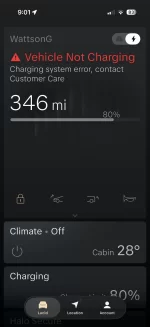
Prior to 3.4.1, my car stops charging once it hits the target and throws an error. This persisted through the 3.4.1 update. It will charge at a high AC rate (so I’ve no issue at 80A), then once it hits 80% (my set limit), it throws a “Vehicle Not Charging” error. Happens even when I use the Lucid wall adapter. Seems unique to me but Lucid is aware. Only annoying in winter as it then loses an absurd amount of range overnight with 25 degree temps. Which also seems to be a bug.

Example - Charges to 308 miles by midnight - throws the error, then is down to 297 miles by 7:00am.
 

Attachments

  • IMG_5983.webp
    IMG_5983.webp
    57 KB · Views: 106
Prior to 3.4.1, my car stops charging once it hits the target and throws an error. This persisted through the 3.4.1 update. It will charge at a high AC rate (so I’ve no issue at 80A), then once it hits 80% (my set limit), it throws a “Vehicle Not Charging” error. Happens even when I use the Lucid wall adapter. Seems unique to me but Lucid is aware. Only annoying in winter as it then loses an absurd amount of range overnight with 25 degree temps. Which also seems to be a bug.

Example - Charges to 308 miles by midnight - throws the error, then is down to 297 miles by 7:00am. See pic.
I have been getting that error before and after the latest update.
 
I have been getting that error before and after the latest update.
Same here. It hits 80% and then it stops charging, but attempts to charge again, over and over. I reported this back on 19-Dec-2025 along with the logs from the Lucid Connected Charger (LCHCS), in hopes this would be helpful to them.

image0.webp
 
I received the 3.4.1 update last weekend and the car worked great early in the week. Car was gone the latter half of the week for some service in FW:

- Replaced the coolant system as it was throwing random Service Drive System warnings the first month of ownership
- Identified cause of a whistling noise over 40mph (actually was the light bar on the front hood - need to replace that and the part is on order).

Got it back last night and tried to charge it today. And it won’t charge at all (neither my Rivian wall connector nor my Lucid mobile charger). I’m assuming this is due to the update. Customer care had me try multiple resets and different plugs and nothing worked. Curious if others have had this happen after the update and if they had a solution that worked.
 
Same here. It hits 80% and then it stops charging, but attempts to charge again, over and over. I reported this back on 19-Dec-2025 along with the logs from the Lucid Connected Charger (LCHCS), in hopes this would be helpful to them.

View attachment 36723
When you provided the LCHCS logs, you downloaded them using the charger interface after logging in?
See image below.
I click on the Download button, but nothing happens.

Screenshot 2026-02-07 at 7.56.52 PM.webp
 
Let me know how that goes. Customer care told me that they were going to push the update again. However service told me customer care is wrong and they won’t push the update again until they analyze what caused it to fail in the first place.

I don’t know who’s right in that case, but I wouldn’t wait for an update to get pushed again. I’d call your service center and make sure that they know it failed and get an appointment scheduled just in case.
So they pushed the update to me again. He told me it would be a few hours as they would diagnose why it failed before pushing it again. I initiated the update from the car this time. Fingers crossed!
 
So they pushed the update to me again. He told me it would be a few hours as they would diagnose why it failed before pushing it again. I initiated the update from the car this time. Fingers crossed!
Let me know how it goes. They told me that it keeps failing, but mobile service wasn’t clear if they tried to update against or just did something else.

Good luck!
 
When you provided the LCHCS logs, you downloaded them using the charger interface after logging in?
See image below.
I click on the Download button, but nothing happens.

View attachment 36724
They asked me for the diagnostic log as well. Nothing downloads, just like you. Not sure why. I told them this a couple of weeks ago, never heard back.
 
They asked me for the diagnostic log as well. Nothing downloads, just like you. Not sure why. I told them this a couple of weeks ago, never heard back.
I found this thread that's related to the inability to download an LCHCS log.
However, no solution posted yet since the original post last October.

@borski the OP was looking for a response from you.
Do you have a solution on how to download a log?


Screenshot 2026-02-07 at 7.56.52 PM.webp
 
FOB battery life issue seems to be resolved!!

According to my latest micro-current measurements battery life has gone from 7 days worst case to greater than 1 year!

How can this be? software
1. Keeping fob stationary for >70 seconds, even within auto-open range now drops current to ~5uA. Previously you had to stay away ~50ft or equivalent or you got ~5mA (1000 times more). Didn't capture all the exact details of the previous version because I updated the fob before I had worked it out so maybe it wasn't this bad.
2. Inside the car as soon as you switch to drive the current drops to ~10uA, no matter if you move the fob or not. Previously any fob movement would turn on power to ~5mA level. That explains why they had fob battery problems on EV race.
In the new OOS interview with Emad (other thread), he confirmed there was a 10x fob battery improvement on avg, shout out to @bicycleguy with his measurements and post. Spot on!
 
When you provided the LCHCS logs, you downloaded them using the charger interface after logging in?
See image below.
I click on the Download button, but nothing happens.

View attachment 36724
Yes I used the charger interface. I have that same problem. Maybe they updated the software on the LCHCS? Unfortunately, I am trying to access it remotely, because the LCHCS is at our vacation home. Although, I have the correct port forwarding, I still can't do a download. When I did the download last time in December, I was local to the charger.
 
I received the 3.4.1 update last weekend and the car worked great early in the week. Car was gone the latter half of the week for some service in FW:

- Replaced the coolant system as it was throwing random Service Drive System warnings the first month of ownership
- Identified cause of a whistling noise over 40mph (actually was the light bar on the front hood - need to replace that and the part is on order).

Got it back last night and tried to charge it today. And it won’t charge at all (neither my Rivian wall connector nor my Lucid mobile charger). I’m assuming this is due to the update. Customer care had me try multiple resets and different plugs and nothing worked. Curious if others have had this happen after the update and if they had a solution that worked.
Figured I would post an update to this. I took my Gravity out this AM to see if it would DC fast charge. Currently charging just fine at a Tesla Supercharger. So, it appears the 3.4.1 update just broke my ability to AC charge at all, hasn’t affected DC fast charging.

I should be hearing from the Dallas satellite team on Monday regarding next steps.
 
Back
Top