Lucid Gravity 3.4.0 software update

Yes. 5’ or longer and it will eventually reboot. Just have to be patient and continue until the fingers are numb. Never like that with the Air. Always enjoyable to do the reboot after a long day of work and wanting to just go home…..
I think the touch pads are very sensitive to perfect thumb pad (not tip) contact. I've experimented a bit with optimal contact point with the plumpest part of my thumb pad nestled into the pocket of the touch pad made by the lip.

Figuring out the touch placement hugely improved the success with first click and I Mostly have very responsive button presses and resets as needed at this point. I also touch the two thumb pads first and then a fraction second later push the break. YMMV

FYI: I'm still on 3.3.20
 
It shouldn't be drain as long as the battery% isn't dropping (which presumably it isn't because you're plugged in and drawing power to keep it up to 80%). Likely just the estimated range calculation (which is always rough to begin with).

While it sounds like you had similar conditions on other nights to compare against, it's never the exact same conditions. But yeah, it could be some quirk in the calculations. I would almost think it would be the other way around when plugged in all night as the battery might be just a little warmer from charging. But what goes into the GOM calculation is always a mystery, and rarely very accurate. Plus unless you start the nav, it really has no idea how you're going to be driving anyway. Usually they rely on recent driving patterns, where a taking the highway the day before would bias the calculation toward higher speed thus lower range. Or vise versa. The GOM can shift 30% or more based on temperature and other conditions. 9 miles is a relative speed bump in the grand scheme of GOM variance.
That’s just it. It doesn’t draw any power after hits 80%. It throws the error and says it can’t charge and then the battery loses range. Whether it’s “excessive”, IDK, but that’s the issue, it doesn’t use “shore power”. Super strange.
 
I think the touch pads are very sensitive to perfect thumb pad (not tip) contact. I've experimented a bit with optimal contact point with the plumpest part of my thumb pad nestled into the pocket of the touch pad made by the lip.

Figuring out the touch placement hugely improved the success with first click and I Mostly have very responsive button presses and resets as needed at this point. I also touch the two thumb pads first and then a fraction second later push the break. YMMV

FYI: I'm still on 3.3.20
True, but they’re broadly MUCH more responsive and reliable with 3.4.1. YMMV
 
That’s just it. It doesn’t draw any power after hits 80%. It throws the error and says it can’t charge and then the battery loses range. Whether it’s “excessive”, IDK, but that’s the issue, it doesn’t use “shore power”. Super strange.
But what % is it at by morning? If still 79-80%, then there's not significant drain.

Now, the issue of it not topping up a from the normal tiny drain due to the error is another matter. That sounds like a bug. You do want it to top up so that when you set a departure time (or manually remote start), it draws from shore power.

But that aside, if it's still showing 79-80% by morning, it's the projected efficiency that went down, not the kWh it's multiplied by to estimate range.
 
It shouldn’t take that long. You have to press the brake first and then hold the buttons on the steering wheel. If you do them at the same time it usually won’t register.
I know. It should not take that long, but it does with our car. Over the course of hours trying the first time it didn’t matter what order the brake or buttons were pushed, same time or not. It would not reset quickly. It is not like I haven’t had to do this reset or know how to do it. I’ve had the Air for four years and I have had my share of reboots. The Air always worked under a minute. This Gravity, nope. I just hold everything until it finally does 10’ later.

Perhaps the 3.4.1 will fix things when it arrives for our Gravity? In any case it is finally going into service tomorrow, for this and a range of other issues - always offline, homelink not working, key fob issues, key card issues, etc. etc.. are they all software? Who knows, but at least they can trouble shoot and do the delivery punch list items we have been asking for since December.
 
Bay area to Tahoe night drive experience with 3.4.1, although it is not on the fix list, I don't recall having this happen as often before on the same route.

Multiple instances of the map losing speed limit and dream drive pro goes from 75 straight to 45, no warning and quite jarring. Requires immediate intervention of pushing the pedal or rapidly toggling up the speed again.

Also, a couple moments where it was very dark and the pay attention red warning goes crazy, unable to detect my face while I'm driving the curves, and it blares the double beep for minutes. No override option I believe?
 
Bay area to Tahoe night drive experience with 3.4.1, although it is not on the fix list, I don't recall having this happen as often before on the same route.

Multiple instances of the map losing speed limit and dream drive pro goes from 75 straight to 45, no warning and quite jarring. Requires immediate intervention of pushing the pedal or rapidly toggling up the speed again.

Also, a couple moments where it was very dark and the pay attention red warning goes crazy, unable to detect my face while I'm driving the curves, and it blares the double beep for minutes. No override option I believe?
I had a similar experience two days ago.
Driving at 70ish with ACC on, when the car suddenly decreases speed to 45.
I believe it was a case of the cameras reading the speed limit sign of an exit ramp as I was driving past the exit.

A route I've driven many times, but first instance of reading a speed limit sign for an exit.
I don't recall if I was perhaps changing lanes (from left to right) and right side camera picked up the sign.
I drive by exits all the time, but first time for this experience. Only happened once.

Will have to drive the route again and test.
 
Got mine last night! Installed with no issues. Have not driven it yet though.
 
Got mine last night also. Installed with no problems. Roll-out seems to be speeding up,
 
[…] Multiple instances of the map losing speed limit and dream drive pro goes from 75 straight to 45, no warning and quite jarring. Requires immediate intervention of pushing the pedal or rapidly toggling up the speed again.
[…]
This is normal and I experience it all the time. I passed a speed limit sign that the Gravity noticed but I didn’t. It often happens in construction zones, school zones, etc. Once in a while, it will adjust speed where I’m wondering if I missed a speed limit sign or it made an error. It does occasionally make errors.

There is a setting to enable/disable auto speed adjustment and offset. I leave it on, as I know I sometimes miss speed limit signs and I would rather override than risk getting a ticket. The transitions are more abrupt than like, though. I wish it would detect changes sooner and slow down more gradually, but I’m assuming it will get better with DDP updates over time.
 
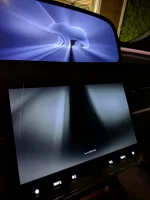
This color mismatch still happening for the reboot screen after update. Anyone else or just me?
 

Attachments

  • PXL_20260207_135843043.webp
    PXL_20260207_135843043.webp
    226.1 KB · Views: 85
This color mismatch still happening for the reboot screen after update. Anyone else or just me?
Mine are both gray-tone. Honestly didn't know the boot screen colors could be changed.
 
I got my 3.4.1 and it seems to be improved a lot.

But now none of my back sensors work. I don’t have the towing package, and Lucid said that they will get a special update for me soon. But honestly, I’m just tired.

If somebody has an idea on how to reset that warning, it will be amazing. Or disable that rear attachment manually, but I couldn’t find the option anywhere on the main panel or even inside the settings.
 
This is normal and I experience it all the time. I passed a speed limit sign that the Gravity noticed but I didn’t. It often happens in construction zones, school zones, etc. Once in a while, it will adjust speed where I’m wondering if I missed a speed limit sign or it made an error. It does occasionally make errors.

There is a setting to enable/disable auto speed adjustment and offset. I leave it on, as I know I sometimes miss speed limit signs and I would rather override than risk getting a ticket. The transitions are more abrupt than like, though. I wish it would detect changes sooner and slow down more gradually, but I’m assuming it will get better with DDP updates over time.
Agree on the need for a gradual slow down. Same when DD has been disengaged. Question is, how gradual. It's relative. This may be my first email to the software feedback email account unless someone knows a reason to not have that feature. The brake pedal could be used for an emergency slow down.
 
Mine are both gray-tone. Honestly didn't know the boot screen colors could be changed.
I don't think it can be changed. Haven't seen anyone else report this but mine have never matched after this splash screen was introduced. Annoying
 
Bay area to Tahoe night drive experience with 3.4.1, although it is not on the fix list, I don't recall having this happen as often before on the same route.

Multiple instances of the map losing speed limit and dream drive pro goes from 75 straight to 45, no warning and quite jarring. Requires immediate intervention of pushing the pedal or rapidly toggling up the speed again.

Also, a couple moments where it was very dark and the pay attention red warning goes crazy, unable to detect my face while I'm driving the curves, and it blares the double beep for minutes. No override option I believe?
I had a similar experience two days ago.
Driving at 70ish with ACC on, when the car suddenly decreases speed to 45.
I believe it was a case of the cameras reading the speed limit sign of an exit ramp as I was driving past the exit.

A route I've driven many times, but first instance of reading a speed limit sign for an exit.
I don't recall if I was perhaps changing lanes (from left to right) and right side camera picked up the sign.
I drive by exits all the time, but first time for this experience. Only happened once.

Will have to drive the route again and test.
When I watched NotchEV's You Tube video on Dream Drive he goes over a setting to disable this jarring experience. IIRC it's something to do with selecting posted speed limits vs. speed of the car in the setting but I may have that wrong.

here's the link:
 
Back
Top