Lucid Gravity 3.4.0 software update

Interesting and thorough review on this Gravity software update by Notch, I would definitely recommend watching!

Nevertheless I observe that he doesn’t “ trust “ the Lucid Nav system maps choosing to mount his phone on the left hand side and run Google Maps/waze? Simultaneously to the Lucid system! Why is this needed on $120k car?
Watching now.
I must say @Cyp , I love that fancy new introduction.
At least new to me!
Good job man!
 
Blind cameras definitely much sharper and higher resolution. I don't remember if they always had these corners being there, probably the camera housing. Anyone else on old or new SW have this too?
These corners were definitely not there in the previous software versions. I assume they’ve widened the camera view causing this vignetting. I hope they revise this as it looks very sloppy. Not something you should find in a car this expensive and this generally refined. I do think the image quality is radically better than before but would prefer the previous framing without the vignetting.
 
New major bug. Not sure if this is new just for 3.4.1 or if existed prior to update but first time for me in 2 months of driving.

Uploaded to 3.4.1 on Sunday night. Spent yesterday driving around doing errands and evaluating and mostly loving the updates. After dinner run last night, parked in garage and went inside relying on proximity to shut down car and lock. About an hour later, I went into garage and notice Gravity lights were on, car jamming to music. Double checked to be sure I did not have keys on me (nope) and then made sure they were in drawer I keep them, away from car. I then checked the app and noticed it showed that the drivers door was open. Went back out to garage and verified that the door was not open. Opened and shut the door and car then properly powered down and locked.

Did short drive this morning and no door open error.
 
New major bug. Not sure if this is new just for 3.4.1 or if existed prior to update but first time for me in 2 months of driving.

Uploaded to 3.4.1 on Sunday night. Spent yesterday driving around doing errands and evaluating and mostly loving the updates. After dinner run last night, parked in garage and went inside relying on proximity to shut down car and lock. About an hour later, I went into garage and notice Gravity lights were on, car jamming to music. Double checked to be sure I did not have keys on me (nope) and then made sure they were in drawer I keep them, away from car. I then checked the app and noticed it showed that the drivers door was open. Went back out to garage and verified that the door was not open. Opened and shut the door and car then properly powered down and locked.

Did short drive this morning and no door open error.
That's scary, because I've gotten used to it locking pretty dependably. If I have to crane my neck every time to see if the mirrors folded in now, that's gonna be disappointing for a $108k car.

There's a simple mitigating step for this that I can't believe Lucid didn't include from the very start... locking chirp. At least then we get the confirmation and know to listen for it. Simple tech that's been around for decades.
 
New major bug. Not sure if this is new just for 3.4.1 or if existed prior to update but first time for me in 2 months of driving.

Uploaded to 3.4.1 on Sunday night. Spent yesterday driving around doing errands and evaluating and mostly loving the updates. After dinner run last night, parked in garage and went inside relying on proximity to shut down car and lock. About an hour later, I went into garage and notice Gravity lights were on, car jamming to music. Double checked to be sure I did not have keys on me (nope) and then made sure they were in drawer I keep them, away from car. I then checked the app and noticed it showed that the drivers door was open. Went back out to garage and verified that the door was not open. Opened and shut the door and car then properly powered down and locked.

Did short drive this morning and no door open error.
So I randomly noticed yesterday, that if I'm in close proximity to mine, it honks once or flashes its lights. I've never EVER seen the car do this before. I don't know if this is something to do with the key being within 30 feet of the car but it is a new behavior for my Gravity.
 
That's scary, because I've gotten used to it locking pretty dependably. If I have to crane my neck every time to see if the mirrors folded in now, that's gonna be disappointing for a $108k car.

There's a simple mitigating step for this that I can't believe Lucid didn't include from the very start... locking chirp. At least then we get the confirmation and know to listen for it. Simple tech that's been around for decades.
I don't use proximity lock/unlock, but the chirp idea is a good one that might entice me to use the feature.
However, I'm fine without it.
Consider sending the idea suggestion to the Lucid sw feedback email.
 
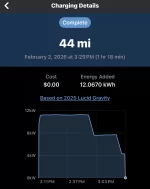
post update, the changes they made to the battery management system for at home charging are terrible!!!

Before the update, the car would start charging at 19kW (80A) for 15-30 minutes, then drop down to 60% of that or 11kW (48A) for the remainder of the charge.

Post update, the car would start charging at only 18kW for 30 minutes, then slowly taper down. It’d first drop down to 13kW, then drop and stay at 7kW for the remainder of the charge.

The changes they made to the battery management system are a complete step backwards.

Edit 1: After stopping the charge early to restart it and see if the car can start charging again at the higher rate, the car is giving me a black screen and is completely non responsive. Had to do a hard reset to bring it back (held steering wheel buttons for 25 seconds to get the double beep).

Edit 2: Was finally able to get the car to start charging again after the hard reset. Car is back to charging again at 18kW and will most likely repeat the same charging cycle I stated above.

Anybody with 48A chargers at home noticing anything different about your charging?

Pre update:
- Starts at 100% of set max amps
- Drops down to 60% of max amps

Post update:
- Starts charging at slightly less than 80A
- Drops down to 70% of set max amps (I set mine to 80A)
- Drops down to 36% of set max amps

Edit 3: The car charged at 18kW for 5 minutes and is now back to 7kW (28A or 36% of my max amps setting).

Thank you for sharing your experience. I just sent you a direct message.
 
There is currently no way to prevent the vehicle from locking when at home or a designated saved address like Tesla does. At least Gravity lets you save destinations in the nav, unlike Air.
One way I've found to leave your Gravity unlocked is to open the trunk, then press the close button and walk away. The car won't lock if the trunk is open and since it takes so long to close, it'll still be open when the car detects the fob is gone and so it won't lock. And due to current bugs it won't lock even when the trunk finishes closing.
 
Not sure it got mentioned, but the profile bug has been resolved. I can now use my own profile, link it to the key fob and stream music. I no longer need to use the guest profile (which btw worked great but now the wifey and I can have separate profiles that actually work and remember settings.
This hasn't been a problem for us on 3.3.22 - at least having two profiles.
Having the key fob switch the profile is pretty hit and miss, but changing it manually and having things reset is usually pretty good, except sometimes the drivers seat doesn't move all the way to the profile stored position.
 
Last edited:
These corners were definitely not there in the previous software versions. I assume they’ve widened the camera view causing this vignetting. I hope they revise this as it looks very sloppy. Not something you should find in a car this expensive and this generally refined. I do think the image quality is radically better than before but would prefer the previous framing without the vignetting.
Thanks for the confirmation, that's what my memory seemed to remember too. I will take the higher resolution and sharpness for sure over the previous version, but do hope they polish and get rid of the vignetting too - however I would guess its now dropped way down on the priority list now.
 
This is not good! It seems the update has led to increased charging issues instead of fixing/solving the 80A continuous charge issues for some of us. Before the update, mine would hold a 48A continuous charge, any attempted amp charge amount above 48A, resulted in reduction of charging rate by 40%, and as of the update yesterday, it's now reduced by 60%. I'm going to test mine at 48A later to see if they've also taken this ability away from me.
Need to see how my DE is when it gets back from service but it could hold 48A and I confirmed looking at my home charging history.

GT used to go from 11kw to 7kw and with new update goes even lower to 4kw lol. Attached screenshot.
 

Attachments

  • IMG_3194.webp
    IMG_3194.webp
    43.1 KB · Views: 79
Need to see how my DE is when it gets back from service but it could hold 48A and I confirmed looking at my home charging history.

GT used to go from 11kw to 7kw and with new update goes even lower to 4kw lol. Attached screenshot.
I see similar behavior on my charging history. Don't know if it chooses to charge slower since it is going to be charged to my requested level within the time frame I have scheduled or if it is a problem. I do know I haven't needed to charge till the end of my scheduled charging window.
 
I see similar behavior on my charging history. Don't know if it chooses to charge slower since it is going to be charged to my requested level within the time frame I have scheduled or if it is a problem. I do know I haven't needed to charge till the end of my scheduled charging window.
Shouldn't be since for me I don't use scheduled charging to take that variable out
 
New major bug. Not sure if this is new just for 3.4.1 or if existed prior to update but first time for me in 2 months of driving.

Uploaded to 3.4.1 on Sunday night. Spent yesterday driving around doing errands and evaluating and mostly loving the updates. After dinner run last night, parked in garage and went inside relying on proximity to shut down car and lock. About an hour later, I went into garage and notice Gravity lights were on, car jamming to music. Double checked to be sure I did not have keys on me (nope) and then made sure they were in drawer I keep them, away from car. I then checked the app and noticed it showed that the drivers door was open. Went back out to garage and verified that the door was not open. Opened and shut the door and car then properly powered down and locked.

Did short drive this morning and no door open error.
Could it just be your door having a soft closing issue and not a software issue? I’ve definitely not had my door soft close fully before
 
Anyone still having problems with Live View on 3.4.1? I was able to use it one time when I first updated to 3.3.20, but it's been broken ever since. Nothing I've tried works: singing off/on, WiFI on/off, etc.

Other than that, the update has been great.
Yes. Mine hasn’t worked properly since a road trip I took over the holidays. During that time (a few days before Christmas) I checked on the car while it was parked in Vegas (The Bellagio parking deck) and that image is still frozen in the feature, and connectivity is permanently offline / broken — even after the 3.4.1 update. I know it’s beta, but it’s frustrating the feature appears to work for some and not for others with seemingly no rhyme or reason 🤷🏻‍♂️

IMG_0451.webp
 
Could it just be your door having a soft closing issue and not a software issue? I’ve definitely not had my door soft close fully before
I thought about this but when I checked, the door was completely closed and flush. I have had experience with soft close door occasionally not closing on my previous Mercedes and in those cases, the door would be noticeably not flush.

This also got me to thinking that Lucid should have an App warning if a door/hatch is left open for an extended period and/or if left unlocked. Our other car, Mercedes, will send me a notification on the Mercedes app if it is left unlocked more than about 10 minutes (which I always do when in garage.)
 
I wouldn't recommend turning WiFi on. I got the dreaded "vehicle offline" error in the app for the first time this morning after enabling WiFi in the car last night.
FWIW, as soon as I turned off Wi-Fi in the car, within 5 minutes the v3.4 update showed up. Coincidence!?!? ;)

Note: After the update, I'm hoping that Wi-Fi is working as it should. The car shows up regularly now in the app with Wi-Fi enabled.
 
Just a generalized reaction/assessment. Installed new software update (vehicle and FOB) two days ago and can clearly see areas of improvement. Fortunately, I've never experienced the level of software issues as others, with my FOB/proximity, DD, etc all working reliably pretty much from the beginning (or at least after the prior update). This update seems to have pretty cleanly addressed the spurious alarms/notices as well as responsiveness to the DD touchpad. The HVAC is much more controlled/rational, the randomly-illuminating interior/Vibe lights appears to be resolved, and the 'start-up' time from entry to drive-ability is now acceptable. Overall, it's now at a point where I can allow my wife to drive it without anxiety and without elaborate instructions on 'what to do when this or that happens'. Couple of things remain on my wish list: As others have observed, at each start-up, the normal expectation is for all screens to display same status as when vehicle was shut down (rather than reverting to 'home' and 'car' screens). My personal irritation (which I have seen others comment on as well) will likely require changes to the Sirius XM application. For users of that service, the normal screen is the 'Favorites' screen that the user has input. Unfortunately, each time the vehicle is started again, that screen is lost and the service returns to a SXM 'home' screen with recommendations from the company. To return to the Favorites screen requires first selecting 'Collections' and then another sub-menu for 'Favorites'. While the last channel listened to remains active from shut-down to start-up, it is impossible to change between Favorite channels without again going through the multiple sub-menus. The last channel listened to and the last screen viewed should always be retained between shut-downs and start-ups. Just a simple ergonomic (and safety) issue. Should be a pretty simple 'fix' for SXM if Lucid requests it.
 
My personal irritation (which I have seen others comment on as well) will likely require changes to the Sirius XM application. For users of that service, the normal screen is the 'Favorites' screen that the user has input. Unfortunately, each time the vehicle is started again, that screen is lost and the service returns to a SXM 'home' screen with recommendations from the company. To return to the Favorites screen requires first selecting 'Collections' and then another sub-menu for 'Favorites'. While the last channel listened to remains active from shut-down to start-up, it is impossible to change between Favorite channels without again going through the multiple sub-menus. The last channel listened to and the last screen viewed should always be retained between shut-downs and start-ups. Just a simple ergonomic (and safety) issue. Should be a pretty simple 'fix' for SXM if Lucid requests it.
Yep, although I'm not sure that's not something Lucid can't change itself. I guess it depends on whether that's actually a separate SXM app that Lucid is just running on their platform, or whether it's a set of Lucid screens simply displaying SXM content? The look and feel seems to mirror the other Lucid screens so I assume it's theirs, not a separate SXM app.

But yes, annoying to have to re-navigate to the Favorites screen all the time. The whole point of setting favorites is to be shortcut.

Also hoping they change the action of the steering wheel seek buttons to skip CHANNELS, not TRACKS.
 
Back
Top