Lucid Gravity 3.4.0 software update

I think the old software team knew what they were doing, but they just weren’t given enough time to finish it. I don’t think the “new “leadership has anything to do with the quality or timing of this release… But that’s just my guess.


Doing a car with 100% new hardware and 100% new software in two years is just impossible… And everyone had to know that. It looks to me like someone made the decision to ship that car before they were done, and the old software leadership team was just used as the scapegoat for that decision.

Sometimes it’s amazing what even six more months of coding and testing can do to approve the quality of a product…
Yes, but you have to take a breather and step back in the middle and really assess whether the current path and approach is warranted. Most of those issues can be recovered by saying removing these 15 things and make sure these 5 things that everyone touches everyday work 100%.
 
Might it be using geofencing to decide not to lock while at home or has it happened away from your home?
there is no geofencing function yet with the Gravity? do I miss here something?
 
[…] There's almost never any tweeners that like to switch back and forth. Whether choosing 1PD or 2PD, they want it left that way all the time.
I must be one of the few. Hold mode most of the time, creep when I’m parking in my garage for fine speed control as I park within an inch of garage door clearance. Sometimes creep for parking in other tight spaces.

I also submitted an enhancement request for the creep/hold toggle to be put on the parking/camera display. That’s when I want to toggle.
 
I must be one of the few. Hold mode most of the time, creep when I’m parking in my garage for fine speed control as I park within an inch of garage door clearance. Sometimes creep for parking in other tight spaces.

I also submitted an enhancement request for the creep/hold toggle to be put on the parking/camera display. That’s when I want to toggle.
You are not alone. Would love be able to toggle it and/or the Air's Tap-to-Creep.
 
I must be one of the few. Hold mode most of the time, creep when I’m parking in my garage for fine speed control as I park within an inch of garage door clearance. Sometimes creep for parking in other tight spaces.

I also submitted an enhancement request for the creep/hold toggle to be put on the parking/camera display. That’s when I want to toggle.
Fair point. I'm sure there's some, but I suspect most just pick one or the other and stick with it.

They could probably make HOLD/CREEP another option for the for the joker buttons pretty easily.

I did another drive in the last hour before I parked it in the garage to do a MAXL ONE treatment to make it nice and slippery. No Dream Drive Limited or High Beam Assist error messages this time like I got this morning.

And 1000% improvement on the steering wheel pads! Wow, night and day. They actually work on nearly every click now. Nice.

But then I went back out to check something else and the doors wouldn't present from fob proximity. That was working fine all day, till now. Still hit & miss. Had to use the fob to unlock the front door and get in.
 
Still on the fence on how much i like 3.4.1.

Second day with two more trips and every time the screeens open on Home for the top and seats for the bottom despite always leaving them both on nav. I will say that as far as i can tell, when i do press nav it is at least on the right setting for the nav screen (car facing up with 3d detail,. So that might be a fix there.

Also, i haven’t gotten any car warnings but today i got a notification to update my key fob but it is already updated and i confirmed that by trying it again.

Let me say that i am not a big user of the rear seats so whatever awesomeness you guys are seeing on those controls aren’t a factor for me.

Also today it did not start the phone music when i got in the car.
 
Still on the fence on how much i like 3.4.1.

Second day with two more trips and every time the screeens open on Home for the top and seats for the bottom despite always leaving them both on nav. I will say that as far as i can tell, when i do press nav it is at least on the right setting for the nav screen (car facing up with 3d detail,. So that might be a fix there.

Also, i haven’t gotten any car warnings but today i got a notification to update my key fob but it is already updated and i confirmed that by trying it again.

Let me say that i am not a big user of the rear seats so whatever awesomeness you guys are seeing on those controls aren’t a factor for me.

Also today it did not start the phone music when i got in the car.
I just received a notification of a key fob update this evening.
I had already updated to 02.35.08 after installing 3.4.1 on Saturday.
Did the key fob update again; same version as before.
 
Think I found my first 3.4.1 Bug

Now when I pull into my garage, the front parking camera no longer comes on. Instead, Homelink display stays on, even after parking. If I am not home and go to park, the front camera does come on.

It seems Honelink display stays on and overrides the front parking camera.
I noticed that too. Enable the surround view cameras (P button) and the front camera will come up on the cockpit display. You can switch to the rear camera here as well. It's an extra step, but a bad workaround.
 
I'm surprised there has been so little discussion about the DD steering wheel controls working perfectly now. This is by far the most significant improvement IMHO. This is not to say I don't greatly appreciate the other bugs that have been squashed and the new features that have been added. Overall, this has been a very successful and impactful update. Even with 3.3.20 I was always anticipating numerous glitches and spurious error messages that chip away at your satisfaction, even when you know they are not real. I've had 2 days driving around town on 3.4.1, and not a single instance of the old problems or any regressions. Most definitely, a strong positive step forward. Hopefully I'll still feel this way in a month ;)
 
there is no geofencing function yet with the Gravity? do I miss here something?
There is currently no way to prevent the vehicle from locking when at home or a designated saved address like Tesla does. At least Gravity lets you save destinations in the nav, unlike Air.
 
...
But here is another set of issues. My wife just got in the car with her own fob, mapped to her own profile, and just like before, the profile did not automatically switch to hers, which I hoped would be fixed by now. What's worse is she's now signed out of Spotify and the audio app is just not loading at all, or maybe it's crashing immediately.
What happens when you go to Settings > Applications > Spotify?

Do you get the option to log out? If so, try that and then logging back in.
 
Just finished updating. I haven’t done the “power cycle” yet, so the results may change.

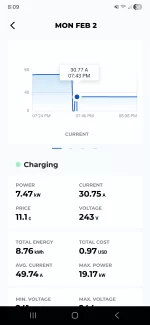
Charging resumed and instead of dropping to 60% of 80A (11kW) after 30 minutes or so, it dropped to 70% (13 kW). Slight improvement, but it’s still not charging at the full speed of 19kW.
Mine actually got worse, it's dropped from 60% to 40%. Before it would start at 19kw, then 11kw. This time it never got over 18kw, then 7kw. I also noticed the charging range on the display was defaulted to 48A/80A after the update. I moved it up to 80A beforehand. Will give it a go again tomorrow to build my case for replacing the BMS.
 

Attachments

  • Screenshot_20260202_200916_Grizzl-E Connect.webp
    Screenshot_20260202_200916_Grizzl-E Connect.webp
    62.4 KB · Views: 75
I noticed that too. Enable the surround view cameras (P button) and the front camera will come up on the cockpit display. You can switch to the rear camera here as well. It's an extra step, but a bad workaround.
Doh! ... but NOT a bad workaround.
 
Mine actually got worse, it's dropped from 60% to 40%. Before it would start at 19kw, then 11kw. This time it never got over 18kw, then 7kw. I also noticed the charging range on the display was defaulted to 48A/80A after the update. I moved it up to 80A beforehand. Will give it a go again tomorrow to build my case for replacing the BMS.
Not sure if this will help, but you might also try going to the charging menu, then hit the settings button in the upper right, then press "reset" at the bottom of the popup screen to reset the current limiter settings. FWIW, I regularly charge at 80A/19kw using the Lucid high-power charger, and I have never had an issue.

What EVSE are you using? I had problems with my old Tesla 80A HPWC; it never worked at all with Gravity and I had to swap it out. I'm not sure why this happened, as AC charging is still handled through J1772, which was the same back then. Still works OK on my wife's Air, though.

 
Not sure if this will help, but you might also try going to the charging menu, then hit the settings button in the upper right, then press "reset" at the bottom of the popup screen to reset the current limiter settings. FWIW, I regularly charge at 80A/19kw using the Lucid high-power charger, and I have never had an issue.

What EVSE are you using? I had problems with my old Tesla 80A HPWC; it never worked at all with Gravity and I had to swap it out. I'm not sure why this happened, as AC charging is still handled through J1772, which was the same back then. Still works OK on my wife's Air, though.
It's happened on my charger (Grizzl-e 80A) and the Lucid Houston service center's charger while it was in their shop. They could only get their charger to 16kw then it dropped down to 9kw. I'm not sold on the guidance I'm getting from this service center as they kept stating this update would fix everything. Obviously they were wrong!
 
I noticed that after the update while driving, I was unable to switch between massage modes and intensity. Has anyone else noticed this?
 
The update has been rock solid for me, but I did notice two weird things:
1. It turned on energy saving mode after updating
2. It disabled Lucid Stability Control, which I've never messed with directly. I have played around with the various drive modes, but I've mostly had it in Smooth.
 
Back
Top