Lucid Gravity 3.4.0 software update

Anyone still having problems with Live View on 3.4.1? I was able to use it one time when I first updated to 3.3.20, but it's been broken ever since. Nothing I've tried works: singing off/on, WiFI on/off, etc.

Other than that, the update has been great.
 
Anyone still having problems with Live View on 3.4.1? I was able to use it one time when I first updated to 3.3.20, but it's been broken ever since. Nothing I've tried works: singing off/on, WiFI on/off, etc.

Other than that, the update has been great.
Yes. It’s the same as prior to the update. Connects sometimes, not others, no reason as I try WiFi/no WiFi for car and phone. It’s in beta so just needs time.

I am spoiled by my wife’s X, which has almost immediate connection for remote viewing.
 
Anyone still having problems with Live View on 3.4.1? I was able to use it one time when I first updated to 3.3.20, but it's been broken ever since. Nothing I've tried works: singing off/on, WiFI on/off, etc.

Other than that, the update has been great.
Live view works for me if my car is not connected to WiFi. If connected to my home WiFi, it won’t work at all.
 
Anyone still having problems with Live View on 3.4.1? I was able to use it one time when I first updated to 3.3.20, but it's been broken ever since. Nothing I've tried works: singing off/on, WiFI on/off, etc.

Other than that, the update has been great.
For me it works when Wi-Fi is off both in the car and my phone
 
Think I found my first 3.4.1 Bug

Now when I pull into my garage, the front parking camera no longer comes on. Instead, Homelink display stays on, even after parking. If I am not home and go to park, the front camera does come on.

It seems Honelink display stays on and overrides the front parking camera.
 
Think I found my first 3.4.1 Bug

Now when I pull into my garage, the front parking camera no longer comes on. Instead, Homelink display stays on, even after parking. If I am not home and go to park, the front camera does come on.

It seems Honelink display stays on and overrides the front parking camera.
Pretty esoteric, but WOW, what a great forum!!! I have found sooo many smart, clever people and tons of workarounds - it's a great day to be alive!
 
Upgrade went fine last night. I stepped outside to do the reboot after the installation was done. So far, so good, though I needed to log out/in to get SiriusXM back, and TuneIn had completely logged out.

Observations: it still is what I’d call an incremental update in that the overall UI is basically unchanged. Some things like the new transparency mode are very, very cool (!!!), and while other changes like Surreal Sound are definitely an improvement, they haven’t exactly blown me away yet. I’d frankly rather see true support for Dolby Atmos in more apps than just Tidal. (And of course CarPlay / Android Auto, but I wasn’t expecting that in this iteration.)

Anyway, my car wasn’t blasting cold air this morning, so I have to say this update was very welcome!
 
Upgrade went fine last night. I stepped outside to do the reboot after the installation was done. So far, so good
of course I did just notice that my Halo app appears to be buggy again, “USB drive too slow” message (drive is *not* slow and Halo was working as recently as last night). Might need another reboot to set things right!
 
Think I found my first 3.4.1 Bug

Now when I pull into my garage, the front parking camera no longer comes on. Instead, Homelink display stays on, even after parking. If I am not home and go to park, the front camera does come on.

It seems Honelink display stays on and overrides the front parking camera.
My front camera is working fine, homeland presents as I approach as you would expect then camera presents as i enter the garage.
 
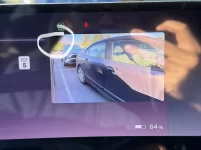
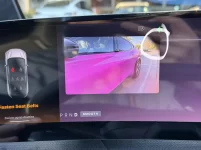
Blind cameras definitely much sharper and higher resolution. I don't remember if they always had these corners being there, probably the camera housing. Anyone else on old or new SW have this too?
 

Attachments

  • IMG_3171.webp
    IMG_3171.webp
    370 KB · Views: 122
  • IMG_3170.webp
    IMG_3170.webp
    366.6 KB · Views: 124
Updated last night. After short drive this morning, have similar observations as others above -mostly positive.

One pro and con: During drive, there were no false errors, sensors blocked (which were quite common on cool mornings due to condensation on sensors). The one con is that Dream Drive appears to be more sensitive to erroneous reading of exit ramp speed limits. I have Dream Drive set to go to 8 mph above speed limit. Previously DDP would stay at that speed pretty good and very rarely accidentally read the exit ramp speed. But this morning DDP kept on reading the exit ramps and dropping speed from 70s down to 40s. This was primarily if I was driving in right most lane. If I moved to center/left lanes, this was not noticed. This was during 2 short drives this morning, so will keep an eye out if it continues.
 
My front camera is working fine, homeland presents as I approach as you would expect then camera presents as i enter the garage.
Mine has not worked properly 3 times in a row. Will try hard reset and check again. Bug report submitted.
 
Blind cameras definitely much sharper and higher resolution. I don't remember if they always had these corners being there, probably the camera housing. Anyone else on old or new SW have this too?
Yes, I noticed the corners (vignetting) which is due to software set to slightly wider angle than lens shade/housing.

On a similar note, I was one of the rare people that did not have an issue with the old, less clear blind view images, largely due to me coming from cars that have never have this feature. Will have to say that once you get used to this new, clearer view, I do enjoy it. Now if they can just do something about improving night time/low light rear view and surround views.
 
Updated last night. I’m still experiencing some issues post update:
1. Car isn’t locking when walking away with the key fob. Happened 2x while outside of the house.
2. Navigation app still doesn’t save the last view setting.
 
Blind cameras definitely much sharper and higher resolution. I don't remember if they always had these corners being there, probably the camera housing. Anyone else on old or new SW have this too?
Is that the mirror housing? Any narrower and it wouldn't catch the side of the Gravity
 
Updated last night. I’m still experiencing some issues post update:
1. Car isn’t locking when walking away with the key fob. Happened 2x while outside of the house.
2. Navigation app still doesn’t save the last view setting.
I noticed this too, locking when walking away takes a second longer than before. But it does lock, at least for me.
 
I tested two more things today:
1) Parking using cameras and then putting it into park. Unfortunately, that still triggers the video recording unavailable: service cameras error. Submitted to swfeedback email. Note that if I don't use the cameras when parking, I do not get the error message.
2) Drive into low angle bright sun. I did not get dream drive limited/sensors blocked errors that I used to get and dream drive continued to work. Hopefully that is fixed.
 
I noticed this too, locking when walking away takes a second longer than before. But it does lock, at least for me.
Might it be using geofencing to decide not to lock while at home or has it happened away from your home?
 
Mine updated overnight. Just went out and did a short drive around the neighborhood. Immediately get a Dream Drive Limited error message when getting in the car, and a High Beam Assist Unavailable message (repeatedly). Also, the little white headlight icon is flashing on an off. I don't remember it ever doing that before. In Settings, the High Beam Assist shows "Feature Unavailable". I did the steering wheel reboot sequence, and it didn't fix the high beam error. It did turn on Energy Saver (like someone mentioned above). Went through the settings 3 times before I finally figured out how to turn that off (it's in the charging menu).

Then I parked in my garage and tried it 10 minutes later. Still got the Dream Drive Limited message, but the High Beam Assist error went away.

It didn't fix CREEP, or nav view, or SXM Favorites failing to return to where it was left on the last drive. Still have to start over every time on those.
 
Back
Top