
You are using an out of date browser. It may not display this or other websites correctly.
You should upgrade or use an alternative browser.
You should upgrade or use an alternative browser.
HUD tilted
- Thread starter mrc
- Start date
- Joined
- Jun 6, 2025
- Messages
- 329
- Reaction score
- 453
- Location
- Atlanta, GA
- Cars
- 2026 Gravity DE
- Gravity DE Number
- 195
- Referral Code
- OW6JOVYZ
Mine is also tilted. It seems less worse if you raise the seat height up. I think it’s the curvature of the windshield. They need to program an adjustment to tilt it depending on the seat height.I feel like my HUD is not projecting straight but slightly angled or tilted. Is that a prob anybody else has had?View attachment 35466
- Joined
- May 5, 2025
- Messages
- 333
- Reaction score
- 487
- Location
- NorCal Bay Area
- Cars
- Lyriq, Gravity DE+GGT
- Gravity DE Number
- 114
- Referral Code
- MTJPLBDS
Agreed. Or allow manual control to adjust it.Mine is also tilted. It seems less worse if you raise the seat height up. I think it’s the curvature of the windshield. They need to program an adjustment to tilt it depending on the seat height.
- Joined
- Jul 13, 2023
- Messages
- 1,504
- Reaction score
- 2,515
- Location
- Tahoe City, CA
- Cars
- Toyota Highlander
Just judging from the forum comments, it seems to be fairly common that people find their HUD display to be a bit tilted to the side.I feel like my HUD is not projecting straight but slightly angled or tilted. Is that a prob anybody else has had?View attachment 35466

I think BMW has that option so it's not unheard of.Mine is also tilted. It seems less worse if you raise the seat height up. I think it’s the curvature of the windshield. They need to program an adjustment to tilt it depending on the seat height.
I think BMW has that option so it's not unheard of.
My GMC Sierra Denali EV has that option for the HUD. You can move it up and down, and rotate the image in small increments to dial in it. It’s perplexing that Lucid’s HUD doesn’t allow these basic adjustments.

- Joined
- Oct 3, 2025
- Messages
- 142
- Reaction score
- 149
- Cars
- GDE, GT3RS
you can move it up and down ...My GMC Sierra Denali EV has that option for the HUD. You can move it up and down, and rotate the image in small increments to dial in it. It’s perplexing that Lucid’s HUD doesn’t allow these basic adjustments.

- Joined
- Nov 7, 2024
- Messages
- 173
- Reaction score
- 261
- Location
- Bradenton, FL
- Cars
- Lucid Gravity GT
- Referral Code
- S1DX1X6D
same thing here, so far Lucid service said it's "in spec" while also admitting their calibration hardware was not working at the moment. I will probably need to raise this once more during future service calls
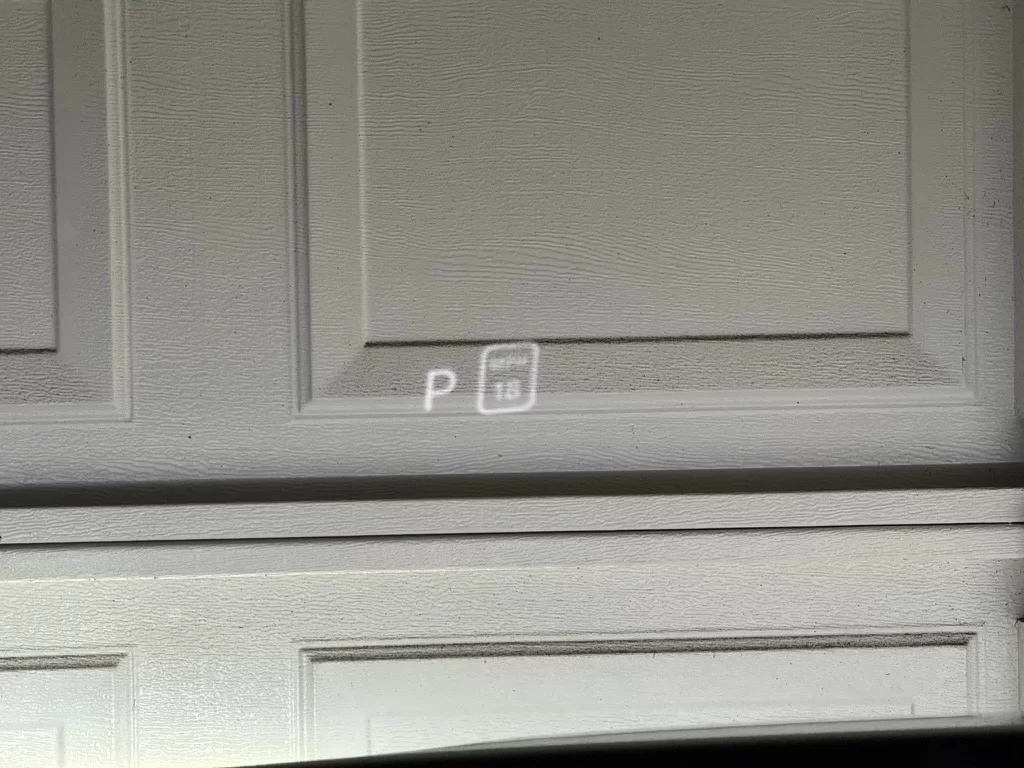
Everybody, I think. It's just one of MANY problems with the HUD. It's embarrassingly bad, especially for a luxury car. It's not oriented right (it disappears using polarized sunglasses). It's not aimed right (sit high in the seat and it fades to nothing). It's not bright enough (even non-polarized sunglasses make it almost unreadable). The adjustment doesn't move it low enough. And as you said, it's tilted.I feel like my HUD is not projecting straight but slightly angled or tilted. Is that a prob anybody else has had?
I'd be embarrassed if I were Lucid.
Our Porsche Macan (which was still cheaper than the Gravity GT) does tilt adjustment too. And goes much brighter than the Gravity HUD. Also has no issue at all with polarized sunglasses. And it just 20x better all around.My GMC Sierra Denali EV has that option for the HUD. You can move it up and down, and rotate the image in small increments to dial in it. It’s perplexing that Lucid’s HUD doesn’t allow these basic adjustments.
The idea that I need to get new prescription glasses just to see the Gravity HUD is laughable.

- Joined
- Dec 23, 2021
- Messages
- 1,173
- Reaction score
- 1,675
- Cars
- 2018 velar 2002 bmw z8
Mine was somewhat tilted when I first got the car but after fine tuning it as well as my seating height ( I’m 5’11” btw) it’s spot on. Maybe as mine is a newer car they have been adjusting more at the factory level?

- Joined
- Aug 18, 2020
- Messages
- 1,438
- Reaction score
- 1,176
- Location
- Tucson, AZ
- Cars
- LCID DER,GGT TSLA X,CT
- Air DE Number
- 153
- Referral Code
- 0M97RTIO
Maybe you are just used to tilting your head to get the correct HUD view? One way to really see if the HUD is tilted is to look at the "LUCID" HUD splash screen when the car boots up. It's surrounded by some graphic bracketing and it becomes obvious that the screen is tilted.Mine was somewhat tilted when I first got the car but after fine tuning it as well as my seating height ( I’m 5’11” btw) it’s spot on. Maybe as mine is a newer car they have been adjusting more at the factory level?

- Joined
- Nov 19, 2021
- Messages
- 16,234
- Reaction score
- 22,385
- Location
- Cupertino, CA
- Cars
- Air DE-P, Gravity DE
- Air DE Number
- 241
- Gravity DE Number
- 013
- Referral Code
- Q1BTN5Y3
I have not seen a HUD that doesn't. I'm sure some exist, but at least this part is not unique to Lucid. There are polarized lenses that don't block it, though. But yeah, same goes for any other HUD I've used. Doesn't detract from the other points, but wanted to point this out.it disappears using polarized sunglasses

- Joined
- Jan 4, 2022
- Messages
- 5,689
- Reaction score
- 10,966
- Location
- Santa Clarita, CA
- Cars
- 2026 Gravity Dream
- Gravity DE Number
- 68
- Referral Code
- AWNJLGKT
I feel like my HUD is not projecting straight but slightly angled or tilted. Is that a prob anybody else has had?View attachment 35466
- Joined
- Jul 8, 2025
- Messages
- 8
- Reaction score
- 23
- Location
- NorCal South Bay, CA
- Cars
- Gravity
- Gravity DE Number
- 59

- Joined
- Jul 9, 2025
- Messages
- 1,092
- Reaction score
- 1,593
- Location
- San Diego, CA
- Cars
- 2026 Gravity GT
- Referral Code
- 3Q9SEQEI
I'm confused by how the HUD text is in color.
- Joined
- Jan 4, 2022
- Messages
- 5,689
- Reaction score
- 10,966
- Location
- Santa Clarita, CA
- Cars
- 2026 Gravity Dream
- Gravity DE Number
- 68
- Referral Code
- AWNJLGKT
It’s due to the way the camera on the phone see’s it when taking the shot sometimes.I'm confused by how the HUD text is in color.