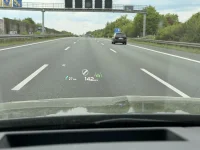
Gravity HUD Position and Clarity Questions

I have a HUD, it is average at best and to date the only feature I find to be beneficial is the orange triangle indicating that there is a vehicle on your left or right. This is duplicated in the wing mirrors but that require you to focus on the wing mirror. I purchased the HUD for two reasons 1) I wanted the 120v outlets that were only available at the time of ordering as part of the technology package and 2) I liked the AR component.

My only ask is that Lucid communicate an approximate schedule for the enhancement of the HUD in bold hoping that someone form Lucid will see the ask!
 
I don't have a HUD optioned on my Gravity and only sampled it for a few minutes during a test drive, so I am disinclined to speak too harshly about it...
...but...
I have had many cars with HUDs over many years, and the Gravity I tried had far and away the worst implementation I have ever seen. So bad that I found it actively harmful and turned it off after a few minutes of use. It actually made my eyes hurt.
 
If I were going to hazard a guess... it is the AR-capable intentional design to use a larger area of the windshield. GM is moving in that direction too, and they project up much higher. But, I suspect that the AR content is only impacting the higher areas for specific purposes and shorter-term. Where Lucid & Gravity may have gone sideways is using the upper areas of the HUD for regular content that should only have been utilized for AR content.
 
I don't have a HUD optioned on my Gravity and only sampled it for a few minutes during a test drive, so I am disinclined to speak too harshly about it...
...but...
I have had many cars with HUDs over many years, and the Gravity I tried had far and away the worst implementation I have ever seen. So bad that I found it actively harmful and turned it off after a few minutes of use. It actually made my eyes hurt.
This is my experience. It makes my eyes hurt. The first time I used it I got a splitting headache. It may have been a coincidence, but it definitely is hard to focus on IMO, at least with my eyes.
 
I'm willing to give Basemark a shot to tackle this even though I have huge doubts it's purely SW solvable. I have to think Basemark was at least given a peak beforehand and think they can make something out of it before accepting the partnership. Treating it as a lotto personally.
 
to date the only feature I find to be beneficial is the orange triangle indicating that there is a vehicle on your left or right.
That's the main reason why I keep it on
 
This isn't really about the HUD, but relates to the yellow triangles:

I'd love to see Lucid implement a screen on the Center Clearview Cockpit similar to the one they have when DD is on, simulating the cars around you, but selectable as a permanent view even when DD is not on. It would be helpful also to zoom back a few car lengths to actually SHOW cars in the blind spot, and not just the little yellow alerts emanating from the bumper.
 
In these days of backup cameras and birdseye view cameras, I do not use view out rear hatch for any mission critical work. Cruising down road I just need a basic view of if I have someone behind me and about how close. Lane changes I use side view mirrors and trust blind spot warning info. In slow speed parking situations, I totally use the cameras. Will not ever own a car without birdseye view camera.
THey could easily solve it using the digital rear mirror from cameras like Cadillac and Hyundai do as well.
 
THey could easily solve it using the digital rear mirror from cameras like Cadillac and Hyundai do as well.
Heck, Polestar is already doing this on the Polestar 4 - no rear window.
 
This is my experience. It makes my eyes hurt. The first time I used it I got a splitting headache. It may have been a coincidence, but it definitely is hard to focus on IMO, at least with my eyes.
I haven't run into that. Sounds like some are worse than others. While the positioning and tilt and where it's aimed are poor on mine, when I sit where I can see it, it's clear and crisp. I'm not getting the double vision or fuzziness some are reporting.
 
This is Lucid's 1st attempt at a HUD. I am giving them some grace because frankly, IMHO, there is no other 3-row EV available today that's better than the Gravity (perhaps in China!).

I wouldn't be surprised if Lucid is changing a few components in the HUD module. Question is whether these changes can be applied to existing HUDs or new replacement HUD, with updated internal components, will be required.
Either way, if you don't already have a HUD, you'll be SOL!
 
While I agree it's Lucid's 1st attempt to "tech" up an HUD and that Gravity is awesome, I'm quite happy to be "SOL" with no obnoxious frame reflection on my windshield every time I drive...not to mention ambient light bars freaking out and glowing white while trying to see out that same windshield at night. Y'all can have it!
The squircle and high position of the clear view cockpit screen are fine with me; the HUD just seems redundant.

Don't need "windshield cartoons" to figure a way through traffic and haul ass to zip around clueless kooks going 45 in the passing lane either.
Sprint Mode is easily selected on the fly...
 
Last edited:
Another thing I would like to be able to do is select what is displayed on the HUD. I've owned cars where there were options and found it very useful to only show the info I wanted.
 
Question to those of you who had (or still have) HUD tilted (not blurry) - did anyone got this fixed at the service? From what I've read so far on this thread and others is that Lucid service usually makes HUD worse, attempting to fix it, but as far as I recall this was mainly when the HUD was blurry, not tilted.
 
Question to those of you who had (or still have) HUD tilted (not blurry) - did anyone got this fixed at the service? From what I've read so far on this thread and others is that Lucid service usually makes HUD worse, attempting to fix it, but as far as I recall this was mainly when the HUD was blurry, not tilted.
It's appear tilted relative to your viewing height.
If I lower my seat a few inches, HUD positioning is perfect; no blur, no tilt and no blinding from the Sun.
But alas, I love my seat in the highest position!
 
That's how it looks like with my Audi etron. With lucid that is something I would expect to look like or function like as well
 

Attachments

  • IMG_3891.webp
    IMG_3891.webp
    428.2 KB · Views: 109
That's how it looks like with my Audi etron. With lucid that is something I would expect to look like or function like as well
The Lucid HUD shows you something similar when you are in navigation mode, it has the arrows and info on next turn. Just monochromatic
 
That's how it looks like with my Audi etron. With lucid that is something I would expect to look like or function like as well
Dare I point out that you can see the HUD section as a slightly darker reflection on the windshield. You are always going to have "some" level of difference between different lengths of dash to the windshield.
 
It's appear tilted relative to your viewing height.
If I lower my seat a few inches, HUD positioning is perfect; no blur, no tilt and no blinding from the Sun.
But alas, I love my seat in the highest position!
Yeah, I hate compromising so much on seat height, but I have little choice if I want to use the HUD and see even just a limited view out the rearview mirror. (Hopefully I never get pulled over by the cops because it's impossible to see the top of any car behind me in that mirror. I'd never see the lights unless I see them in the side mirrors.)

Sitting high in most cars just improves visibility so much. Can see around the outside of car better when parking, and over/around traffic in front better when driving. But I have to give that up in the Gravity. And after sitting high in other cars, sitting low feels like I'm getting swallowed up by the car, if that makes any sense. It's not just the dash that then gets relatively higher, it's the sides too. I hate that feeling.
 
Back
Top