Gravity Bugs / Issues

My rear driver side wheel has sustained a small amount of damage.
The very edge of the tire went over a large stone block hidden by overgrown grass.
As the tire rolled, the weight of the car shifted and the edge of the wheel made contact with the stone block.

I've sanded down the rash that was there, to what is shown in the pics below.
I have to look really hard to see it, but my mind knows it's there, so it's bugging me.

I took the car to a alloy wheel repair shop for an assessment.
They can recut/reman the entire wheel in order to restore to new condition for the price of $239.
The process involves a diamond cut of the wheel surface to remove the damaged area, power-coating of the wheel, and restoring to new condition.

I'm posting here after seeing posts in this thread about wheel damage from @jered and @Bdr100.
Hoping either member or someone else can advise of next steps.
@Northpointe I read a related thread in which you stated you had experience in alloy wheel repair, so your input would be valuable as well.

View attachment 37125 View attachment 37126

I have a shop here in Houston that has done similar repairs for about $150 per wheel. On a similar note, I accidentally curbed a wheel a month or so ago due to the deplorable night/low light vision of surround cameras. Fortunately, I have the black version of your wheels, and so after a little sanding, I used a black sharpie and it is now not very noticeable.
 
Took my dogs for a ride to the local market and put the environmental control in Creature Comfort mode. Upon returning from shopping and unlocking my car the screens remained in Creature Comfort mode and were unresponsive to touch. I pulled out my phone and used the app to turn the mode off, which worked but it seems unusual. Was this an error or is the system designed to work this way?
 
Took my dogs for a ride to the local market and put the environmental control in Creature Comfort mode. Upon returning from shopping and unlocking my car the screens remained in Creature Comfort mode and were unresponsive to touch. I pulled out my phone and used the app to turn the mode off, which worked but it seems unusual. Was this an error or is the system designed to work this way?
Not designed to be that way. It’s a bug. Happens to me sometimes and opening and closing driver door tends to get Creature Comfort “off”.
 
Not designed to be that way. It’s a bug. Happens to me sometimes and opening and closing driver door tends to get Creature Comfort “off”.
Good to know. I'll try the door hack if it happens again. Thank you.
 
Took my dogs for a ride to the local market and put the environmental control in Creature Comfort mode. Upon returning from shopping and unlocking my car the screens remained in Creature Comfort mode and were unresponsive to touch. I pulled out my phone and used the app to turn the mode off, which worked but it seems unusual. Was this an error or is the system designed to work this way?
yep, i had the same issue when i went car camping. I also had to use the phone to turn it off. I also don't know exactly how CC mode turns off. When I went camping, the next morning I unlocked the car and spent a lot of time opening and closing doors and even leaving doors open, but I didn't explicitly try to turn it off on the dash or anywhere. I ended up burning a few extra hours of climate control, a lot of it with the doors open. I suppose it's a safety feature to leave it on maybe until you drive again (or in my case and yours, you can't drive so you have to use the app to turn it off), but it was a little confusing.
 
My rear driver side wheel has sustained a small amount of damage.
The very edge of the tire went over a large stone block hidden by overgrown grass.
As the tire rolled, the weight of the car shifted and the edge of the wheel made contact with the stone block.

I've sanded down the rash that was there, to what is shown in the pics below.
I have to look really hard to see it, but my mind knows it's there, so it's bugging me.

ugh
Tesla wheels are the worst when it comes to curb rash tho, I swear they stick out on purpose- the Lucid is so much better in that regards- best of luck on the repair
 
yep, i had the same issue when i went car camping. I also had to use the phone to turn it off. I also don't know exactly how CC mode turns off. When I went camping, the next morning I unlocked the car and spent a lot of time opening and closing doors and even leaving doors open, but I didn't explicitly try to turn it off on the dash or anywhere. I ended up burning a few extra hours of climate control, a lot of it with the doors open. I suppose it's a safety feature to leave it on maybe until you drive again (or in my case and yours, you can't drive so you have to use the app to turn it off), but it was a little confusing.
I do think Lucid would FAR prefer to have CC hard to turn off than to have it go off accidentally and inadvertently kill someone’s pet. So I am fine with it being hard to turn off until Lucid is confident it works as well as similar modes in Tesla and Rivian.
 
Has anyone been able to install UX 3.5 yet? I came to Lucid in part for Apple CarPlay and have been disappointed it wasn't available upon launch. Now that it's coming soon I'm anxious to hear any feedback from anyone who's actually installed and using it.
 
oh I'm positive as soon as one of us gets the release notes we will post it and report about the update
Has anyone been able to install UX 3.5 yet? I came to Lucid in part for Apple CarPlay and have been disappointed it wasn't available upon launch. Now that it's coming soon I'm anxious to hear any feedback from anyone who's actually installed and using it.
 
It was supposed to drop today correct?
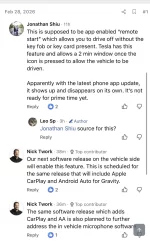
Nick Twork said somewhere on X it requires a phone app update to work as there are other changes in 3.5. It’s in another thread somewhere.

So, as with most Lucid OTAs, I’d be on the lookout for a phone update before any OTA, but especially this one.

As of now, there’s no update in the Apple App Store.

Also, as with all OTAs, it will roll out in stages. It won’t just drop to 100% of the fleet in one day. Patience.
 
Regarding using CC for car camping, it's not an issue. I've done a bunch lately and I do the following and it's worked great:
-Get in front to turn on CC...then get open door/close and get in back of car
-I put my FOB in a faraday case (but I've also started turning off the auto lock/unlock when camping)
-Since CC disables window/door controls in back, I use my phone to lock myself in
-In morning, unlock car and turn off CC on phone.

It's all very easy and has worked great, though my guess is Camp mode will be coming soon. Lucid wouldn't be dumb enough to release it AFTER camp season, right?;-) Right????? lol
 
It was supposed to drop today correct?
Apple doesn't make the betas available until after introduction webcast. I don't expect this to be any different.
 
Apple doesn't make the betas available until after introduction webcast. I don't expect this to be any different.
Are you implying I will need an updated Apple app as well as Lucid's UX 3.5?
 
Are you implying I will need an updated Apple app as well as Lucid's UX 3.5?
Yes. That’s exactly what I am saying based on what Nick Twork said at end of February. May not need app update for CarPlay, but there must be some other functions.
 
Are you implying I will need an updated Apple app as well as Lucid's UX 3.5?
I've had my car since December and I have seen at least 2 app updates already. Last one a month ago.
1773325876506.webp
 
Are you implying I will need an updated Apple app as well as Lucid's UX 3.5?
Actually, Nick didn’t say it, this guy did in a back and forth with Nick. Or referred to it.

Regardless, most car updates have been preceded by an app update for whatever reason - sometimes for the fob.
 

Attachments

  • IMG_0442.webp
    IMG_0442.webp
    130.8 KB · Views: 76
yep, i had the same issue when i went car camping. I also had to use the phone to turn it off. I also don't know exactly how CC mode turns off. When I went camping, the next morning I unlocked the car and spent a lot of time opening and closing doors and even leaving doors open, but I didn't explicitly try to turn it off on the dash or anywhere. I ended up burning a few extra hours of climate control, a lot of it with the doors open. I suppose it's a safety feature to leave it on maybe until you drive again (or in my case and yours, you can't drive so you have to use the app to turn it off), but it was a little confusing.
You just tap the same button again. Same way you turn it on.
 
Back
Top