Google Launches New EV Route Planner

This feature has been there quite a long time, so that it could also suggest more EV-efficient routes, as they aren’t always the same as Gas car routes.

Unfortunately, it appears you can only have one car set up at a time, which is lame.
I think the difference now compared to the previous version of the feature is the use of AI.
 
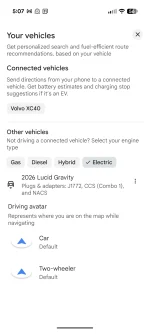
We can choose from a drop-down list of natively "Connected Vehicles" (currently only our Volvo XC40) and "Other", which takes me to that lame car chooser, where I click on the Gravity.
Interesting. Must be AA-specific. I only get one option for a car on iOS.
 
Interesting. Must be AA-specific. I only get one option for a car on iOS.
Maybe the phone app's drop down list of connected vehicles is only present if you have a car that is logged into native Google maps. It shows up as a device on Google's device management pages.
 
Maybe the phone app's drop down list of connected vehicles is only present if you have a car that is logged into native Google maps. It shows up as a device on Google's device management pages.
Out of curiosity, I went into Google Maps settings on my phone and added my Gravity under "Your Vehicles". But now I'm not finding a way to add more vehicles. Instructions say to click the + but there's not a + on my page. 🤔
 
Unfortunately that does me no good with a 2025 Macan EV. (In our late 60's, that car and the Gravity will have likely been be our last vehicle purchases).
Why do so many members think the car they buy around 70 years old will be the last car they ever buy? Do you guys know something I don’t? 😳

Sorry, 🧦
 
Out of curiosity, I went into Google Maps settings on my phone and added my Gravity under "Your Vehicles". But now I'm not finding a way to add more vehicles. Instructions say to click the + but there's not a + on my page. 🤔
I also do not have a + to add more vehicles. My "Your Vehicles" page shows only our native Google Volvo and one added vehicle, our Gravity, with the only choices being to edit or delete that vehicle.
 

Attachments

  • Google Maps Your Vehicles.webp
    Google Maps Your Vehicles.webp
    82.4 KB · Views: 112
Why do so many members think the car they buy around 70 years old will be the last car they ever buy?...
I'll be buying vehicles well past any prudent cutoff date.
 
Why do so many members think the car they buy around 70 years old will be the last car they ever buy? Do you guys know something I don’t? 😳

Sorry, 🧦
Wayne Schell bought his first ev (Lucid Air) in 2022 at the age of 86.

 
Why do so many members think the car they buy around 70 years old will be the last car they ever buy? Do you guys know something I don’t? 😳

Sorry, 🧦
Well I do hope I'm wrong, and I'm still able to drive (and be alive) at 90. 😎

But with both cars being nearly brand new EVs, and no daily commute, at least one should probably last 20 years. Although maybe I'm counting a little too much on Lucid staying in business (or for that matter, Porsche). In the dreadful event of Lucid not surviving and leaving us with stranded assets in a couple of years, all bets are off I suppose.

And who knows how much impact the coming era of robotaxis will have on us, especially at that age.
 
Is this working for anyone yet? I'm testing it now but the only EV feature is for EV map filters (charger power level filter). Nothing for EV routing yet.
 
Is this working for anyone yet? I'm testing it now but the only EV feature is for EV map filters (charger power level filter). Nothing for EV routing yet.
I couldn't get it to do any EV routing.
 
All the Google documentation says it should be working. But I went back into the Your Vehicles setting and see this at the bottom. Battery prediction not checked. WTH?

I changed the vehicle to my Porsche Macan and same result.

Everything says it should work on EVs that aren't fully integrated. You just have to enter the starting SOC manually. But it's not activating. ???

Screenshot_20260402-160828.webp
 
In the Learn More, it says this. But all the stuff I read says it should apply to all 350 vehicles (including all Lucid and Porsche EVs).

Screenshot_20260402-163402.webp
 
I should have known. Cell phone 101. Power it off and back on. Now it shows up.
 
I should have known. Cell phone 101. Power it off and back on. Now it shows up.
Well it showed up for a few seconds. The Battery Prediction check mark was there after I powered the phone off and went to edit the vehicle. Then I went to the car to test it and nothing. Checked the phone again and the checkmark was gone. Powered the phone off/on and still gone. I know I saw it during that one look. Arrrgh!
 
I should have known. Cell phone 101. Power it off and back on. Now it shows up.
I do have a check mark for battery prediction, but I'm still not seeing a battery usage prediction for the Gravity. Only for our native-google "connected" Volvo.
Seems like Google has another step or two of development left on this one.
 
I do have a check mark for battery prediction, but I'm still not seeing a battery usage prediction for the Gravity. Only for our native-google "connected" Volvo.
Seems like Google has another step or two of development left on this one.
I uninstalled Google Maps updates on my phone and then reupdated. Now the check mark is there. But like you, still no battery prediction in the car.
 
I uninstalled Google Maps updates on my phone and then reupdated. Now the check mark is there. But like you, still no battery prediction in the car.
Mine isn't checked whether I select my Air or a Gravity. Even after deleting the updates, clearing the storage and re-updating and starting clean.
 
Mine isn't checked whether I select my Air or a Gravity. Even after deleting the updates, clearing the storage and re-updating and starting clean.
Buggy. And it doesn't seem to matter what car model. I tried a bunch and it did the same on all of them. Even the Fords that have integrated SOC.

Fortunately it's a Google issue, who's usually good about fixing bugs and sending out timely updates.

Otherwise, Android Auto is working really well. And it's a welcome bypass around some of the other annoying Gravity annoyances (nav system, audio content, losing connectivity, etc).
 
Back
Top