You are using an out of date browser. It may not display this or other websites correctly.
You should upgrade or use an alternative browser.
You should upgrade or use an alternative browser.
RESOLVED EA station free at 150kW but tried to charge me at 350kW ???
- Thread starter dscafetta
- Start date

- Joined
- Nov 14, 2021
- Messages
- 11,710
- Reaction score
- 13,497
- Cars
- Dream P
- Air DE Number
- 33
- Gravity DE Number
- 33
- Referral Code
- R0YBCKIJ
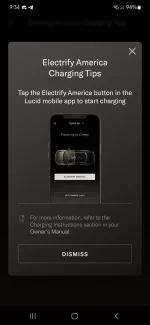
If you get a payment screen, open up your Lucid App, go to the charging tab, and click on the white Electrify America button, select your charger. If that is not an option, unplug and replay and try again.Anyone know why EA charging station tries to charge me to use the 350kW charger, but the 150kW charger is free? Supposed to be free for 3 years. I'm at 1 month.

- Joined
- Nov 28, 2022
- Messages
- 5,921
- Reaction score
- 3,293
- Location
- Edison, NJ
- Cars
- Kia EV9, future Air?
Probably just a plug and play issue with that specific 350.If you get a payment screen, open up your Lucid App, go to the charging tab, and click on the white Electrify America button, select your charger. If that is not an option, unplug and replay and try again.
Thanks. I am very new to this. Which button is the EA button?!?!If you get a payment screen, open up your Lucid App, go to the charging tab, and click on the white Electrify America button, select your charger. If that is not an option, unplug and replay and try again.
- Joined
- Nov 14, 2021
- Messages
- 11,710
- Reaction score
- 13,497
- Cars
- Dream P
- Air DE Number
- 33
- Gravity DE Number
- 33
- Referral Code
- R0YBCKIJ
If you are on a payment screen on the station itself, grab your phone. Open up the Lucid app. Push the lightning bolt button on the bottom. Right under the car you should see a white Electrify America button.Thanks. I am very new to this. Which button is the EA button?!?!
Here are some screenshots.