3.0 on Air

Seriously. The amount of whining about needing to pay nearly 1k to get the new features across the multiple threads on this update.

To be real, were this most car companies, Lucid would have told you to buy a new car to get the latest and greatest, and they would not be wrong for it. Technology needs to advance to be compelling, and that means moving on. The fact that they even have a backwards compatible hardware update for these cars that can be thrown in relatively easily and relatively cheaply is kind of unheard of.

I paid for the CCV2 board when I purchased a used 2023, anticipating the improved software. Now that 2.11 - 3.0UX is here, the only material difference I see (other than the reorganization of controls) is much faster response. For most people, the software improvements are likely not worth the $1,000 to upgrade to CCV2.
 
Using Android Auto things can get a little strange. If I need to use it, usually first time on it in the a.m. I have to turn on Bluetooth and it will choose Lucid Air 820 and it will fire up Wifi so that I get Android Auto. I like to play music via my phone's music player. If Android Auto is on then in the Control Panel I can get the listing of the song up and drill down in the music player to get at folders and have them listed on the Control Panel, but cannot swipe down to put it on the Pilot Panel which it used to do. If I choose music on the Pilot Panel I get the Android Auto icon on the upper left hand corner. You have to touch it to see all the music choices, i.e. AM/FM Radio...That is a little weird and took me a second or 2 to figure that out. Also if something is playing on the phone music player it will show on the bottom of the Pilot Panel.

If I go just Bluetooth via Settings, My Devices and choose the Bluetooth icon then Android Auto shuts off and I go back to the Music in Bluetooth all I get on the Pilot Panel is the Playlist which in my case is the folder I am playing music from on my phone's music player and that is all. I do not see all the folders listed that are on my phone, I have to go into the phone to do that. Again, they use to list out on the Pilot Panel.

With Sirius XM I do get a listing of stations on the Pilot Panel ( which is great) I have previously chosen, favorites and also there is history as well. So not sure why Sirius XM gets listings but phone music player does not.

I do notice that the sound is richer with the 2.11/UX 3.0 upgrade.

Best practice with this update is to spend an hour or two in the driveway figuring out what is what and you can make sure stuff is set up to your liking before you drive with all the other crazies out there.
 
Three questions on UX3.0:

1 - Is there a way to get Android Auto Waze navigation on lower large screen?

2 - On Lucid navigatiuon on lower screen, how do you get rid of the search box?

3 - Is there a user manual for UX 3.0?

P.S. - I also noticed richer, less tinny sound.

Thanks,
 
I don't know what their motivation was. Maybe to sacrifice a function for a "clear look", which I am not a fun of. Who knows?
I agree, people usually don't go into their glovebox, especially while driving. However I would dare to guess that quite a few of Lucid owners regularly check their trip data, mostly for efficiency. But I might be wrong...
On Gravity, you can have your trip on the left side cockpit panel, and since that’s a touch screen, reset as needed. So it was less important to have it on the Home Screen.

That was copied over to the Air, apparently, where that isn’t an option. So not ideal, I agree. But that was likely the “motivation.”
 
I don't know what their motivation was. Maybe to sacrifice a function for a "clear look", which I am not a fun of. Who knows?
I agree, people usually don't go into their glovebox, especially while driving. However I would dare to guess that quite a few of Lucid owners regularly check their trip data, mostly for efficiency. But I might be wrong...
I've never used the trip function in the almost 4 years I've owned my Touring. I didn't even noticed it had moved. Of course everyone uses different features and has different priorities.
 
... I typically pull up the trip metrics before ...
I remember, oh so long ago, when the m/kw # was displayed under the SLC/trip mileage #...
I miss that, and wish we had it back...

I also would love to see the 4 tire pressure #s displayed in a compact manner on the main screen...
 
I remember, oh so long ago, when the m/kw # was displayed under the SLC/trip mileage #...
I miss that, and wish we had it back...

I also would love to see the 4 tire pressure #s displayed in a compact manner on the main screen...
It would be a good idea to send this to [email protected]. I got the strong impression at the software preview event at Lucid headquarters that the people on the other end of this line do care about it.
 
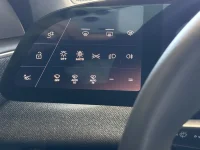
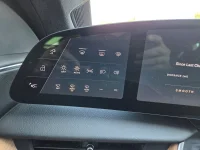
I’m waiting patiently for my update. But too curious to know if the left side of the cockpit has changed or better yet, customizable.
 

Attachments

  • image.webp
    image.webp
    751.1 KB · Views: 45
I paid for the CCV2 board when I purchased a used 2023, anticipating the improved software. Now that 2.11 - 3.0UX is here, the only material difference I see (other than the reorganization of controls) is much faster response. For most people, the software improvements are likely not worth the $1,000 to upgrade to CCV2.
This is probably just the first phase. HOPEFULLY, more changes will be coming to being the Air UI and functionality in line with what Gravity is capable of.
 
I’m waiting patiently for my update. But too curious to know if the left side of the cockpit has changed or better yet, customizable.
I have a news for you, see attached. Regardless of whichever "vibe" I choose, the left doesn't change color.
 

Attachments

  • 20261001_162631.webp
    20261001_162631.webp
    1.7 MB · Views: 44
Was there supposed to be an attachment of a picture with your post?
Yes. Not sure why it didn't show up. Basically it was a video of me tapping the screen and text boxes disappear and reappear when I tap again
 
Last edited:
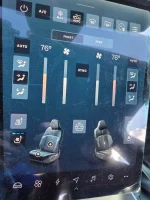
Here is the contrast of the climate screen. Let me know what you all think. I wish there was an option to revert the update.
 

Attachments

  • 20261001_162640.webp
    20261001_162640.webp
    2 MB · Views: 43
Yes. Not sure why it didn't show up. Basically it was a video of me tapping the screen and text boxes disappear and reappear when I tap again
Thanks for trying. Appreciate it.

Might try a reboot when I get home.

Did anyone else get the software pushed again? My car now saying I have a software update available but it’s the same version number I just installed.
 
On Gravity, you can have your trip on the left side cockpit panel, and since that’s a touch screen, reset as needed. So it was less important to have it on the Home Screen.

That was copied over to the Air, apparently, where that isn’t an option. So not ideal, I agree. But that was likely the “motivation.”
By putting these buttons in the pull down quick access, the swipe/tap to get to them is now always the same regardless of what's on the pilot screen at the moment. I wonder if this was the chief motivation to move them there. Maybe they decided that the consistency was worth the extra swipe.

I saw in another comment that the pilot screen does not default to the home screen anymore. It just shows whatever you had on last. I haven't personally verified it yet though. If it's true then having the buttons on the pull down makes more sense now than before.

I use the fold mirrors and trip buttons frequently, so was initially disappointed when they disappeared on the home screen. But now I kinda get it.
 
I don't know what their motivation was. Maybe to sacrifice a function for a "clear look", which I am not a fun of. Who knows?
I agree, people usually don't go into their glovebox, especially while driving. However I would dare to guess that quite a few of Lucid owners regularly check their trip data, mostly for efficiency. But I might be wrong...
This could be resolved easily by adding the efficiency number to the trip data shown at the left part of the center dash. There's a huge amount of empty real estate there.
 
I've never used the trip function in the almost 4 years I've owned my Touring. I didn't even noticed it had moved. Of course everyone uses different features and has different priorities.
Of course, that's why I said "quite a few" and not "all". I based my judgement in part on the number of efficiency related threads/replies on this forum only...
 
This could be resolved easily by adding the efficiency number to the trip data shown at the left part of the center dash. There's a huge amount of empty real estate there.
Yes, but users can't add it. I think it's there on Gravity, but not on Air.
 
Back
Top