Home Assistant Automations

I found that I could get Co-pilot to create some code for me, however, you make is sound like Claude is integrated with HA. If so, how do that? Now that I think about, it is probably a question to ask Claude. 🤪

So Claude Code can fully interact with your computer. So I have a browser connection to my Home Assistant. And I can ask Claude to control my browser and fix things. Occasionally I have to copy and paste a bit of code or change a setting, but it does a LOT of the work for me.

I have also installed the Claude Chrome extension. Which loads a smaller version of Claude on the browser itself. I have also opened a tab to my HA. Then I asked Fable to create a prompt for the Claude Chrome extension to do a task. So I work through what I want with Fable and it helps me direct the Chrome Extension to get it implemented.
 
Do you use the subscription? I do have chatgpt business account. Maybe I can give it a try with the as well 😅
 
I’m 90% sure ChatGPT codex could do this if your business account has that
 
So Claud is creating python/selenium code?
 
I found that I could get Co-pilot to create some code for me, however, you make is sound like Claude is integrated with HA. If so, how do that? Now that I think about, it is probably a question to ask Claude. 🤪
Yup. I asked Claude how to do it. It tells you the add-on app to install - walks you through the process. Then once set up, it does pretty much everything directly and lets you know where it needs your help!
 
Thanks. This is just what I needed.

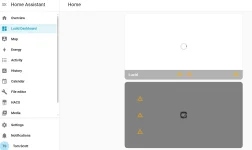
@borski BTW, the Lucid Dashboard that shows two boxes with a picture of the car and some battery stats is not loading for me. Any idea why not?
which dashboard?
 

Attachments

  • HA-LucidDashboard.webp
    HA-LucidDashboard.webp
    36.5 KB · Views: 79
Can you post your yaml?
 
This Dashboard was installed automatically. This is copied from the Raw Configuration Editor for the "Lucid Dashboard."

views:
- title: Home
cards:
- type: picture-glance
entity: sensor.Lucid_paint_color
state_image:
Cosmos Silver: /local/lucid/front/cosmos_silver.png
Eureka Gold: /local/lucid/front/eureka_gold.png
Infinite Black: /local/lucid/front/infinite_black.png
Quantum Grey: /local/lucid/front/quantum_grey.png
Sapphire Blue: /local/lucid/front/sapphire_blue.png
Stellar White: /local/lucid/front/stellar_white.png
Zenith Red: /local/lucid/front/zenith_red.png
entities:
- entity: climate.Lucid_climate_control
- entity: sensor.Lucid_remaining_battery_percent
- entity: light.Lucid_headlights
title: Lucid
- type: picture-elements
tap_action:
action: none
card_mod:
style: |
ha-card {
--lucid-bat-pct-inv: {{ 100 - states('sensor.Lucid_remaining_battery_percent')|float }}%;
}
elements:
- type: image
entity: binary_sensor.Lucid_front_left_door
state_image:
"off": /local/lucid/front_left_closed.png
"on": /local/lucid/front_left_open.png
tap_action:
action: none
style:
top: 50%
left: 50%
height: 100%
width: 100%
- type: image
entity: binary_sensor.Lucid_front_right_door
state_image:
"off": /local/lucid/front_right_closed.png
"on": /local/lucid/front_right_open.png
tap_action:
action: none
style:
top: 50%
left: 50%
height: 100%
width: 100%
- type: image
entity: binary_sensor.Lucid_rear_right_door
state_image:
"off": /local/lucid/rear_right_closed.png
"on": /local/lucid/rear_right_open.png
tap_action:
action: none
style:
top: 50%
left: 50%
height: 100%
width: 100%
- type: image
entity: binary_sensor.Lucid_rear_left_door
state_image:
"off": /local/lucid/rear_left_closed.png
"on": /local/lucid/rear_left_open.png
tap_action:
action: none
style:
top: 50%
left: 50%
height: 100%
width: 100%
- type: image
entity: cover.Lucid_trunk
state_image:
closed: /local/lucid/trunk_closed.png
open: /local/lucid/trunk_open.png
tap_action:
action: none
style:
top: 50%
left: 50%
height: 100%
width: 100%
- type: image
entity: cover.Lucid_frunk
state_image:
closed: /local/lucid/frunk_closed.png
open: /local/lucid/frunk_open.png
tap_action:
action: none
style:
top: 50%
left: 50%
height: 100%
width: 100%
- type: conditional
conditions:
- entity: switch.Lucid_charging
state: "on"
elements:
- type: image
image: /local/lucid/charging.gif
tap_action:
action: none
style:
top: 50%
left: 50%
mix-blend-mode: screen
height: 100%
clip-path: inset(var(--lucid-bat-pct-inv) 0 0 0)
- type: image
image: /local/lucid/indicator.gif
tap_action:
action: none
style:
top: var(--lucid-bat-pct-inv)
left: 50%
mix-blend-mode: screen
- type: image
entity: cover.Lucid_frunk
state_image:
closed: /local/lucid/icons/frunk_open.svg
open: /local/lucid/icons/frunk_closed.svg
style:
top: 12%
left: 50%
border-radius: 20%
background-color: "#222a"
border: "1px solid #ddda"
- type: image
entity: cover.Lucid_trunk
state_image:
closed: /local/lucid/icons/trunk_open.svg
open: /local/lucid/icons/trunk_closed.svg
style:
top: 90%
left: 50%
border-radius: 20%
background-color: "#222a"
border: "1px solid #ddda"
- type: image
entity: lock.Lucid_door_locks
state_image:
locked: /local/lucid/icons/locked.svg
unlocked: /local/lucid/icons/unlocked.svg
style:
top: 50%
left: 50%
border-radius: 20%
background-color: "#222a"
border: "1px solid #ddda"
- type: state-badge
title: null
entity: sensor.Lucid_predicted_range
style:
top: 25%
left: 13%
"--ha-label-badge-title-font-size": 0
- type: state-badge
title: null
entity: sensor.Lucid_average_efficiency_rolling_15m_mi_kwh
style:
top: 50%
left: 13%
"--ha-label-badge-title-font-size": 0
- type: state-badge
entity: sensor.Lucid_interior_temperature
style:
top: 75%
left: 13%
"--ha-label-badge-title-font-size": 0
image: /local/lucid/skeleton.png
 
This is a @segbrk thing I think
 
weird occurrence today. restarted HA an Lucid wouldn't start so I tried but no good with a server error. so I removed the integration and deleted all of the lucid app within ha.
redl'd it and went to reactivate/install the integration and got the dreaded 500 internal server error:
Config flow could not be loaded: 500 Internal Server Error Server got itself in trouble
I noticed a very short/quick reference to starting the configuration UI just prior to the error message

Logger: homeassistant.util.package
Source: util/package.py:222
First occurred: 11:41:04 AM (12 occurrences)
Last logged: 11:41:05 AM

Unable to install package lucidmotors==1.4.1: error: File not found: `/usr/src/homeassistant/homeassistant/package_constraints.txt`
Unable to install package markdownify==0.11.6: error: File not found: `/usr/src/homeassistant/homeassistant/package_constraints.txt`
Unable to install package async-lru==2.0.4: error: File not found: `/usr/src/homeassistant/homeassistant/package_constraints.txt`
Unable to install package tenacity==8.2.3: error: File not found: `/usr/src/homeassistant/homeassistant/package_constraints.txt`

ideas? more coffee maybe?
 
Last edited:
weird occurrence today. restarted HA an Lucid wouldn't start so I tried but no good with a server error. so I removed the integration and deleted all of the lucid app within ha.
redl'd it and went to reactivate/install the integration and got the dreaded 500 internal server error:
Config flow could not be loaded: 500 Internal Server Error Server got itself in trouble
I noticed a very short/quick reference to starting the configuration UI just prior to the error message

Logger: homeassistant.util.package
Source: util/package.py:222
First occurred: 11:41:04 AM (12 occurrences)
Last logged: 11:41:05 AM

Unable to install package lucidmotors==1.4.1: error: File not found: `/usr/src/homeassistant/homeassistant/package_constraints.txt`
Unable to install package markdownify==0.11.6: error: File not found: `/usr/src/homeassistant/homeassistant/package_constraints.txt`
Unable to install package async-lru==2.0.4: error: File not found: `/usr/src/homeassistant/homeassistant/package_constraints.txt`
Unable to install package tenacity==8.2.3: error: File not found: `/usr/src/homeassistant/homeassistant/package_constraints.txt`

ideas? more coffee maybe?
ok so I'm just going to rip & replace, start over as now I can't even get HACS reinstalled. must have mucked something up between the rasp pi's
 
weird occurrence today. restarted HA an Lucid wouldn't start so I tried but no good with a server error. so I removed the integration and deleted all of the lucid app within ha.
redl'd it and went to reactivate/install the integration and got the dreaded 500 internal server error:
Config flow could not be loaded: 500 Internal Server Error Server got itself in trouble
I noticed a very short/quick reference to starting the configuration UI just prior to the error message

Logger: homeassistant.util.package
Source: util/package.py:222
First occurred: 11:41:04 AM (12 occurrences)
Last logged: 11:41:05 AM

Unable to install package lucidmotors==1.4.1: error: File not found: `/usr/src/homeassistant/homeassistant/package_constraints.txt`
Unable to install package markdownify==0.11.6: error: File not found: `/usr/src/homeassistant/homeassistant/package_constraints.txt`
Unable to install package async-lru==2.0.4: error: File not found: `/usr/src/homeassistant/homeassistant/package_constraints.txt`
Unable to install package tenacity==8.2.3: error: File not found: `/usr/src/homeassistant/homeassistant/package_constraints.txt`

ideas? more coffee maybe?
I still have active data in my home assistant so don’t think they broke the API?
 
ok so I'm just going to rip & replace, start over as now I can't even get HACS reinstalled. must have mucked something up between the rasp pi's
Yeah this is something local to your system. Sorry!
 
Yeah this is something local to your system. Sorry!
Yeah I finally just started from scratch with a fresh image and build
That worked not sure what broke.
 
I made an off-hand comment about this in another thread, but this is the right place to share with folks looking for ideas on using HA with their Lucid.

I live in the Phoenix area, and it gets HOT in the summer. I've been an HA user for several years and have gotten pretty frisky with it. One of the cool things I use is the Google Calendar integration. My goal was to have HA watch my calendar for the types of entries where my car will be parked in the sun, and start the A/C 10 minutes before the scheduled event ends. This will let me get into a nice cool car.

The triggers section watches for my calendar events that will end in less than 10 minutes.

The conditions sections allows only entries that begin with "Alloy" (for Alloy Personal Training), "Massage", "Haircut", or "Lucid". That last one is so I can prepend any non-typical entry with Lucid, like "Lucid - Take mom to doctor", and have it activate. Finally, it checks to make sure the car's not at home in case I didn't actually go to the event.

The actions section, of course, fires up the climate control.

alias: Lucid Pre-Cool by Calendar
description: ''
triggers:
- trigger: template
value_template: >-
{{ (as_timestamp(states.calendar.chris.attributes.end_time) -
as_timestamp(now())) / 60 < 10}}
conditions:
- condition: or
conditions:
- condition: template
value_template: >
{{
states.calendar.chris.attributes.message.startswith('Alloy')
}}
- condition: template
value_template: >
{{
states.calendar.chris.attributes.message.startswith('Lucid')
}}
- condition: template
value_template: >
{{
states.calendar.chris.attributes.message.startswith('Massage')
}}
- condition: template
value_template: >
{{
states.calendar.chris.attributes.message.startswith('Haircut')
}}
- condition: zone.not_in_zone
target:
entity_id: device_tracker.lucid_air
options:
behavior: any
for: '00:00:00'
zone: zone.home
actions:
- action: climate.set_hvac_mode
metadata: {}
target:
entity_id: climate.lucid_air_climate_control
data:
hvac_mode: heat_cool
mode: single
 
I’m so thankful that borski made this. It makes my ownership a lot better
I couldn't have charged my Air without it! I'm using only excess solar energy, which comes and goes during the day.
 
Back
Top