
- Joined
- Jan 3, 2022
- Messages
- 7,532
- Reaction score
- 8,629
- Location
- San Francisco Bay Area
- Cars
- Gravity GT, XC40 P8 EV
- Referral Code
- 3OKY7YGA
We've gone several years now without an Android watch app for Lucid's vehicles. With AI arriving just in time to supplant my deteriorating cerebral capacity, I wrote my own for WearOS. It works great on my Pixel 5 watch. I'm very pleased with the result and will likely use it nearly every day.
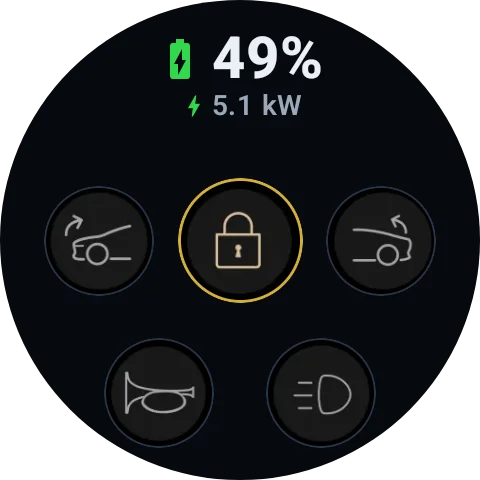
The line of text just below the current charge percentage shows the car's nickname when not plugged in. Otherwise, it displays "Plugged In" if plugged in but not charging, or a lightning bolt icon and the current charging speed if charging.
There's also a tiny yellow polling status dot that appears briefly at the very bottom of the screen each time the app polls Lucid's Cloud API. The app connects to the car through Lucid's cloud, so it works when both the car and the watch have access to the internet (WiFi or LTE) - exactly the same mechanism as Lucid's phone app.
The Frunk, Door Locks, and Trunk buttons ask for user confirmation before sending their request to the cloud for safety.
The line of text just below the current charge percentage shows the car's nickname when not plugged in. Otherwise, it displays "Plugged In" if plugged in but not charging, or a lightning bolt icon and the current charging speed if charging.
There's also a tiny yellow polling status dot that appears briefly at the very bottom of the screen each time the app polls Lucid's Cloud API. The app connects to the car through Lucid's cloud, so it works when both the car and the watch have access to the internet (WiFi or LTE) - exactly the same mechanism as Lucid's phone app.
The Frunk, Door Locks, and Trunk buttons ask for user confirmation before sending their request to the cloud for safety.
Last edited:


