Gravity Bugs / Issues

We had much improved software performance after the 3.6.0 update in our two Gravities, but problems are now creeping back in. We sometimes lose audio, and the auto-dimming headlight feature has become erratic.

A problem we had in the nav system of our older Gravity a year ago has now shown up in our newer Gravity. The screens often show our location as being the Lucid HQ in Newark, CA instead of our actual location in southwest Florida. Sometimes we can correct the location by hitting "Re-Center", sometimes not. This started intermittently but has now begun to occur with almost every startup.

Here's what showed up on our upper and lower screens yesterday when we were, in fact, driving along a rural lakeshore. It took a reboot to correct the image, and that is not something I'm interested in doing almost every time we start up the car.

View attachment 40119View attachment 40120

I too see Lucid HQ on startup in the NAV, but it corrects itself within a few seconds, I assume when it finally triangulates where I am.
 
When I spoke to the software lead in Charlotte I asked about how homelink shows all programmed garage doors when you back out of the garage in the morning and not just the ones close by. He said that it takes a little while for the onboard GPS to get its location for geofencing, so that's probably what's happening. The default is to display all. He also said that the GPS on the new NVidia stack is quicker, so we'll probably see an improvement when they roll onto it.
 
When I spoke to the software lead in Charlotte I asked about how homelink shows all programmed garage doors when you back out of the garage in the morning and not just the ones close by. He said that it takes a little while for the onboard GPS to get its location for geofencing, so that's probably what's happening. The default is to display all. He also said that the GPS on the new NVidia stack is quicker, so we'll probably see an improvement when they roll onto it.
Fortunately that one has an easy workaround...

shopping.webp


Hearing all the problems with Homelink, I never even bothered trying to set it up in my Gravity. I already had enough aggravations to deal with. Dug my old school remote out of the drawer and clipped it to my visor. No headaches (from that).
 
That may be what we're seeing, too. The lights no longer automatically dim with oncoming traffic, but we're also not getting high beam flashes from other cars indicating they are being blinded or annoyed by our headlights.
That’s exactly it. It’s like magic to me and if I look really closely I can see it adjust the lights to not point at the one car. Really cool. But the lights stay super bright and, to your point, no one’s flashing me (at least not in the way I prefer 😉), so I believe it’s working well.
Same cool/magical effect on our R1S with the active lighting or whatever the cool name is.
 
I'm awfully reticent to generally declare mission accomplished on the fob Gravity-wide considering how many times things would improve for a little while then get worse again. And as we can see, at least some people are still having issues. @DeaneG, my fear of installing the fob update doesn't come from any specific feedback, it just comes from months of watching this go back and forth, and also realizing from this forum that everyone seems to experience different forms of different issues, so I don't really trust my specific hardware/software combination to just work flawlessly from here on out. I have my Jenga tower jusssst right and I am not keen on pulling another piece out just yet, even if I'm told "hey, that one is totally safe."
Agree. And, at the same time, it’s night and day better than it was. Before you could start it from the app, I used to be terrified the fob just wouldn’t let me in and the key card was best friend (though it didn’t always work every time - which has since been fixed with the center console campaign). No concerns at all anymore. Which, of course means when I go out today, it won’t work. 🤣

Only fob update issues I’ve seen here is the update stopping or not “taking” but the. It’s worked at a later time. Mine’s been great, but again, YMMV.

Interestingly, my fob was okay but at my recent service appointment they replaced it and gave me a new one. There’s a “button campaign” which is kind of funny because I WAS one of the people who had a button fall off and then crazy glued it back on…and it worked fine. Though it did make me feel like I was fixing my kids’ Fisher Price My First Fob…

PaaK is my next BIG feature wish.
 
Fortunately that one has an easy workaround...

View attachment 40172

Hearing all the problems with Homelink, I never even bothered trying to set it up in my Gravity. I already had enough aggravations to deal with. Dug my old school remote out of the drawer and clipped it to my visor. No headaches (from that).
FWIW - I’ve had zero issues with homelink since delivery in early August 2025. Again, I know it’s spotty and everyon’s experience has been different.
 
Count me into the "resigned" crowd, I've lost confidence in Lucid's software quality skills and only occasionally peek at the forum, life is too short to spend emotional energy on this half baked car. It gets me around and wheels stay on, everything else is "It's Lucid, stupid". It's still annoying, but I try not to let it under my skin. At least I'm always the first one peeling from the red light, no exceptions.
 
The audio occasionally dropping out for several seconds is a new bug for us, since the release of 3.6.0. I'd heard others complaining, but we never had it. Very annoying.
I've had this. it's not super common but it happens. I figured it was a Carplay connection thing. Speaking of which, do you guys sometimes just have Carplay simply not want to come up? It happens sporadically for me where the bluetooth appears connected but for some reason I can't make Carplay come up unless I fumble around with submenus and try to disconnect/reconnect, etc. Like, I can see the Carplay icon but it's greyed out and I can't press it, I have to force the reconnection between the car and the phone.
 
I've had this. it's not super common but it happens. I figured it was a Carplay connection thing. Speaking of which, do you guys sometimes just have Carplay simply not want to come up? It happens sporadically for me where the bluetooth appears connected but for some reason I can't make Carplay come up unless I fumble around with submenus and try to disconnect/reconnect, etc. Like, I can see the Carplay icon but it's greyed out and I can't press it, I have to force the reconnection between the car and the phone.
I don't use CarPlay but Android Auto has been great on mine. As many little issues as I've had, that's not one of them. This is the most dependable bluetooth AA connection I've ever had in a car.

But I do have that problem trying to launch Spotify from the pilot panel sometimes, presumably because the car's internet connection is out. Spotify screen comes up but nothing starts playing and there's no PLAY arrow present. Same thing that happens when I lose connectivity during a song (actually I think the song in the buffer finishes then it won't go any further). I write that all off to being the inconsistent connectivity,
 
I've had this. it's not super common but it happens. I figured it was a Carplay connection thing. Speaking of which, do you guys sometimes just have Carplay simply not want to come up? It happens sporadically for me where the bluetooth appears connected but for some reason I can't make Carplay come up unless I fumble around with submenus and try to disconnect/reconnect, etc. Like, I can see the Carplay icon but it's greyed out and I can't press it, I have to force the reconnection between the car and the phone.
I have had to go into Settings->Connectivity->Devices and click the CarPlay icon by my iPhone to get it to come up as well...other times it comes on perfectly when I enter the car.
There doesn't seem to be any rhyme or reason to when it decides not to come up.
I'm not techy enough to explain it either; it's just how it acts sometimes
 
I've had this. it's not super common but it happens. I figured it was a Carplay connection thing. Speaking of which, do you guys sometimes just have Carplay simply not want to come up? It happens sporadically for me where the bluetooth appears connected but for some reason I can't make Carplay come up unless I fumble around with submenus and try to disconnect/reconnect, etc. Like, I can see the Carplay icon but it's greyed out and I can't press it, I have to force the reconnection between the car and the phone.
Yes. Happens to me randomly when I get out and back in after some time. I don’t have to re-pair, but do have to choose my phone again, etc. It’s strange but it’s very infrequent.
 
the UI doesn’t make it obvious but when carplay doesn’t come up by itself sporadically, i just tap the greyed out carplay icon and it connects - no going through menus or reconfiguring.
That hasn’t worked for me, unfortunately. Trust me, I’ve tapped 100 times.
 
That hasn’t worked for me, unfortunately. Trust me, I’ve tapped 100 times.
Same here. Sometimes works, sometimes doesn’t.

Having said that, I’ve had a couple of rental cars recently with wireless CP and it’s just as wonky as Gravity when connecting. My Gravity connects to CP most of the time.
 
I've found that if you hardwire your iPhone to the USBc ports in the console then carplay comes up no problems. If i'm using bluetooth then things get wonky
 
Here is my test criteria:
  • Are the headlights illuminating the road well?
  • Do I see the headlights adjusting for oncoming traffic? Is the left side decreasing while the right side remains bright?
  • Am I being flashed by oncoming traffic more than with high beams off?
I was paying attention to this very closely when 3.6.0 first came out and did a set of experiments. The matrix headlights seem to be working well, and I stopped thinking about it.
I don't drive at night much, but did a little least night through a canyon. First time I really got to see the matrix brights at work. Really nice! Much brighter view of the road overall, and really cool watching each beam click off against the canyon wall as an oncoming car is approaching and going by. Was hoping to see confirmation that it was really working. Nice to see it!

Just like the rear steering. I keep meaning to test it to make sure it's really happening. I presume I can do a sharp turn in an open space, stop midway, get out and look (knowing that 3 degrees will be barely visible).
 
I don't lower the windows often, except for something like using a parking card to get in a garage on a trip. Had to do that a few times on this current trip. Windows are still going up then down. On about the 3rd or 4th attempt it finally stays up.
 
I don't drive at night much, but did a little least night through a canyon. First time I really got to see the matrix brights at work. Really nice! Much brighter view of the road overall, and really cool watching each beam click off against the canyon wall as an oncoming car is approaching and going by. Was hoping to see confirmation that it was really working. Nice to see it!

Just like the rear steering. I keep meaning to test it to make sure it's really happening. I presume I can do a sharp turn in an open space, stop midway, get out and look (knowing that 3 degrees will be barely visible).
They work very well indeed! Now if the cameras were visible at night... I guess I am asking for too much
 
I don't lower the windows often, except for something like using a parking card to get in a garage on a trip. Had to do that a few times on this current trip. Windows are still going up then down. On about the 3rd or 4th attempt it finally stays up.
This happened to me last weekend. I found that opening the door, putting the window all the way up, and closing the door seemed to reset whatever part got stupid.
 
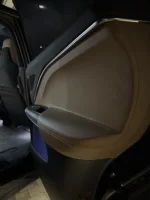
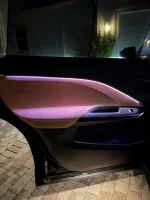
It’s interesting how Lucid said the enhanced ambient lighting was only available with the HUD because of the different wiring harness. I definitely do not have the HUD yet my rear left door recently turned on the extra ambient lighting? It’s one year old today and I have never seen this light on till now.
 

Attachments

  • IMG_0317.webp
    IMG_0317.webp
    647 KB · Views: 35
  • IMG_0320.webp
    IMG_0320.webp
    266.8 KB · Views: 36
Back
Top