HomeLink works manually, how to set to automatic?

sschwall

New Member

Joined
May 4, 2026
Messages
2
Reaction score
2
Location
Oakton, VA USA
Cars
Gravity GT
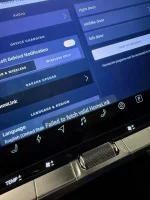
My Tesla MS opens and closes garage door when we arrive and leave. The Gravity GT required manually pushing the dash icon. HomeLink works but only manually. I don't see any way in setup screen to turn on 'auto-close' or 'auto-open'. Is it possible to do so?

When I go to the setup screen I get the error "failed to fetch valid HomeLink".

Just to be clear, the HomeLink works - I just can't set it to automatic.
 

Attachments

  • IMG_9228.webp
    IMG_9228.webp
    382.6 KB · Views: 97
My Tesla MS opens and closes garage door when we arrive and leave. The Gravity GT required manually pushing the dash icon. HomeLink works but only manually. I don't see any way in setup screen to turn on 'auto-close' or 'auto-open'. Is it possible to do so?

When I go to the setup screen I get the error "failed to fetch valid HomeLink".

Just to be clear, the HomeLink works - I just can't set it to automatic.
This was a feature when they first released the car; they recalled it as it was buggy, but they plan to re-release it again at some point.

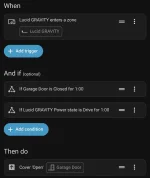
Alternatively you can do the same thing with Home Assistant if you're somewhat technical.
 
I have Genie garage door opener and it doesn’t play well with Ratgdo and HA. The alternative that works for me is routing my Genie garage door through Samsung Smart Things. SmartThings will open the garage door when I get within a certain distance of the house. It works 98.7% of the time.
 
Thanks for the explanation - it is a great feature I hope it comes back. I will see if I can figure out the Home Assistant.
 
I have programmed the lower right button on the steering wheel to activate my garage door opener.
 
Back
Top