Cruise/drive assist speed has to be set everytime?

NerviG

Active Member

Joined
Oct 3, 2025
Messages
136
Reaction score
145
Cars
GDE, GT3RS
I am honestly just posting because I want to make sure I am not missing something but coming from BMW/Porsche, when you set the cruise speed/driving assist and then you hit the break the car disables the cruise control but the speed is still set as you had it previously and then you can press "resume" and it engages at that set speed from before.

On the Gravity, there is no "resume"? Everytime you break and then you re-engage, it sets the speed whatever you are driving at the moment and you have to adjust it up everytime as needed?

Is that how it works or do I miss something?
 
According to the manual it should resume at the same speed unless the posted speed limit changed.

When Adaptive Cruise Control deactivates and then activates again, the last set desired speed will resume for the same posted speed limit. If the posted speed limit changes while Adaptive Cruise Control is deactivated then upon activation again the system will default to the speed offset setting of the newly posted speed limit.
 
hm I might need to check some settings maybe. if you break it deactivites and is just gone, same if you use the X on the steering wheel? How else would it deactivate?
to enable again, it just takes whatever speed you drive. Maybe it is a setting and it would at least take the posted speed limit, I will check.
 
I changed the adaptive cruise control from “set speed” to “+4 miles/hour over the speed limit”, which is where I almost always set it anyway. Thus, it will always resume to that spend. The only issue is that on occasion I notice the speed limit on the display doesn’t match the posted speed limit sign. In that rare case I will have to manually adjust it. Also, another feature I found is that if you do a long tap on the top of the left capacitive pad instead of a short tap it adds 5 mph instead of 1 mph to the set speed.
 
I changed the adaptive cruise control from “set speed” to “+4 miles/hour over the speed limit”, which is where I almost always set it anyway. Thus, it will always resume to that spend. The only issue is that on occasion I notice the speed limit on the display doesn’t match the posted speed limit sign. In that rare case I will have to manually adjust it. Also, another feature I found is that if you do a long tap on the top of the left capacitive pad instead of a short tap it adds 5 mph instead of 1 mph to the set speed.
This ^. It’s a setting you have to change. Once you do, it works just as intended. But there is no “resume” precisely like some cars.
 
This ^. It’s a setting you have to change. Once you do, it works just as intended. But there is no “resume” precisely like some cars.
Which is weird because the manual says otherwise. Another missing/broken software thing I guess.
 
I changed the adaptive cruise control from “set speed” to “+4 miles/hour over the speed limit”, which is where I almost always set it anyway. Thus, it will always resume to that spend. The only issue is that on occasion I notice the speed limit on the display doesn’t match the posted speed limit sign. In that rare case I will have to manually adjust it. Also, another feature I found is that if you do a long tap on the top of the left capacitive pad instead of a short tap it adds 5 mph instead of 1 mph to the set speed.
very helpful and I made the same setting change. I think I can live with that! because yeah normally I always adjust it 5-10mph over the speed limit, I think the resolves my complaint :D thank you!
 
very helpful and I made the same setting change. I think I can live with that! because yeah normally I always adjust it 5-10mph over the speed limit, I think the resolves my complaint :D thank you!
I like to set it to +13%. This allows some more nuance, such as in 20-30 mph zones. And because the Gravity's displayed speed is the same as the actual speed, you get what you ask for, unlike the Air where the displayed speed is +2mph more than the actual speed.
 
A few weeks ago while driving with ACC engaged, my car suddenly decelerated from the set cruising speed of 75 mph to 45 mph.
I rarely use ACC, but had never experienced the sudden deceleration.
I have the ACC cruising speed set for "Posted Speed Limit".
In hindsight, thinking back to the experience, I recalled that the deceleration occurred when passing an exit sign that showed a speed limit of 45 mph for the exit ramp.
I've figured it had to be the cameras seeing the speed limit sign for the exit and responding to the new speed limit.
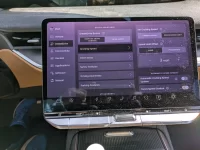
Looking at the ACC settings I noticed the option to toggle off "Automatic Cruising Speed", which I did. (See first attachment below; can't insert for some reason)

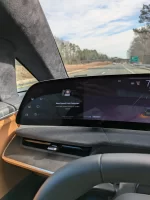
During testing today, prior to engaging ACC, as I would pass an exit ramp, I would hear a chime and see the speed limit indication (next to my actual speed) temporarily change to the posted exit ramp speed limit before returning to the speed limit for the road I was on. Once I engage ACC, each time I passed an exit ramp sign with a different speed limit, the message "New Speed Limit Detected. Press left center button to update speed". (See the second attachment below; can't insert) I didn't act on the suggestion in the message, but I'm pretty sure the care would have suddenly decelerated to the exit ramp speed limit.

I also noticed in instances where ACC is engaged and the car's actual speed doesn't match the posted speed limit, even though the speed limit indicator is showing the correct speed limit, when I press the left center button, (center of left steering wheel button) the car's speed changes to the upper offset of the posted speed limit. This sometimes happens during the brief time when I've just turned onto a new road.

Example: Road speed limit is 70, ACC engaged, cruising speed is 73 (3 mph offset). I deactivate ACC, merge onto new road with speed limit of 65, which the car has recognized. Re-activate ACC and car speeds up to 71. I press left center button and cruising speed changes to 68 (3 mph offset).

 

Attachments

  • acc_setting.webp
    acc_setting.webp
    2.3 MB · Views: 178
  • acc_message.webp
    acc_message.webp
    1.7 MB · Views: 157
A few weeks ago while driving with ACC engaged, my car suddenly decelerated from the set cruising speed of 75 mph to 45 mph.
I rarely use ACC, but had never experienced the sudden deceleration.
I have the ACC cruising speed set for "Posted Speed Limit".
In hindsight, thinking back to the experience, I recalled that the deceleration occurred when passing an exit sign that showed a speed limit of 45 mph for the exit ramp.
I've figured it had to be the cameras seeing the speed limit sign for the exit and responding to the new speed limit.
Looking at the ACC settings I noticed the option to toggle off "Automatic Cruising Speed", which I did. (See first attachment below; can't insert for some reason)

During testing today, prior to engaging ACC, as I would pass an exit ramp, I would hear a chime and see the speed limit indication (next to my actual speed) temporarily change to the posted exit ramp speed limit before returning to the speed limit for the road I was on. Once I engage ACC, each time I passed an exit ramp sign with a different speed limit, the message "New Speed Limit Detected. Press left center button to update speed". (See the second attachment below; can't insert) I didn't act on the suggestion in the message, but I'm pretty sure the care would have suddenly decelerated to the exit ramp speed limit.

I also noticed in instances where ACC is engaged and the car's actual speed doesn't match the posted speed limit, even though the speed limit indicator is showing the correct speed limit, when I press the left center button, (center of left steering wheel button) the car's speed changes to the upper offset of the posted speed limit. This sometimes happens during the brief time when I've just turned onto a new road.

Example: Road speed limit is 70, ACC engaged, cruising speed is 73 (3 mph offset). I deactivate ACC, merge onto new road with speed limit of 65, which the car has recognized. Re-activate ACC and car speeds up to 71. I press left center button and cruising speed changes to 68 (3 mph offset).
This is exactly what I am describing in the bugs thread. It started with 3.4.1 for me. Makes ACC super annoying on road trips right now.
 
This is exactly what I am describing in the bugs thread. It started with 3.4.1 for me. Makes ACC super annoying on road trips right now.
Maybe 3.4.1 toggled the auto update setting to on.
 
Just did a search and I think I found your post.
So, turning off the auto speed limit update should resolve it, you think?

Post in thread 'Gravity Bugs / Issues' https://lucidowners.com/threads/gravity-bugs-issues.12738/post-328865
I would think so. I will try that during the first part of my road trip tomorrow. Hopefully, they’ll fix it in an update as it’s definitely new behavior for me in 3.4.1 and I have over 10,000 miles since August. Lots of road trips without that issue.
 
I would think so. I will try that during the first part of my road trip tomorrow. Hopefully, they’ll fix it in an update as it’s definitely new behavior for me in 3.4.1 and I have over 10,000 miles since August. Lots of road trips without that issue.
I suppose they will fix it if they view it as needing to be fixed.
I honestly like the feature.
The problem isn't really the feature, it's the cameras misinterpreting the exit ramp speed limit signs as the road speed limit.
I'd prefer that be fixed over the feature which I view as actually useful in instances where the speed limit has changed and I didn't notice the change.
Potentially saves me from a speeding ticket.

Perhaps as is the case with other features, what will be the default setting.

Quite ironic that I missed your post about this issue in the bugs thread because I was out testing about the time of that post. :)
Hadn't had time to catch up on that thread. Gotta stay up on the forum episodes.
 
I suppose they will fix it if they view it as needing to be fixed.
I honestly like the feature.
The problem isn't really the feature, it's the cameras misinterpreting the exit ramp speed limit signs as the road speed limit.
I'd prefer that be fixed over the feature which I view as actually useful in instances where the speed limit has changed and I didn't notice the change.
Potentially saves me from a speeding ticket.

Perhaps as is the case with other features, what will be the default setting.
Agree! That’s what I meant. It’s a super important feature (and fundamental to ACC and hands-off driving for DDPro). I think it’s a bug that it sees the yellow suggested signs and views them as speed limit signs. Speed Limit signs should be very easy to “read” as they’re all the same format 99% of time (except when there’s a separate speed for trucks, but I am fine if it can’t parse that always). Car can ignore anything but for that format. It’s almost like it’s too sensitive now.
 
Is automatic cruising speed update a new feature? I don't remember seeing that in settings before. Perhaps it only appears if you have cruising speed set to posted speed limit.
 
Is automatic cruising speed update a new feature? I don't remember seeing that in settings before. Perhaps it only appears if you have cruising speed set to posted speed limit.
Not a new feature. It’s been there (and working correctly) for several months. This behavior with ACC IS new and a bug (I think) related solely to reading the wrong signs.
 
Is automatic cruising speed update a new feature? I don't remember seeing that in settings before. Perhaps it only appears if you have cruising speed set to posted speed limit.
And yes, it only appears if you have cruising speed set to posted speed limit.
 
No, it’s nether missing nor broken. You’re simply using it wrong. It’s a setting.

Except that is not what the manual says, nor is it a setting. Maybe go read what the manual actually says before popping in three months later to tell me I'm using a feature that Lucid says the car has wrong.

There is no resume, if you re-engage DD it will either engage at your current speed or whatever posted speed limit+ offset setting you have and not the "last set desired speed" as indicated in the manual.

"When Adaptive Cruise Control deactivates and then activates again, the last set desired speed will resume for the same posted speed limit."

So, say the posted speed limit is 60mph and you enable ACC at that speed (with no offset just to keep it simple). Then you use the pad to increase to 65mph. This is your "last set desired speed". If ACC is deactivated when you reactivate it the speed setting will revert to the 60mph speed. Feel free to go try it, I have. The manual's text is clearly wrong in how it works.
 
Back
Top