
You are using an out of date browser. It may not display this or other websites correctly.
You should upgrade or use an alternative browser.
You should upgrade or use an alternative browser.
Gravity Delivery Discussion
- Thread starter hydbob
- Start date

Yes, I noticed that, but without any details on where that might be I figured I'd ask the group.Just wanted to point this out as well from the NA 12.2 owner's manual:
NOTE: This feature is available only in certain regions/countries with specific trims.
While it makes sense that the adaptive drive beam may not be permitted in the US yet, the "personalized" user guide for my vehicle still lists it, so it's not clear. I am not aware of any regional restrictions on automatic speed limit functions, but can't say with certainty that there are none.
There were 2 Stellar White GDEs in the delivery center when we picked up my Aurora Green GGT. Both my wife and I thought that the white color made the vehicle look very different, and also larger. The Gravity looks SO much cooler than the Cyber*uck in the background!Got delivery about 4 weeks ago, was impatient because my 3 month order wasn’t in production yet so I ended up getting an available car that had all my specs except it was platinum instead of stealth. Anyway just got it back from getting a chrome delete.View attachment 33971

Just confirmed that the adaptive drive beam is permitted in the US. Tesla and Rivian both currently support this.Yes, I noticed that, but without any details on where that might be I figured I'd ask the group.
While it makes sense that the adaptive drive beam may not be permitted in the US yet, the "personalized" user guide for my vehicle still lists it, so it's not clear. I am not aware of any regional restrictions on automatic speed limit functions, but can't say with certainty that there are none.
Doh! I just figured out the problem - me. In order to set the speed offset and auto speed update, you must have "Posted Speed Limit" selected. I had "Current Speed" instead. Now to figure out the adaptive drive beam setting ...I just happened to find the speed settings in a video from the European launch of Gravity.
View attachment 33978
- Joined
- Nov 11, 2024
- Messages
- 1,315
- Reaction score
- 1,333
- Cars
- Gravity GT custom wheels
I can confirm that is what mine looks likeI just happened to find the speed settings in a video from the European launch of Gravity.
View attachment 33978

- Joined
- Aug 18, 2020
- Messages
- 1,425
- Reaction score
- 1,168
- Location
- Tucson, AZ
- Cars
- LCID DER,GGT TSLA X,CT
- Air DE Number
- 153
- Referral Code
- 0M97RTIO
Is this what you’re talking about? Both these features work in my car.I'm reposting this question in case it got lost in the post about my delivery.
Has anyone been able to enable the following features? They are all listed in the v12.2 user manual.
- Adaptive Drive Beam (p 142)
- DD2 Pro Speed Limit Offset (p 131)
- DD2 Pro Automatic Cruising Speed Update (p 131)
I don’t see anything about adaptive drive beam on any of my menus. The location with the exterior lighting only has high beam assist. The toggle for the adaptive driving beam is only available in certain countries it says in the online manual.
Thanks for the photo. I did figure this out per my earlier post. Adaptive drive beam is OK in the US and it is described in my supposedly vehicle-specific manual as well as the US spec sheet, so I suspect it is just not released yet. Can't get an answer one way or another from Lucid.Is this what you’re talking about? Both these features work in my car.
View attachment 33983
I don’t see anything about adaptive drive beam on any of my menus. The location with the exterior lighting only has high beam assist. The toggle for the adaptive driving beam is only available in certain countries it says in the online manual.
What is adaptive drive beam?Thanks for the photo. I did figure this out per my earlier post. Adaptive drive beam is OK in the US and it is described in my supposedly vehicle-specific manual as well as the US spec sheet, so I suspect it is just not released yet. Can't get an answer one way or another from Lucid.

- Joined
- Mar 27, 2025
- Messages
- 1,174
- Reaction score
- 1,621
- Cars
- GGT, BMW i3
The car switches between low and high beam lights based on the upcoming traffic, using the camerasWhat is adaptive drive beam?
mine does this. One sec and I’ll go find it.The car switches between low and high beam lights based on the upcoming traffic, using the cameras
The car switches between low and high beam lights based on the upcoming traffic, using the cameras
Attachments
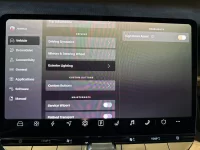
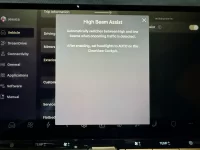
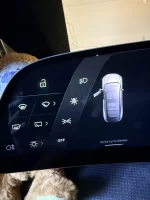
I just posted photos. Mine does the adaptive drive beam. Check the photos I posted and maybe that will help.Thanks for the photo. I did figure this out per my earlier post. Adaptive drive beam is OK in the US and it is described in my supposedly vehicle-specific manual as well as the US spec sheet, so I suspect it is just not released yet. Can't get an answer one way or another from Lucid.

- Joined
- Nov 11, 2024
- Messages
- 139
- Reaction score
- 241
- Cars
- Gravity GT
My understanding is that there are two high beam related features. One is High Beam Assist (the pics posted above) - this just detects headlights or other lights and turns it into a low beam and then turns back into High Beam when the lights pass. The feature that was originally mentioned is that even when it detects a car incoming, it can keep in high beam and only turn low beam for the portion of the headlights that are landing on that car. Afaict, the latter hasn't been enabled yet.
Guys, you are rfeferring to High Beam Assist, which simply switches to low beams when there is oncoming traffic. Adaptive Drive Beam is also known as matrix headlights. It switches off individual pixels to block the light for each specific oncoming vehicle while keeping the other pixels on high beams. A much more spohisticated and effective solution. It's part of the DD2 Premium package.
From the user guide:
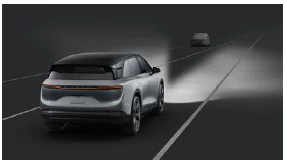
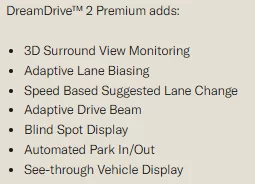
From the user guide:
The high beam lights are controlled
automatically, and the beam pattern is
adapted to the presence of oncoming
and preceding vehicles/road users. This
is so the driver can have maximum
lighting ahead on the road and not have
to manually turn the high beams on and
off when one or more vehicles enter
and exit the driving space where the
vehicle’s high beams could adversely
affect them.

- Joined
- Jun 2, 2025
- Messages
- 175
- Reaction score
- 259
- Cars
- 26 GGT/AG/Yosemite
In my experience with my R1S, adaptive headlights are very noticeable (in a good way) while you’re driving as they actively avoid illuminating oncoming cars. As far as I can tell, the Gravity doesn’t do this yet.Guys, you are rfeferring to High Beam Assist, which simply switches to low beams when there is oncoming traffic. Adaptive Drive Beam is also known as matrix headlights. It switches off individual pixels to block the light for each specific oncoming vehicle while keeping the other pixels on high beams. A much more spohisticated and effective solution. It's part of the DD2 Premium package.
From the user guide:
View attachment 33993
View attachment 33994
This graphic also reminds me that we don’t have the see-through vehicle display yet either.
- Joined
- May 5, 2025
- Messages
- 329
- Reaction score
- 485
- Location
- NorCal Bay Area
- Cars
- Lyriq, Gravity DE+GGT
- Gravity DE Number
- 114
- Referral Code
- MTJPLBDS
I believe these past few days mine has been doing this as I have noticed the high beam make a switch when an oncoming car came into view. Will pay more attention to this in the coming days to confirmIn my experience with my R1S, adaptive headlights are very noticeable (in a good way) while you’re driving as they actively avoid illuminating oncoming cars. As far as I can tell, the Gravity doesn’t do this yet.
This graphic also reminds me that we don’t have the see-through vehicle display yet either.
Very interesting. Thanks for the clarification.My understanding is that there are two high beam related features. One is High Beam Assist (the pics posted above) - this just detects headlights or other lights and turns it into a low beam and then turns back into High Beam when the lights pass. The feature that was originally mentioned is that even when it detects a car incoming, it can keep in high beam and only turn low beam for the portion of the headlights that are landing on that car. Afaict, the latter hasn't been enabled yet.