Tidal/Dolby Atmos

Saksak

Active Member

Verified Owner
Supporting Member
Joined
Nov 9, 2025
Messages
802
Reaction score
1,245
Cars
Model X, XC90, S4, LS460
Air DE Number
1
Gravity DE Number
160
Referral Code
34DTL9L0
Is there an easy way to find Dolby Atmos albums on Tidal for the Lucid Gravity? I’ve looked but on the Tidal app but it’s frustratingly hard.

I’m curious as to the sound difference compared to non-atmos albums and wondering if subscribing to Tidal is worth it.
 
The only way to locate it is in the Tidal app. They really did a poor job of it (Tidal) with the app. Only reason I am paying for the service is that the Dolby Atmos songs do sound absolutely amazing and no other apps in Gravity at this time support it.
 
Is there an easy way to find Dolby Atmos albums on Tidal for the Lucid Gravity? I’ve looked but on the Tidal app but it’s frustratingly hard.

I’m curious as to the sound difference compared to non-atmos albums and wondering if subscribing to Tidal is worth it.
Look for the symbol below next to the song. The quickest way is to look for them on your phone, save to a playlist and then play the playlist in the car.

1769228462302.webp
 
Is there an easy way to find Dolby Atmos albums on Tidal for the Lucid Gravity? I’ve looked but on the Tidal app but it’s frustratingly hard.

I’m curious as to the sound difference compared to non-atmos albums and wondering if subscribing to Tidal is worth it.
2-1/2 years later and this is still how I do it:
Post in thread 'Why does Tidal make it hard to find Dolby Atmos music' https://lucidowners.com/threads/why...rd-to-find-dolby-atmos-music.6311/post-149281
 
Thank you for the tips! Amazing that tidal makes it so hard. I’ll finally be able to experience Atmos in the Gravity. Summary of what is working:
I just type "Atmos" into the search bar and it pulls up songs. Then it starts to build playlists of only Atmos songs.
Finds albums with Atmos in the title. A good starting point for exploring - I enjoy discovering new titles and it’s been useful. However, it doesn’t find everything, as many albums/titles are not labeled.
Look for the symbol below next to the song. The quickest way is to look for them on your phone, save to a playlist and then play the playlist in the car.

View attachment 36288
I was wondering how to differentiate Atmos from non-Atmos! Now I know.
2-1/2 years later and this is still how I do it:
Post in thread 'Why does Tidal make it hard to find Dolby Atmos music' https://lucidowners.com/threads/why...rd-to-find-dolby-atmos-music.6311/post-149281
Still the best for finding Atmos versions for artists/titles that I know about.

Thanks @Alset2 @HC_79 @Neurio . I’ve been able to put together an Atmos playlist with 1k tracks that I can now explore. I wish Tidal had a general “quality” filter.
 
Thank you for the tips! Amazing that tidal makes it so hard. I’ll finally be able to experience Atmos in the Gravity. Summary of what is working:

Finds albums with Atmos in the title. A good starting point for exploring - I enjoy discovering new titles and it’s been useful. However, it doesn’t find everything, as many albums/titles are not labeled.

I was wondering how to differentiate Atmos from non-Atmos! Now I know.

Still the best for finding Atmos versions for artists/titles that I know about.

Thanks @Alset2 @HC_79 @Neurio . I’ve been able to put together an Atmos playlist with 1k tracks that I can now explore. I wish Tidal had a general “quality” filter.
Hmmm interesting.... when I search for simply "atmos" it will populate a play list of 100 songs from various artist. But I don't remember if it did that right away. It seems I remember it only pulled up The Doors and Fleetwood Mac (or something like that), but I have hundreds of songs now when I search "atmos"
But it would be nice if Tidal had a dedicated "Dolby Atmos" category
 
Hmmm interesting.... when I search for simply "atmos" it will populate a play list of 100 songs from various artist. But I don't remember if it did that right away. It seems I remember it only pulled up The Doors and Fleetwood Mac (or something like that), but I have hundreds of songs now when I search "atmos"
But it would be nice if Tidal had a dedicated "Dolby Atmos" category
They do. Click the search magnifying glass at the bottom of the app, then scroll down and look for Dolby Atmos. They have new releases and various playlists under that option:
AISelect_20260124_201822_Samsung capture.webp
 
They do. Click the search magnifying glass at the bottom of the app, then scroll down and look for Dolby Atmos. They have new releases and various playlists under that option:
View attachment 36326
Ahh nice!
Thank you for that

Is that the in car app?
 
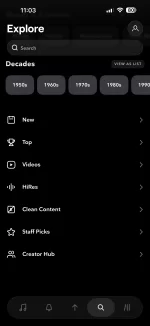
Huh weird. I don't see that Atmos option in search on the mobile app. I'm on Android so maybe that's the issue? Or did you have to enable it in settings or something?

1000005000.webp
 
Huh weird. I don't see that Atmos option in search on the mobile app. I'm on Android so maybe that's the issue? Or did you have to enable it in settings or something?

View attachment 36329
Same with me; this is (nearly) what I see. Is it device related? I have an iPhone 15 Pro Max with iOS 18.6.2. In the Tidal app settings (Audio & Playback), I had to enable Dolby Atmos but that didn’t make a difference.
 
Huh weird. I don't see that Atmos option in search on the mobile app. I'm on Android so maybe that's the issue? Or did you have to enable it in settings or something?

View attachment 36329
That's right, there is no Atmos filter in Tidal's Android Mobile app, nor in a browser with a Windows PC. I contacted their support line about it, and they said I should buy an iPhone.

Something to keep in mind if thinking of subscribing to Tidal.
 
Huh weird. I don't see that Atmos option in search on the mobile app. I'm on Android so maybe that's the issue? Or did you have to enable it in settings or something?

View attachment 36329
Not sure. I've got a Galaxy S23 Ultra, which is Atmos capable. I do have the Atmos options turned on on both the phone itself and through Tidal. I don't think I ever did anything special to see the Atmos section within the Tidal app.
 
Not sure. I've got a Galaxy S23 Ultra, which is Atmos capable. I do have the Atmos options turned on on both the phone itself and through Tidal. I don't think I ever did anything special to see the Atmos section within the Tidal app.
Maybe it's just on Google phones that Tidal decided to hide the Atmos filter.
 
Maybe it's just on Google phones that Tidal decided to hide the Atmos filter.
My iPhone doesn't have it either. And searching for the word Atmos only returns results that have that in the name.
 

Attachments

  • tidalsearch.webp
    tidalsearch.webp
    48.5 KB · Views: 98
My iPhone doesn't have it either. And searching for the word Atmos only returns results that have that in the name.
Wow. My iPhone shows the Atmos option…Tidal really has issues with their apps…
 
That’s odd, in my Tidal iOS app, I don’t have see the Dolby Atmos genre by default but if I search for “Atmos”, the very top of the search results gives me the option to pull up the Dolby Atmos genre. And that takes me to a dedicated page for Dolby Atmos content in Tidal.

This is on Tidal iOS app 2.176.1, build 8097

IMG_4018.webp


IMG_4019.webp
 
That’s odd, in my Tidal iOS app, I don’t have see the Dolby Atmos genre by default but if I search for “Atmos”, the very top of the search results gives me the option to pull up the Dolby Atmos genre. And that takes me to a dedicated page for Dolby Atmos content in Tidal.

This is on Tidal iOS app 2.176.1, build 8097

View attachment 36360

View attachment 36361
Great find! I can see it on my Pixel (Android) phone too.
 
That’s odd, in my Tidal iOS app, I don’t have see the Dolby Atmos genre by default but if I search for “Atmos”, the very top of the search results gives me the option to pull up the Dolby Atmos genre. And that takes me to a dedicated page for Dolby Atmos content in Tidal.

This is on Tidal iOS app 2.176.1, build 8097

View attachment 36360

View attachment 36361
Thank you! I see it now and it works great on iOS. I don’t know how I missed it in my search.
 
Back
Top