
I’ve been on 2.8.30 since March and haven’t seen an update since on my 2025 Air Touring. Looks like the navigation changes alone are worth the updates. Anyone else? I wonder if I need to call them to have the updates pushed out to my car?
You are using an out of date browser. It may not display this or other websites correctly.
You should upgrade or use an alternative browser.
You should upgrade or use an alternative browser.
Still on 2.8.30 on my Air Touring
- Thread starter nwills
- Start date

- Joined
- Mar 14, 2026
- Messages
- 372
- Reaction score
- 647
- Location
- Silicon Valley
- Cars
- Stellar DE-P
- Air DE Number
- 088
I would say definitely yes.I’ve been on 2.8.30 since March and haven’t seen an update since on my 2025 Air Touring. Looks like the navigation changes alone are worth the updates. Anyone else? I wonder if I need to call them to have the updates pushed out to my car?
Also, keep in touch with updates by making an account at lucidtracker.app created by one of our very talented forum members.
Do you have WiFi on? Maybe worth trying if not?
https://lucidowners.com/threads/air-software-version-2-10-0.16217/post-364759
https://lucidowners.com/threads/air-software-version-2-10-0.16217/post-364759

- Joined
- Aug 17, 2022
- Messages
- 261
- Reaction score
- 281
- Location
- Scottsdale
- Cars
- Lucid Air GT, Mach E
- Referral Code
- Q3IN007R
I just updated to 2.10.0 today. Customer support related that they are generally expecting all updates to be over WiFi - as was explained to me, it’s cheaper for them and allows them to push out faster. It’s the new way so turn it on but I would call them. Today’s phone call and connection was fast.

- Joined
- May 5, 2025
- Messages
- 50
- Reaction score
- 46
- Cars
- 2022 Lucid Air GT
I was stuck on 2.8.30 for a while. I decided to reset my Telematics Control Unit. As soon as I plugged it back in the next update immediately popped up on the screen for loading.I’ve been on 2.8.30 since March and haven’t seen an update since on my 2025 Air Touring. Looks like the navigation changes alone are worth the updates. Anyone else? I wonder if I need to call them to have the updates pushed out to my car?

- Joined
- Jan 1, 2025
- Messages
- 566
- Reaction score
- 678
- Location
- Philadelphia
- Cars
- '25 Lucid Air Touring
- Referral Code
- U8QZ9T7X
How'd you reset it? Pull a fuse or did you have to pull up some trim to get at the device?I was stuck on 2.8.30 for a while. I decided to reset my Telematics Control Unit. As soon as I plugged it back in the next update immediately popped up on the screen for loading.
- Joined
- May 5, 2025
- Messages
- 50
- Reaction score
- 46
- Cars
- 2022 Lucid Air GT
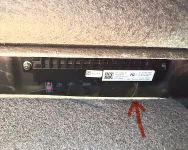
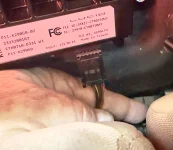
The TCU is located behind the right rear seat. Open the trunk and pull both handles to lower both seat backs. Pull away the black floor covering (velcro) on the back of the seat. Look down in the seam between the seat and the trunk floor, you’ll see it there. Black metal box with several cables. The cable on the far right with multiple colored wires is the one you’re looking to pull out then push back in. There is a lock tab at the top of the plug you need to push down. Space is tight and the angle make it difficult to do it with one hand. My technique. Place your left forearm along the seam and with your left hand hold the wires/plug between your thumb and index finger. With your right hand, place the finger nail of your index finger on the lock tab and push down. Now pull out the plug with your left hand. Leave it unplugged for a moment then plug it back in. It was this moment when I saw the next update come up on my screen. Good luck! Hope it works for you.
Attachments
- Joined
- Jan 1, 2025
- Messages
- 566
- Reaction score
- 678
- Location
- Philadelphia
- Cars
- '25 Lucid Air Touring
- Referral Code
- U8QZ9T7X
Good to know, thanks for the pics. Haven't had any need to mess with it but it's nice to know where it is.
Resetting the modem was a regular thing when I had a Polestar 2, but they stowed it in one of the pillars behind some plastic trim piece that would never go back on correctly. Fortunately (or maybe unfortunately) the equipment was so buggy they eventually wrote in a software reset procedure.
Resetting the modem was a regular thing when I had a Polestar 2, but they stowed it in one of the pillars behind some plastic trim piece that would never go back on correctly. Fortunately (or maybe unfortunately) the equipment was so buggy they eventually wrote in a software reset procedure.