
Lucid Gravity 3.4.0 software update

Had a successful update late this afternoon; took a bit longer than the time estimate, but it looks like all went well. I briefly opened the door after completion and checked it out, then left so it could do the recommended passive reboot. Looking forward to driving tomorrow.
 
First impressions. It’s a great update overall.

The new software has made a dramatic improvement to SSP. I could not stop listening to tracks in the car , it was noticeably more crisp and … immersive. Just wow. Best sound system I’ve heard.

The see through vehicle feature is very cool.

Screen UI responsiveness is WAY faster and almost instant switch to seat setting (which historically had lagged and even ignored me in past).

Key fob is just right now. Opens right as I approach and locks about 8-10 seconds after I walk about 10 feet from the car. Tested multiple times and very consistent.

Seat settings, HVAC all being retained. There was this ‘energy saver ‘ mode that is new - the green leaf. It asked me to exit it to change climate settings. Any idea what this is doing? Just saving juice? HVAC was quiet even after I turned off the energy saver, very stable.

One annoyance - I still cannot get Live View to show when this car is parked at my house. Rarely I’ve succeeded in getting it to display if I run off my phones WiFi. But not now and update didn’t help. Earlier today it worked perfectly while in Santa Cruz. Any ideas? Car is not charging or plugged in or occupied. 🤷🏽‍♂️ Live view stability was prominently advertised for the new update but it did not work for me at all.

I’ll do a longer drive tomorrow with it and report on alerts but overall, thrilled with the update!
 
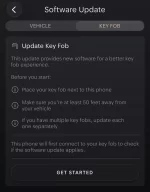
I have updated my key fob multiple times over the past few days, and as soon as I go back to check for new updates, the app shows another key fob update is available. It’s the same update. Is this a glitch or normal behavior? I’m wondering if this is preventing me from being shown the new vehicle software update. Eager to try it.


IMG_4861.webp
 

Attachments

  • IMG_4862.webp
    IMG_4862.webp
    60 KB · Views: 110
I have updated my key fob multiple times over the past few days, and as soon as I go back to check for new updates, the app shows another key fob update is available. It’s the same update. Is this a glitch or normal behavior? I’m wondering if this is preventing me from being shown the new vehicle software update. Eager to try it.

The app doesn't know what software version is on the key fob until it connects and tries to update. The screen you are seeing that says update key fob is the default page and will always show whether you have updated your key fob already or not - it does not mean there is another update available for the key fob. You can ignore that page until Lucid says there is another software update for the key fob. I agree that it is a bit confusing. It should be more clear when there is a new key fob update to install based on your install history.
 
Got the 3.4.1 update ready notice yesterday evening. I took a 1.5 hour trip yesterday evening and, just before I got home, I got the pop up saying that the update was ready to install. Once the 3.4 update was announced, I put my GGT onto WiFi at home in hopes of downloading/getting the update faster. I was monitoring the upload and download WiFi bandwidth used by my car and it did not download the update while connected to WiFi. Instead, the updated downloaded over cellular while I was driving around last night. It seems weird that it would download over cellular instead of WiFi. The timing may be pure coincidence as Lucid may have pushed the update to my car when I left home and, had I stayed at home, it would have downloaded at the same time over WiFi. I have no way to test it. Has anyone monitored their network usage and can confirm that the update downloaded over WiFi?

The install took about 1.5 hours. The first 3% took about 30 minutes and it got to about 25% after about an hour. I was concerned it was going to take a very long time to install but then the progress jumped up and it finished in the expected amount of time. I updated my key fob, replaced the battery, and did the power cycle. I look forward to testing it out today.
 
The app doesn't know what software version is on the key fob until it connects and tries to update. The screen you are seeing that says update key fob is the default page and will always show whether you have updated your key fob already or not - it does not mean there is another update available for the key fob. You can ignore that page until Lucid says there is another software update for the key fob. I agree that it is a bit confusing. It should be more clear when there is a new key fob update to install based on your install history.
Seems your key fob is up to date. It’s simply asking if you have another (2nd) key fob to update. Maybe?
 
The app doesn't know what software version is on the key fob until it connects and tries to update. The screen you are seeing that says update key fob is the default page and will always show whether you have updated your key fob already or not - it does not mean there is another update available for the key fob. You can ignore that page until Lucid says there is another software update for the key fob. I agree that it is a bit confusing. It should be more clear when there is a new key fob update to install based on your install history.
Seems your key fob is up to date. It’s simply asking if you have another (2nd) key fob to update. Maybe ?
 
IMG_1328.webp


Anyone else having an issue updating the fob. I’ve toggled the Bluetooth multiple times and also restarted the app. No dice.


IMG_1329.webp
IMG_1330.webp
 
Maybe try powering off the phone, pulling the battery from the key fob, restarting the phone, reinstalling the key fob battery, then try again.
 
I get that same alert every time I update my fob. Rebooted phone. App. Removed fob battery and replaced. Tried over multiple days. Always get that alert but it still updates, apparently.
 
Seems your key fob is up to date. It’s simply asking if you have another (2nd) key fob to update. Maybe ?
I didn’t receive a second fob :( but I’ve tried clicking through to update as if I do and it’s the same cycle of screens / prompts.
 
Maybe try powering off the phone, pulling the battery from the key fob, restarting the phone, reinstalling the key fob battery, then try again.

tried that but did not work. will take it to the SC to update.

The first fob update at 3.2.0 happened without any issues FWIW.
 
I walked far down the street (it’s 9 degrees outside), pulled the battery out, and tried again. This time it found the key fob, but said it was already updated. Yet, the app still shows an update is available, so I’m not convinced. I walked home, took the car out for a little ride, restarted the phone and app, and same thing: it shows key fob update is available, but when I step through it it says it’s already updated. Thoughts?
It suspect the fob update ALWAYS shows as available, because people can have more than one fob. It wouldn't know if the fob is already updated unless it connects to that specific one via the update process first.
 
I don't think it's close to that. Lucid was targeting 18k total sales in 2025, which includes Air and Gravity. Thru Oct, Gravity was still in the hundreds. It ramped up the last 3 months but I would guess that we're probably in the "few thousand" range for Gravity deliveries by now.
 
tried that but did not work. will take it to the SC to update.

The first fob update at 3.2.0 happened without any issues FWIW.
I had to move my first, updated fob to a whole other part of the house in a faraday pouch, then the second fob way away from the car and it finally recognized the second fob and did an (albeit slower than the first fob) update.
 
Back
Top