Hey, Gravity Owners! Key Fob Firmware 2.35.13 Now Available

marqie

(they/them)
LUCID Team Member

LUCID Official
Joined
Nov 22, 2021
Messages
957
Reaction score
3,930
Location
Newark, CA
We’ve improved the reliability and responsiveness of the Gravity key fob with key fob firmware update 2.35.13, now available through the Lucid mobile app.

With this update, your key fob now automatically recovers if it becomes unresponsive. You can also perform a reset manually by holding the lock button for 5 seconds.

To obtain the update, be sure to have the latest Lucid mobile app installed (version 2.17.0 or higher). Then follow the prompt on the Lucid mobile app home page indicating that a firmware update is available.
 
Thanks for the info. Knock on wood, my key fob has been flawless since 3.6.0 so with that OTA and now this it might be finally the time we can say the key fob issues are resolved once and for all 🙂🎉

Now…… PAAK please 😛
 
Waiting for the folks to post up who have still had problems on 3.6 to see if this has helped resolve them…
 
Just updated my main keyfob... going to hold off a bit before I update the second one just in case the new firmware has any issues.
 
Mine's definitely more responsive after the update. If I approach the car from the back, it works every time. If approach from the driver's side, I still have to wait once every few times, but the wait time is shorter now. Should I replace the battery?
 
Mine's definitely more responsive after the update. If I approach the car from the back, it works every time. If approach from the driver's side, I still have to wait once every few times, but the wait time is shorter now. Should I replace the battery?
Couldn't hurt.
Also, if you find yourself waiting for the door handle to pop out, wake the car up by pushing it in.
 
I took delivery of my gravity on June 23rd. Everything with the key fob was great. No issues. I guess the only thing was I could not update to the latest version just now with my Android but I was able to with my iPhone.
 
You can also perform a reset manually by holding the lock button for 5 seconds.
Got a chance to test this as my fob became unresponsive for maybe the third time in 7 months. Nice idea but I think maybe they didn't think this one through.

So I'm showing off my car to relatives in town, we're standing outside the car and the fob is not doing anything. Slightly embarrassing but no worries I'll just press the lock button for 5 seconds. Lo and behold the car comes to life but then sounds the car alarm! While fidgeting around for the unlock button to stop the alarm and unlock the door I'm wondering why didn't they put the reset on the unlock button?
 
Lo and behold the car comes to life but then sounds the car alarm!
IMG_4987.gif
 
I was very happy before the update now when I lock the car using the keyfob the horn keep beeping until I press it again.
Now I have to walk across the room from the garage leave the keyfob or the car will not turn off.
Like I said I was happy with the keyfob before the update!!
"O" by the way when I walk away from the car their is no horn sound to tell me the car has lock. That sucks!
 
Usually the horn beeps when I'm locking it but the frunk or back hatch isn't fully closed all the way yet

If I press the lock button repeatedly I get an audible chirp

The way yours is behaving sounds like you need to remove the battery for a few seconds or replace it ....OR call Service
 
It doesn't make a noise with the auto lock enabled, only if you walk far enough away for the lock to activate before the trunk or frunk are closed.

Personally I prefer the quiet method or having an option ideally. And hopefully if they do it's the chirp you get when using the fob instead of the horn honking like it does if the trunk/frunk are open still.
 
I have experienced the surprising behavior of the horn sounding when pressing lock on the fob, with the frunk and trunk visibly and obviously closed. I did a quick walk around the car to check if any doors had been left open - and none were - but the rear passenger side window was slightly open, like the window didn’t go back up after the door was shut. Perhaps the car thought the door was still open.

Bug or not, the horn sounding led me to fix an insecure situation by opening and closing the door so I’d consider the horn sounding to be a feature in this case.
 
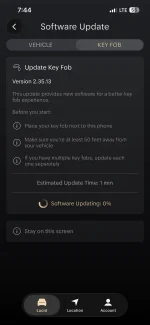
Anyone else having trouble or have protips for installing this fob update? The app shows “Software Updating: 0%” and stays stuck there. I’ve been trying for the last week or so and it seems to connect to the fob ok, but always stalls here.

Sometimes it times out with a message like “if the problem persists, contact customer care” so of course I’m here first 🙂

The last fob update was super quick and worked with no problems for me. I also have zero problems with unlocking etc. since 3.6, so I’m fine skipping this, but the app keeps showing the update is available.
 

Attachments

  • IMG_4294.webp
    IMG_4294.webp
    70.4 KB · Views: 40
Anyone else having trouble or have protips for installing this fob update? The app shows “Software Updating: 0%” and stays stuck there. I’ve been trying for the last week or so and it seems to connect to the fob ok, but always stalls here.

Sometimes it times out with a message like “if the problem persists, contact customer care” so of course I’m here first 🙂

The last fob update was super quick and worked with no problems for me. I also have zero problems with unlocking etc. since 3.6, so I’m fine skipping this, but the app keeps showing the update is available.
I had the same problem. For me at least, rebooting my phone fixed it. It should still start very quickly if it’s actually going to work.
 
If not, a fresh battery helps
I had to replace my fob battery after exactly one month of ownership. Hoping these updates also extend battery life, and I got a 10-pack of CR2450s which I hope last over a year haha
 
I had to replace my fob battery after exactly one month of ownership. Hoping these updates also extend battery life, and I got a 10-pack of CR2450s which I hope last over a year haha
Important battery information:

For optimal key fob performance, the only battery we currently recommend for the Lucid Gravity is a CR2450 Panasonic Lithium battery without bitter coating. This is the only battery that meets our internal testing requirements for reliable operation.

Using the recommended battery and keeping your key fob software up to date helps ensure the best possible experience with your Lucid Gravity.

If you have any questions or need assistance, our Customer Care team is happy to help.

Thank you,
Lucid Customer Care"
Lucid recommends Panasonic batteries only.
 
Back
Top