
Gravity Key Fob Version 2.35.13

mishal

Member

Verified Owner
Joined
Aug 16, 2026
Messages
22
Reaction score
19
Location
Dammam, Saudi Arabia
Cars
Gravity Touring
Hello,

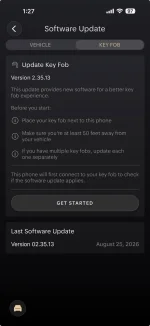
So I've updated my Key Fob to version 2.35.13 like 10 times already and the notification still shows that I need to update it. I have been on the latest version for almost 2 weeks now and it's still there. I tried removing the battery and I also tried pressing on the lock button for 5 seconds to reset the key and nothing works.

Any idea? Or should I simply just ignore the message?
 

Attachments
  • key fob update .webp
    key fob update .webp
    38 KB · Views: 27
Last edited:
If you go into the Lucid phone app and tap on [Software Update] and then [Key Fob], you'll get the screen shot that you posted. It will always offer you the option to [Get Started] there, even if you've already updated. If you are on the main screen of the phone app and there's a special entry there that says there is a keyfob update is available, that's an error. I think this is something they just started doing with this last release. It should have gone away after you tapped on it and did the update. If it hasn't, doing an uninstall/reinstall of the phone app might make it go away?
 
I've actually seen the Key Fob update available on the main screen after updating my Gravity to version 3.6.4, and I went ahead and updated the key fob as you can see in my previous screenshot. After the update the notification disappeared from the main page, but it is still shown on the key fob update section (as in the screenshot above).

I have also uninstalled/reinstalled the app and nothing changed.
 
Yes, if you click through to [Software Update] and then [Key Fob], you'll still see that screen. It doesn't know what version of the keyfob firmware you are running until you tap [Get Started] and it actually tries to connect to it. When it reads the firmware version from the keyfob it should tell you that it's running the same version as what you are trying to install. If so, you are up to date and can stop reinstalling it. If not, then it sounds like the firmware update is failing and you'd need to contact service. The ability to push the latest firmware update to a keyfob remains as an option in the app. That's normal, as some users have a second keyfob to update or whatever.
 
I understand, but why doesn't that apply to the vehicle software update? Where it shows "Your software is up to date". Maybe it's an app glitch, I am not sure.
 
Your car has a persistent connection to Lucid via wifi or the built in cell service. Your phone app can read the software version on it at any time. The keyfob communication is via NFC (very short range). It only attempts to read data from one when you confirm a keyfob is nearby and press the [Get Started] button.
 
Last edited:
Thanks for letting me know.

Glad to see it’s a common issue and hopefully Lucid team will resolve it.
 
Thanks for letting me know.

Glad to see it’s a common issue and hopefully Lucid team will resolve it.
It’s not an issue that can be solved - working as intended. Your phone does not know what version of fob firmware is installed until it starts communicating with it. Communication only happens when you try to update.
 
It’s not an issue that can be solved - working as intended. Your phone does not know what version of fob firmware is installed until it starts communicating with it. Communication only happens when you try to update.
Gotcha!

Thank you for explaining it. Much appreciated.
 
I found that the notification disappears if you reset the vehicle.
or - at least it disappeared right after I did a reset.
Might have been just luck. Hard to prove once it disappears from the app.
Best - Ed
 
Back
Top