Do you keep drowsy/distracted driver alerts on?

Do you keep drowsy/distracted driver alerts on?


  • Total voters
    39

allenmhc

Active Member

Joined
Jul 31, 2025
Messages
229
Reaction score
445
Location
Bay Area, CA
Cars
Gravity DE, Model 3
Gravity DE Number
266
I'm curious how many people keep their interior driver alerts on.

This is just a hunch. So in the Long Goodbye thread, there's confirmation from Emad that one of their issues is that the Dream Edition Gravities are so specced out that they're running into hardware constraints, i.e., the onboard computer can't keep up with all the features. Now, I have a DE as well, but I haven't really had that many bugs since 3.5.1—but I've also turned all the driver alerts off, and I rarely use ADAS. I can imagine that these two features alone take up a bunch of compute overhead; the driver alert system heats up the steering wheel camera from all the processing (confirmed when I had it on, and multiple reviewers remarked on this), and we also know from Tesla's hardware iterations that better autonomous driving capabilities require more advanced hardware, to run the AI models for image detection + decision-making.

So it's a bit of a long shot, but I'm wondering whether just keeping the alerts off actually keeps the car more glitch-free.
 
I do not have the Dream Edition but keep the driver alerts on by default and moderately use the ADAS on a GT. For me, software does not have generalized moderate or large glitches currently.
 
Last edited:
Not answering the poll since I'm not in a Gravity, but in my Air, I've turned off Distracted Driver Warning, but I've kept on Drowsy Driver Warning, as it at least doesn't spam me with false warnings. As a matter of fact, I tried to fake it into alerting and I couldn't, but then one night it went off and I really was pretty drowsy, so that feature does seem to work as advertised!

Before even the recent revelations about possible CPU load, I've tried to only let features I care about enabled. That's based on 30+ years of experience working in IT.

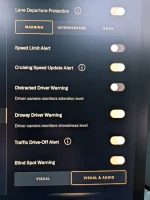
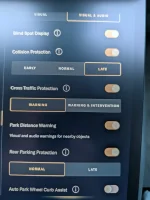
For reference, I've attached the settings I typically set in DreamDrive. My car has been fairly stable and reliable with these settings. I only have to do a reboot maybe once a month at most, aside from the ones I do after every update as a just-in-case.
 

Attachments

  • PXL_20260514_133558922.webp
    PXL_20260514_133558922.webp
    409.9 KB · Views: 71
  • PXL_20260514_133611727.webp
    PXL_20260514_133611727.webp
    388.3 KB · Views: 72
Not answering the poll because I turn off the distracted driver alert (annoying) but left the drowsy driver alert on (it has never prompted an alert to date)
 
I'm curious how many people keep their interior driver alerts on.
Sorry to sound like a complainer but I really hate polls that don't include a spot for the user to put in what the poller never thought about. It really makes the whole point of the poll useless and the person filling in the pole feels as if their lying so doesn't complete the pole.
 
Sorry to sound like a complainer but I really hate polls that don't include a spot for the user to put in what the poller never thought about. It really makes the whole point of the poll useless and the person filling in the pole feels as if their lying so doesn't complete the pole.
I mean, I'm sorry? This is a known problem with polling in general: you can't guarantee that everyone will respond to a poll (e.g., election polls), so you try to project from a representative sample, acknowledging that the sample itself has selection bias by definition. I tried to be completely transparent about why I'm asking this question, which is more than what most polls do.
 
The dwell time is too short on the distracted driver alert.
 
Hello! I also found that turning off the driver attention alert and the drowsy driver features (for ALL profiles), gets the key fob to start working reliably.

Remember to do it for all the profiles as if any of the profiles have it on, there is something still running by the gravity computer that seem to just crash everything and getting the key fob detection issues (even the card didn't want to open the car) if the profile with these settings on was loaded recently.

I had it off with my profile, and my wife was gone for multiple weeks and things worked great. Once my wife was back the gliches (in particular key fob detection, starting the car, responsiveness) started to happen every time. I turned it off for her profile too and everything got better, but most of all the key fob detection.

Hope it helps
 
Hello! I also found that turning off the driver attention alert and the drowsy driver features (for ALL profiles), gets the key fob to start working reliably.

Remember to do it for all the profiles as if any of the profiles have it on, there is something still running by the gravity computer that seem to just crash everything and getting the key fob detection issues (even the card didn't want to open the car) if the profile with these settings on was loaded recently.

I had it off with my profile, and my wife was gone for multiple weeks and things worked great. Once my wife was back the gliches (in particular key fob detection, starting the car, responsiveness) started to happen every time. I turned it off for her profile too and everything got better, but most of all the key fob detection.

Hope it helps
Hmm, that's real interesting, but lines up!
 
Hmm, that's real interesting, but lines up!
Honestly, as I said in the other thread he made that claim in I'm highly doubtful that is what fixed it. I have all of those features on and have never had fob issues.
 
Take my vote with a couple of grains of salt. I voted before I realized it was in a Gravity thread but I have an Air. And I have them off because of the location of the camera being behind the steering wheel
 
Hello! I also found that turning off the driver attention alert and the drowsy driver features (for ALL profiles), gets the key fob to start working reliably.

Remember to do it for all the profiles as if any of the profiles have it on, there is something still running by the gravity computer that seem to just crash everything and getting the key fob detection issues (even the card didn't want to open the car) if the profile with these settings on was loaded recently.

I had it off with my profile, and my wife was gone for multiple weeks and things worked great. Once my wife was back the gliches (in particular key fob detection, starting the car, responsiveness) started to happen every time. I turned it off for her profile too and everything got better, but most of all the key fob detection.

Hope it helps
This is awesome, I'm seeing the same thing!
 
Back
Top