
Cool, is it based on your configuration in the car or how the car was shipped? I have 19s on my GT right now but it shipped with 21s.Yes, same with mine. During update, it says the current software is 3.2.0, but it shows as 2.11.0 once the installation is finished.
The car on the pilot panel now has my correct color and wheels! Very exciting.
You are using an out of date browser. It may not display this or other websites correctly.
You should upgrade or use an alternative browser.
You should upgrade or use an alternative browser.
3.0 on Air
- Thread starter nashvillelucid
- Start date
- Joined
- Aug 22, 2024
- Messages
- 59
- Reaction score
- 45
- Cars
- Air Pure
Just got the push notification myself for 2.11. Excited to see this when it's finished with the update.

- Joined
- Aug 23, 2025
- Messages
- 496
- Reaction score
- 277
- Cars
- Lucid Air Grand Touring
Hmm not necessarily as it could simply be a portion of what 3.x on the air will be but not all there yetIt just finished...shows 2.11.0. That was weird!


- Joined
- Nov 18, 2021
- Messages
- 282
- Reaction score
- 298
- Location
- New Smyrna Beach, FL
- Cars
- Lucid AGT, Z06 Corvette
- Referral Code
- ERLT5FS6
My car is still on the original 21-inch wheels, and that's what it shows.Cool, is it based on your configuration in the car or how the car was shipped? I have 19s on my GT right now but it shipped with 21s.


- Joined
- Aug 12, 2022
- Messages
- 1,714
- Reaction score
- 1,660
- Location
- Buffalo, NY
- Cars
- Lucid Air Touring
- Referral Code
- BJ2URGEK
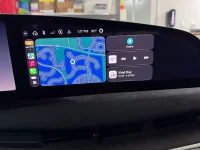
Thank you for posting all of this. In the picture you posted of your Sirius music on the pilot panel and right cockpit display, are you using AA or Carplay? Or is that the native Sirius app in the car? I'm asking because in the release notes, it says AA and Carplay will use the entire right cockpit display. But it doesn't appear to do that in your picture?Pics of updated look and layout
- Joined
- Aug 12, 2022
- Messages
- 1,714
- Reaction score
- 1,660
- Location
- Buffalo, NY
- Cars
- Lucid Air Touring
- Referral Code
- BJ2URGEK
You can disregard that question. I just saw the AA image on the picture. Wonder why it's not using the whole screenThank you for posting all of this. In the picture you posted of your Sirius music on the pilot panel and right cockpit display, are you using AA or Carplay? Or is that the native Sirius app in the car? I'm asking because in the release notes, it says AA and Carplay will use the entire right cockpit display. But it doesn't appear to do that in your picture?

- Joined
- Aug 11, 2026
- Messages
- 12
- Reaction score
- 67
- Cars
- Lucid Air GT
I believe that picture was taken while using Android Auto. And you are correct, its did not seem to appear fully on the right cockpit screen like I thought it would.Thank you for posting all of this. In the picture you posted of your Sirius music on the pilot panel and right cockpit display, are you using AA or Carplay? Or is that the native Sirius app in the car? I'm asking because in the release notes, it says AA and Carplay will use the entire right cockpit display. But it doesn't appear to do that in your picture?
- Joined
- Nov 18, 2021
- Messages
- 282
- Reaction score
- 298
- Location
- New Smyrna Beach, FL
- Cars
- Lucid AGT, Z06 Corvette
- Referral Code
- ERLT5FS6
To me, CarPlay looks to be about the same size as it used to be.I believe that picture was taken while using Android Auto. And you are correct, its did not seem to appear fully on the right cockpit screen like I thought it would.
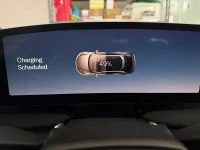
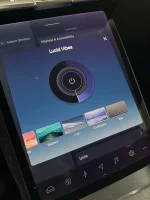
Also, the background on the Cockpit Panel (in front of the driver) seems much brighter than before. I think you used to be able to dim the background using the "wheel" in the Lucid Vibes setting, but now this doesn't appear to work. Spinning the wheel brighter or dimmer has no effect.
Attachments

- Joined
- Aug 17, 2022
- Messages
- 1,850
- Reaction score
- 1,797
- Location
- Harrisburg, PA
- Cars
- Touring ZR/SC/21/SSP/DDP
- Referral Code
- 2BFU7LV3
I haven't been able to get AA to fill the entire screen but it's certainly larger than it was.You can disregard that question. I just saw the AA image on the picture. Wonder why it's not using the whole screen

- Joined
- Aug 18, 2020
- Messages
- 1,425
- Reaction score
- 1,168
- Location
- Tucson, AZ
- Cars
- LCID DER,GGT TSLA X,CT
- Air DE Number
- 153
- Referral Code
- 0M97RTIO
That's because they decided to move the display over (like it currently is under "UX 2") and leave a gap on the left side of the right cockpit. The reason being that many people complained that they could not reach the Home, Navigation, Music, etc controls that were all the way on the right. So they put them as a vertical bar on the left and also moved the display over so that those controls would not be obstructed by the steering wheel.To me, CarPlay looks to be about the same size as it used to be.
I think they could at least move the controls back to the right and gain a bit a screen real estate. Ideally, they should use ALL of the gap area and let people move their head back and forth to see around the steering wheel - muscle memory will take over fast. Also, since my arms are longer than the average bear, I don't mind reaching all the way to the right of the cockpit to control things.


- Joined
- Apr 9, 2024
- Messages
- 278
- Reaction score
- 466
- Location
- San Diego, CA
- Cars
- Air Touring, Model Y AWD
- Referral Code
- Z6C15AB2
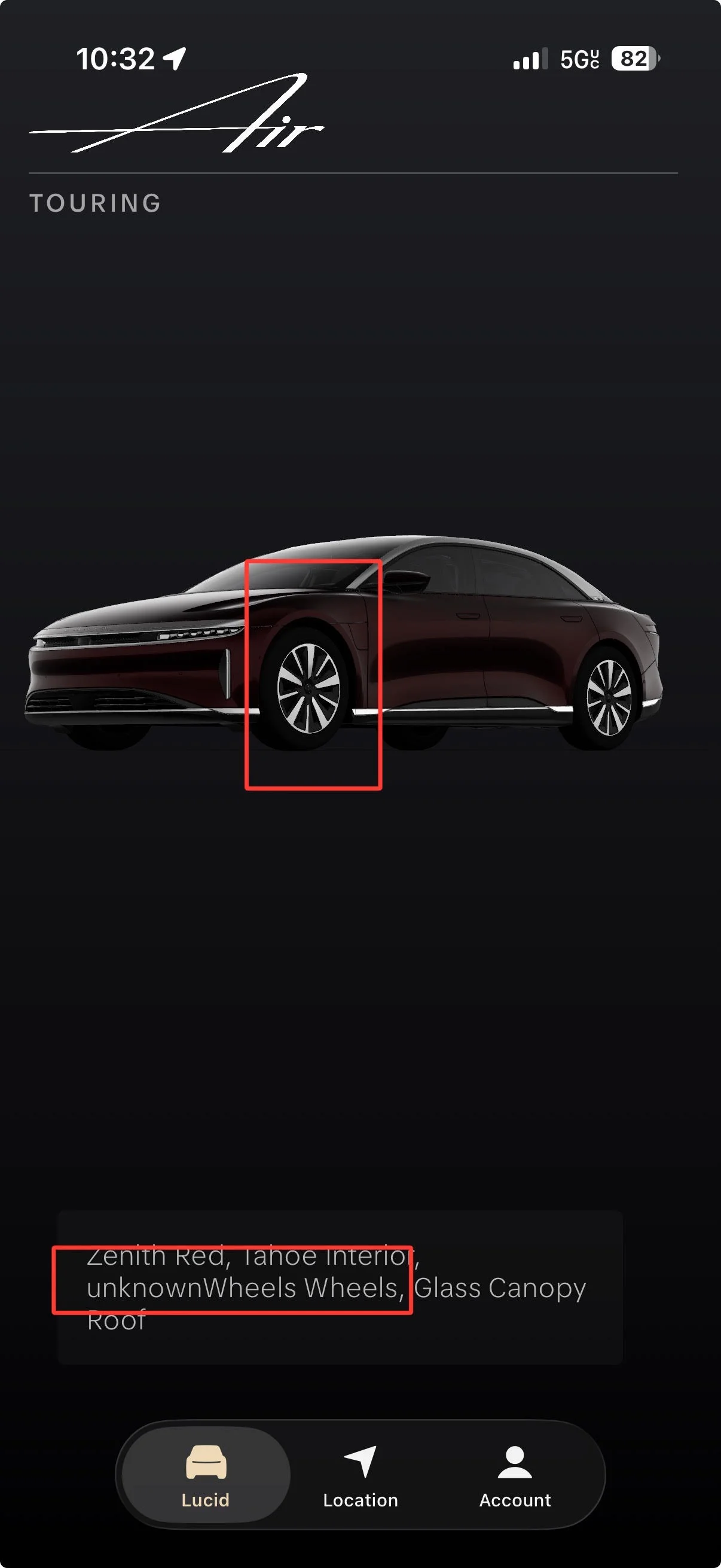
Anyone with Aeronaut wheels got the update?
Does the pilot screen show the correct Aeronaut wheels or the wrong Aero Range wheels like the mobile app does?
I sent this glitch and the below screenshot to the SW Feedback email address 6 months ago but it's never been addressed.
Does the pilot screen show the correct Aeronaut wheels or the wrong Aero Range wheels like the mobile app does?
I sent this glitch and the below screenshot to the SW Feedback email address 6 months ago but it's never been addressed.
- Joined
- Jun 14, 2025
- Messages
- 155
- Reaction score
- 191
- Location
- Charleston, SC
- Cars
- 2025 Lucid Air Pure
- Referral Code
- Z24URLI6
I think full screen is just supposed to be the map, when it is maximized. Someone needs to maximize Google maps in AA without those other app tiles and see if it covers the whole screen, like the native Lucid map does.You can disregard that question. I just saw the AA image on the picture. Wonder why it's not using the whole screen
- Joined
- Aug 17, 2022
- Messages
- 1,850
- Reaction score
- 1,797
- Location
- Harrisburg, PA
- Cars
- Touring ZR/SC/21/SSP/DDP
- Referral Code
- 2BFU7LV3
It doesn't even in just map mode. It's longer and wider for sure but still stops at the furthermost curve leaving unused real estate still.I think full screen is just supposed to be the map, when it is maximized. Someone needs to maximize Google maps in AA without those other app tiles and see if it covers the whole screen, like the native Lucid map does.
- Joined
- Jun 14, 2025
- Messages
- 155
- Reaction score
- 191
- Location
- Charleston, SC
- Cars
- 2025 Lucid Air Pure
- Referral Code
- Z24URLI6
Oh I see, it looks like they slid over to the left side and elimininated the Lucid Home/Nav/Music/Phone buttonsIt doesn't even in just map mode. It's longer and wider for sure but still stops at the furthermost curve leaving unused real estate still.

- Joined
- Mar 24, 2026
- Messages
- 90
- Reaction score
- 125
- Location
- San Francisco Bay Area
- Cars
- Lucid Air Pure 2026
Been using it for a day now. Very smooth. Regarding CarPlay and Android Auto, the screens are rectangular because Apple and Google make them that way. It can’t fill up the entire screen. But it certainly fills up more of it then did before.