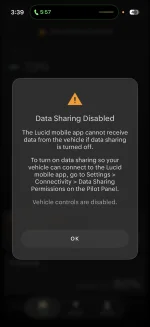
Data Sharing Disabled

mike1121

Active Member

Verified Owner
Joined
May 27, 2026
Messages
336
Reaction score
449
Location
Southern CA
Cars
Gravity Grand Touring
Referral Code
6298AY75
Any idea how to clear this app issue? Just picked up my GGT yesterday and this issue has persisted. Called customer service, called my service center. I’m pretty sure it’s just a server error on Lucid’s end. I’ve ensured the appropriate options are turned on in the car. Uninstall/reinstall app, deep sleep cycle overnight, etc.
Thanks all
 

Attachments

  • IMG_2823.webp
    IMG_2823.webp
    63.7 KB · Views: 77
Any idea how to clear this app issue? Just picked up my GGT yesterday and this issue has persisted. Called customer service, called my service center. I’m pretty sure it’s just a server error on Lucid’s end. I’ve ensured the appropriate options are turned on in the car. Uninstall/reinstall app, deep sleep cycle overnight, etc.
Thanks all
you have to activate data sharing in settings menu. From the middle screen go to Settings / Connectivity / Data Sharing Permissions (I think) and make sure the permissions are allowed.
 
Appreciate it, I have verified that’s turned on. What’s odd is that the notification pops up on my phone when I turn data sharing off, as well as when the vehicle is charging etc.
 
Do you have WiFi on or off in the Gravity? I’ve seen connectivity issues between the phone app and the Gravity in old software versions with WiFi on. Try the following in the order listed:
  1. Turn off WiFi and Bluetooth phone connection in the Gravity.
  2. Ensure cell signal strength is strong in your area for the Gravity (Gravity is AT&T which may be different from your phone).
  3. Turn off Data Sharing in the Gravity.
  4. Uninstall the phone App.
  5. Reset your phone.
  6. Hard reboot the Gravity (hold down brake, X, Mic for 30 seconds getting double chime, not the 10 second single chime soft reset).
  7. Reinstall phone App with the latest version and log in.
  8. Turn on Data Sharing in the Gravity.
If that doesn’t work, repeat step 4-7 (Data Sharing is enabled before reboot).

This is just a guess to reinitialize everything to a pristine state before the App/Gravity tries to initiate the connection protocol. If that doesn’t work, scheduling a service visit is the only thing I can think of.
 
Do you have WiFi on or off in the Gravity? I’ve seen connectivity issues between the phone app and the Gravity in old software versions with WiFi on. Try the following in the order listed:
  1. Turn off WiFi and Bluetooth phone connection in the Gravity.
  2. Ensure cell signal strength is strong in your area for the Gravity (Gravity is AT&T which may be different from your phone).
  3. Turn off Data Sharing in the Gravity.
  4. Uninstall the phone App.
  5. Reset your phone.
  6. Hard reboot the Gravity (hold down brake, X, Mic for 30 seconds getting double chime, not the 10 second single chime soft reset).
  7. Reinstall phone App with the latest version and log in.
  8. Turn on Data Sharing in the Gravity.
If that doesn’t work, repeat step 4-7 (Data Sharing is enabled before reboot).

This is just a guess to reinitialize everything to a pristine state before the App/Gravity tries to initiate the connection protocol. If that doesn’t work, scheduling a service visit is the only thing I can think of.
Thank you for such a detailed response! Unfortunately this did not work. I have let my delivery advisor in Costa Mesa know, hopefully they can get it resolved. Vehicles fantastic aside from this little glitch.
 
If anyone comes across this thread having the same issue I received an update from customer support this morning:

“Still no update on the data sharing issue but good/bad news you aren't the only one experiencing this! So we definitely have something bigger going on here. Movement is being made each day as they figure out what is going on.”

So if you are experiencing app connection issues, it may all be related.

Customer support has been really great keeping me informed and following up with me. Never left me hanging. I really appreciate that!
 
Back
Top