Efficiency meter and navigation SOC demystified

Saksak

Active Member

Verified Owner
Supporting Member
Joined
Nov 9, 2025
Messages
825
Reaction score
1,280
Cars
Model X, XC90, S4, LS460
Air DE Number
1
Gravity DE Number
160
Referral Code
34DTL9L0
One of the great things about the Gravity’s built-in navigation is the accuracy of the predicted SOC (state of charge) on arrival - usually within a percent. This assumes conditions don’t change much, such as driving style, weather, temperature, etc.

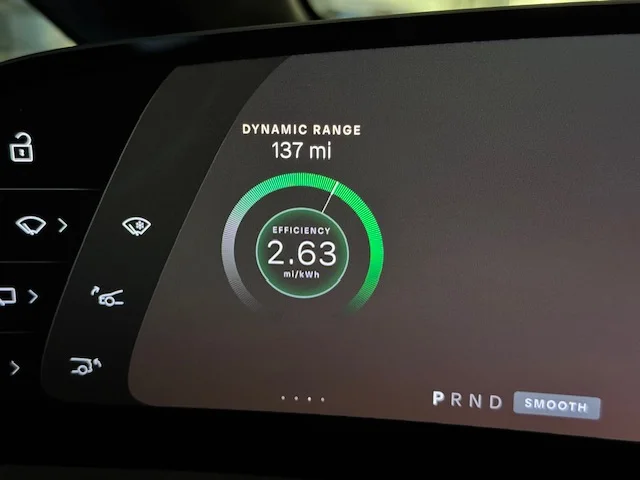
One of the mysteries is the efficiency meter. Is the dynamic range shown accurate? Is the efficiency (mi/kWh) useful? To answer this question, take a look at these graphs and data:
IMG_1535.webp
IMG_1537.webp

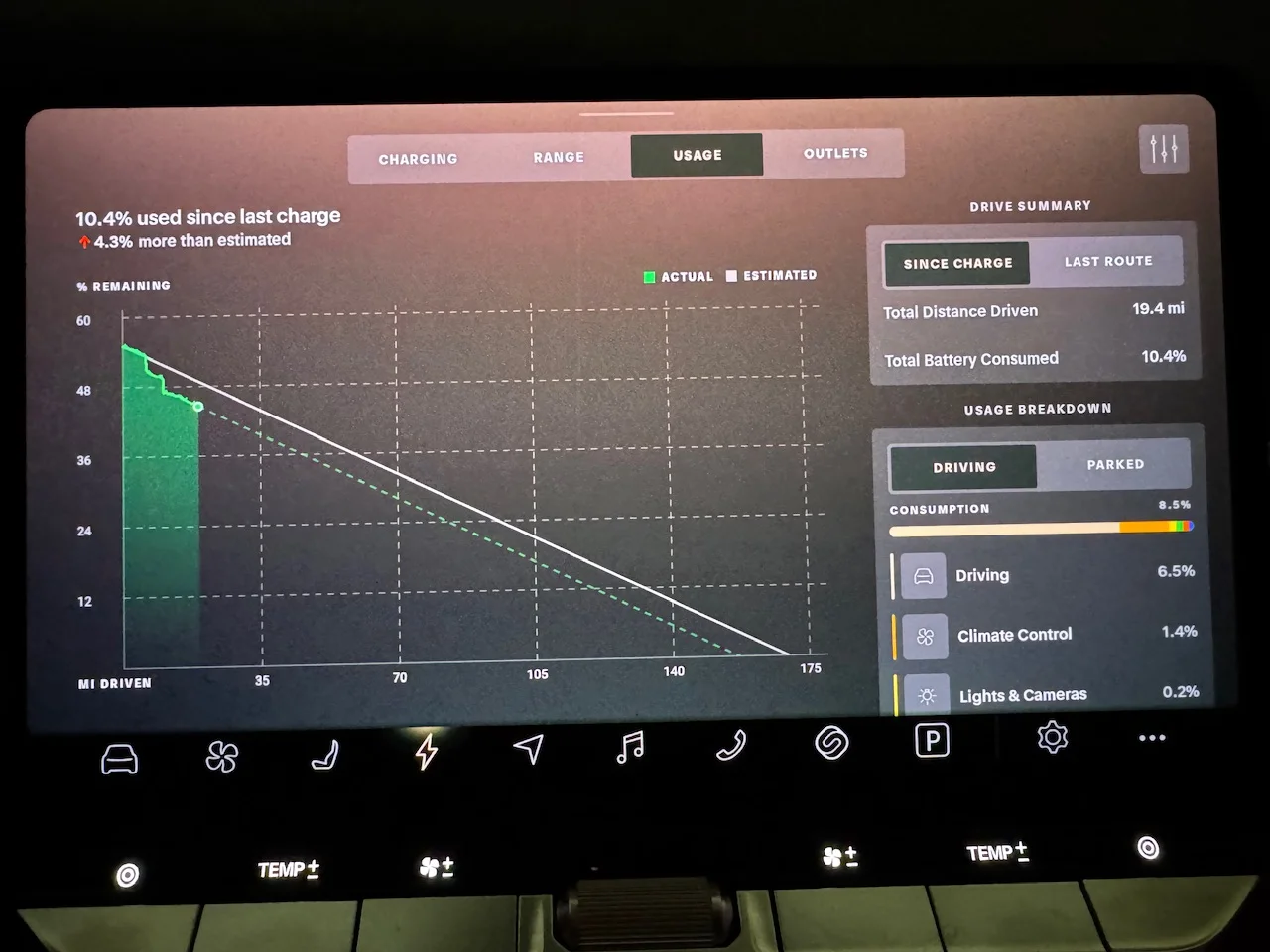
Dynamic range of 137 + 19.4 distance traveled = 156.4. This is the green line hitting 0% SOC. The slope of the green line is the efficiency (2.63 mi/kWh).

What is the white line? It’s a snapshot of the green line (efficiency meter) right after you finished charging, where estimated and actual are identical. As you drive, the green line moves as battery charge level and efficiency (meter) changes. The white line stays fixed until your next charging session.

Is 137 miles (dynamic range) really the distance you can travel? Only on a flat road. This is where navigation comes in.
IMG_2454.webp

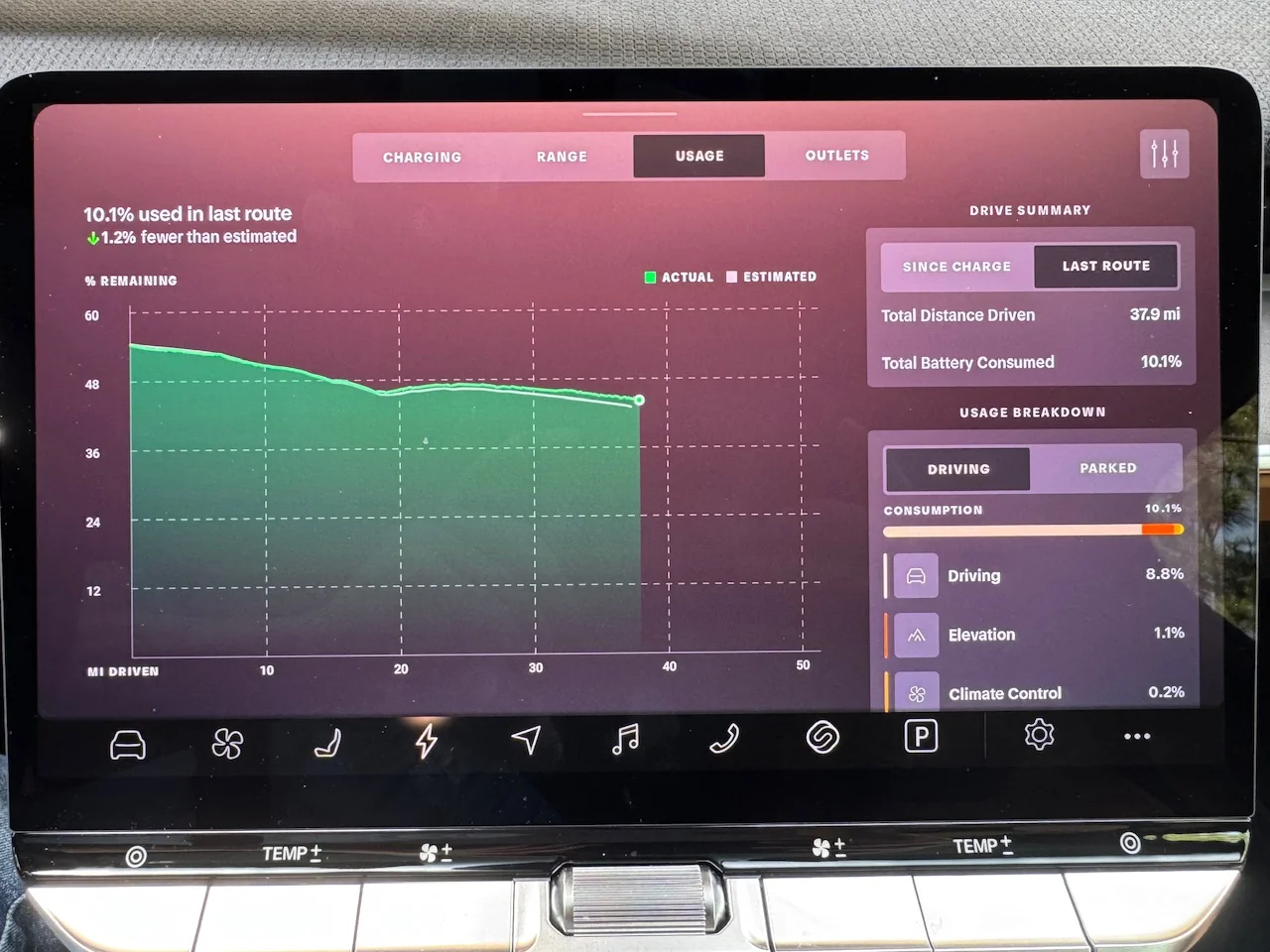
Notice the green and white lines are not straight. Lucid is starting with the dynamic range and efficiency meter, then adjusting SOC based on the route, taking into account elevation changes. The graph is Lucid’s built-in navigation predicting SOC along the route (white line) vs actual SOC as you drive (green line).

The navigation SOC on arrival is directly related to the dynamic range meter. If conditions change, such as encountering rain, faster/slower highway speeds, wind, temperature, etc., your dynamic range will change and be reflected in the SOC on arrival number. You can look at the graphs to see how your actual driving compares to the original prediction at the start of the route.

Lucid has done a great job on this. There is nothing like this graph on Tesla, with Lucid’s arrival SOC being much more accurate. I could never trust Tesla’s arrival SOC.
 

Attachments
  • IMG_1535.webp
    IMG_1535.webp
    6.3 KB · Views: 95
  • IMG_1537.webp
    IMG_1537.webp
    11.1 KB · Views: 99
  • IMG_2454.webp
    IMG_2454.webp
    13.3 KB · Views: 99
Last edited:
This is so helpful thank you for posting. So, we should be paying more attention to the efficiency readings on that meter as it pertains to remaining range?
 
I never owned a tesla so I cannot compare. But for example with my Audi etron I can go to 0% and simply charge
I do drive always while travelling long distances below 5% until next charge. It is 100 % accurate and that is something I would have expected from the lucid gravity as well. Good to know it works like it.
 
This is so helpful thank you for posting. So, we should be paying more attention to the efficiency readings on that meter as it pertains to remaining range?
Yes, the efficiency meter will give you a decent ballpark on relatively flat terrain. If you are pushing the limits on range, though, it’s best to plug in navigation and get the expected SOC on arrival. It makes a big difference if there are elevation changes and if you are going uphill vs. downhill as well as low vs high speed limits.

Mentally adjust for changes in weather and driving speed. If you have been driving in clear weather and will encounter rain, efficiency will go down ~15%. If you’ve been driving in a 65 mph zone and will have a very long stretch of 75 mph, efficiency will also go down. I *think* Lucid navigation takes into account speed limit on roads, but I drive 10 mph over the speed limit. I see the SOC adjust downward a few % as I drive at the higher speeds and the efficiency meter adjusts downward. If Lucid didn’t adjust for speed limits, I would expect a much bigger adjustment (10% - 15%).

Check the graph (charge ->usage->route) in mountainous terrain. I can think of an edge case where you could arrive with positive SOC but can’t clear the summit. If you look at my graph, there was a dip at 18 miles and then SOC started going up and peaked around 23 miles. I was going up and then down a small mountain. It would be interesting to see what navigation would say if that dip fell below 0% SOC!
 
Last edited:
I have talked a bit with the navigation team and they are still working on adding weather information. Winds are probably most important. On my trip from Phoenix to Yellowstone, I had headwinds, rain and snow that made the predicted SOC at each stop optimistic by 5% to 8%. On the way home with good weather, the predicted SOC at each stop was spot on.
 
Agree, winds would be what I would focus on. A 10 mph headwind vs. a tailwind can make a big difference - equivalent to a 20 mph speed difference! It’s also far easier to deal with than rain. Winds affect a wide area and are fairly predictable. Rain can be very localized. How do you translate 60% chance of rain into something usable?

@Adnillien If you have a direct connection to devs, one thing that would help accuracy is a speed adjustment setting that would apply for non-congested traffic conditions. In ABRP, I can set 115% of posted speed limit.
 
Lucid has done a great job on this. There is nothing like this graph on Tesla, with Lucid’s arrival SOC being much more accurate. I could never trust Tesla’s arrival SOC.
Respectfully, I am not sure why you say this. It appears to be a clone of Tesla's Energy Graph which has been around for years. I have used it extensively.
What are the differentiators, please? Perhaps I am not getting your point...
TeslaEnergyGraph.webp
 
Respectfully, I am not sure why you say this. It appears to be a clone of Tesla's Energy Graph which has been around for years. I have used it extensively.
What are the differentiators, please? Perhaps I am not getting your point...
Is that built in or is that a web site? That graph doesn’t exist on my Model X. If built-in, I wonder what other goodies never made it to the X (and never will because it’s discontinued). My in-car graph:
IMG_2799.webp
 
Last edited:
My model Y came with it, but it is alway possible different models at different times did not. From memory, the image you just sent comes from the Consumption tab, but the run down chart comes from the Energy tab. I found Consumption to be most useful at the smallest time scale, BTW.

I am glad you posted the information and tutorial, and I didn't mean to detract from that. Good work! Informative and helpful since I did not know Lucid had that feature either.

Since my Tesla is now history, your version is the only one that matters to me going forward.
 
My model Y came with it, but it is alway possible different models at different times did not. […]
Good to know, and thanks for correcting bad information. I had assumed OTA updates would give me the latest features, but I guess there are still differences between the Tesla models or years.
 
Lucid has done a great job on this. There is nothing like this graph on Tesla, with Lucid’s arrival SOC being much more accurate. I could never trust Tesla’s arrival SOC.
That is not accurate, they absolutely have the same graph that shows the exact same info (and they've had it for a long time). Tesla's arrival SOC has been accurate for at least the last year (taking into account weather, elevation, speed, wind, etc). Maybe you have a really old Tesla or something but my 2023 has everything you mentioned.

Side note, I have a 2023 Model X so it did make it to the Model X....

I do appreciate your overview of everything the Lucid does though.

I always use Android Auto and when I do, it turns off the built in GPS which shows the SOC on arrival. Is there a way to use both? I'd like to be able to have AA on the top screen and the built in NAV on the bottom screen but it keeps turning off the bottom screen navigation when I use AA.
 
That is not accurate, they absolutely have the same graph that shows the exact same info (and they've had it for a long time).

Side note, I have a 2023 Model X so it did make it to the Model X....
I have a 2016 Model X, but I upgraded the infotainment hardware a few years ago. I was told it was needed to continue getting all latest updates (besides FSD). So much for that - now I know what I’m missing…
 
Wind and driving speed are the big 2, I've found.

I have a few things on my roof (2 awnings, cargo bag) but traveling across Nebraska at 85mph (speed limit is 80 there) with headwinds I was getting terrible dynamic range...like 1.8. It drove me crazy as I was barely making it to places with chargers.

My other range story: I was getting the "cannot charge" error and deep sleep made it go away. But I was in Portland, OR and it was showing after sleeping all day. My nav to Seattle SC said I'd get there with -5% even though miles to SC were about the same as my predicted miles left. Well, I had no choice, since it would not charge, to go for it. I figured I'd at least get closer before calling a flatbed. Well, I drove 60mph the entire way letting everyone pass me and be annoyed...and I couldn't believe the difference. I actually arrived with 5% remaining. So that 10-15mph difference over just 150 miles made a 10% swing. Great to know if ever cutting it close...just slow way down.
 
I want this on my Air. I would find it more interesting than useful, but the nerd in me lusts for it. It is the first time I have cared about getting UX 3.0 on the Air.
 
Back
Top