Request for Gravity 80A Home Charging Data (Software 3.3.20)

Nocturnal

Member

Joined
Feb 10, 2025
Messages
55
Reaction score
43
Cars
Lucid Gravity GT
Hi everyone — I’m trying to understand whether my Lucid Gravity’s AC charging behavior on an 80A home charger is normal or if my vehicle is tapering earlier than expected. Since Gravity is still very new and not many owners have 80A setups, I’m hoping to gather some real‑world data points from other owners running the latest software.

My Setup
  • Lucid Connected Home Charging Station set to 80A
  • 100A dedicated circuit with 80A breaker
  • Stable home voltage (solar + low household load)
  • Climate off during charging
  • Car parked for hours before charging (battery cool)
  • Charge limit: 100%
  • Software version: 3.3.20

My Charging Results (75% → 99%)
With charge limit set to 100%, I monitored the charging power in the Lucid app up to 99%:
  • 75%: 17 kW
  • 76%: 16 kW
  • 80%: 15 kW
  • 85%: 14 kW
  • 86% → 99%: 12 kW flat
Below 75%, the car holds a steady 18 kW as expected.

Why I’m Asking
When my Gravity was in service, I had a loaner. On the same charger and same circuit, the loaner held 18 kW all the way to 85% with no taper at all. I only charged the loaner to 85%, so I don’t know how it behaves above that.
Lucid engineering reviewed my logs and told me my vehicle is “operating within designed parameters,” but they didn’t provide details. Before I accept that, I’d like to see how other Gravities behave on 80A AC with software 3.3.20.

What I’m Asking Other Gravity Owners to Share
If you have:
  • A home charger set to 80A (Lucid Home Charger or another EVSE capable of 80A)
  • A Gravity running software 3.3.20
  • A few minutes to watch your charging screen or app
Please post:
1. Your charging power (kW) at these SoC points:
  • 75%
  • 80%
  • 85%
  • 90%
  • 95%
  • 99%
2. Your charge limit for the test
  • Please temporarily set your charge limit to 100% so you can see charging power all the way up to 99% (charging will stop at 100%, so 99% is the last useful point).
3. Your charger brand
  • (Lucid Home Charger, ChargePoint, Emporia, Wallbox, etc.)
4. Approximate ambient temperature
  • Rough estimate is fine.

Right now, there are no publicly posted Gravity AC charging curves at 80A. If a few of us share our data, we can establish what “normal” looks like for the Gravity on 80A AC. That will help all of us — and give me clarity on whether my taper is expected or if I should keep pushing Lucid for further diagnosis. Thanks in advance to anyone willing to run a quick test and share their numbers.
 
It should not be lowering at all.
 
Hi everyone — I’m trying to understand whether my Lucid Gravity’s AC charging behavior on an 80A home charger is normal or if my vehicle is tapering earlier than expected. Since Gravity is still very new and not many owners have 80A setups, I’m hoping to gather some real‑world data points from other owners running the latest software.

My Setup
  • Lucid Connected Home Charging Station set to 80A
  • 100A dedicated circuit with 80A breaker
  • Stable home voltage (solar + low household load)
  • Climate off during charging
  • Car parked for hours before charging (battery cool)
  • Charge limit: 100%
  • Software version: 3.3.20

My Charging Results (75% → 99%)
With charge limit set to 100%, I monitored the charging power in the Lucid app up to 99%:
  • 75%: 17 kW
  • 76%: 16 kW
  • 80%: 15 kW
  • 85%: 14 kW
  • 86% → 99%: 12 kW flat
Below 75%, the car holds a steady 18 kW as expected.

Why I’m Asking
When my Gravity was in service, I had a loaner. On the same charger and same circuit, the loaner held 18 kW all the way to 85% with no taper at all. I only charged the loaner to 85%, so I don’t know how it behaves above that.
Lucid engineering reviewed my logs and told me my vehicle is “operating within designed parameters,” but they didn’t provide details. Before I accept that, I’d like to see how other Gravities behave on 80A AC with software 3.3.20.

What I’m Asking Other Gravity Owners to Share
If you have:
  • A home charger set to 80A (Lucid Home Charger or another EVSE capable of 80A)
  • A Gravity running software 3.3.20
  • A few minutes to watch your charging screen or app
Please post:
1. Your charging power (kW) at these SoC points:
  • 75%
  • 80%
  • 85%
  • 90%
  • 95%
  • 99%
2. Your charge limit for the test
  • Please temporarily set your charge limit to 100% so you can see charging power all the way up to 99% (charging will stop at 100%, so 99% is the last useful point).
3. Your charger brand
  • (Lucid Home Charger, ChargePoint, Emporia, Wallbox, etc.)
4. Approximate ambient temperature
  • Rough estimate is fine.

Right now, there are no publicly posted Gravity AC charging curves at 80A. If a few of us share our data, we can establish what “normal” looks like for the Gravity on 80A AC. That will help all of us — and give me clarity on whether my taper is expected or if I should keep pushing Lucid for further diagnosis. Thanks in advance to anyone willing to run a quick test and share their numbers.
Without even looking at the app I can tell you right away what my charging history will look like.

Doesn't matter the the current SoC (40%, 50%, 60%, 70%...)

  1. Start Charging @ 19kW
  2. 15-30 minutes later charging will drop to 11kW until finished.
This has happened without fail for every time I've charged the vehicle since I've installed my Lucid home charger (NACS version).
 
New firmware update being released for Lucid 80A charger. According to CS, being released soon. To address issues charging some vehicles.
 
Without even looking at the app I can tell you right away what my charging history will look like.

Doesn't matter the the current SoC (40%, 50%, 60%, 70%...)

  1. Start Charging @ 19kW
  2. 15-30 minutes later charging will drop to 11kW until finished.
This has happened without fail for every time I've charged the vehicle since I've installed my Lucid home charger (NACS version).
Thank you for this information. Your BMS (battery management system) is definitely malfunctioning. I had the same issue, and at that point Lucid did concede there is a problem, so they replaced the BMS on my battery pack, and now the charging curve is as I described in the OP. I have NACS charger as well.

Being, software and hardware engineer myself, having done extensive research on this and also after consulting multiple AI I'm fairly certain my current charging curve is also faulty, and even have several most likely reasons in mind, but want to gather more data, before taking any kind of enforcement action against Lucid, since they won't admit it.
 
New firmware update being released for Lucid 80A charger. According to CS, being released soon. To address issues charging some vehicles.
The problem I described in this thread is not related to the charger. I've had 2 different Gravity loaners while my car was in service, getting repaired other various manufacturing defects (I've had like 5 of them since I took delivery 1.5 months ago), and my charger charged both loaners at nearly flat 18kW. First loaner was charged to only 85%, as stated in the OP, but the Gravity loaner I have right now I tested all the way up to 100%, and charging stayed flat at 18kW (sometimes even spiking to 19kW) all the way to 97%, and only at the last couple of percent it dropped to 16kW-17kW. This eliminates the possibility there is something wrong with the charger.
 
Except, the 80A charger issue I was having, didn’t happen to all Gravity vehicles. Only some Gravity’s.
 
Except, the 80A charger issue I was having, didn’t happen to all Gravity vehicles. Only some Gravity’s.
This is very useful information, thanks. Could you share anything you know about the upcoming firmware update for the Gravity NACS home charger, like what is the firmware version that is supposed to fix this issue, or ETA when it might be released?
 
at least Lucid doesn’t fail at having us constantly question whether something is wrong with the vehicle or something related to the vehicle.
 
I connected my charger to my WiFi network, but I’m unable to connect to it unless I reboot the charger. When I’m able to log into the charger’s personal wifi network after rebooting, it shows that I have a good connection to my WiFi network. I even see the chargers assigned ip address on my router.

How do I continue to connect to the charger’s UI? I can’t even tell what the newest firmware version is. The UI is so terrible. There should be a button that says “check for firmware update” but there isn’t…
 
I’m on a trip and won’t be home for another 6 days. I can check firmware version then. What is your home WiFi network router address? That could be an issue. There is some probability that my firmware updated last week. You might cycle power to the charger to force it to reboot and check for firmware.
 
I’m on a trip and won’t be home for another 6 days. I can check firmware version then. What is your home WiFi network router address? That could be an issue. There is some probability that my firmware updated last week. You might cycle power to the charger to force it to reboot and check for firmware.
192.168.86.1
 
I think that is your problem. Your home network and charger Factory IP are both 192.168.. If you check the manual and other threads here on charger installation this is a known issue for WiFi.
 
I didn't see this post before I made a new thread, but I'm having big issues with holding 80 amps continuously. It keeps wanting to drop down 60% to 48A or 60% of whatever setting I said it in the car. Explained here...

 
I didn't see this post before I made a new thread, but I'm having big issues with holding 80 amps continuously. It keeps wanting to drop down 60% to 48A or 60% of whatever setting I said it in the car. Explained here...

It's not your charger. Charger only advertises available current level and does initial handshake with the car's charging system and authorization to pull power. Once that is complete the charger acts as passive power source, it doesn't control anything. Any tapering you see, like the one you described is imposed by BMS. You can verify that by trying to charge your car at someone else home L2 charger - you will see the same behavior. Start with asking Lucid to replace your BMC and updating firmware on the new one, to make sure charging curve profile is up-to-date. If that doesn't fix the problem your service center will have to work with Lucid engineering to troubleshoot what's wrong. You'll need to perform charging test for them and note down exact times of start and tapering points when current drops.
 
Thanks for the clarity, very helpful! I've got a lot of the charging information in the charger app if needed, Now, trying to get a service appointment to address the issue should fun...
 
Can anyone, who had similar to mine charging issues, comment in their charging curve after installing v3.5.1? Does your Gravity hold charging speeds close to 18kW all the way until pack is fully charged or at least deep into 90s% SoC?
 
Can anyone, who had similar to mine charging issues, comment in their charging curve after installing v3.5.1? Does your Gravity hold charging speeds close to 18kW all the way until pack is fully charged or at least deep into 90s% SoC?
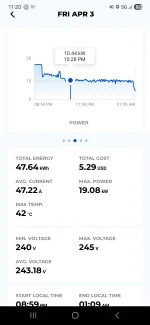
I could only dream of that performance. Went 66% to 100% last night and this is my mess.
 

Attachments

  • Screenshot_20260404_112051_Grizzl-E Connect.webp
    Screenshot_20260404_112051_Grizzl-E Connect.webp
    78 KB · Views: 89
I dont think replies from 3rd party charger owners would be helpful here. I'm trying to troubleshoot Lucid's charging with their own equipment, and have them repair mine if it doesnt match the specs, and is worse than what other Gravity owners see. Lucid is not liable for Gravity charging underperforming with 3rd party chargers - they never guaranteed compatibility, and their published vehicle charging specs are only applicable when used with their own charger for Gravity.

If people, who own charger for Gravity could comment on their charging post v3.5.1 update - it'd be much appreciated. I've documented mine with screenshots from Lucid app every 5% or so, but not ready to share, because it was a cold test - charging the car in the middle of the night, after it hasn't been driven for at least 3.5 hours. Once I empty the pack enough to do another, hot test, right after driving, then I will share my charging curves.
 
Back
Top