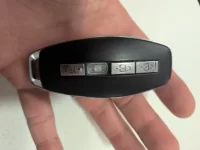
Button fell of the key

NoseyReporter

Active Member

Verified Owner
Joined
Apr 24, 2022
Messages
1,081
Reaction score
1,529
1000007397.webp


I rarely drive the Gravity. It's not like this key is used often. Wtf Lucid.
 
Wow… that fob really said “I’m done” and launched its own eject button.
That’s frustrating, especially with how little you’ve used it. Definitely worth having Lucid replace it. The button should not be falling out on a nearly new fob. Honestly, if Lucid provided a second key fob like most other manufacturers, this probably wouldn’t feel quite as stressful especially for the mere mortals among us who don’t have the Lucid Gravity Dream Edition. Thanks for sharing the photo and good heads-up for the rest of us to keep an eye on!
 
Happened to me too. The buttons are glued to the silicone. Once one is off, the others will easily eject themselves from regular use.

Lucid is aware of this issue. My mobile service guy has gotten multiple calls about this.

IMG_4112.webp
 
Wow… sounds like these fobs are going through a full identity crisis.
If the glued buttons start ejecting themselves one by one, that’s definitely not the kind of “modular design” anyone asked for.

Good to know Lucid is already aware of the issue, though. Hearing that mobile service has gotten multiple calls about this definitely explains a lot. Hopefully they push out an improved fob design soon and maybe even consider giving a second fob for the rest of us non–Dream Edition mortals.

Appreciate you sharing your experience. Helps the rest of us keep an eye on our own fobs before they decide to self-destruct too. 😄
 
Sometimes it isn’t wise to go with the lowest bidder. 😜

Seriously - key fobs have been around for what - 30 years? This isn’t reinventing the wheel here. Seems like this would probably rank among the easiest of all things to get right.
 
The crazy part is I'm not the type of guy who has a bunch of things in his pockets. I always carry the key solo, and it's the only thing in my right pocket. Cellphone goes in the other pocket.

The key has led a relatively easy life. I'm shocked. I literally pulled it out of my pocket yesterday and the button fell on the floor.

I guess, it's fitting right? It would be a Lucid otherwise. At least I can sit here and laugh about it.

Send me your buttons, I'll make a sign that spells out LUCID with them. 😄
 
It's irritating for Gravity owners but also a little humorous. People complained about the design of the Air fob not having buttons. And now their Gravity fob has buttons that pop loose...😅
 
By the way, all the car fobs that I've used and taken apart (to replace the batteries) have lips at the edge to hold them in place. Who thought it was a good idea to glue them to the silicone??!!🤔
 
What do you all recommend using to re-attach the button? Cyanoacrylate (Crazy Glue) or a silicon-based product or something else?
 
I would push Lucid to repair/replace it. Adhesives for silicone to plastic require specialized chemistry.
Agree. But if you really want to try here's what AI says...

"For bonding silicone to plastic, options include specialized silicone adhesives like Sil-Poxy, epoxy, or a cyanoacrylate (super glue) with a special primer for silicone. The best choice depends on the specific plastic and desired strength, but surface preparation, such as sanding and cleaning both surfaces, is crucial for all options.
Adhesive options
Silicone Adhesives: Adhesives specifically designed for silicone, such as Sil-Poxy, are an excellent choice. They are flexible, resist weathering, and are specifically made to bond with silicone rubber and many plastics.
Epoxy: High-strength epoxy can work, but you should check its compatibility with the specific plastic and ensure it can handle the flexibility of silicone.
Cyanoacrylate (Super Glue): This can bond silicone to plastic, especially if you use a product with a primer designed for silicone or a specific "plastic & rubber" formula, such as 3M™ Scotch-Weld™ PR100.
Application tips
Prepare the surfaces: Clean both the plastic and silicone with an appropriate solvent to remove any residue. Lightly sanding the surfaces can improve adhesion.
Apply the adhesive: Apply a small amount of your chosen adhesive to one of the surfaces.
Join and press: Press the two pieces together firmly and hold them in place until the adhesive sets. Apply enough pressure to ensure full contact.
Cure: Allow the adhesive to cure completely according to the manufacturer's instructions before use. "
 
It's like the buttons are saying "I'm out of here, tired of people blaming me for the FOB not willing to wake up!" 😂
 
After hearing about this issue on the forum a few weeks ago, I ordered the following fob case from Amazon: https://www.amazon.com/dp/B0CHN1W2MB?ref=ppx_yo2ov_dt_b_fed_asin_title&th=1

It was initially recommended by Cdaorl on this thread with an accompanying picture: https://lucidowners.com/threads/gravity-accessories-slowly-appearing.12327/post-308059

It's not a perfect fit for the Gravity fob but it's close and I haven't had any of my buttons fall off [knocks on wood]. Can't be sure having it in a case helps with this issue, but it seems less friction across the buttons can't hurt.
 
Sometimes it isn’t wise to go with the lowest bidder. 😜
They didn’t. These are the same guys who make Mercedes’ fobs.
 
What do you all recommend using to re-attach the button? Cyanoacrylate (Crazy Glue) or a silicon-based product or something else?
When this happened to our GT fob (hasn’t happened to our DE fob) I just threw a piece of clear tape over it. Worked fine, held the button in place, no issues. It was a temporary fix until I got a new fob regardless.
 
My frunk button also just fell off....

What did we decide as best way to address?
 

Attachments

  • 17702286117636568404950399808958.webp
    17702286117636568404950399808958.webp
    457.1 KB · Views: 91
My frunk button also just fell off....

What did we decide as best way to address?
Super glue. No joke. Just a dab of it. That’s what was recommended by the SC and it worked like a charm.

I was told to do this and that they would not replace the fob.
 
Back
Top