Gravity Bugs / Issues

I wish they’d move that Homelink button to the pilot screen, where it’d be easier to reach, especially when you have to push it several times. Ideally, the Homelink buttons would be overhead physical buttons, like every other car (although it would likely be limited to 3 buttons).

Does anyone know what the limit of Homelink buttons is in the software? For example, If I have several houses with several garage doors and neighborhood entry grates?

Not sure, but I think I remember hearing that the Gravity Homelink will store up to 20 settings.
 
A big shout out to my service tech Sean.
That's him on the Lucid CPO page.
Just saw it today.

I'd text him tomorrow to ask about the Technician Challenge 2025 shirt he's wearing, but I pretty sure he'll be busy.
I like the challenge idea; good in-house motivation.

Screenshot 2025-12-28 at 1.06.36 PM.webp
 
. . . install both the exterior WPF and interior front windshield tint then. I was shown that as far as the exterior WPF is concerned, there will be a visible seam that will run across the midpoint of both sun visors. So, looking straight ahead, I will not see it.

My PPF installer recommends against installing both exterior WPF and interior windshield tint. Each film has a different refraction index which in turn differs from the glass index, with the laminated windshield itself already having a film between the two layers of glass. Each layer brings an added risk of refractive distortion. This risk increases with the slope of the windshield, and the Gravity windshield is raked fairly steeply.

I opted to use only WPF, as the factory windshield blocks almost all UV light, anyway, and the new tint technology on the upper canopy has pretty good IR rejection, too.

The Xpel WPF I used was 40" wide. I was going to have them put a second width over the rest of the front canopy section (back to the B pillar), but when I saw how invisible the line was I didn't bother with the rest of the front canopy, as it is at much lower risk of an abrasive hit. And the line lands right across the middle of the visor line, so you don't notice it from either inside or outside the car. In fact, when I'm cleaning the windshield I sometimes have to feel for the line with my fingers, as I can't always see it even when I'm looking.

Also, notice that the WPF only has a 12-month warranty vs the 10- or 12-year warranty of the PPF. That is because the WPF has a much shorter service life and will likely have to be replaced several times during the life of the car. Stopping at the visor line will reduce the cost of replacement.

 
A big shout out to my service tech Sean.
That's him on the Lucid CPO page.
Just saw it today.

I'd text him tomorrow to ask about the Technician Challenge 2025 shirt he's wearing, but I pretty sure he'll be busy.
I like the challenge idea; good in-house motivation.

View attachment 35495

I wonder if the technicians had these shirts printed themselves, signifying what a challenge servicing the Gravities is turning out to be? I have heard several technicians say that their hopes the early Gravities would be delivered with fewer initial service issues than the early Airs have been pretty much dashed.

The wait times to get anything done by either mobile or in-house techs is far beyond anything I saw in the first four years of owning Lucids.
 
I wonder if the technicians had these shirts printed themselves, signifying what a challenge servicing the Gravities is turning out to be? I have heard several technicians say that their hopes the early Gravities would be delivered with fewer initial service issues than the early Airs have been pretty much dashed.

The wait times to get anything done by either mobile or in-house techs is far beyond anything I saw in the first four years of owning Lucids.
Hmmm. Double entendre shirts.
If so, Lucid must embrace it.
I like that.

Kinda goes with the recent CEO email; we know we've got work to do.
It could be said, that mindset is included in the meaning of the "Compromise Nothing" slogan.
"We're not where we need or want to be and won't compromise getting there".
 
Other posters here have reported these types of occasional "phantom" alerts. Try a hard reboot (two chimes) and if that doesn't clear it then wait while the car sleeps overnight and if it's still showing up then you have an issue that Service should check out
Good luck
 
My PPF installer recommends against installing both exterior WPF and interior windshield tint. Each film has a different refraction index which in turn differs from the glass index, with the laminated windshield itself already having a film between the two layers of glass. Each layer brings an added risk of refractive distortion. This risk increases with the slope of the windshield, and the Gravity windshield is raked fairly steeply.

I opted to use only WPF, as the factory windshield blocks almost all UV light, anyway, and the new tint technology on the upper canopy has pretty good IR rejection, too.

The Xpel WPF I used was 40" wide. I was going to have them put a second width over the rest of the front canopy section (back to the B pillar), but when I saw how invisible the line was I didn't bother with the rest of the front canopy, as it is at much lower risk of an abrasive hit. And the line lands right across the middle of the visor line, so you don't notice it from either inside or outside the car. In fact, when I'm cleaning the windshield I sometimes have to feel for the line with my fingers, as I can't always see it even when I'm looking.

Also, notice that the WPF only has a 12-month warranty vs the 10- or 12-year warranty of the PPF. That is because the WPF has a much shorter service life and will likely have to be replaced several times during the life of the car. Stopping at the visor line will reduce the cost of replacement.
Thank you for all that info. I’ve prepaid everything, and now I’m going to ask for a refund. I’ll follow your example and NOT have the interior tint done, to the front windshield.
 
Thank you for all that info. I’ve prepaid everything, and now I’m going to ask for a refund. I’ll follow your example and NOT have the interior tint done, to the front windshield.
The only caveat here is the UV rating is for the Gravity's front windshield.
If it's a low rejection rate, having an interior tint is beneficial for sun protection (UV)
If it's already 99% , then no need for tint as far as UV protection goes.
We use it here in AZ also for heat barrier.
 
Thank you for all that info. I’ve prepaid everything, and now I’m going to ask for a refund. I’ll follow your example and NOT have the interior tint done, to the front windshield.

If you don't notice any distortion at all with the WPF, you can try adding the interior tint afterward if you feel you want it. (Xpel claims their WPF blocks 99% of UV rays, and that's on top of what the windshield already blocks.)

However, we had noticeable horizontal distortion with the first WPF application on our first Gravity. Applying it to the second Gravity resulted in far less distortion (but not completely absent), so our installer redid the first Gravity for free. It turned out to be much better.

Given that our Air windshield looks as if it's been through a sandblaster in direct sunlight, I wish the new soft WPF films had been available when we had that car wrapped several years ago. We live near sand quarries, and that's the price we pay.
 
Does anyone know what the limit of Homelink buttons is in the software? For example, If I have several houses with several garage doors and neighborhood entry grates?
15 total HomeLink entries shared across multiple profiles. I have 8 set up in my Gravity and Air.
 
Given that our Air windshield looks as if it's been through a sandblaster in direct sunlight, I wish the new soft WPF films had been available when we had that car wrapped several years ago. We live near sand quarries, and that's the price we pay.
I used to have a long daily commute and windshield would get the same effect. I turned to polishing the windshield with glass polish once a year and it cleared up great. Use a polisher, not your arm - trust me!
 
I have to say…driving my brand new GGT kicks ass.

The more I drive it, the less reason I see to hold on to my Air GT. And up until my Gravity, I really, really loved driving my Air GT.

The financially sensible, no, responsible thing to do, is to “cut my losses” and get rid of the Air. I just wish I could dream up a practical reason to keep both.
 
I have to say…driving my brand new GGT kicks ass.

The more I drive it, the less reason I see to hold on to my Air GT. And up until my Gravity, I really, really loved driving my Air GT.

The financially sensible, no, responsible thing to do, is to “cut my losses” and get rid of the Air. I just wish I could dream up a practical reason to keep both.
Sounds like a good dilemma to have.
 
I have a charging info issue - might need its own thread, but let me see if anyone here has a similar issue.

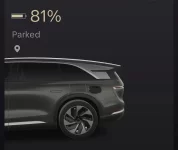
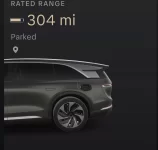
My car doesn’t seem to know when it is actually charged to the percentage I set. For example, 386 miles = 100%. So up until this weekend, I got 309 of range at 80%. Now, I could be at 296 miles or 305 (but not 309!) and the car and app say I am 80% charged.

No matter if I change the target percentage, it’s not right. Moved it to 90% and it stopped at 304.

Happens with the Lucid mobile wall connector, Tesla mobile wall connector and my Rivian wall charger (with a NACS adapter on the end).

Since August delivery this has never been an issue. Anyone else have the issue?

It DOES charge, it just stops well below the target. Very odd. My only thoughts are:

1) Cold battery throws it off
2) Supercharging messed it up - this happened to Kyle in OOS, I think. I did do a 700 mile road trip and super charged 3-4 times before this issue happened. No idea how/if he reset it. Car reset doesn’t help.
 

Attachments

  • IMG_0031.webp
    IMG_0031.webp
    27.7 KB · Views: 91
  • IMG_0032.webp
    IMG_0032.webp
    30.1 KB · Views: 88
Last edited:
I have a charging info issue - might need its own thread, but let me see if anyone here has a similar issue.

My car doesn’t seem to know when it is actually charged to the percentage I set. For example, 386 miles = 100%. So up until this weekend, I got 309 of range at 80%. Now, I could be at 296 miles or 305 (but not 309!) and the car and app say I am 80% charged.

No matter if I change the target percentage, it’s not right. Moved it to 90% and it stopped at 304.

Happens with the Lucid mobile wall connector, Tesla mobile wall connector and my Rivian wall charger (with a NACS adapter on the end).

Since August delivery this has never been an issue. Anyone else have the issue?

It DOES charge, it just stops well below the target. Very odd. My only thoughts are:

1) Cold battery throws it off
2) Supercharging messed it up - this happened to Kyle in OOS, I think. I did do a 700 mile road trip and super charged 3-4 times before this issue happened. No idea how/if he reset it. Car reset doesn’t help.
If it's what Kyle C. experienced, what he was told by Lucid is that it would recalibrate by itself. Over what period of time and if it required a different charge type somewhere along the line I'm not sure though.

NotchEV/Cyp might the one to ask as he was strictly on SC's during that East Coast race.

Coincidentally, I just rented a Tesla Model 3 and that thing would only charge to 96% no matter what I tried to do to go above it. 🤔
 
Fingers crossed that mine does this too, although it’s already been rebooted and opened and closed a bunch with no changes.
Well I thought for sure that it was broken for real since it has stayed that way for a couple of days, but then it fixed itself today after a short drive 🤷🏻‍♂️

This was the first time I had a passenger get in and out of that door so maybe that somehow reset it.

The mobile tech happened to call a few minutes after it fixed itself, and he said that he’s seen this (door handles getting confused and then fixing themself) a bunch and thinks it’s software.
 
Last edited:
I have a charging info issue - might need its own thread, but let me see if anyone here has a similar issue.

My car doesn’t seem to know when it is actually charged to the percentage I set. For example, 386 miles = 100%. So up until this weekend, I got 309 of range at 80%. Now, I could be at 296 miles or 305 (but not 309!) and the car and app say I am 80% charged.

No matter if I change the target percentage, it’s not right. Moved it to 90% and it stopped at 304.

Happens with the Lucid mobile wall connector, Tesla mobile wall connector and my Rivian wall charger (with a NACS adapter on the end).

Since August delivery this has never been an issue. Anyone else have the issue?

It DOES charge, it just stops well below the target. Very odd. My only thoughts are:

1) Cold battery throws it off
2) Supercharging messed it up - this happened to Kyle in OOS, I think. I did do a 700 mile road trip and super charged 3-4 times before this issue happened. No idea how/if he reset it. Car reset doesn’t help.
Your screenshots are from the app. What does the car show?

I also charge to 80% with 309 rated miles. However, there are times when the app will incorrectly show the dynamic miles (usually 276) as the rated miles. The car always shows the correct rated miles and after a day or so the app shows the correct rated miles.
 
Your screenshots are from the app. What does the car show?

I also charge to 80% with 309 rated miles. However, there are times when the app will incorrectly show the dynamic miles (usually 276) as the rated miles. The car always shows the correct rated miles and after a day or so the app shows the correct rated miles.
I just opened the app. The charging percentage is 79%. While looking at the mileage info on the app, the info changed from 259 to 269 to 301 miles in a matter of seconds.
 
I have a charging info issue - might need its own thread, but let me see if anyone here has a similar issue.

My car doesn’t seem to know when it is actually charged to the percentage I set. For example, 386 miles = 100%. So up until this weekend, I got 309 of range at 80%. Now, I could be at 296 miles or 305 (but not 309!) and the car and app say I am 80% charged.

No matter if I change the target percentage, it’s not right. Moved it to 90% and it stopped at 304.

Happens with the Lucid mobile wall connector, Tesla mobile wall connector and my Rivian wall charger (with a NACS adapter on the end).

Since August delivery this has never been an issue. Anyone else have the issue?

It DOES charge, it just stops well below the target. Very odd. My only thoughts are:

1) Cold battery throws it off
2) Supercharging messed it up - this happened to Kyle in OOS, I think. I did do a 700 mile road trip and super charged 3-4 times before this issue happened. No idea how/if he reset it. Car reset doesn’t help.
Sorry.
You did say in your post that the car and app say 80%.
 
If it's what Kyle C. experienced, what he was told by Lucid is that it would recalibrate by itself. Over what period of time and if it required a different charge type somewhere along the line I'm not sure though.

NotchEV/Cyp might the one to ask as he was strictly on SC's during that East Coast race.

Coincidentally, I just rented a Tesla Model 3 and that thing would only charge to 96% no matter what I tried to do to go above it. 🤔
Yeah. I kind of just expect it to fix itself - weird as it is. I haven’t made a service appointment as it IS charging, it’s just so odd…will keep monitoring.
 
Back
Top