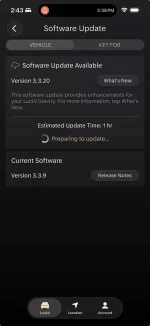
Here are Gravity OTA 3.3.20 release notes:
- Welcome Experience
- Improved system startup time when opening the door or starting the car.
- Added a new splash screen for a better entry experience.
- Access & Driving
- Enhanced key fob detection for improved reliability.
- Updated logic to allow driving with key fob as long as driver occupancy is detected/unchanged from initial key fob detection in some instances.
- Changes to simplify the ability to drive using the NFC card.
- After unlocking the vehicle using the NFC card, drivers now have the ability to begin driving the car without the need to reauthenticate the NFC card on the center console. (Reauthentication is required after two minutes)
- Cameras & Surround View
- Improved camera stability to support more reliable, consistent performance.
- Instrument Cluster & Widgets
- Addressed cases where certain widgets or icons on the instrument cluster may briefly flicker or take extra time to appear after startup or a reboot.
- Improved behavior of media applications and other widgets so they stay in sync with user input.
- Media & Audio
- Addressed an issue where the audio source could sometimes switch to the wrong input after a Bluetooth call instead of returning to the previously selected source.
- Improved audio system wake-up behavior after resume, reducing a potential delay experienced before audio returned.
- Navigation & Maps
- Handled some instances of incompatible Tesla chargers being displayed through search.
- Updated the navigation engine for improved route display and reliability.
- Corrected issues where the route line might temporarily disappear on certain screens or stop updating when another app is in focus.
- Addressed potential flicker in the home/navigation widgets on the cluster.
- Stabilized the vehicle location in rare instances of map drift while vehicle is stationary.
- Climate Control
- Reduced noise and excessive fan speed of the climate control system at vehicle startup.
- Update to align the HVAC fan speed with the command made in the infotainment during vehicle start up, exit and entry.
- Over-the-air (OTA) Software
- Improved how software versions are stored and reported so OTA versions don’t show incorrect values after startup.
- More resilient communication of software version information between systems.
- Cloud & Sanctuary
- Improved download performance and reliability for Sanctuary and cloud-delivered content.
- Network & Core System
- Enhanced cellular network resume behavior so connections come online more reliably after sleep or low-power states.
- Addressed rare conditions that could cause system instability.
- Lighting
- Removed errant “Headlight Error” message which appeared during some charging sessions where primary headlight function was not affected.
- General Stability & Performance
- Numerous under-the-hood improvements across displays, vehicle communication, and system health monitoring to improve overall stability and reduce edge-case issues.
Last edited: